

Free on Tutorly.sg
Practise with step-by-step help — free to start
On Tutorly.sg/app you can practise unlimited Singapore syllabus questions, get instant explanations when you are stuck, and use past-year papers — no sign-up needed to start.
- ✓ PSLE, O Level, A Level, and more
- ✓ Step-by-step working when you are stuck
- ✓ Works on phone and laptop
If you’re in secondary school in Singapore, you already know this: English isn’t “just another subject”.
It affects your L1R 5, your JC/poly choices, and honestly, almost every other subject because you need to read, understand, and write clearly. But between CCA, tuition, and homework, it’s very normal to feel:
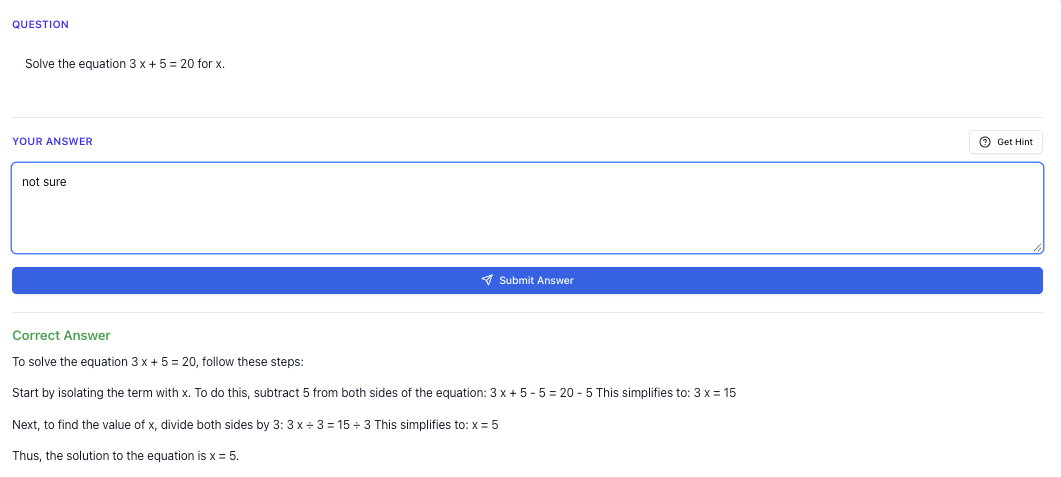
“Stuck on a question? See simple explanations that help you understand fast.”
👉 Give it a try and turn confusion into clarity in minutes.
- “My English is stuck at B 4/C 5… I don’t know what else to do.”
- “My teacher gives comments like ‘develop your ideas more’, but I don’t know how.”
- “I wish someone could mark my compositions instantly so I can practise more.”
That’s where a virtual English tutor can really help — especially one built for the Singapore MOE syllabus.
In this guide, I’ll walk you through how to use a virtual English tutor (specifically Tutorly.sg, since it’s designed for Singapore students) to improve:
- Continuous writing (Paper 1)
- Situational writing (Paper 1)
- Comprehension and summary (Paper 2)
- Editing and grammar (Paper 1 & 2)
- Oral communication (Paper 4)
You’ll see:
- A step-by-step tutorial on using an AI English tutor effectively
- A practical exam strategy guide for O-Level style questions
- Worksheet-style practice, including harder variants
- Common mistakes students make with virtual tutors (and how to avoid them)
Throughout, I’ll keep it specific to Secondary / O-Level English in Singapore – no generic overseas stuff.
Why A Virtual English Tutor Makes Sense For O-Level Students
Let’s be honest: English tuition in Singapore can be expensive, and it’s not always easy to find a tutor who understands your school’s expectations or the latest MOE/O-Level format.
A virtual English tutor like Tutorly.sg helps you by:
- Being available – you can practise compositions at 11pm if that’s when you’re free
- Giving instant, detailed feedback – instead of waiting a week for your teacher to return your script
- Staying aligned to MOE / O-Level formats – not random overseas exams
- Letting you practise more frequently – short daily practice instead of once-a-week tuition
Tutorly.sg is not some random global AI. It’s built specifically for Singapore students from Primary to JC, and it has already been used by thousands of students here. It’s even been mentioned on Channel NewsAsia (CNA), so teachers and parents are starting to take it seriously.
Most importantly: it’s a website, not a mobile app, so you can type properly and write longer answers more comfortably on a laptop.
Step-by-step Tutorial: How To Use A Virtual English Tutor For O-Level Prep
Let’s walk through how you can use a virtual English tutor like Tutorly.sg in a structured way, instead of just “chatting with AI”.
“Access more than 1000+ past year papers to practice”
👉 Start a paper today and test yourself like it’s the real exam.
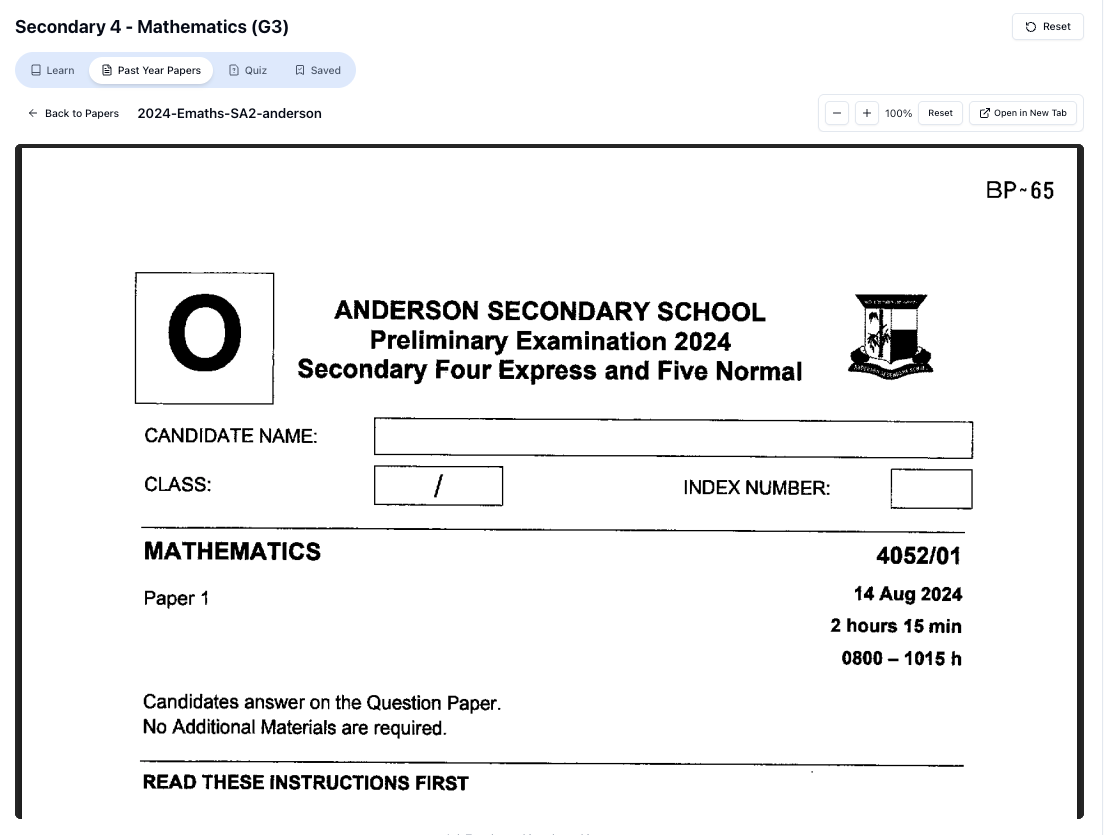
Step 1: Choose The Right Level And Focus
On Tutorly.sg, you select your level and subject (e.g. “Sec 4 / O-Level English”). That way, the questions and feedback are at the correct difficulty and follow the MOE format.
Next, decide your focus for the session. For example:
- 20–30 mins: Continuous writing practice
- 15–20 mins: Comprehension and summary
- 10–15 mins: Editing/grammar drill
- 10 mins: Oral-style practice (spoken answers you type out)
Try not to “do everything at once”. One focus per session keeps your brain fresher and your progress clearer.
Step 2: Use It To Generate O-Level Style Questions
Instead of waiting for worksheets, ask Tutorly to give you practice in a specific area. For example:
- “Give me an O-Level style continuous writing question with 5 options.”
- “Give me a Sec 3 mid-year level situational writing task (formal letter).”
- “Give me a challenging Sec 4 comprehension passage with questions similar to O-Level Paper 2.”
Tutorly will generate Singapore-style prompts, not random US/UK exam formats. This matters because O-Level English has its own expectations — especially for situational writing and summary.
Step 3: Attempt The Question Fully Before Asking For Help
This part is important.
Don’t just ask: “Write the essay for me.”
Instead:
- Write your own answer first.
- Paste it into Tutorly and say:
- “Please mark this like an O-Level teacher.”
- “Give me feedback on content, organisation, language, and tone.”
- “Show me how I can improve this to an A 1 standard.”
Tutorly doesn’t “check every working step” like a human marker, but for English, it can:
- Comment on your idea development
- Point out weak vocabulary or repetition
- Highlight grammar and sentence structure issues
- Suggest better phrasing and paragraphing
Step 4: Ask For A Model Answer + Comparison
After you’ve gotten feedback, ask for:
- A model answer at A 1 standard
- A side-by-side comparison of your answer vs the model
For example, for a composition:
“Show me an A 1-level model answer for this question, then explain how my essay is different in content, organisation, and language. Be specific.”
Use this to spot patterns:
- Are your introductions too long?
- Are your examples too shallow or unrealistic?
- Are your conclusions weak or abrupt?
This is where virtual tutors shine — you don’t need to feel paiseh asking for detailed breakdowns.
Step 5: Turn Feedback Into Mini Practice
If Tutorly keeps pointing out similar issues, convert them into micro-drills.
Examples:
- “Give me 10 sentences with subject-verb agreement errors to correct.”
- “Give me 5 short paragraphs with weak vocabulary. Help me rewrite each one with stronger words.”
- “Give me 5 topic sentences for body paragraphs about social media addiction. Then I’ll try to develop each one into a full paragraph and you mark it.”
Short, focused practice like this is very efficient, especially when you’re busy with other subjects.
Step 6: Build A Consistent Routine
You don’t need 2-hour sessions. What works better for most Sec 3–4 students:
- 15–30 mins a day, 4–5 days a week
- Rotate between:
- Day 1: Composition (intros + body paragraphs)
- Day 2: Comprehension practice
- Day 3: Situational writing
- Day 4: Summary + editing
- Day 5: Weak areas (based on your feedback that week)
Because Tutorly.sg is available at https://tutorly.sg/app, you can squeeze in practice after CCA, before bed, or even in the morning before school.
Exam Strategy Guide: Using A Virtual Tutor For Each Paper
Now let’s go paper by paper, and I’ll show you how a virtual English tutor can help you sharpen your strategy.
Paper 1: Writing (Situational + Continuous)
Situational Writing Strategy
Marks are awarded for Task Fulfilment, Organisation, and Language. Many students lose marks because they:
- Miss some content points
- Use the wrong tone (too casual/formal)
- Don’t follow the required format (e-mail, report, speech, etc.)
How to practise with a virtual tutor:
- Ask for a situational writing question in the format you want (e.g. speech, formal letter).
- Write your answer within 20 minutes (simulate exam timing).
- Paste it in and ask:
- “Did I cover all the content points?”
- “Is my tone suitable for the audience?”
- “Is my format correct for this text type?”
- Ask Tutorly to:
- Highlight missing content
- Suggest improved topic sentences and linking phrases
- Show you a model answer with proper tone and structure
Over time, you’ll internalise how a principal’s speech sounds different from a WhatsApp message to a friend, or a formal complaint letter.
Continuous Writing Strategy
For the composition section, your goal is to show:
- Clear planning (logical flow)
- Depth of ideas (not just “because it is important”)
- Varied sentence structures and vocabulary
- A strong, relevant ending
How to use Tutorly:
- Ask for 5 continuous writing questions and pick one.
- Spend 5–10 minutes planning (you can even type your plan and ask Tutorly to comment on it before writing).
- Write your essay under timed conditions (around 50–60 minutes in real exam, but you can start with 40–45 in practice).
- Get feedback on:
- Whether your storyline or argument is realistic and well-developed
- Whether each paragraph has a clear main idea and strong topic sentence
- Whether your language errors are frequent or occasional
You can also ask:
“Show me 5 stronger ways to write my introduction while keeping the same main idea.”
This helps you upgrade your writing without changing your content completely.
Paper 2: Comprehension, Summary, Editing
Comprehension Strategy
Many students read the passage but still get stuck on:
- Inference questions (“What can you tell about the character…”)
- Vocabulary in context
- Paraphrasing answers
With a virtual tutor, you can:
- Ask for a Sec 4/O-Level style comprehension passage with questions.
- Attempt all questions first.
- Paste your answers and ask:
- “Mark these according to O-Level standards.”
- “Explain why my wrong answers are wrong.”
- “Show me how to paraphrase this answer properly.”
You can also ask:
“Give me 10 practise questions focusing only on inference.”
“Give me 10 practice questions focusing only on vocabulary in context.”
This lets you drill your weak question types instead of repeating what you’re already good at.
Summary Strategy
Summary is often a killer. You need to:
- Identify relevant points
- Paraphrase accurately
- Stay within the word limit
- Maintain good grammar and sentence structure
How to practise with Tutorly:
- Ask for a summary passage and question (“Summarise the difficulties faced by…”).
- Write your own summary.
- Paste it and ask:
- “Which points did I miss?”
- “Which phrases are too close to the original text?”
- “How can I compress this into fewer words without losing meaning?”
Then ask Tutorly to:
- Show you a model summary
- Break down why that summary scores high (coverage, concision, paraphrasing)
Editing / Grammar Strategy
Editing is one of the most “trainable” parts of the paper.
With Tutorly, you can:
- Ask for editing passages with 10 errors (like O-Level format).
- Correct them, then paste your answers.
- Ask for:
- A breakdown of each error type (tense, subject-verb agreement, preposition, etc.)
- Extra practice focusing only on the error types you keep getting wrong
Over time, you’ll start recognising patterns in your own grammar mistakes.
Paper 4: Oral Communication
You can’t fully replace speaking practice, but a virtual tutor can still help a lot with content and structure.
How to use it:
- Ask for O-Level oral-style stimulus-based conversation questions.
- Type out your spoken response in full sentences (as if you’re saying it).
- Ask Tutorly to:
- Comment on your content depth
- Suggest more relevant examples
- Improve your sentence variety and vocabulary
You can also ask:
“Give me 10 follow-up questions an examiner might ask based on this topic.”
Free on Tutorly.sg
Practise with step-by-step help — free to start
On Tutorly.sg/app you can practise unlimited Singapore syllabus questions, get instant explanations when you are stuck, and use past-year papers — no sign-up needed to start.
- ✓ PSLE, O Level, A Level, and more
- ✓ Step-by-step working when you are stuck
- ✓ Works on phone and laptop
Then practise answering those too. This prepares you for the “unexpected” questions during the real exam.
Worksheet Practice
Let’s go through some sample practice you can actually try now, and I’ll show you how a virtual tutor would fit into this.
1. Situational Writing (Moderate Difficulty)
Question (Formal Email):
You are the chairperson of your school’s Environment Club. Your club is planning a “Green Week” event and you would like to invite a local environmental activist, Ms Nur Aisyah, to give a talk. Write an email to her to:
- Introduce your school and the club
- Explain the purpose of the event
- Suggest possible dates and times
- Ask about her requirements (e.g. equipment, fees)
- Persuade her to accept the invitation
Write your email in 120–150 words.
How to use Tutorly:
- Write your answer.
- Paste it into Tutorly and ask:
- “Check if my tone is suitable for a formal email to an invited speaker.”
- “Did I cover all the content points clearly?”
- “How can I improve my closing paragraph to sound more persuasive?”
Ask for a model answer and compare your tone, structure, and vocabulary.
2. Continuous Writing (Hard Variant)
Question (Argumentative):
“School examinations do more harm than good.”
What is your view?
You should write 350–500 words.
How to use Tutorly:
- First, type your outline:
- Introduction (your stand)
- 2–3 main arguments
- 1 counter-argument (and your rebuttal)
- Conclusion
- Ask Tutorly:
- “Is this outline strong enough for an A 1-level argumentative essay?”
- “Are my arguments repetitive or too similar?”
- Then write the full essay and ask for:
- Detailed marking (content, organisation, language)
- Suggestions for stronger topic sentences and more mature examples
You can also ask:
“Show me 5 alternative examples from Singapore context (e.g. PSLE, O-Levels, streaming system) that I can use in my body paragraphs.”
This helps you move beyond generic “stress” examples.
3. Comprehension (Hard Variant)
“Doing Secondary Science? Pick a topic and practise like it’s a real exam — with clear answers right after.”
👉 Try Tutorly now and start a Science topic in seconds.

Passage summary (for practice):
Imagine a passage about teenagers’ dependence on smartphones, covering:
- Constant checking of social media
- Fear of missing out (FOMO)
- Sleep problems due to late-night scrolling
- Impact on face-to-face communication
- Possible benefits (e.g. staying connected, access to information)
Sample Questions:
- What does the phrase “glued to their screens” suggest about teenagers’ behaviour?
- In your own words, explain why teenagers feel anxious when they are away from their phones.
- What is one positive and one negative effect of smartphone use mentioned in the passage?
- From paragraphs 3–5, summarise the problems caused by excessive smartphone use among teenagers. Your summary should be in continuous writing, in no more than 80 words.
How to use Tutorly:
- Attempt the questions fully.
- Paste your answers and ask:
- “Mark my answers and explain each mistake in simple terms.”
- “Show me how to paraphrase my answers more effectively.”
- For the summary: “Which points did I miss, and how can I shorten my sentences but keep the meaning?”
Then ask for a model summary and compare sentence by sentence.
4. Editing / Grammar (Moderate to Hard)
Sample Editing Passage (10 Errors):
Many students in Singapore feels that English is a difficult subject. They struggle to express themself clearly in writing, and often makes the same grammar mistakes again and again. Some believes that the only way to improve is to attend expensive tuition classes. However, there are many affordable resources available online which can helps students practise. Using this tools regularly can build confident and fluency over time.
Your task:
- Identify and correct the 10 errors.
How to use Tutorly:
- Correct the passage on your own.
- Paste both the original and your corrected version into Tutorly.
- Ask:
- “Check my corrections and explain each grammar rule involved.”
- “Give me 5 more sentences practising the error types I got wrong.”
This turns one passage into a whole mini-lesson on your weak areas.
5. Oral (Stimulus-based Conversation – Harder Topic)
Topic: Social Media Activism
Your teacher shows you an image of students sharing posts about a charity campaign on social media.
Sample Prompts:
- Do you think social media is an effective way to support good causes? Why or why not?
- What are some possible problems with relying too much on social media for activism?
- How would you encourage your classmates to get involved in a cause they care about?
How to use Tutorly:
- Type out your spoken responses as if you’re talking.
- Ask:
- “Help me improve these answers to sound more mature and thoughtful, at O-Level oral standard.”
- “Suggest better vocabulary and transitions I can use when speaking.”
You can also ask Tutorly to generate follow-up questions to push your thinking deeper.
Common Mistakes When Using A Virtual English Tutor
A virtual English tutor is powerful, but only if you use it properly. Here are mistakes I see students make all the time.
1. Letting The AI Write Everything
If you just ask, “Write an essay on this topic”, you’ll get a nice essay — but you won’t improve.
Use this rule:
AI can plan with you, give feedback, and show examples.
You must do the actual writing and thinking.
Otherwise, during your O-Level exam, you’ll be stuck.
2. Not Writing Under Timed Conditions
Many students type slowly and keep editing while writing. In the exam, you don’t have that luxury.
When practising:
- Set real timings:
- Situational writing: ~20 minutes
- Continuous writing: ~50–60 minutes
- Comprehension + summary: timed sections
- Only after you finish, then ask Tutorly for feedback.
This trains your exam stamina and speed, not just your content.
3. Ignoring The “Why” Behind Corrections
If Tutorly says, “This phrase is awkward” or “This is a grammar error”, don’t just accept and move on.
Always ask:
- “Why is this wrong?”
- “What is the grammar rule here?”
- “Can you give me 5 more examples of this rule in use?”
Your goal is to learn the pattern, so you don’t repeat the same mistake.
4. Using Overly Fancy Vocabulary From The AI
Sometimes AI-generated answers use words that sound very “chim” or not natural for a Sec 4 student.
Be careful:
- Don’t suddenly stuff your essays with words you don’t fully understand.
- Ask:
- “Give me simpler, natural alternatives suitable for an O-Level student.”
- “Show me which words sound too formal or unnatural for an exam essay.”
Markers prefer clear, accurate English over forced bombastic vocabulary.
5. Practising Randomly Without A Plan
If you just log in and do whatever you feel like, your progress will be slow.
Instead:
- Identify 2–3 main weak areas (e.g. summary, inference, grammar).
- Use Tutorly to target those areas for at least 2 weeks.
- Only then move to another focus.
A virtual tutor is most effective when you use it strategically, not randomly.
Bringing It All Together
A virtual English tutor, especially one built for Singapore like Tutorly.sg, can be a huge help if:
- You’re stuck at B 3–C 5 and want to push to A 2–A 1
- You don’t always have access to a human tutor
- You need fast, specific feedback on your writing and comprehension
- You’re juggling many subjects and need efficient, short practice sessions
Because Tutorly.sg:
- Is aligned to MOE / O-Level formats
- Has already been used by thousands of students in Singapore
- Has been featured on CNA, so it’s not just some random tool
- Runs fully on the web at https://tutorly.sg/app, so you can use it from any browser
If you build a simple habit of:
- 15–30 minutes a day
- One clear focus each session
- Always writing first, then asking for feedback
- Turning feedback into mini-drills
you’ll see your English confidence and marks grow steadily.
Try Tutorly.sg For Your Next English Practice Session
Instead of waiting for the next tuition class or worksheet, you can start practising right now:
-
Explore how the AI tutor works for Secondary/O-Level English:
https://tutorly.sg/ai-tutor-singapore -
When you’re ready to actually practise compositions, comprehension, summary, and more, go straight to:
https://tutorly.sg/app
Set a 20–30 minute timer, pick one area (composition, situational writing, comprehension, or grammar), and let Tutorly act as your on-demand virtual English tutor — any time you need it.
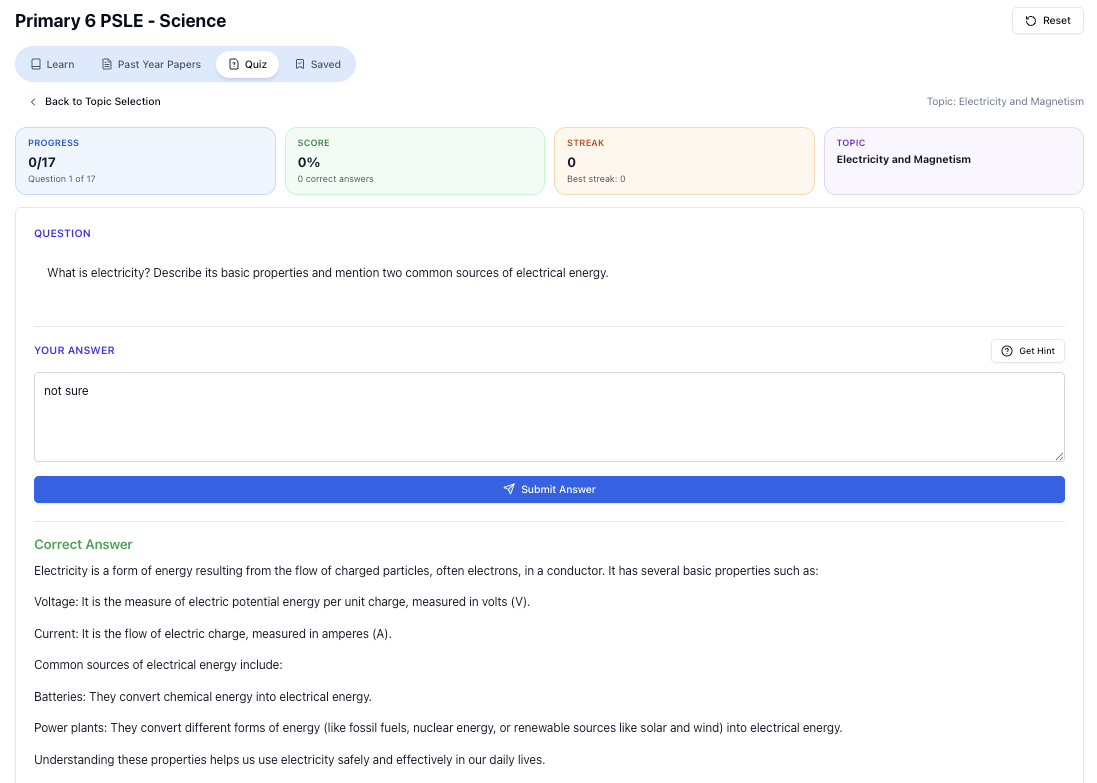
“Practice PSLE Science questions and get clear, step-by-step answers instantly.”
👉 Try a question now and see how fast you can improve.
Ready to practise?
If you want a Singapore-focused AI tutor you can use immediately (website, no sign-up), try Tutorly here:
Related Articles
Free on Tutorly.sg
Practise with step-by-step help — free to start
On Tutorly.sg/app you can practise unlimited Singapore syllabus questions, get instant explanations when you are stuck, and use past-year papers — no sign-up needed to start.
- ✓ PSLE, O Level, A Level, and more
- ✓ Step-by-step working when you are stuck
- ✓ Works on phone and laptop