

Free on Tutorly.sg
Practise with step-by-step help — free to start
On Tutorly.sg/app you can practise unlimited Singapore syllabus questions, get instant explanations when you are stuck, and use past-year papers — no sign-up needed to start.
- ✓ PSLE, O Level, A Level, and more
- ✓ Step-by-step working when you are stuck
- ✓ Works on phone and laptop
If you’re a Secondary student in Singapore, you’ve probably heard teachers mention Pearson’s Smarthinking here and there, especially if your school uses Pearson textbooks or online platforms.
But let’s be honest:
Most students either:
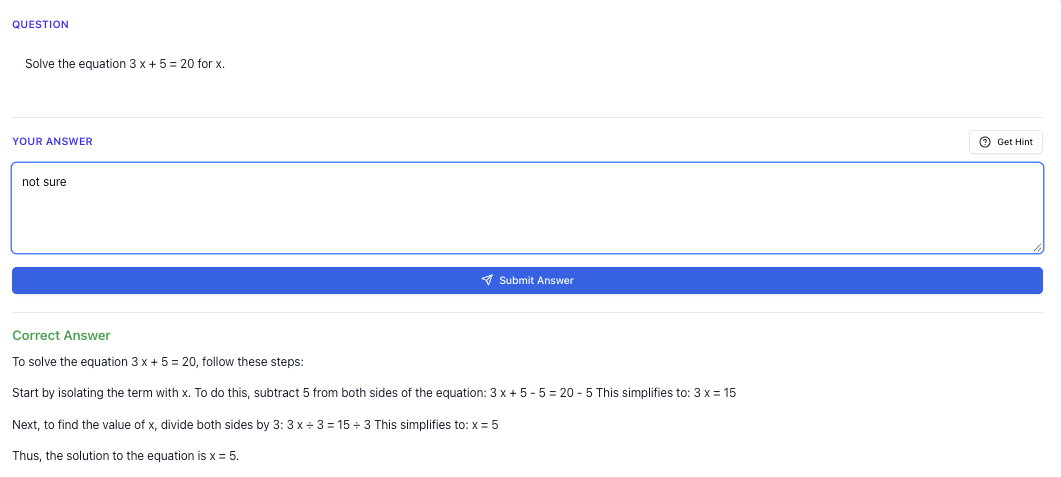
“Stuck on a question? See simple explanations that help you understand fast.”
👉 Give it a try and turn confusion into clarity in minutes.
- Don’t know how to use it properly, or
- Log in once, click around, then never touch it again.
That’s a waste, especially when you’re aiming for solid grades in Sec and O Levels.
In this guide, I’ll walk you through:
- How Pearson’s Smarthinking works (in simple terms)
- A step-by-step tutorial to use it effectively
- How to combine it with Tutorly.sg, a AI tutor built specifically for Singapore’s MOE syllabus - A practical exam strategy guide for O Levels
- How to create and use worksheet practice (including harder variants)
- The common mistakes Singapore students make with online tutoring tools
By the end, you’ll know exactly how to use Smarthinking and Tutorly.sg together so you’re not just “studying online” but actually improving your marks.
Note: Tutorly.sg has already been used by thousands of students in Singapore and has been featured on CNA (Channel NewsAsia), so it’s not some random overseas tool. It’s built for MOE, PSLE, O Levels and A Levels – but in this article, we’ll focus on Secondary / O Level.
What Pearson’s Smarthinking Actually Is (In Singapore Terms)
Pearson’s Smarthinking is basically an online tutoring and writing support service provided by Pearson. Many schools in Singapore get access to it when they adopt Pearson platforms or textbooks.
Depending on what your school has enabled, Smarthinking usually offers:
- Live online tutoring (you book a session or sometimes get on-demand help)
- Writing review (you submit essays and get feedback)
- Subject help in areas like Math, Science, English, etc.
Sounds useful, right? But there are some limitations for Singapore students:
- It’s not built specifically for Singapore’s MOE syllabus
- Examples may follow US/UK curriculum, not our O Level style
- Time zones and tutor availability can be an issue
- You might wait for feedback instead of getting immediate responses
This is where combining it with Tutorly.sg makes a lot of sense.
- Smarthinking: good for structured feedback, especially on writing.
- Tutorly.sg: instant, AI tutor that’s aligned to MOE and understands O Level exam style questions.
You can access Tutorly here:
- AI tutor overview: https://tutorly.sg/ai-tutor-singapore
- Go straight to the web app: https://tutorly.sg/app
Let’s go step-by-step.
Step-by-step tutorial
1. Know what you’re using each platform for
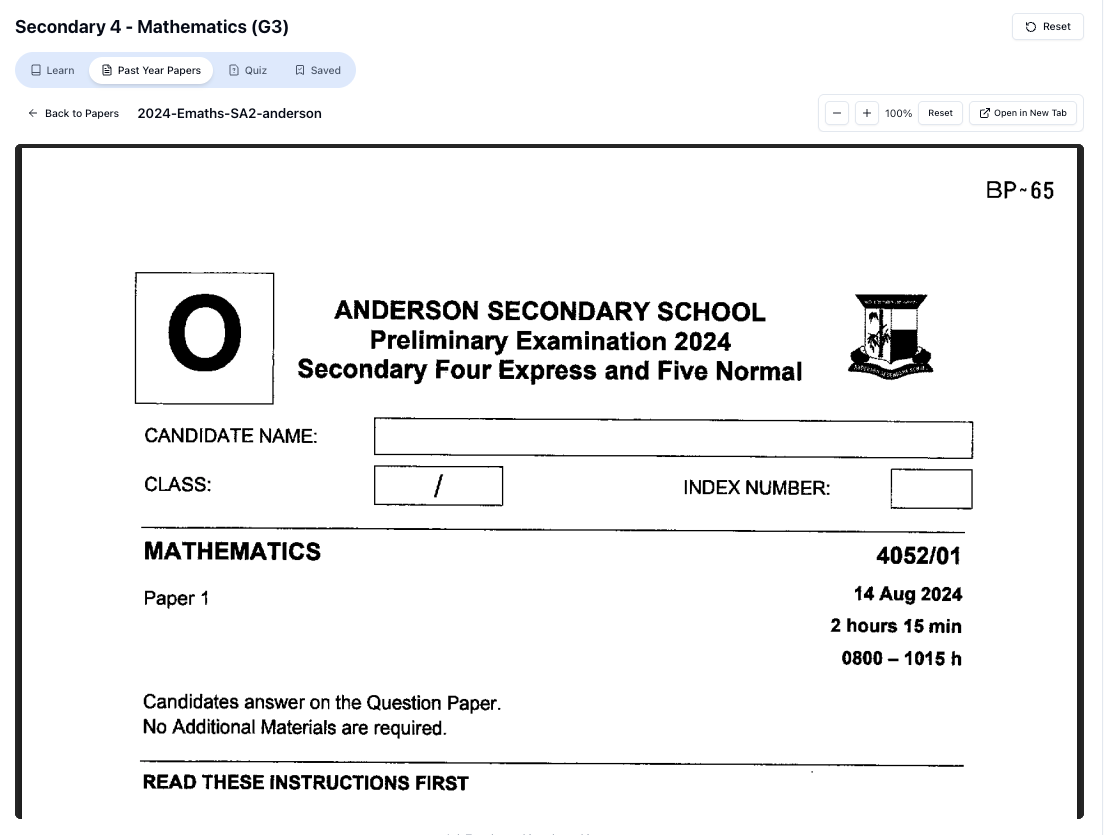
“Access more than 1000+ past year papers to practice”
👉 Start a paper today and test yourself like it’s the real exam.
Before you even log in, be clear:
-
Use Smarthinking mainly for:
- Essay / composition / situational writing feedback
- Longer pieces of work that benefit from human review
- Clarifying concepts where your school teacher wants you to use it
-
Use Tutorly.sg mainly for:
- Quick homework questions (e.g. Algebra, Chemistry, Physics, E Math, A Math)
- Practising O Level style questions
- Getting step-by-step worked solutions to questions you can’t solve
- Revising by topic (e.g. “Sec 3 A Math – Trigonometric Identities”)
Think of it like this:
Smarthinking = “Send and wait for feedback”
Tutorly.sg = “Ask now, understand now”
You’ll need both types of support during Sec 3–4.
2. Using Pearson’s Smarthinking: A simple workflow
Your school will usually provide access through:
- The school’s LMS (e.g. SLS, Moodle, or a Pearson portal)
- Or a direct link and login from your teacher
Once you’re in, here’s how to use it without wasting time.
Step 2.1: Choose your subject and type of help
Common options include:
- Live Tutoring – you book a slot or join a session
- Submit a Question – you send in a specific problem
- Writing Review – you upload an essay/assignment for feedback
If you’re in Sec , here’s how I’d prioritise:
- English / EL / Literature → use Writing Review
- Pure / Combined Sciences, E Math, A Math → use Submit a Question or live sessions if timing works
- Humanities (SS, History, Geography) → use Writing Review for essays, but be careful with syllabus differences
Step 2.2: Be specific with what you submit
Don’t just upload your work and type “please help”.
For example, for O Level English situational writing:
- State: “O Level style situational writing – formal letter to principal about CCA changes.”
- Mention word limit: “Around 250–300 words.”
- Add your question prompt clearly.
For Math:
- Attach or type the full question, e.g.
“Sec 4 E Math, Algebra, solving quadratic equations. Question: Solve .”
The more specific you are, the more targeted the feedback.
Step 2.3: Read the feedback properly (don’t just skim)
When Smarthinking returns feedback:
-
Copy the main points into your notes:
- For English: common grammar errors, organisation, weak topic sentences
- For Math/Science: where your method went off, conceptual misunderstandings
-
For each major comment, ask yourself:
- “Can I correct this myself?”
- “Do I know what this term means?”
-
Anything you still don’t understand, bring it to Tutorly.sg.
Example:
Smarthinking feedback: “Your thesis statement is not clearly addressing the question.”
You go to Tutorly.sg and ask:
“Explain what a thesis statement is for O Level English essay, and show me 3 examples based on this question: ‘Should homework be banned in secondary schools?’”
Now you’re using both tools smartly.
3. Using Tutorly.sg to follow up on Smarthinking feedback
Once you have Smarthinking feedback, head to:
Here’s how to make it work for O Level-style learning.
Step 3.1: Turn feedback into practice questions
Example (English):
- Smarthinking says: “Your topic sentences are weak.”
- On Tutorly.sg, you ask:
“Give me 5 practice questions to improve topic sentences for O Level argumentative essays. Then show me model topic sentences for each.”
Example (Math):
- Smarthinking says: “You made algebraic manipulation errors.”
- On Tutorly.sg, you ask:
“Give me 10 Sec 3 E Math algebra questions on expanding and factorising, with full worked solutions.”
Tutorly.sg will:
- Check your final answers
- Then show you step-by-step working so you can compare and learn the method.
Step 3.2: Use Tutorly.sg for immediate clarification
If Smarthinking feedback uses terms you’re not familiar with (e.g. “coherence”, “subject-verb agreement”, “significant figures”), just ask Tutorly.sg to:
- Explain the term in simple language
- Show you O Level style examples
- Give you short drills to practise
This saves you from getting stuck or waiting till the next school lesson.
Exam strategy guide (for O Levels & school exams)
Let’s talk about how to use both tools strategically across the year, not just randomly.
1. Sec 3: Build foundations, not panic
In Sec 3, you should:
-
Use Smarthinking to:
- Get feedback on longer essays or lab reports
- Train yourself to write more clearly and formally
-
Use Tutorly.sg to:
- Clarify new topics early (e.g. A Math, more complex Chemistry topics)
- Practise questions chapter by chapter after class
Example routine:
- After each new Math topic, do your school worksheet.
- Any question you can’t solve → ask Tutorly.sg for a worked solution and explanation.
- Once a term, submit a major English essay to Smarthinking.
- Then use Tutorly.sg to drill your weak areas based on the feedback.
### 2. Sec \frac{4}{5}: Exam-focused usage
Now you’re closer to O Levels, so you need to be more exam-specific.
English & Humanities
-
Use Smarthinking:
- 1–2 months before mid-years and prelims
- Submit your best attempt at essays (don’t submit half-hearted work)
- Focus on:
- Argumentative / discursive essays
- Situational writing
- Social Studies essays (if your teacher allows external tools)
-
Then use Tutorly.sg to:
- Ask for alternative introductions and conclusions
- Get sample body paragraphs with clear PEEL structure
- Practise short paragraph writing instead of always full essays
Example prompt to Tutorly.sg:
“Give me 3 different PEEL paragraphs for this Social Studies question: ‘How far is globalization beneficial to Singapore?’ Use MOE/O Level style.”
Math & Science
Closer to exams, time is tight. Here’s how to use both:
-
Use Smarthinking when:
- You have a specific conceptual doubt and time to wait for a tutor
- You want a human to walk through a tricky proof or explanation
-
Use Tutorly.sg when:
- You’re doing TYS or school papers and get stuck
- You want fast, clear worked solutions
- You want new practice questions at your level
Good exam habit:
- Attempt the question yourself fully.
- If stuck or your answer doesn’t match the answer key, ask Tutorly.sg:
- “Show me a step-by-step solution for this Sec 4 E Math question: [paste question]. Then explain where students commonly make mistakes.”
- If you still don’t understand the concept even after Tutorly, then consider a more in-depth Smarthinking session or asking your school teacher.
3. During the final revision period
About 1–2 months before O Levels:
-
Use Smarthinking mainly for:
- Final essay polishing
- One or two key pieces that you want high-quality feedback on
-
Use Tutorly.sg heavily for:
- Daily timed practice questions
- Reviewing weak topics (e.g. Trigonometry, Probability, Organic Chem)
- Simulating exam-style questions and solutions
At this stage, you don’t have time to wait days for feedback on everything. You need instant correction and fast explanation, which is where Tutorly.sg fits perfectly.
Worksheet practice
Now let’s get practical. I’ll show you how to:
- Create your own practice worksheets
- Use hard variants to stretch yourself
- Combine Smarthinking and Tutorly.sg to mark and improve
Free on Tutorly.sg
Practise with step-by-step help — free to start
On Tutorly.sg/app you can practise unlimited Singapore syllabus questions, get instant explanations when you are stuck, and use past-year papers — no sign-up needed to start.
- ✓ PSLE, O Level, A Level, and more
- ✓ Step-by-step working when you are stuck
- ✓ Works on phone and laptop
1. English: From basic to harder variants
Step 1: Basic worksheet (self-made)
Take a common O Level essay theme, e.g. “The impact of social media on teenagers”.
Create a simple worksheet for yourself:
- Write:
- One thesis statement
- Three topic sentences (for three body paragraphs)
- Draft one full body paragraph only.
Submit this to Smarthinking using Writing Review.
When you get feedback, note:
- Are your topic sentences clear?
- Are your examples relevant?
- Is your grammar accurate?
Step 2: Harder variant with Tutorly.sg
Now, go to https://tutorly.sg/app and ask:
“Give me 5 harder O Level style argumentative essay questions about technology and teenagers. Then show me 2 sample thesis statements for each.”
Pick one question and:
- Write the full essay under exam conditions (e.g. 45 minutes).
- After that, ask Tutorly.sg:
- To generate a model outline for the same question
- To give model paragraphs so you can compare structure and language
You’re now training yourself on harder, more varied questions while still getting structured feedback.
2. Math: From standard to hard exam variants
Let’s use Sec 4 E Math – Quadratic Equations as an example.
Step 1: Standard practice set
On Tutorly.sg:
“Generate 10 Sec 4 E Math questions on solving quadratic equations by factorisation and formula. Include answers and full worked solutions.”
You can copy these into your own worksheet (Google Doc, notebook, etc.).
Do them under timed conditions (e.g. 20–25 minutes).
After that:
- Mark using the answers.
- For any question you got wrong, ask Tutorly.sg to explain the step-by-step solution in simple terms.
Step 2: Harder variants (discriminant, word problems)
Now ask Tutorly.sg:
“Give me 8 harder Sec 4 E Math quadratic questions involving discriminant and word problems, similar to O Level standard. Include full worked solutions.”
“Doing Secondary Science? Pick a topic and practise like it’s a real exam — with clear answers right after.”
👉 Try Tutorly now and start a Science topic in seconds.

Examples of harder variants:
-
Questions where you must:
- Use the discriminant to determine the nature of roots
- Find range of values of 𝑘 such that an equation has real roots
-
Word problems like:
- “The length of a rectangle is (𝑥+3) cm and the breadth is (𝑥-2) cm. The area is . Find the possible values of 𝑥.”
Do these without looking at the solutions first.
Then:
- Compare your working with Tutorly.sg’s step-by-step solution.
- Note where you usually slip (algebra, sign errors, misinterpreting the word problem).
If you’re really stuck on a particular type of question, you can:
- Take one or two of your attempts and submit them to Smarthinking for a human tutor to comment on your method.
- Then go back to Tutorly.sg to drill more of that specific type (e.g. “Give me 5 more discriminant questions where I have to find the range of 𝑘.”)
3. Science: Structured practice with hard variants
Let’s take Sec 4 Pure Chemistry – Mole Concept & Stoichiometry.
Step 1: Conceptual MCQ-style worksheet
On Tutorly.sg:
“Generate 15 Sec 4 Pure Chemistry MCQ questions on mole concept and stoichiometry, aligned to Singapore O Level syllabus. Include answers and short explanations.”
Use these as a quick concept check.
Any question you don’t understand, ask:
“Explain why option C is correct and why the other options are wrong, in simple O Level terms.”
Step 2: Harder calculation variants
Next, ask Tutorly.sg:
“Give me 8 challenging Sec 4 Pure Chemistry mole calculation questions, similar to hard O Level questions. Include full worked solutions.”
You should see:
- Multi-step calculations
- Limiting reagents
- Gas volumes and concentration mixed in one question
Work through them yourself first.
Then:
- Compare with Tutorly.sg’s full solution.
- If a step confuses you, ask:
“Explain step 3 in more detail and show me a similar practice question.”
If you want a human to look at your lab report or long-written explanation (e.g. explaining electrolysis), that’s when you might submit it to Smarthinking for review.
Common mistakes
A lot of Singapore students have access to good tools but still don’t see grade improvements. Usually it’s because of these issues.
1. Treating Smarthinking like a magic marking service
Some students just upload essays or questions, then don’t actually study the feedback.
Don’t do this.
When you get feedback:
- Summarise the main issues in your own words.
- Turn each issue into a practice task on Tutorly.sg.
Example:
- Feedback: “Weak conclusion, too repetitive.”
- Action: Ask Tutorly.sg for:
- “5 examples of strong O Level essay conclusions on [topic]”
- Then write 3 new conclusions yourself and compare.
2. Expecting overseas-style explanations to match O Level exactly
Smarthinking tutors might follow US/UK exam styles. That’s fine for general skills, but for exact O Level phrasing and format, you should:
- Cross-check with your school notes
- Use Tutorly.sg to “translate” concepts into MOE/O Level style
Example prompt:
“Explain this concept in a way that matches the Singapore O Level E Math syllabus: [paste explanation from Smarthinking]. Then give me 3 exam-style questions.”
3. Using Tutorly.sg only as an answer key
If you just paste questions to get answers, you’re not really learning.
Better approach:
- Try the question yourself.
- Write down your final answer.
- Ask Tutorly.sg for:
- The final answer
- Step-by-step working
- A short explanation of common mistakes for this type of question
Then compare:
- Where did your method differ?
- Did you make an algebra slip? Misread the question? Forget units?
4. Not practising under timed conditions
Both Smarthinking and Tutorly.sg are great for learning, but O Levels are timed exams.
A lot of students:
- Can do questions with help
- But panic under time pressure
So at least once a week:
- Set a timer (e.g. 30–45 minutes)
- Do a mini “paper” of 10–15 questions or one full essay
- Only after the time is up, check answers with Tutorly.sg or send your essay to Smarthinking
5. Ignoring weak topics because “AI can help me later”
Some students think, “Never mind, if I get stuck in exams, I’ll just ask online.”
But in the exam hall, it’s just you and the paper.
Use both tools now to:
- Identify your weak topics early
- Drill them until they feel comfortable
- Reach a point where you only need help for the really tricky questions
Final thoughts: Using Pearson’s Smarthinking with Tutorly.sg, not instead of it
Pearson’s Smarthinking is useful, especially when your school already provides it:
- You get human feedback on writing
- You can clarify tricky concepts with a tutor
- It’s structured and academic
But for Singapore Secondary / O Level students, it has gaps:
- Not fully tailored to MOE syllabus
- Not always immediate
- Not optimised for O Level exam style questions
That’s why pairing it with Tutorly.sg makes sense:
- Tutorly.sg is a AI tutor website built specifically for Singapore students (Primary to JC 2).
- It’s aligned to the MOE syllabus and familiar with PSLE, O Level and A Level styles.
- It’s already been used by thousands of students in Singapore, and has been mentioned on CNA (Channel NewsAsia).
Use Smarthinking for:
- Essays, reports, extended responses
- Occasional deeper human feedback
Use Tutorly.sg for:
- Daily homework
- Quick concept explanations
- O Level-style practice questions and worked solutions
- Turning feedback into targeted practice
If you’re serious about improving your grades without burning out, start building this routine now, not one month before prelims.
You can explore more about the AI tutor here:
https://tutorly.sg/ai-tutor-singapore
Or jump straight into studying with the web app here:
https://tutorly.sg/app
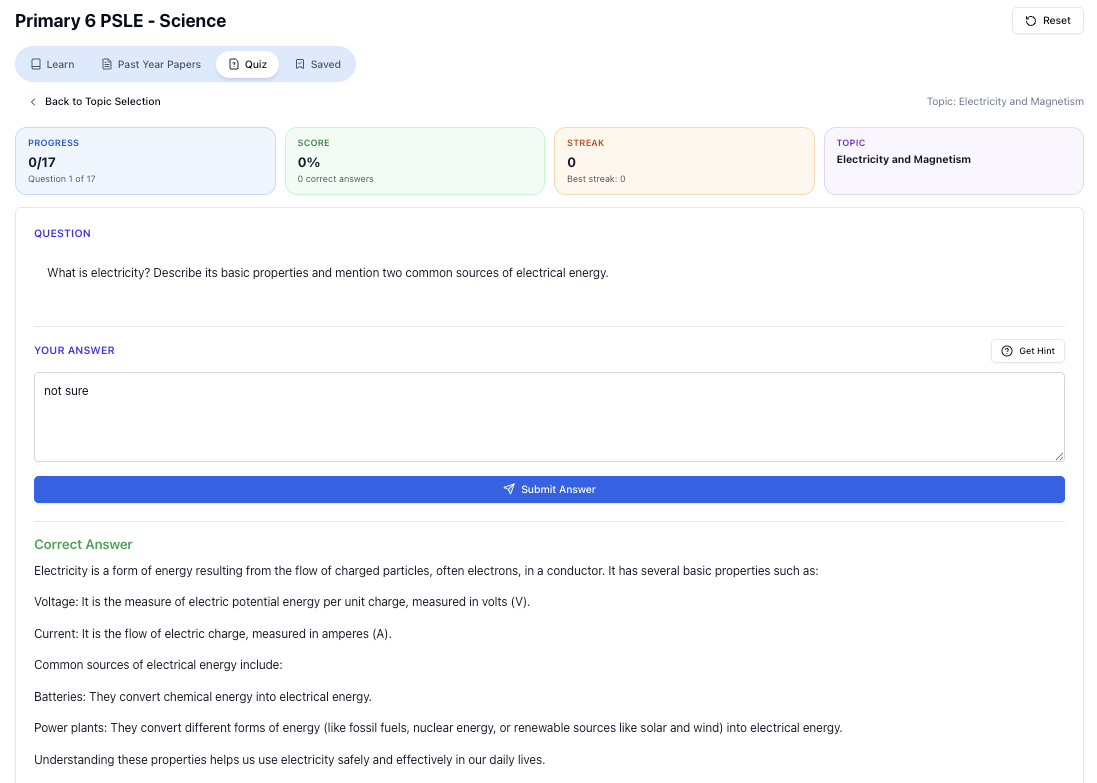
“Practice PSLE Science questions and get clear, step-by-step answers instantly.”
👉 Try a question now and see how fast you can improve.
Ready to practise?
If you want a Singapore-focused AI tutor you can use immediately (website, no sign-up), try Tutorly here:
Related Articles
Free on Tutorly.sg
Practise with step-by-step help — free to start
On Tutorly.sg/app you can practise unlimited Singapore syllabus questions, get instant explanations when you are stuck, and use past-year papers — no sign-up needed to start.
- ✓ PSLE, O Level, A Level, and more
- ✓ Step-by-step working when you are stuck
- ✓ Works on phone and laptop