

Free on Tutorly.sg
Practise with step-by-step help — free to start
On Tutorly.sg/app you can practise unlimited Singapore syllabus questions, get instant explanations when you are stuck, and use past-year papers — no sign-up needed to start.
- ✓ PSLE, O Level, A Level, and more
- ✓ Step-by-step working when you are stuck
- ✓ Works on phone and laptop
If you’re teaching in Singapore right now—whether in MOE schools, enrichment centres, or as a private tutor—you’re probably feeling the pressure:
- MOE syllabus keeps changing
- Parents expect results (PSLE, O Levels, A Levels)
- Students are glued to screens but still hate homework
- Admin, marking, and lesson prep eat into your nights and weekends
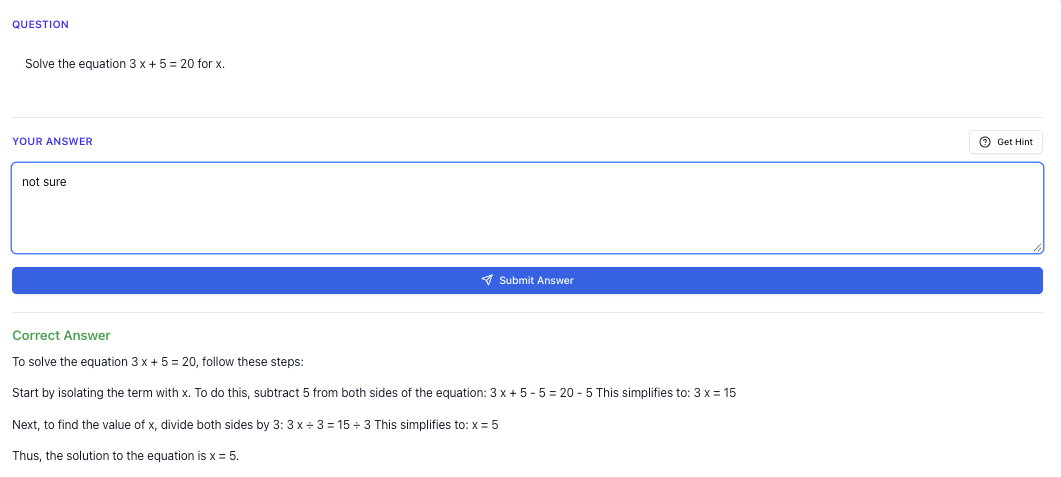
“Stuck on a question? See simple explanations that help you understand fast.”
👉 Give it a try and turn confusion into clarity in minutes.
1. What “Online Tuition Classes” Really Mean For Singapore Teachers
When people say “online tuition”, they often imagine:
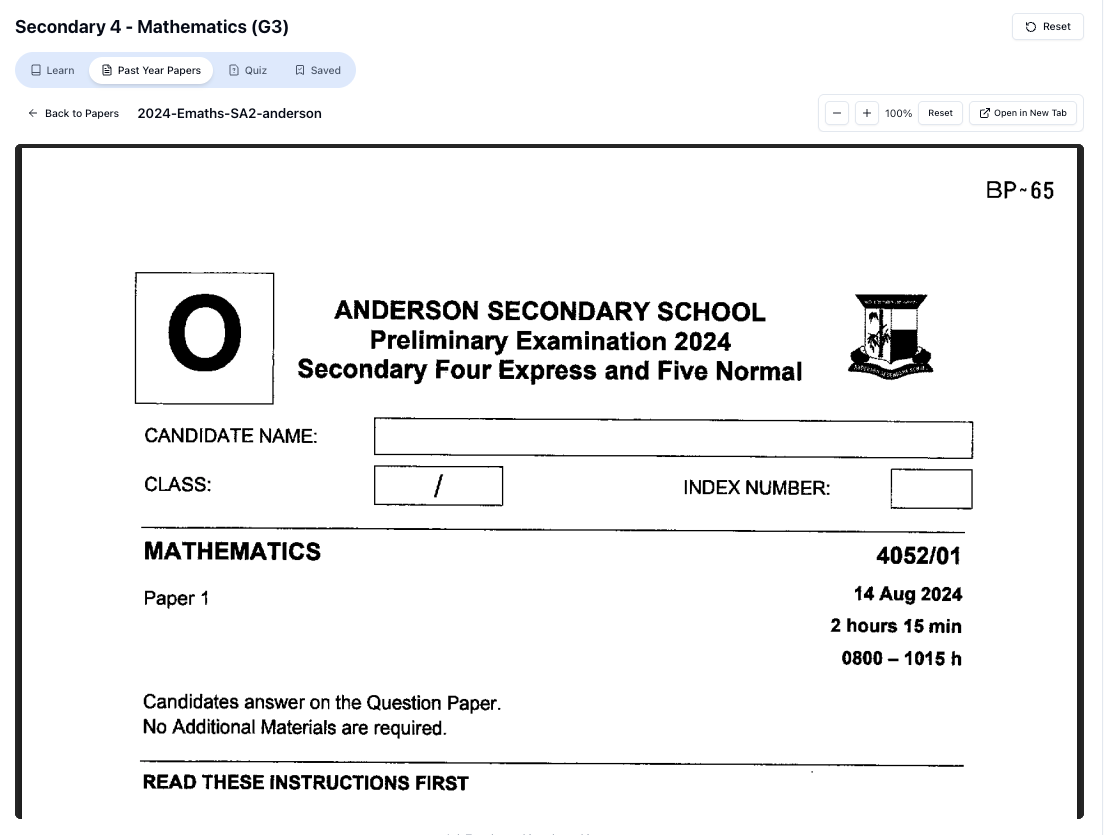
“Access more than 1000+ past year papers to practice”
👉 Start a paper today and test yourself like it’s the real exam.
- Zoom calls
- Slides
- Screen sharing
But if you’re teaching in Singapore, especially MOE syllabus content, “online tuition classes” are more than just video calls.
They usually involve:
-
Syllabus-accurate content
- PSLE: Heuristics, situational writing, synthesis & transformation
- O Levels: Pure/Combined Science, E/A Math, essay skills
- A Levels: H 1/H 2 topics, especially tricky ones like vectors, organic chem, and essay subjects
-
High-stakes exams
Parents don’t just want “enrichment”; they want grades. That means your online classes must be exam-focused, not just “nice explanations”. -
Different student profiles
- Some join because they’re weak
- Some are already scoring A/A* and just want to maintain
- Some are there because their parents forced them
-
Tech issues + attention span
- “Cher, I cannot hear you.”
- “Wi-Fi lag.”
- Camera off, mic off, and you’re basically talking to profile pictures.
So the real question is:
How can you run online tuition classes that are effective and sustainable for you as a teacher?
That’s where using AI properly makes a big difference.
2. Why Many Online Tuition Classes Fail (And How To Avoid That)
Let’s be honest: not all online classes work well.
Here are the most common problems Singapore teachers tell me:
2.1. One-way lecturing
You share slides, you explain, students stare (or pretend to), and at the end you ask:
“Any questions?”
Silence.
Then when you mark their work, you realise they didn’t understand half the lesson.
Fix: Build in constant interaction:
- Polls, quick questions, short quizzes
- Ask them to type answers in chat
- Get them to explain how they got their answer
You don’t need fancy tools for this, but you do need to plan interaction moments.
2.2. Students are shy to ask questions
Singapore students often don’t want to “look blur” in front of classmates.
So they:
- Keep quiet during class
- Pretend to understand
- Struggle with homework later
Fix: Give them a safe space to ask questions privately, anytime.
This is where an AI tutor like Tutorly.sg helps. You can tell your students:
“If you’re stuck after class, go to Tutorly.sg at https://tutorly.sg/app and ask the AI tutor your question. It’s aligned to the MOE syllabus and available .”
They can ask without feeling paiseh, and you don’t need to be on WhatsApp answering math questions at 11pm.
2.3. Teachers burn out doing everything manually
Common time sinks:
- Creating worksheets from scratch
- Explaining the same concept 10 times to different students
- Replying to late-night messages from anxious parents and students
Fix: Use AI to handle repeated explanations and practice questions, while you focus on:
- Clarifying misconceptions
- Higher-order thinking
- Exam strategies
- Building confidence
Tutorly.sg is built exactly for this: it handles step-by-step explanations and targeted practice, so you don’t have to repeat the same thing 50 times.
3. How Tutorly.sg Fits Into Your Online Tuition Classes
First, clear up a misconception: Tutorly.sg is not a mobile app.
It’s a website built specifically for Singapore students from Primary 1 to JC 2, aligned to the MOE syllabus.
Here are the links again:
- Overview: https://tutorly.sg/ai-tutor-singapore
- Go straight to the AI tutor: https://tutorly.sg/app
You can use it in three main ways as a teacher or tutor.
3.1. As your “assistant tutor” during live classes
You can:
- Share your screen and use Tutorly.sg to generate:
- Extra practice questions on the spot
- Similar questions with small twists
- Alternative explanations for a concept
Example (Math):
You’re teaching Sec 3 E Math on quadratic equations.
- You explain how to solve by factorisation.
- You open https://tutorly.sg/app, choose the appropriate level and subject.
- You ask the AI tutor:
“Give me 5 MOE-style quadratic equations for Sec 3 E Math, with answers.”
- You paste the questions into your slides or type them into the chat.
- Students attempt them, then you go through the solutions, using Tutorly’s step-by-step methods if needed.
You stay in control of the teaching, but the AI does the heavy lifting of generating practice and model answers.
3.2. As homework support after class
Instead of setting a huge worksheet and then dealing with a flood of “Cher, how to do?” messages, you can:
- Assign a reasonable amount of work.
- Tell students:
“If you’re stuck, use Tutorly.sg at https://tutorly.sg/app.
Type your question clearly, check the final answer first, then study the step-by-step solution to understand how to get there.”
Important: Tutorly.sg checks the final answer, then shows how to get there with a clear, step-by-step explanation. It does not read every working step the student writes, so you should still train them to show proper working for exams.
For you, this means:
- Fewer repeated explanations
- Less time spent on basic questions
- More time in the next class to tackle real misconceptions
3.3. As a differentiation tool in mixed-ability classes
In many Singapore classes, you’ll have:
- A few students already scoring A/A*
- A big group around B/C
- A weaker group struggling at D/E
In an online setting, it’s even harder to differentiate.
You can use Tutorly.sg to:
- Give stronger students more challenging questions or extension tasks
- Let weaker students ask the AI tutor to re-explain basics at their own pace
For example:
-
Your top Sec 4 student can ask:
“Give me challenging O Level Algebra questions with detailed solutions.”
-
Your weaker student can ask:
“Explain how to expand (𝑥+2)(𝑥-3) step by step. I’m Sec 2.”
You don’t need three separate lesson plans. The AI adjusts the explanation to each student’s level (they select their level and subject before asking).
4. Designing An Effective Online Tuition Class (Step By Step)
Let’s put everything together into a simple structure you can use for any online class: PSLE, O Levels, or A Levels.
Step 1: Start with a quick diagnostic
Spend the first 5–10 minutes checking what students actually know.
Options:
- A short MCQ quiz
- A few rapid-fire questions in chat
- Ask them to solve 1–2 questions on their own
You can generate these questions using Tutorly.sg before class:
- Go to https://tutorly.sg/app
- Ask:
“Create 5 diagnostic questions for Sec 4 Pure Chemistry on mole concept, MOE O Level style, with answers.”
You now have a ready-made warm-up that tells you where your students are.
Step 2: Teach the core concept clearly, but briefly
Keep your explanation focused:
- Use simple examples first
- Show one or two exam-style questions
- Highlight common mistakes
For example, for PSLE Math heuristics:
- Show a simple “before-after” table question
- Then a tougher one that looks confusing but uses the same method
You can ask Tutorly.sg to:
“Give me 2 PSLE Math ‘before-after’ model questions with full worked solutions.”
Use the AI’s solution as a reference or adapt it into your own explanation.
Step 3: Guided practice with increasing difficulty
This is where many online classes become passive.
Instead:
- Give a question.
- Ask students to:
- Solve it on their own
- Type their final answer in chat
- Check quickly who’s getting it wrong.
- Use Tutorly.sg’s step-by-step solution to guide your explanation if needed.
For example, for A Level H 2 Math:
“Solve the inequality .”
You can ask the AI tutor:
“Show step-by-step working for solving for H 2 Math, explaining each step simply.”
You then walk students through the logic, not just the final answer.
Step 4: Independent practice + AI safety net
Give students a few questions to do on their own during class.
Tell them clearly:
“If you’re stuck on any question, you can copy it into Tutorly.sg at https://tutorly.sg/app after class.
First, try on your own. Then use the AI tutor to compare your answer with the model solution.”
This trains them to:
- Attempt first
- Use AI as support, not a shortcut
Step 5: Close with exam tips and reflection
End each class with:
- 3–5 minutes of exam tips
- 1–2 key takeaways
- A reminder that they have help from Tutorly.sg
Example for O Level English:
- Tip: “For situational writing, always identify purpose, audience, and context before writing your first line.”
- Takeaway: “Today we focused on writing clear topic sentences for each paragraph.”
- Reminder:
“If you’re unsure about phrasing or how to improve a paragraph, paste it into Tutorly.sg and ask how to improve it for O Level standards.”
5. Subject-Specific Ideas For Using Tutorly.sg In Your Classes
Here are some practical ways to use Tutorly.sg across different levels and subjects.
5.1. PSLE (Primary 1–6)
Free on Tutorly.sg
Practise with step-by-step help — free to start
On Tutorly.sg/app you can practise unlimited Singapore syllabus questions, get instant explanations when you are stuck, and use past-year papers — no sign-up needed to start.
- ✓ PSLE, O Level, A Level, and more
- ✓ Step-by-step working when you are stuck
- ✓ Works on phone and laptop
Math
- Generate practice questions for:
- Fractions
- Ratio
- Heuristics (e.g. “draw a model”, “guess and check”)
- Ask the AI to show step-by-step working for tricky word problems.
Example prompt for you:
“Create 8 PSLE Math word problems on fractions and ratio, with step-by-step solutions using model drawing.”
English
- Practise:
- Situational writing (emails, letters)
- Continuous writing (composition ideas, outlines)
- Grammar and vocabulary questions
You can ask:
“Mark this PSLE composition and suggest 3 improvements to make it Band 1.”
You still give the final grade, but you can use the AI’s feedback to speed up your marking and comments.
### 5.2. 𝑂 Levels (Sec 1–\frac{4}{5})
E Math / A Math
-
Generate exam-style questions for:
- Algebra
- Trigonometry
- Coordinate geometry
- Differentiation
-
Use step-by-step explanations to show:
- Common mistakes
- Alternative methods (e.g. factorisation vs quadratic formula)
Example prompt:
“Give me 10 O Level E Math questions on quadratic equations, MOE style, with full worked solutions.”
Pure/Combined Science
- Use Tutorly.sg to:
- Explain concepts in simpler language
- Generate structured questions and MCQs
- Show how to answer with proper keywords
Example:
“Explain electrolysis of aqueous sodium chloride for O Level Pure Chemistry, including what happens at the anode and cathode, and common exam mistakes.”
“Doing Secondary Science? Pick a topic and practise like it’s a real exam — with clear answers right after.”
👉 Try Tutorly now and start a Science topic in seconds.

You can copy or adapt the explanation into your notes or slides.
English / Humanities
- Use AI to:
- Suggest better topic sentences
- Improve paragraph structure
- Generate PEEL examples for essays
Example:
“Give me 3 sample PEEL paragraphs for an O Level Social Studies essay on how globalisation affects Singapore.”
You then critique and refine these with your class, teaching them what a strong answer looks like.
5.3. A Levels (JC 1–JC 2)
H 1/H 2 Math
- Use Tutorly.sg to:
- Generate practice questions by topic (e.g. complex numbers, vectors, binomial expansion)
- Show detailed workings so students can self-study between classes
Example:
“Create 5 H 2 Math questions on vectors (lines and planes) similar to A Level standard, with full solutions.”
H 1/H 2 Chemistry / Physics / Biology
- Use AI for:
- Concept explanations that are “exam language” but still understandable
- Practice questions with marking points
Example:
“Explain nucleophilic substitution in halogenoalkanes for H 2 Chemistry, with a mechanism diagram described in words and common exam pitfalls.”
GP (General Paper)
- Use Tutorly.sg to:
- Generate essay outlines
- Suggest counterarguments
- Improve introductions and conclusions
Example:
“Give me an essay outline for the GP question: ‘Is progress always beneficial?’ with 3 main arguments and 2 counterarguments.”
You then teach students how to refine and personalise these ideas.
6. Common Concerns Teachers Have About AI (And Honest Answers)
“Will AI replace tutors and teachers?”
In Singapore, parents still value:
- Human guidance
- Real-time feedback
- Someone who understands their child’s personality and motivation
AI like Tutorly.sg is strong at:
- Generating explanations
- Providing instant practice
It’s weak at:
- Reading a student’s mood
- Motivating a child who has given up
- Handling classroom dynamics
So no, it doesn’t replace you. It replaces:
- Endless repetitive explanations
- Manual question creation
- Some of the late-night “how to do this question” messages
You become more valuable, not less, because you can focus on what only a human teacher can do.
“Will students just copy the AI answers?”
Some will try.
Your job is to design your online tuition system so that:
- Marks come from exam-style conditions (timed work, no AI)
- AI is used for learning, not just getting homework done
Practical steps:
- Make some assignments “closed book, no AI” and done live during class
- Use AI-supported homework as practice, not the only source of grades
- Teach them how to use Tutorly.sg properly:
- Try first
- Check answer
- Study the steps
- Re-attempt a similar question
You can even ask them to:
“Screenshot the Tutorly.sg explanation that helped you the most this week and tell me what you learned from it.”
This turns AI use into part of their learning reflection.
“Is Tutorly.sg really aligned to the MOE syllabus?”
Tutorly.sg is built specifically for Singapore students from Primary 1 to JC 2, and its content is designed around:
- MOE syllabus topics
- PSLE, O Level, and A Level exam styles
- Local terminology and question formats
It’s not some generic global platform trying to fit Singapore. It is Singapore.
That’s one reason it has already been used by thousands of users here and was even mentioned on CNA (Channel NewsAsia)—people recognise that it’s designed for our context.
7. Practical Ways Teachers And Tutors Can Start Using Tutorly.sg Today
You don’t need to overhaul your entire system. Start small and build up.
Option 1: Use it for lesson prep
Before class:
- Go to https://tutorly.sg/app
- Generate:
- 5–10 practice questions
- A set of worked solutions
- A clear explanation of a tricky concept
You’ve just saved 30–60 minutes of prep time.
Option 2: Use it live in class
During Zoom/Google Meet:
- Share your screen with Tutorly.sg
- Generate extra questions on the spot
- Use the AI’s step-by-step solution as a backup explanation
This is especially useful when a student asks a question slightly outside your prepared material.
Option 3: Make it official “after-class support”
Tell parents and students:
“Our online tuition classes come with AI support through Tutorly.sg.
If your child is stuck on homework or revision at 11pm, they can ask the AI tutor for help instead of waiting till the next lesson.”
This:
- Makes your classes more attractive
- Reduces pressure on you to be “always available”
- Gives students a healthy way to get help anytime
8. Final Thoughts: Teaching Online In Singapore Doesn’t Have To Mean Doing Everything Alone
Online tuition classes for teachers in Singapore are here to stay.
You’re expected to:
- Know the MOE syllabus inside out
- Prepare engaging lessons
- Handle admin and marking
- Support anxious students and parents
- Compete with other tutors and centres
Trying to do all of this without help is a recipe for burnout.
Using an AI tutor like Tutorly.sg isn’t about being fancy or “techy”. It’s about being practical:
- Let AI handle repetitive explanations and question generation
- Let students get help without spamming your WhatsApp
- Focus your energy on what only you can do: teaching, guiding, and motivating
If you’re teaching PSLE, O Levels, or A Levels, and you want to make your online tuition classes more effective and sustainable, start by trying Tutorly.sg yourself.
-
Learn more about how it works for Singapore students:
https://tutorly.sg/ai-tutor-singapore -
Or jump straight into the AI tutor and test it with your own questions:
https://tutorly.sg/app
Ready To Try Tutorly.sg As Your Co‑Teacher?
You don’t need to commit to anything big.
Open a browser tab, go to https://tutorly.sg/app, and:
- Ask it to explain a topic you’re teaching this week
- Generate a small set of practice questions
- Try a few step-by-step solutions yourself
Then decide how you want to plug it into your online tuition classes.
You’re already doing the hard work as a teacher in Singapore.
Let the AI handle some of the heavy lifting, so you can focus on what really matters: helping your students grow.
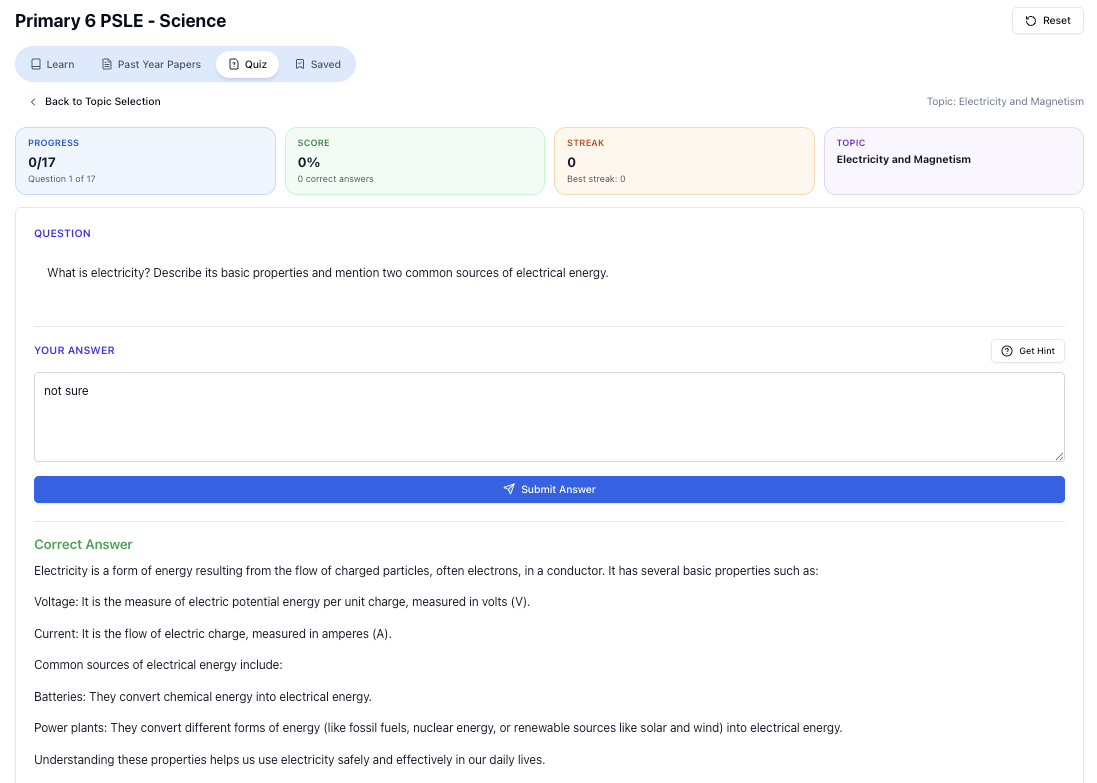
“Practice PSLE Science questions and get clear, step-by-step answers instantly.”
👉 Try a question now and see how fast you can improve.
Ready to practise?
If you want a Singapore-focused AI tutor you can use immediately (website, no sign-up), try Tutorly here:
Related Articles
- [Online AI Tutor Singapore: How To Study Smarter With Tutorly.sg (Not Just Scroll More)](/blog/online-ai-tutor-singapore)
- 'Online Tuition Classes In Singapore: tuition online classes'
- 'Online Tuition Classes: Expert Guide'
Free on Tutorly.sg
Practise with step-by-step help — free to start
On Tutorly.sg/app you can practise unlimited Singapore syllabus questions, get instant explanations when you are stuck, and use past-year papers — no sign-up needed to start.
- ✓ PSLE, O Level, A Level, and more
- ✓ Step-by-step working when you are stuck
- ✓ Works on phone and laptop