

Free on Tutorly.sg
Practise with step-by-step help — free to start
On Tutorly.sg/app you can practise unlimited Singapore syllabus questions, get instant explanations when you are stuck, and use past-year papers — no sign-up needed to start.
- ✓ PSLE, O Level, A Level, and more
- ✓ Step-by-step working when you are stuck
- ✓ Works on phone and laptop
Online tuition is now a normal part of life for many Secondary students in Singapore.
Maybe your school teacher posts work on SLS, your tuition teacher sends you Google Docs, and you still have to revise for your O Levels on top of that. It’s very easy to feel:
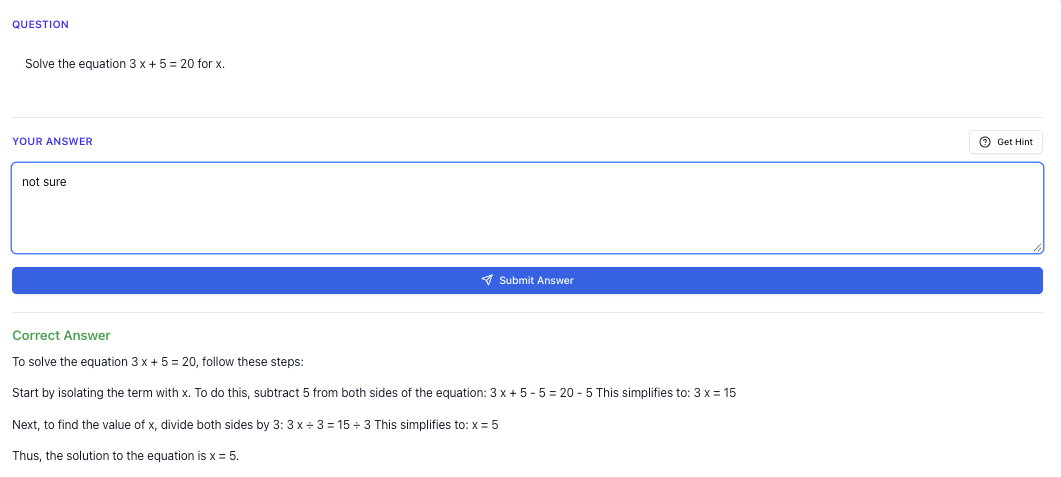
“Stuck on a question? See simple explanations that help you understand fast.”
👉 Give it a try and turn confusion into clarity in minutes.
- “I did the assignment… but I don’t think I actually learnt anything.”
- “Online tuition is convenient, but I’m still not seeing my grades move.”
- “I keep copying answers from the screen instead of understanding.”
If that sounds like you, this guide is for you.
I’ll walk you through how to handle online tuition assignments properly, especially for O Level subjects like E Math, A Math, Pure Sciences, and English — and how to use Tutorly.sg, a AI tutor website built for Singapore students, to make every assignment count.
Tutorly.sg has already been used by thousands of students in Singapore, and has even been featured on Channel NewsAsia (CNA), so you’re not experimenting with something random.
Links you’ll want to keep open:
- Tutorly’s AI tutor: https://tutorly.sg/ai-tutor-singapore
- Tutorly’s web app: https://tutorly.sg/app
Step-by-step tutorial: How to handle an online tuition assignment properly
Let’s say your tutor or school gives you an online assignment. It could be:
- A Google Form quiz
- A PDF worksheet on algebra
- A set of comprehension questions in a shared document
- A physics structured question set for O Levels
Most students just “do and submit”. To actually improve, use this 5-step system.
Step 1: Scan the assignment like an exam paper
Before you touch any question, spend 2–3 minutes scanning the whole assignment.
Look for:
- What topics are tested? (e.g. Algebraic Manipulation, Kinematics, Chemical Bonding, Narrative Writing)
- What type of marks? (MCQ, short answer, structured, essay)
- Any questions that look very similar to past year O Level questions?
Why this matters:
- You train your brain to recognise patterns — same skill you need in the actual O Level paper.
- You can quickly spot which questions are likely to be your “weak spots”.
Mini-task you can do:
On a rough paper, write three columns:
- “Confident”
- “Not sure”
- “No idea”
As you scan, just write the question numbers under each column. Don’t overthink. This gives you an instant overview of where you stand.
Step 2: Attempt without help first (no peeking!)
When it’s online, it’s very tempting to:
- Open a new tab and search
- Scroll up and down for hints
- Ask a friend for the answer
But if you always do that, you’re not building exam stamina.
For each question:
-
Set a mini time limit.
- MCQ / short answer: 1–2 minutes
- 3–4 mark questions: 4–6 minutes
- Long structured / essay: 15–25 minutes
-
Write your full working or outline.
- For Math/Science: write every step you would show in an exam.
- For English: write a proper paragraph or full answer, not bullet points.
-
Mark your confidence.
- Put a small “C” (confident), “?” (not sure), or “X” (wild guess) beside your answer.
You’re not just finishing homework. You’re simulating exam conditions.
Step 3: Use Tutorly.sg to check, then learn the method
Now you have your own honest attempt.
Here’s where online tuition can become much more powerful if you use a tool like Tutorly.sg properly.
Go to: https://tutorly.sg/ai-tutor-singapore
Then:
- Select your level (e.g. Sec 3, Sec 4) and subject (e.g. E Math, A Math, Pure Physics, English).
- Type in the exact question from your assignment.
- Enter your final answer as well.
Important: Tutorly doesn’t “read your working”. It checks your final answer, then shows you step-by-step how to get there.
Use it like this:
-
If you got it correct but weren’t confident
→ Compare your method with Tutorly’s method. Ask: “Is their way faster or clearer for exams?” -
If you got it wrong
→ Go through the step-by-step solution slowly.
→ On your paper, re-do the question by copying the idea, not the exact wording. -
If you had no idea how to start
→ Look at the first 1–2 steps only.
→ Try to continue the solution on your own before checking the rest.
This is how you turn a simple online assignment into targeted learning, instead of just “I checked the answer, done”.
Step 4: Write a tiny “learning note” for each tricky question
This part feels extra, but it’s where the marks come from.
For every question you:
- Got wrong
- Guessed
- Took too long
Write a 1–2 line note. Examples:
- E Math: “When asked for gradient, always use carefully; I kept mixing up points.”
- A Math: “For partial fractions, always check if numerator degree ≥ denominator; need to do long division first.”
- Chemistry: “When they say ‘state and explain’, I must give both observation AND reason.”
- English: “For summary, I must paraphrase; don’t copy phrases directly from passage.”
Keep these notes in one place: a notebook, a Google Doc, or a notes app. This becomes your personal mistake bank for revision before Prelims and O Levels.
Step 5: Do a quick “exam-style reflection”
After finishing and checking the full assignment, spend just 5 minutes asking yourself:
- Which topic gave me the most trouble?
- Was it because I forgot content, or I didn’t know how to apply?
- If this appeared in my O Level paper tomorrow, what would I do differently?
If your answers are vague, this is where Tutorly.sg can help again.
You can ask it things like:
- “Explain this A Math question to me in a simpler way.”
- “Give me 3 more questions similar to this one, same difficulty.”
- “Show me how to structure a 15-mark English situational writing for O Levels.”
Because Tutorly is built around the MOE syllabus, the examples and explanations are aligned to what you’ll actually see in school and national exams.
Exam strategy guide: Turning online assignments into O Level marks
Online tuition assignments are not separate from exams — they’re practice papers in disguise.
“Access more than 1000+ past year papers to practice”
👉 Start a paper today and test yourself like it’s the real exam.
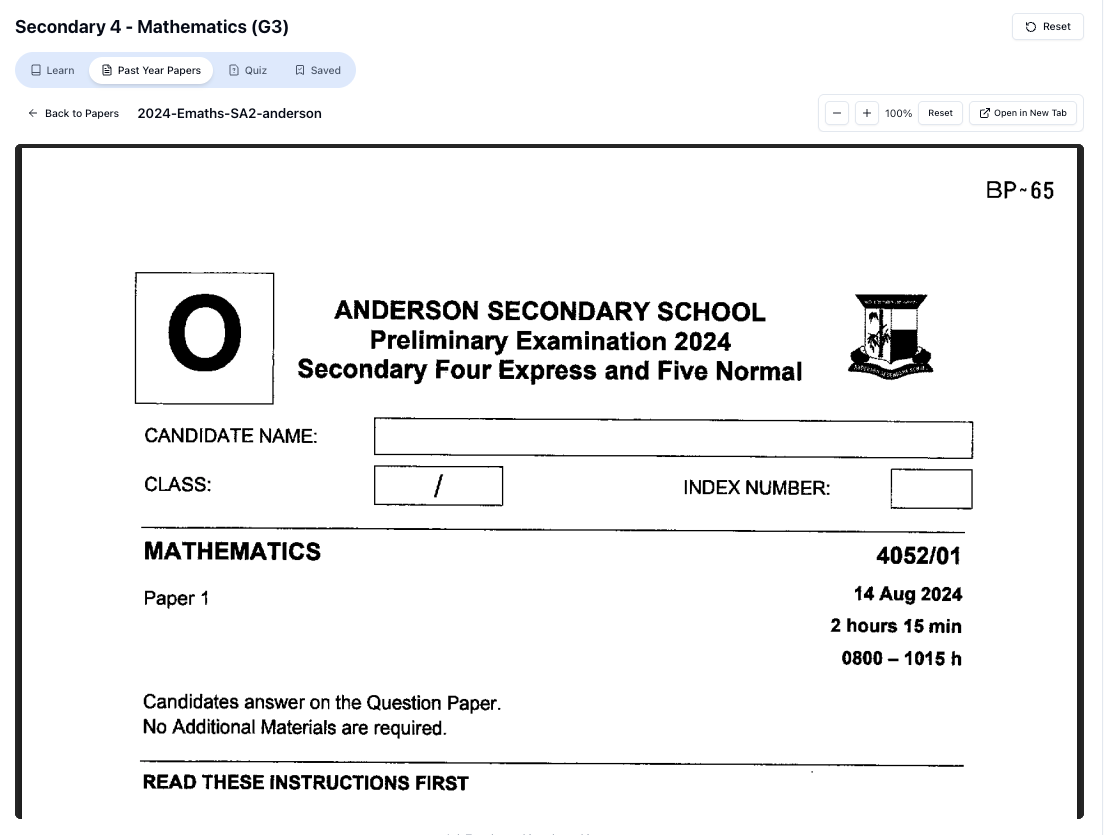
Here’s how to use them to sharpen your O Level exam strategy for common subjects.
1. Math (E Math / A Math): Train speed and accuracy together
For Math, online assignments often test:
- Algebra (factorisation, equations, inequalities)
- Graphs (quadratic, linear, modulus, trigonometric for A Math)
- Geometry and Trigonometry
- Mensuration, Probability, Statistics
How to use assignments for exam training:
-
Time yourself by section, not entire paper.
- For 10 algebra questions: give yourself 15–20 minutes.
- For 5 graph questions: 20–25 minutes.
This mimics the speed you need in Paper 1 and 2.
-
Practise skipping smartly.
- When you hit a question that freezes your brain for >2 minutes, mark it and move on.
- This is a crucial O Level exam skill that you can practise on every assignment.
-
Check with Tutorly for faster methods.
Sometimes your method is correct but long.- Paste the question into Tutorly.
- Compare your steps with its step-by-step solution.
- If Tutorly’s way saves time (e.g. using a formula or a shortcut), adopt it for future exams.
Example exam-style habit:
After every online Math assignment, list:
- 1 question where you wasted too much time.
- 1 question where you made a careless mistake.
- 1 question where you learnt a faster method from Tutorly.
That’s already 3 exam improvements from just one piece of homework.
2. Sciences (Pure / Combined): Practise explanation style, not just facts
A lot of students can memorise definitions but lose marks in structured questions.
For example:
- Physics: “Explain why the car continues moving at constant speed.”
- Chemistry: “Describe and explain the observations when magnesium reacts with dilute hydrochloric acid.”
- Biology: “Explain how the structure of the small intestine is adapted for absorption.”
Using online assignments to build exam-style answers:
-
Always answer in full sentences.
Even if it’s just an online quiz, practise writing complete, exam-ready answers. -
Highlight command words.
- “State” → Short, direct fact.
- “Describe” → What you see / what happens.
- “Explain” → Link cause and effect, or use scientific reasoning.
- “Compare” → Use both similarities and differences.
-
Check with Tutorly for model phrasing.
- Paste the question and your answer.
- Ask Tutorly to show you a full-mark sample answer.
- Compare your wording: are you missing keywords like “kinetic energy”, “collision frequency”, “diffusion gradient”, etc.?
Over time, you’ll build a feel for how to phrase answers in the exact style markers want in O Levels.
3. English: Use assignments to practise structure and time management
English online assignments often involve:
- Comprehension (visual text, narrative, non-narrative)
- Summary writing
- Situational writing (emails, reports, speeches)
- Continuous writing (essays)
Turning each assignment into exam practice:
-
For comprehension:
- Time yourself section by section.
- After checking answers, use Tutorly to explain why an option is wrong, not just which one is correct.
-
For summary writing:
- Stick to the word limit strictly.
- After you write your summary, paste the passage and your answer into Tutorly and ask:
“Show me how to improve this summary for O Level English, keeping within word limit.”
-
For situational writing:
- Always plan your content points first.
- Use Tutorly to generate a sample outline, then compare with yours to see what you missed.
The goal is to make every online English assignment feel like a mini O Level paper.
Worksheet practice: Sample online tuition assignment (with hard variants)
Let’s walk through a mock online assignment that looks like what you might get from a tutor or school — and how you can handle it using the steps above.
I’ll include harder variants so you can see how to stretch yourself.
Section A: E Math – Algebra and Functions
Q 1 (Basic):
Solve the equation
Try it yourself first.
Then, on Tutorly:
- Go to https://tutorly.sg/app
- Choose your level and E Math.
- Type: “Solve the equation .”
- Compare your solution with the step-by-step one.
Q 2 (Intermediate):
Simplify fully:
Again, do your own working first, then check with Tutorly. Pay attention to:
Free on Tutorly.sg
Practise with step-by-step help — free to start
On Tutorly.sg/app you can practise unlimited Singapore syllabus questions, get instant explanations when you are stuck, and use past-year papers — no sign-up needed to start.
- ✓ PSLE, O Level, A Level, and more
- ✓ Step-by-step working when you are stuck
- ✓ Works on phone and laptop
- Cancelling common factors
- Any restrictions on 𝑥 (e.g. )
Q 3 (Hard variant – O Level style):
The function 𝑓 is defined as
- Find 𝑓(2).
- Solve the equation .
- Hence, write 𝑓(𝑥) in the form a(x - p)(x - q).
This kind of question is very common in O Level E Math.
After you try:
- Use Tutorly to check each part.
- Notice how the step-by-step solution handles factorisation or quadratic formula.
- Reflect: Is their method clearer or faster than yours?
Section B: A Math – Trigonometry and Logarithms
Q 4 (Intermediate):
Solve for :
Try:
- Isolate .
- Find the principal value.
- Find all solutions in the given interval.
Then, check with Tutorly and compare how it finds all angles.
Q 5 (Hard variant):
Solve the equation:
This tests:
- Logarithm laws
- Quadratic solving
- Checking for extraneous roots (since 𝑥 - 1 > 0 and 𝑥 + 3 > 0)
After you solve:
- Ask Tutorly to show step-by-step.
- Pay attention to how it handles domain restrictions.
Section C: Pure Physics – Forces and Motion
Q 6 (Intermediate):
A 5 kg object is acted on by a resultant force of 15 N. Calculate its acceleration.
Use . Then verify with Tutorly.
Q 7 (Hard variant – explanation):
A car is moving at constant speed along a straight, horizontal road.
- State the resultant force acting on the car.
- Explain your answer.
After you answer:
- Ask Tutorly: “Show me a full-mark explanation for this O Level Physics question.”
- Compare your explanation – did you mention balanced forces and no acceleration?
Section D: English – Summary and Comprehension Style
Imagine your online tuition assignment gives you a short passage about the impact of social media on teenagers’ sleep and asks:
Q 8 (Summary – Hard variant):
“Write a summary of 80–100 words on the negative effects of social media on teenagers’ sleep and how these can be reduced. Use your own words as far as possible.”
How to practise:
- Underline all relevant points in the passage.
- Draft your summary within the word limit.
- Paste the original passage and your summary into Tutorly and ask:
“How can I improve this summary for O Level English? Please keep it within the word limit.”
Look at how Tutorly:
- Paraphrases phrases
- Groups similar points
- Maintains a clear, logical flow
Use that to refine your own style.
How to turn this into a real practice routine
You don’t need a tutor to set this up for you every time.
“Doing Secondary Science? Pick a topic and practise like it’s a real exam — with clear answers right after.”
👉 Try Tutorly now and start a Science topic in seconds.

You can:
- Take questions from school worksheets, Ten-Year Series, or online resources.
- Type or copy them into a Google Doc or Notion page – this becomes your “online assignment”.
- Attempt them under timed conditions.
- Use https://tutorly.sg/ai-tutor-singapore to check and learn from each one.
This way, you’re creating your own online tuition assignments that are 100% aligned to your needs.
Common mistakes students make with online tuition assignments
Online tuition can help a lot, but only if you avoid these very common traps.
Mistake 1: Copying answers without thinking
Because answers are just a click away, many students:
- Look at the solution
- Copy it down neatly
- Feel like they understand it
- Then forget everything a week later
Fix:
Always attempt first, even if you’re unsure. When checking with Tutorly:
- Cover the later steps.
- Reveal the solution step-by-step.
- Try to predict the next step before you look.
This forces your brain to actively process instead of passively reading.
Mistake 2: Treating every question as equal
Not all questions are equally important for exams.
Some are:
- Basic skill checks (e.g. simple factorisation)
- Core exam-style questions (e.g. full structured questions)
- Extension / challenge questions (very hard; not common in national exams)
Fix:
After doing an assignment, quickly label each question:
- “Exam core” – very similar to what you’ve seen in school tests or TYS.
- “Skill check” – builds foundation.
- “Challenge” – nice to know, but not priority if exams are near.
Spend more time reviewing Exam core questions with Tutorly. Don’t waste too much time obsessing over rare challenge questions a few days before O Levels.
Mistake 3: Not building a mistake bank
If you keep making the same type of mistake:
- Sign errors in algebra
- Misreading Physics graphs
- Not answering the full English question
It means you’re not tracking your errors.
Fix:
For each online assignment, pick:
- 2 questions you got wrong
- 1 question you were unsure
- 1 question you took too long
Write down:
- The question (short summary).
- Your original wrong idea.
- The correct idea (after checking with Tutorly or tutor).
- A short reminder to your future self.
Before exams, revise this mistake bank. This is one of the most efficient ways to boost marks.
Mistake 4: Relying only on scheduled tuition sessions
If you only learn during your weekly 1.5-hour Zoom session, progress will be slow, especially for Sec 3–4 content which is heavy.
You need help whenever you get stuck, not just once a week.
Fix:
Use Tutorly.sg as your backup tutor:
- Stuck on a Physics question at 11 pm? Paste it into Tutorly.
- Confused by a Chem explanation your teacher gave? Ask Tutorly to re-explain in simpler terms.
- Need more practice questions on a specific topic? Ask Tutorly to generate more, with step-by-step solutions.
Because it’s a website and not a mobile app, you can easily use it on your laptop while doing school portals, Google Docs, or PDFs side-by-side.
Mistake 5: Ignoring exam-style time pressure
Many students do online assignments slowly, with distractions:
- Multiple tabs open
- Phone beside them
- Pausing to watch videos or chat
Then, during exams, they panic because they’re not used to time pressure.
Fix:
Turn some of your online assignments into mini timed tests:
- Set a timer for 25–30 minutes.
- Do a batch of questions without checking anything online.
- Only after time is up, use Tutorly to check and learn.
This trains both speed and exam focus.
Final thoughts: Make every online assignment work for you
Online tuition assignments don’t have to be just “more homework”.
If you:
- Attempt honestly under light time pressure
- Use Tutorly.sg to check final answers and learn step-by-step methods
- Write short learning notes for tricky questions
- Build and review your own mistake bank
…you’ll turn each assignment into a powerful tool for O Level preparation.
You don’t need to wait for your next tuition session or for your teacher to reply on WhatsApp. Whenever you’re stuck, you can get help immediately using:
- AI tutor (MOE-aligned): https://tutorly.sg/ai-tutor-singapore
- Full web app (for regular study sessions): https://tutorly.sg/app
If you start applying these habits to your next few online assignments, you’ll notice something important:
you’re not just “finishing work” anymore — you’re actually getting ready to score.
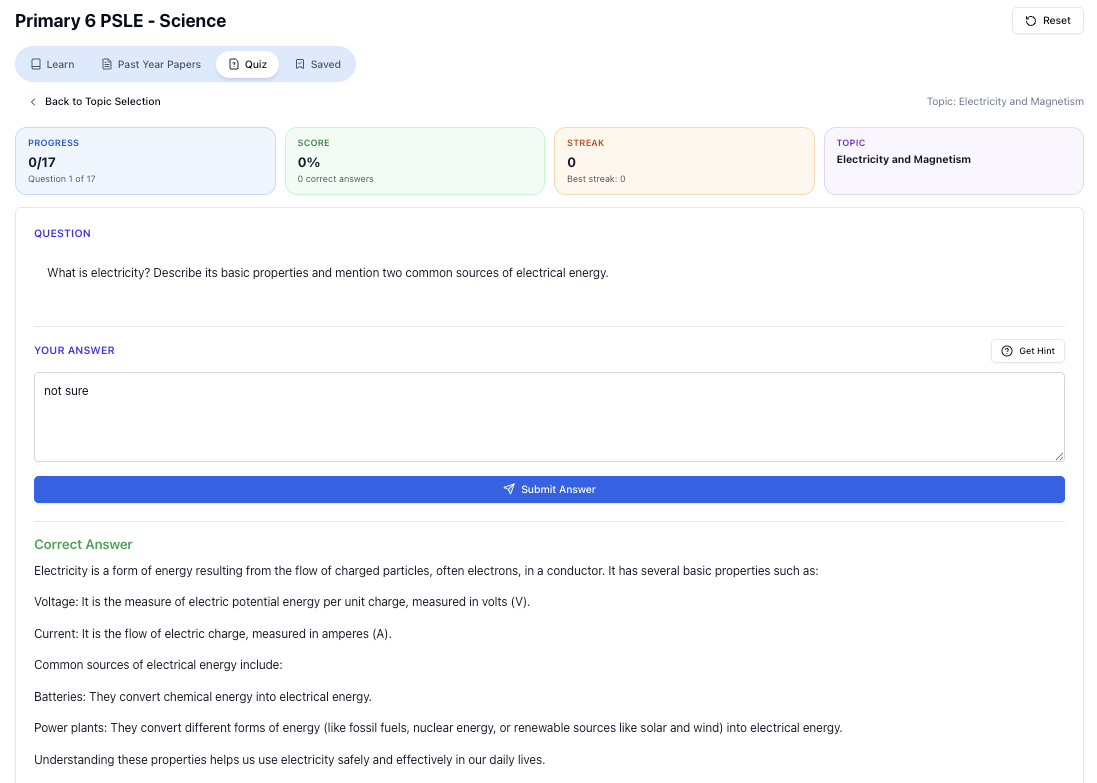
“Practice PSLE Science questions and get clear, step-by-step answers instantly.”
👉 Try a question now and see how fast you can improve.
Ready to practise?
If you want a Singapore-focused AI tutor you can use immediately (website, no sign-up), try Tutorly here:
Related Articles
Free on Tutorly.sg
Practise with step-by-step help — free to start
On Tutorly.sg/app you can practise unlimited Singapore syllabus questions, get instant explanations when you are stuck, and use past-year papers — no sign-up needed to start.
- ✓ PSLE, O Level, A Level, and more
- ✓ Step-by-step working when you are stuck
- ✓ Works on phone and laptop