

Free on Tutorly.sg
Practise with step-by-step help — free to start
On Tutorly.sg/app you can practise unlimited Singapore syllabus questions, get instant explanations when you are stuck, and use past-year papers — no sign-up needed to start.
- ✓ PSLE, O Level, A Level, and more
- ✓ Step-by-step working when you are stuck
- ✓ Works on phone and laptop
Online computer science tutoring can feel a bit confusing in Singapore.
You’ve got:
- random YouTube playlists,
- expensive 1-to-1 coding classes,
- overseas tutors who don’t understand our MOE syllabus,
- and now AI tutors everywhere.
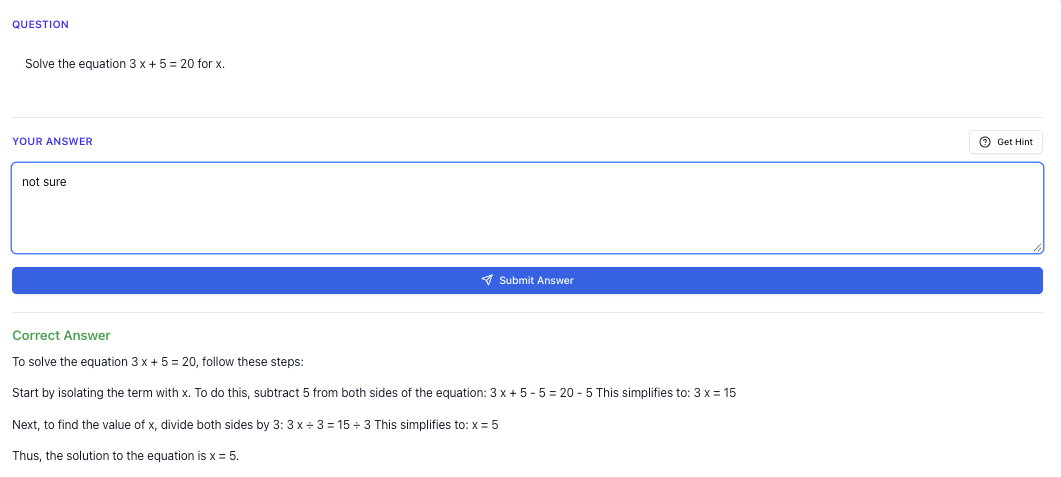
“Stuck on a question? See simple explanations that help you understand fast.”
👉 Give it a try and turn confusion into clarity in minutes.
1. What Does “Computer Science” Even Mean in Singapore?
When you hear “computer science tutoring”, it can mean different things depending on your level.
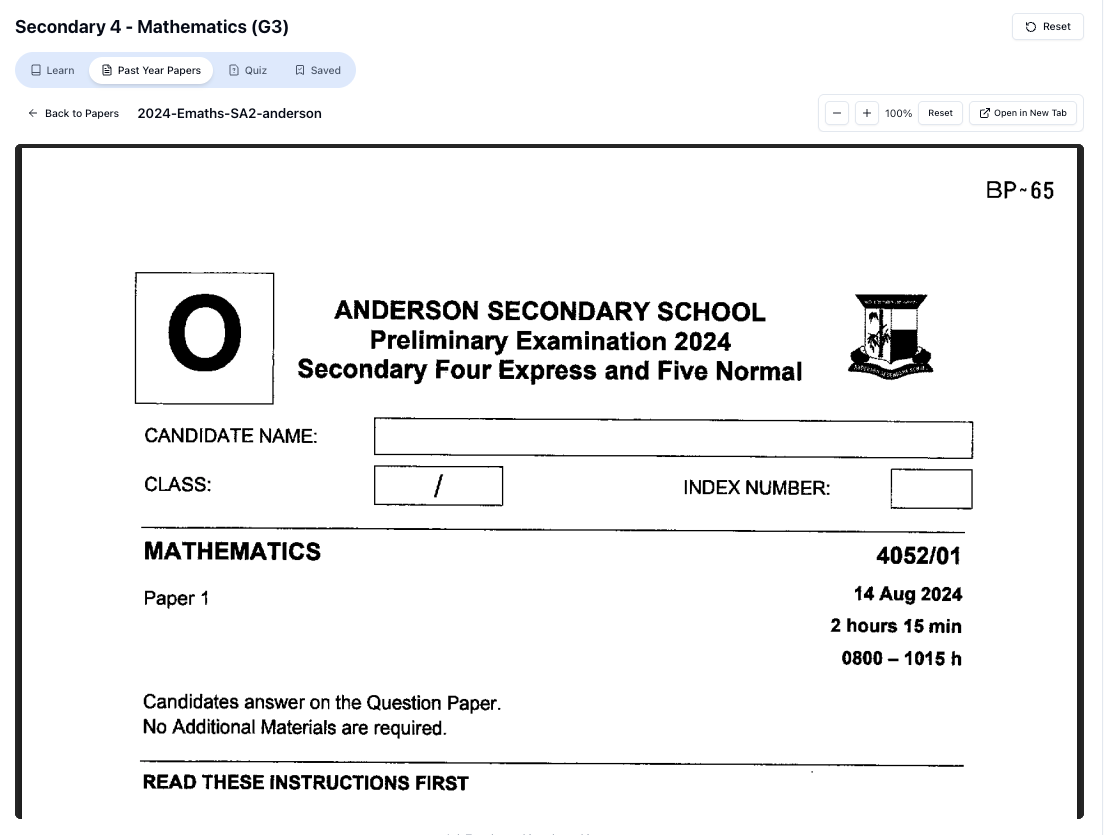
“Access more than 1000+ past year papers to practice”
👉 Start a paper today and test yourself like it’s the real exam.
For Primary School (P 1–P 6)
MOE doesn’t have “Computer Science” as a main examinable subject yet, but you might see:
- Coding enrichment (Scratch, micro:bit, simple robotics)
- School programmes like Applied Learning Programme (ALP) in coding or computational thinking
- Basic exposure to:
- sequences and loops,
- simple conditionals,
- basic problem-solving using block-based coding.
If you’re in primary school, “online computer science tutoring” usually means:
- learning basic coding concepts (loops, if-else, variables),
- building simple games or animations,
- and developing logical thinking that will help later for Math, Science, and eventually O Levels.
For Lower Secondary (Sec 1–2)
You might get:
- Computing modules under Design & Technology / ALP,
- simple Python, HTML, or block-based coding,
- tasks like:
- writing simple programs,
- basic data handling,
- simple websites.
Tutoring here is about:
- making sure you understand the logic, not just copy code,
- getting help with school projects and assignments,
- and preparing a good foundation if you plan to take O-Level Computing or higher-level coding later.
For Upper Secondary (Sec 3–): O-Level Computing
If you take O-Level Computing (Syllabus 7155 or similar), things get more serious:
You’ll need to handle:
- programming in a text-based language (often Python),
- algorithms (searching, sorting, tracing),
- data structures (arrays, lists, maybe stacks/queues concepts),
- logic gates and binary,
- problem-solving and program design.
Online computer science tutoring at this level should help you:
- understand and apply MOE exam-style questions,
- practise tracing code and debugging logically,
- get step-by-step explanations for harder topics like:
- nested loops,
- functions and parameters,
- file handling.
For JC / A Levels: H 2 Computing or CS-Related Modules
At JC level, if you take H 2 Computing, you’ll see:
- deeper algorithms and data structures,
- more formal problem-solving and abstraction,
- software development process,
- sometimes object-oriented concepts.
Tutoring here must:
- stay aligned with A-Level requirements,
- help break down long questions,
- guide you through structured answers, not just “here’s some code”.
Poly / Uni / Self-Learning
You might be:
- in poly doing IT / CS modules,
- a uni student struggling with CS 101-style modules,
- or a secondary/JC student self-learning coding (Python, JavaScript, C++, etc.).
Online tutoring at this stage is more open:
- help with assignments,
- understanding concepts like recursion, Big-O, OOP,
- building projects (web, data science, games).
2. Types of Online Computer Science Tutoring (Singapore Pros & Cons)
Let’s break down the main options you’ll see here.
1. Live 1-to-1 Online Tutors (Zoom, Google Meet, etc.)
What it is:
A human tutor meets you online, usually weekly, using screen sharing and maybe a shared coding platform.
Pros:
- Can adapt to your pace and explain in your style.
- Can go through your school homework or project line-by-line.
- Useful if you’re very weak and need someone to “hold your hand” at the start.
Cons (especially in Singapore):
- Good CS tutors are expensive.
- Time slots are limited; if you’re in Sec or JC, your timetable is already packed.
- Quality varies a lot. Some tutors are good at coding but not good at teaching.
- Many are not aligned to MOE; they might be teaching generic US-style CS.
2. Group Online Classes / Coding Schools
What it is:
Structured courses (often for kids/teens) on specific topics like Python, web dev, robotics.
Pros:
- Some structure: fixed syllabus, progression from basic to advanced.
- Can be fun if they include projects and games.
- Good if you’re starting from zero and just want exposure.
Cons:
- Pace may be too fast or too slow for you.
- Not always aligned with PSLE / O-Level / A-Level needs.
- Once class ends, you might forget everything if you don’t practise.
- Still not cheap, especially long-term.
3. Self-Study Platforms (YouTube, MOOCs, overseas websites)
What it is:
Free/paid courses like Coursera, Udemy, YouTube channels, LeetCode, etc.
Pros:
- Huge amount of content.
- Can be very detailed for specific topics.
- Good for motivated learners.
Cons (for Singapore students):
- Not aligned with MOE exam formats.
- Often assume you already know some math or CS basics.
- Easy to “collect courses” but not actually finish or practise.
4. AI Tutoring Websites (Like Tutorly.sg)
What it is:
You ask questions online and get instant explanations from an AI tutor.
But here’s the key difference for Singapore:
Most AI tools are not built for MOE. They teach generic CS.
Tutorly.sg is different because:
- It is built specifically for Singapore students (P 1–JC 2).
- It’s aligned to MOE syllabus, PSLE, O Levels, A Levels.
- It’s a AI tutor website (not a mobile app), so you can use it on your laptop whenever you’re doing school work.
Tutorly.sg has already been:
- used by thousands of students in Singapore, and
- mentioned on Channel NewsAsia (CNA), which gives parents and students some confidence it’s not some random overseas tool.
Pros of AI tutoring (when it’s done right):
- Available anytime, including late-night when you’re stuck on a coding question.
- Infinite patience: you can ask the same thing 5 times in different ways.
- Cheaper than long-term 1-to-1 tuition.
- Instant feedback on your answers.
Cons / Limitations (being honest here):
- It can’t watch you code live like a human tutor.
- It can’t mark your working line-by-line; it checks your final answer, then shows step-by-step how to get there.
- You still need discipline to practise and think, not just copy.
3. What Makes a Good Online Computer Science Tutor (For Singapore Students)?
Whether you use a human tutor, a course, or an AI tutor like Tutorly.sg, here’s what actually matters.
1. Aligned to Your Syllabus and Level
If you’re doing O-Level Computing, you don’t need a tutor who keeps talking about:
- Java for Android apps, or
- machine learning with TensorFlow.
You need:
- clear explanations for if / else, for loops, while loops,
- practice with tracing tables,
- help with exam-style questions (including pseudocode).
Similarly, if you’re in JC:
- you need help with H 2 Computing topics, not just “fun coding projects”.
How Tutorly.sg helps here:
- Before you ask a question, you choose your level and subject (e.g. Sec 3, O-Level Computing).
- The AI tutor then explains concepts at the right depth and style for that level.
2. Explains “Why”, Not Just “What to Type”
Bad tutoring:
- “Here’s the code, just memorise.”
Good tutoring:
- “Here’s why this loop goes from to 𝑖 < 𝑛.”
- “Here’s what happens if we swap the order of these conditions.”
- “Here’s how to think about this problem before writing any code.”
You should come away thinking:
“I can now solve a similar question by myself.”
Tutorly.sg is designed to:
- give step-by-step explanations,
- show the reasoning behind each step,
- break down logic in simple English first, then connect to code.
3. Lets You Practise, Not Just Read
Computer science is like Math:
You can’t just watch; you need to do.
Good tutoring helps you:
- try a question,
- check your answer,
- see how to improve.
With Tutorly.sg, you can:
- Attempt a coding or theory question yourself.
- Enter your final answer or explanation.
- Let the AI:
- tell you if your answer is correct, and
- show a clear worked solution with reasoning.
You can then compare:
- your logic vs the model solution,
- where you missed a step,
- how to write neater, more exam-friendly answers.
4. How to Use Online Computer Science Tutoring Effectively (By Level)
Let’s get practical. Here’s how I’d guide different students to use online tutoring well.
Primary School: Building Interest & Logic
If you’re P 3–P 6 and just starting coding:
-
Focus on concepts, not language names.
Understand:- what a loop is,
- what an “if” condition does,
- what it means to “store a value” (variable).
-
Ask “what if” questions.
When you code something simple (e.g. a game in Scratch or a basic Python program), use Tutorly.sg to ask:- “What happens if I move this line above that line?”
- “Why do we need this repeat block?”
-
Link it to Maths and problem-solving.
Use coding problems that involve:- simple arithmetic,
- patterns,
- logic puzzles.
You can go to:
👉 https://tutorly.sg/ai-tutor-singapore
Choose your level, and ask things like:
- “Explain loops using a Primary 5 example.”
- “Can you give me a simple coding question about factors or multiples?”
Lower Sec: Strengthening Foundations
If you’re in Sec 1 or 2, you might:
- be using Python in school,
- or doing school ALP projects.
Use online tutoring to:
- Clarify confusing concepts early.
Topics that often confuse students:- for vs while loops,
- if / elif / else,
- lists vs variables.
Ask Tutorly.sg:
- “Explain the difference between for and while loops with Sec 2-level examples.”
- “Why do we use lists instead of many separate variables?”
-
Practise small, focused questions.
Instead of asking for a full project, ask:- “Give me 3 short Python questions on loops at Sec 2 level.”
- “Check my answer and show the correct solution.”
-
Use it as homework backup.
When you’re stuck:- try the question first,
- then ask Tutorly.sg to check your final answer,
- then read the step-by-step solution.
Upper Sec: O-Level Computing
This is where online computer science tutoring can really save you time.
1. Use It for Exam-Style Practice
You’ll face questions like:
- “Trace this algorithm and state the output.”
- “Write a program to process a list of student scores.”
- “Explain what this pseudocode does.”
With Tutorly.sg, you can:
- paste the question,
- write your final answer (output, explanation, or code),
- ask the AI to:
- mark it,
- show the full working.
For example:
“This is my O-Level Computing question and my answer. Please check if my output is correct and show the proper tracing table.”
Free on Tutorly.sg
Practise with step-by-step help — free to start
On Tutorly.sg/app you can practise unlimited Singapore syllabus questions, get instant explanations when you are stuck, and use past-year papers — no sign-up needed to start.
- ✓ PSLE, O Level, A Level, and more
- ✓ Step-by-step working when you are stuck
- ✓ Works on phone and laptop
2. Drill Weak Topics
Common weak areas:
- nested loops,
- file handling,
- arrays/lists,
- logic gates and truth tables.
You can ask:
- “Give me 5 O-Level style questions on nested loops with model answers.”
- “Explain AND, OR, NOT, NAND, NOR with truth tables for O-Level Computing.”
3. Improve Your Explanations
Many students lose marks because they:
- understand the idea,
- but cannot explain it properly in exam-style sentences.
Use Tutorly.sg to:
- write your own explanation first,
- then ask, “Can you improve my explanation to be more exam-appropriate for O-Level Computing?”
Compare and learn the phrasing.
JC / A Levels: H 2 Computing
At this level, content is heavier, and time is tight.
1. Break Down Long Questions
When you get a long H 2 Computing question:
- Read and underline key parts.
- Try to outline your own approach.
- If stuck, ask Tutorly.sg:
- “Help me break down this H 2 Computing question into smaller steps.”
- “Explain part (b) of this question. I don’t understand what it’s asking.”
2. Clarify Theory & Abstraction
Topics like:
- abstraction,
- decomposition,
- recursion,
- data structures,
can feel very “theoretical”.
You can ask:
- “Explain abstraction with a JC-level example that is not too mathematical.”
- “Show me a simple recursion example and explain step-by-step what happens at each call.”
“Doing Secondary Science? Pick a topic and practise like it’s a real exam — with clear answers right after.”
👉 Try Tutorly now and start a Science topic in seconds.

3. Refine Pseudocode and Justifications
H 2 Computing often requires:
- clear pseudocode,
- justifications for algorithms (e.g. why it works, complexity in simple terms).
You can:
- write your pseudocode,
- ask Tutorly.sg to:
- check if it satisfies the requirements,
- suggest clearer structure or variable names.
5. How to Combine Human Tutors, School Lessons, and AI Tutoring
You don’t have to pick only one.
If You Already Have a Human Tutor
Use Tutorly.sg to:
- revise between lessons,
- ask quick questions you forgot to ask during tuition,
- generate extra practice questions at your level.
Example routine:
- After your weekly tuition, list 2–3 topics you were weak in.
- Over the week, ask Tutorly.sg for:
- extra questions,
- alternative explanations,
- checking your answers.
If You Don’t Have a Tutor (Yet)
You can start with:
- school lessons,
- self-practice,
- and Tutorly.sg as your main “on-demand tutor”.
If you later feel:
- “I still don’t get the basics even after asking the AI many times,”
then consider adding a human tutor for a short period to reset your foundation.
For Parents: When Is AI Tutoring Enough?
AI tutoring like Tutorly.sg can be enough when:
- your child is willing to ask questions,
- they already have some basic understanding,
- they mainly need:
- clarification,
- extra practice,
- exam-style exposure.
You might still want a human tutor if:
- your child refuses to start questions alone,
- they’re very far behind syllabus,
- or they need strong external discipline.
But even with a human tutor, using Tutorly.sg between sessions usually leads to faster improvement because they’re not stuck the whole week waiting for the next lesson.
6. Concrete Ways to Use Tutorly.sg for Computer Science Today
Here’s how you can start using Tutorly.sg effectively right away.
Step 1: Go to the Right Place
Open:
👉 https://tutorly.sg/ai-tutor-singapore
You’ll see that it’s clearly built for Singapore students, P 1 to JC 2, not some generic overseas platform.
Step 2: Pick Your Level and Subject
Since Tutorly.sg already knows your level and subject from your selection, you don’t need to keep repeating it in your questions.
Just:
- choose your level (e.g. Sec 3, JC 1),
- choose the relevant subject (e.g. Computing, or use it under Math/Science if you’re doing computational topics),
- then start asking.
Step 3: Use It in These 4 Ways
1. “Explain This Concept to Me”
Examples:
- “Explain what a nested loop is, using a Sec 3-level example.”
- “Explain recursion at H 2 Computing level, but in simple language.”
- “What is a variable in coding? Explain for Primary 5.”
Ask follow-up questions until it clicks. The AI won’t get impatient.
2. “Check My Answer”
Attempt your question first.
Then:
- type your final answer (code, output, explanation),
- ask: “Check if my answer is correct and show the full solution step-by-step.”
Tutorly.sg will:
- judge your final answer,
- then give a clear, structured solution.
3. “Give Me Practice Questions”
Examples:
- “Give me 5 O-Level Computing questions about for loops with answers.”
- “Give me 3 H 2 Computing questions on abstraction with model answers.”
- “Give me 4 short Sec 2 Python questions on if-else.”
Do them one by one, and use the AI to check each answer.
4. “Improve My Explanation or Code Style”
After solving, you can paste your work and ask:
- “Help me improve this explanation to be suitable for O-Level exam marking.”
- “Make my pseudocode neater and more readable.”
- “Suggest better variable names and comments for this JC-level question.”
This helps you move from “I roughly know” to “I can present it well in exams”.
7. Common Mistakes Students Make With Online CS Tutoring (And How to Avoid Them)
Mistake 1: Copying Without Thinking
If you just copy the solution:
- you’ll feel like you “understand”,
- but in exams, you’ll freeze.
Fix:
Before reading the full solution, always:
- try the question yourself,
- write something,
- then compare.
Mistake 2: Asking for Full Project Solutions
Sometimes students paste an entire assignment and say:
“Write the full program for me.”
That might help you pass one assignment, but:
- you won’t learn,
- and you’ll suffer later when topics build up.
Fix:
Break your problem into parts:
- “I don’t know how to loop through this list.”
- “I don’t know how to validate user input.”
Ask Tutorly.sg for help with specific parts, not to do everything.
Mistake 3: Not Revising Old Topics
Computer science builds on itself.
If you’re weak in:
- loops,
- conditions,
- basic variables,
you’ll struggle with: - arrays/lists,
- file handling,
- algorithms.
Fix:
Use Tutorly.sg to:
- revisit older topics,
- ask for simple explanations again,
- practise from easy to harder questions.
8. Why Tutorly.sg Works Well Specifically for Singapore Computer Science Students
To summarise why I strongly recommend you try Tutorly.sg if you’re doing CS in Singapore:
- It’s built for Singapore, aligned to MOE, PSLE, O Levels, A Levels.
- It has already been used by thousands of local students, and even got mentioned on CNA (Channel NewsAsia).
- It’s a AI tutor website, not a random overseas course or mobile app.
- It helps you with:
- explanations at the right level,
- checking your final answers,
- giving step-by-step worked solutions,
- generating practice questions,
- improving your explanations and code style.
You can use it:
- alongside your school CS lessons,
- with or without a human tutor,
- for both theory and coding practice.
If you’re serious about improving your computer science understanding and exam performance, having a reliable, on-demand tutor like this makes a huge difference—especially when you’re stuck at 11.30pm the night before a test.
Ready to Try Online Computer Science Tutoring the Smart Way?
Instead of randomly Googling for answers or watching 10 different YouTube videos, you can:
- Go to https://tutorly.sg/app
- Start using Tutorly.sg on your browser as your AI tutor website.
- Ask your first question:
- maybe a concept you’ve always been unsure about,
- or a homework question you’re stuck on,
- or a topic you want extra practice for.
Treat it like a friendly, patient tutor who actually understands the Singapore syllabus and exam style.
Once you’ve tried it for a few days—especially for your computing or coding-related work—you’ll know very quickly if it’s helping you think more clearly and solve questions with more confidence.
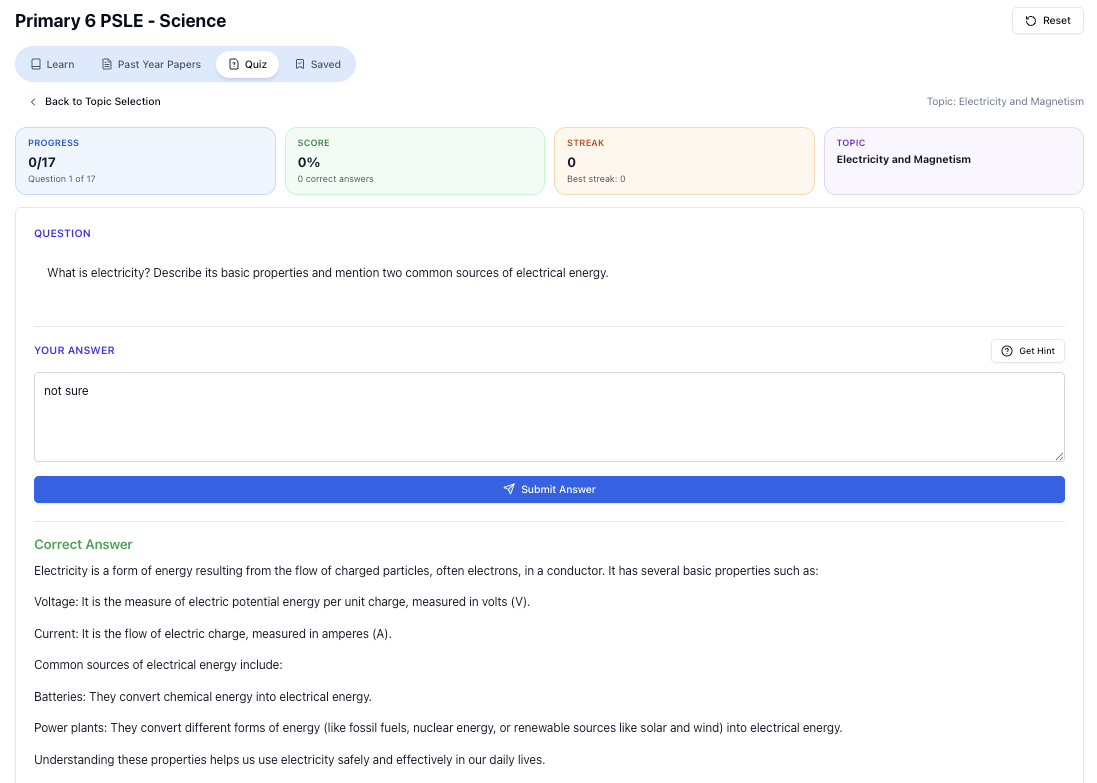
“Practice PSLE Science questions and get clear, step-by-step answers instantly.”
👉 Try a question now and see how fast you can improve.
Ready to practise?
If you want a Singapore-focused AI tutor you can use immediately (website, no sign-up), try Tutorly here:
Related Articles
Free on Tutorly.sg
Practise with step-by-step help — free to start
On Tutorly.sg/app you can practise unlimited Singapore syllabus questions, get instant explanations when you are stuck, and use past-year papers — no sign-up needed to start.
- ✓ PSLE, O Level, A Level, and more
- ✓ Step-by-step working when you are stuck
- ✓ Works on phone and laptop