

Free on Tutorly.sg
Practise with step-by-step help — free to start
On Tutorly.sg/app you can practise unlimited Singapore syllabus questions, get instant explanations when you are stuck, and use past-year papers — no sign-up needed to start.
- ✓ PSLE, O Level, A Level, and more
- ✓ Step-by-step working when you are stuck
- ✓ Works on phone and laptop
If you’re a Secondary student in Singapore, you’re probably juggling a lot:
- Long school days
- CCA
- Tuition
- Homework
- And on top of that… O Levels or end-of-year exams
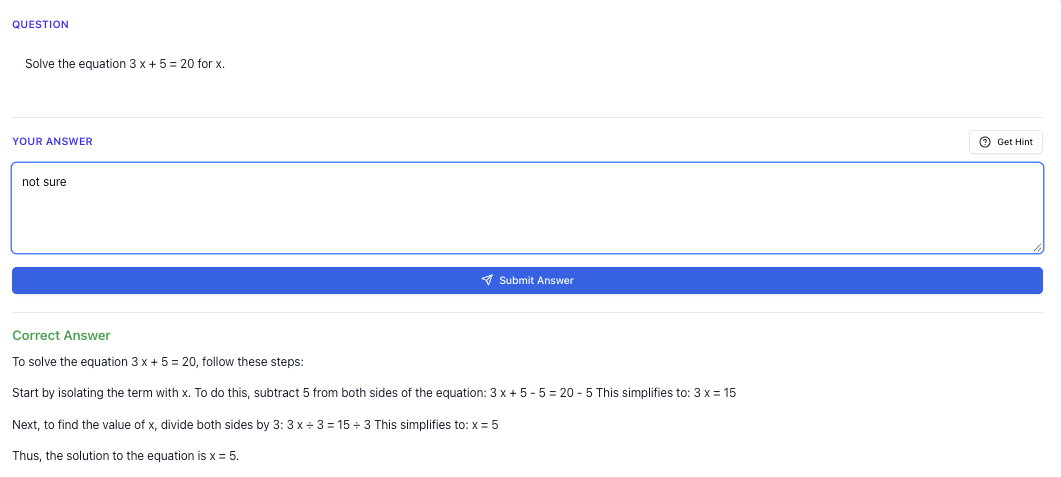
“Stuck on a question? See simple explanations that help you understand fast.”
👉 Give it a try and turn confusion into clarity in minutes.
You’ve also probably heard classmates say things like, “I just use ChatGPT to study now.”
But how exactly do you use AI properly for MOE subjects?
How do you make sure the answers match Singapore’s syllabus and not some random US curriculum?
And how do you avoid just copying answers blindly?
In this guide, I’ll walk you through practical, step-by-step workflows you can use with AI tools like ChatGPT and Tutorly.sg to study smarter for:
- Secondary 1–4 / Sec 5
- O Level exams (especially for Express/NA students)
Tutorly.sg is a AI tutor website built specifically for Singapore students, aligned to the MOE syllabus. It has already been used by thousands of students in Singapore and has even been mentioned on Channel NewsAsia (CNA).
You can check it out here:
- MOE-aligned AI tutor overview: <https://tutorly.sg/ai-tutor-singapore>
- Go straight to the AI tutor: <https://tutorly.sg/app>
Throughout this article, I’ll focus on concrete study workflows, not theory.
Step-by-step tutorial
Let’s start with how to actually use AI (especially Tutorly.sg) in a way that helps you learn, not just copy.
I’ll break this into 4 common situations for Secondary / O Level students:
- Understanding a new concept
- Doing practice questions
- Fixing your mistakes
- Revising near exams
I’ll show examples for Math, Science, and Humanities.
1. Understanding a new concept (without getting overwhelmed)
When your teacher goes through a chapter quickly (it happens a lot), you might leave class thinking:
“I kind of understand… but if you ask me to explain, I’ll blank out.”
Instead of just re-reading the textbook and hoping it sticks, you can use an AI tutor to re-explain the concept in a way that fits you.
How to do this with Tutorly.sg
- Go to <https://tutorly.sg/app>
- Select your level (e.g. Secondary 3) and subject (e.g. Additional Math).
- Type a specific question like:
- “Explain what means in inverse functions using simple Sec 3 A Math language.”
- “I don’t understand limiting reagents in Sec 3 Pure Chemistry. Explain with a simple example and a short step-by-step method.”
- Ask for short, exam-focused explanations, not essays. For example:
“Explain this in under 10 sentences, and give me 1 simple exam-style question at the end.”
Tutorly will then:
- Give a MOE-aligned explanation
- Provide a practice question that looks like something you’d see in school tests or O Levels
You can repeat this for any topic: quadratic graphs, electrolysis, plate tectonics, source-based questions, etc.
Bonus tip: Ask for “different versions” of the same explanation
If you still don’t get it, tell the AI:
“I still don’t fully understand. Explain it again using a different example and simpler wording.”
This is something you might feel paiseh to ask your teacher multiple times, but AI doesn’t get tired or annoyed.
2. Doing practice questions (without just copying)
This is where many students misuse ChatGPT: they paste the question, get the answer, copy, done.
You feel productive, but you didn’t actually learn.
Here’s a better workflow.
The “attempt–check–learn” method
Let’s say you’re doing Sec 4 E Math practice.
-
Attempt first on your own.
Even if you’re not confident, write down your full solution on paper. -
Type only the question and your final answer into Tutorly.sg. Example:
“Sec 4 E Math: Solve the equation .
My answer: and .
Check if my answer is correct, then show me the full working step-by-step.”
- Tutorly will:
- Tell you if your final answer is right or wrong
- Show you a full step-by-step solution for that question
Important: Tutorly does not check your working line-by-line, but it does show clearly how to get from question to correct answer. Your job is to compare your working with theirs and see:
- Where you made mistakes
- Which steps you skipped
- Which method is faster
This trains you to think like an examiner.
You can use the same style for:
- Physics: “My final answer is 2.5 N, check if it’s correct and show me the full steps.”
- Chemistry: “My answer is 0.25 mol, check and show steps.”
- A Math: “My answer is and , check and show full working.”
3. Fixing your mistakes properly
Most students do this:
- See answer
- Say “oh okay”
- Move on
Then repeat the same mistake in the next test.
Use AI to dig into the mistake instead.
A simple 3-question reflection template
After Tutorly shows the solution, ask it:
- “Which step is different from what I did, and why is that step important?”
- “What is the most common mistake students make for this type of question?”
- “Give me 2 more similar questions to practise, with answers only (no working).”
Then:
- Try the 2 questions on your own
- Check just the final answers with Tutorly
- If still wrong, ask for full working and explanation
This way, every mistake becomes a mini-lesson instead of just a sad red cross.
4. Revising near exams (especially O Levels)
When exams are close, you don’t have time to re-learn everything from scratch.
You need:
- Targeted revision
- Fast feedback
- Lots of exam-style practice
Here’s a practical AI-based revision flow.
Step 1: List your weak topics
Be honest. For example:
- E Math: Trigonometry, Coordinate Geometry
- A Math: Integration, Logarithms
- Chemistry: Mole concept, Redox, Organic Chemistry
- Physics: Kinematics, Forces, Electricity
- Geography / History / Social Studies: Structured questions, SBQs
Step 2: Use Tutorly to build a mini revision plan per topic
Prompt example:
“I’m a Sec 4 Express student preparing for O Level E Math. I’m weak in trigonometry (non-right-angled triangles and bearings).
Give me a 3-day revision plan just for this topic, with:
- what to revise each day
- 3 practice questions per day
- short tips for common mistakes.”
You can do the same for Pure Chem, Pure Physics, Combined Science, or Humanities.
#### Step 3: Use it as 𝑎 **\frac{24}{7} “on-call” tutor**
While doing Ten-Year Series (TYS) or school papers:
- When you’re stuck, don’t immediately ask for the full solution.
- Instead, try this:
“I’m stuck at this part of the question. Don’t give me the full answer yet. Just give me a hint for the next step.”
This keeps your brain working, instead of just reading model answers passively.
Exam strategy guide
Now let’s talk about how to use AI to build exam strategies, not just content knowledge.
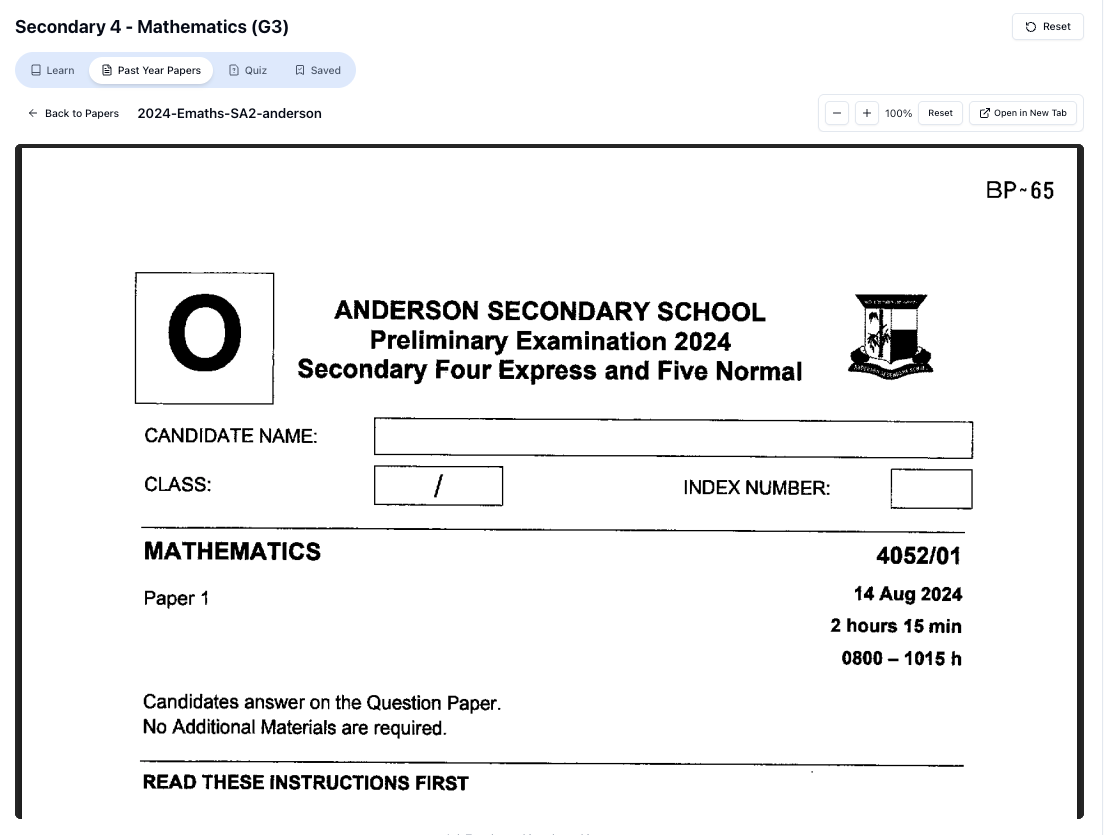
“Access more than 1000+ past year papers to practice”
👉 Start a paper today and test yourself like it’s the real exam.
We’ll cover:
- Time management
- Question selection
- How to use AI to analyse your own performance
- Subject-specific tips (Math, Science, Humanities)
Using AI to plan your exam strategy
You can literally ask an AI tutor:
“I’m a Sec 4 Express student taking O Level E Math and A Math.
My common problems:
- I run out of time.
- I panic when I see long questions.
- I lose marks due to careless mistakes.
Help me design an exam strategy for Paper 1 and Paper 2.”
Tutorly can then suggest:
- How many minutes to spend per question
- When to skip and come back
- How to check answers efficiently
- Which topics to attack first (your strengths)
You can tweak it based on your own habits.
Math (E Math / A Math) exam strategy with AI
Use AI to practise exam conditions:
- Ask:
“Give me a Sec 4 O Level–style E Math Paper 1 mini set:
- 10 questions
- mix of algebra, graphs, trigonometry, statistics
- increasing difficulty
- suitable for 45 minutes.”
- Do the questions on paper, with a timer.
- After 45 minutes, stop, even if you haven’t finished.
- Then use Tutorly to:
- Check your final answers
- Show step-by-step solutions for questions you got wrong
- Ask: “Which type of question took me the longest? Which ones did I lose marks on?”
You can repeat this weekly. Over time, you’ll see patterns:
- Maybe you always take too long on simultaneous equations
- Or you always mess up rounding in statistics
Once you know this, you can adjust your exam strategy:
- Skip your weak-type questions first and come back later
- Be extra careful on questions you should score full marks on
Science (Pure / Combined) exam strategy with AI
Science exams test:
- Content knowledge (definitions, facts)
- Application (explaining, analysing, calculations)
Here’s how AI can help.
1. Turn content into fast recall questions
Ask:
“I’m Sec 4 Pure Chemistry. Create 20 short recall questions for:
- Acids and Bases
- Salts
- Redox
Make them in the style of O Level structured questions, but short.”
Then:
- Try to answer them out loud or on paper
- Check with Tutorly
- Ask for explanations for any you got wrong
2. Practise structured and explanation questions
For example, in Biology or Physics:
“Give me 5 O Level–style questions that start with ‘Explain why…’ for the topic of diffusion and osmosis.”
Then, after you answer:
“Mark my answer like an O Level examiner.
- Tell me how many marks I would get
- Show me the marking points I missed
- Rewrite my answer in full-mark style.”
Free on Tutorly.sg
Practise with step-by-step help — free to start
On Tutorly.sg/app you can practise unlimited Singapore syllabus questions, get instant explanations when you are stuck, and use past-year papers — no sign-up needed to start.
- ✓ PSLE, O Level, A Level, and more
- ✓ Step-by-step working when you are stuck
- ✓ Works on phone and laptop
This is extremely useful because many students know the content but can’t phrase it the way examiners want.
Humanities (Geography / History / Social Studies) exam strategy with AI
Humanities is where AI can really help you see what a high-mark answer looks like.
1. Use AI to analyse your PEEL or PEA paragraphs
Example for Social Studies:
“Here’s my 8-mark ‘Explain’ question answer (paste your paragraph).
- Show me where my Point, Evidence, Explanation, and Link are.
- Suggest how to improve my explanation to reach full marks.
- Rewrite one improved sample paragraph.”
Then compare your style to the improved version. Over time, your writing will become more:
- Focused
- Clear
- Aligned to the marking scheme
2. Practise SBQs (Source-Based Questions) with AI guidance
You can ask:
“Give me 2 SBQ-style questions for Sec 4 Social Studies on governance in Singapore, with short sources and model answers.”
After you attempt them, ask:
“Explain why this model answer is better than mine. What exam skills is it showing?”
This trains your exam technique, not just memory.
Worksheet practice
Now let’s get to the part most students care about: practice questions.
I’ll show you:
- How to use AI to generate worksheet-style practice
- How to include hard exam variants, not just easy questions
- How to use Tutorly for marking and explanations
You can follow these patterns for any subject.
1. Building your own AI-powered “worksheet” for Math
Let’s say you’re weak in Sec Trigonometry (E Math).
You can tell Tutorly:
“Create a 15-question practice set for Sec 4 O Level E Math Trigonometry with:
- 5 easy questions (right-angled triangles, basic sine/cosine/tangent)
- 5 medium questions (non-right-angled triangles, sine rule, cosine rule)
- 5 hard questions (bearings and word problems that combine trigonometry with other topics).
Don’t show solutions yet.”
Do the worksheet on paper.
Then, for marking:
“Here are my final answers for Q 1–Q 15:
Q 1: …
Q 2: …
…
Check which ones are wrong. For the wrong ones, show me full step-by-step solutions.”
This lets you practise like a real worksheet, but with instant feedback.
2. Hard exam variants (Math example)
You don’t want only simple questions. Ask specifically for hard variants:
“Give me 3 hard O Level–style E Math trigonometry questions involving bearings, each worth 5–7 marks, with multiple parts (a), (b), (c). Don’t give solutions yet.”
After you finish:
“Now show me the full solutions, step-by-step, and highlight the most common mistake for each question.”
You’ll start seeing patterns in how hard questions are structured and where students usually lose marks.
3. Science: structured & calculation practice sets
For, say, Sec 4 Pure Chemistry – Mole Concept:
“Create a 12-question worksheet for Sec 4 Pure Chemistry (O Level) on Mole Concept:
- 4 basic definition/recall questions
- 4 medium calculation questions
- 4 hard questions that combine mole concept with limiting reagents or gas volumes.
Don’t give answers yet.”
Again:
- Do on paper
- Then ask Tutorly to check your final answers and show full solutions for the ones you got wrong
You can also ask:
“For each hard question, explain in words how to decide which method to use.”
This helps you build question-recognition skills (very important for O Levels).
4. Humanities: essay and structured question practice
For Social Studies, you can ask:
“Create 3 structured questions (10–12 marks each) for Sec 4 Social Studies on the topic of governance in Singapore. After each question, give:
- a suggested outline
- 1 sample full-mark answer.”
You can:
- Write your own answer first, using the outline only.
- Then compare with the sample full-mark answer.
- Ask Tutorly:
“Doing Secondary Science? Pick a topic and practise like it’s a real exam — with clear answers right after.”
👉 Try Tutorly now and start a Science topic in seconds.

“Point out 3 specific differences between my answer and the full-mark answer that would affect my marks.”
This is how you move from a “pass” answer to a “distinction” answer.
Common mistakes
AI can be a powerful study tool, but only if you avoid some very common traps.
Here are the big ones I see Singapore students make, and how to fix them.
Mistake 1: Copying answers without thinking
You paste a question.
You see the solution.
You copy it into your homework.
Done.
Problem: In exams, there is no AI. You’ll be stuck.
Fix: Force yourself to attempt first.
Use this rule:
“No AI until I’ve tried the question for at least 3–5 minutes.”
Even if your attempt is incomplete, it activates your brain. Then when you see the solution, your mind has something to compare with.
Mistake 2: Using generic ChatGPT that isn’t MOE-aligned
Global AI tools are often trained on overseas syllabuses. That means:
- Different content sequence
- Different exam style
- Sometimes even different definitions or conventions
For example:
- Certain Chemistry topics are grouped differently
- Certain Math notations differ
- Humanities context can be completely off
Fix: For exam prep, use MOE-aligned tools like Tutorly.sg.
Tutorly is built specifically for Singapore’s MOE syllabus from Primary 1 to JC 2, including O Levels and A Levels.
So when you ask a question about “O Level E Math” or “Sec 3 Pure Physics”, it matches what you actually see in school.
Learn more here: <https://tutorly.sg/ai-tutor-singapore>
Mistake 3: Asking vague questions
If you just type:
“Teach me trigonometry.”
The AI will give a long, general explanation that may not match your level or your immediate needs.
Fix: Be specific and targeted.
Better prompts:
- “Explain non-right-angled triangle trigonometry (sine rule and cosine rule) for Sec 3 E Math, with 1 simple and 1 hard example.”
- “I’m Sec 4 Pure Chem. I don’t understand limiting reagents. Show me a simple step-by-step approach I can use in exams.”
The more specific your request, the more useful the answer.
Mistake 4: Letting AI do your homework “for marks”
If you rely on AI to finish your school homework just to avoid scolding, you’re only hurting your future self during exams.
Fix: Use AI as a tutor, not a shortcut.
A simple rule:
- Homework: attempt fully on your own first, then use AI to check and learn.
- Revision: use AI to generate extra practice and explanations.
If you’re honest with yourself here, you’ll see big improvements.
Mistake 5: Not reviewing your own weak spots
Many students use AI only when they’re stuck right now.
They don’t look back and ask:
“What patterns do my mistakes follow?”
Fix: Once a week, do a quick reflection with AI.
Prompt example:
“This week, I did these questions and got these wrong:
- E Math: Q 3, Q 7 (simultaneous equations, graphs)
- A Math: Q 5 (logarithms)
- Chem: Q 2, Q 4 (mole concept)
Based on this, what are my weak areas? Suggest a 3-day mini practice plan.”
This turns random practice into targeted improvement.
Final thoughts: Using AI the smart Singapore way
AI tools like ChatGPT and Tutorly.sg can really help you manage:
- Heavy Secondary school workload
- O Level pressure
- Busy schedules with CCA and tuition
But the key is how you use them:
- Don’t just copy answers
- Use AI to explain, check, and give you more practice
- Focus on MOE-aligned platforms for exam prep
- Treat AI as your tutor, not your “homework machine”
If you want an AI tutor that is actually designed for Singapore students and the MOE syllabus, I strongly recommend trying Tutorly.sg.
- Learn more about how it works: <https://tutorly.sg/ai-tutor-singapore>
- Start using the AI tutor directly here: <https://tutorly.sg/app>
It runs in your browser (no need for any mobile app), and it’s always awake — whether you’re revising at 4 pm after CCA, or 1 am the night before a test.
Use it well, stay consistent, and your Secondary school and O Level journey will feel a lot more manageable.
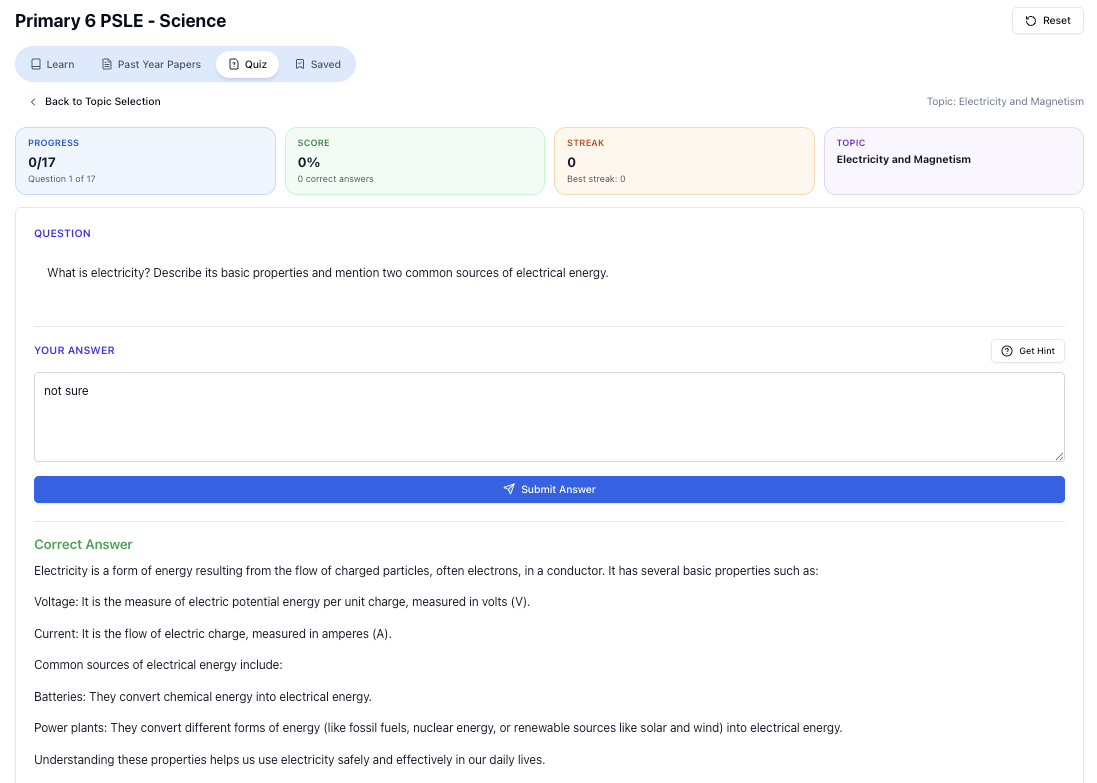
“Practice PSLE Science questions and get clear, step-by-step answers instantly.”
👉 Try a question now and see how fast you can improve.
Ready to practise?
If you want a Singapore-focused AI tutor you can use immediately (website, no sign-up), try Tutorly here:
Related Articles
Free on Tutorly.sg
Practise with step-by-step help — free to start
On Tutorly.sg/app you can practise unlimited Singapore syllabus questions, get instant explanations when you are stuck, and use past-year papers — no sign-up needed to start.
- ✓ PSLE, O Level, A Level, and more
- ✓ Step-by-step working when you are stuck
- ✓ Works on phone and laptop