

Free on Tutorly.sg
Practise with step-by-step help — free to start
On Tutorly.sg/app you can practise unlimited Singapore syllabus questions, get instant explanations when you are stuck, and use past-year papers — no sign-up needed to start.
- ✓ PSLE, O Level, A Level, and more
- ✓ Step-by-step working when you are stuck
- ✓ Works on phone and laptop
If you’re studying in Singapore right now, your life is basically:
School → CCA → tuition → homework → repeat.
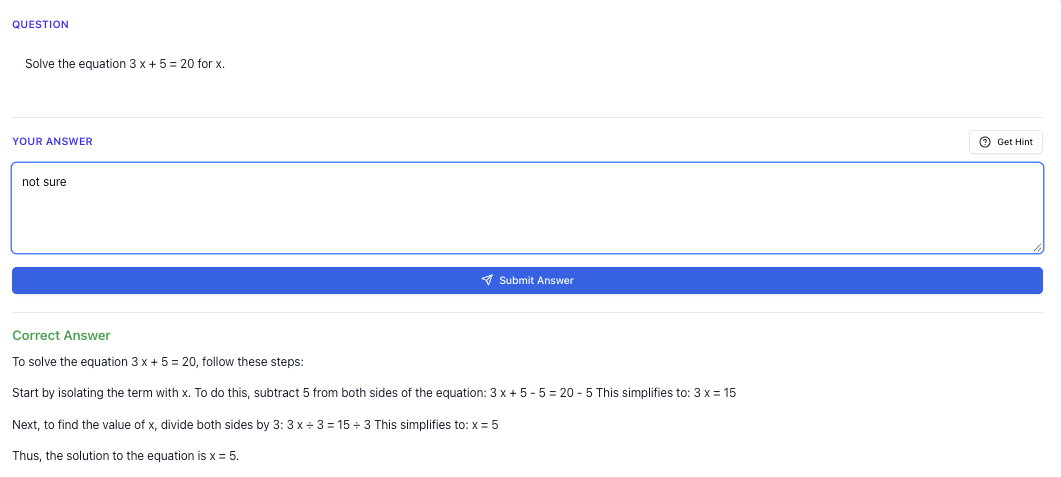
“Stuck on a question? See simple explanations that help you understand fast.”
👉 Give it a try and turn confusion into clarity in minutes.
1. Start With Your Real Goal (Not “Use More Apps”)
Before you even touch any website, be clear:
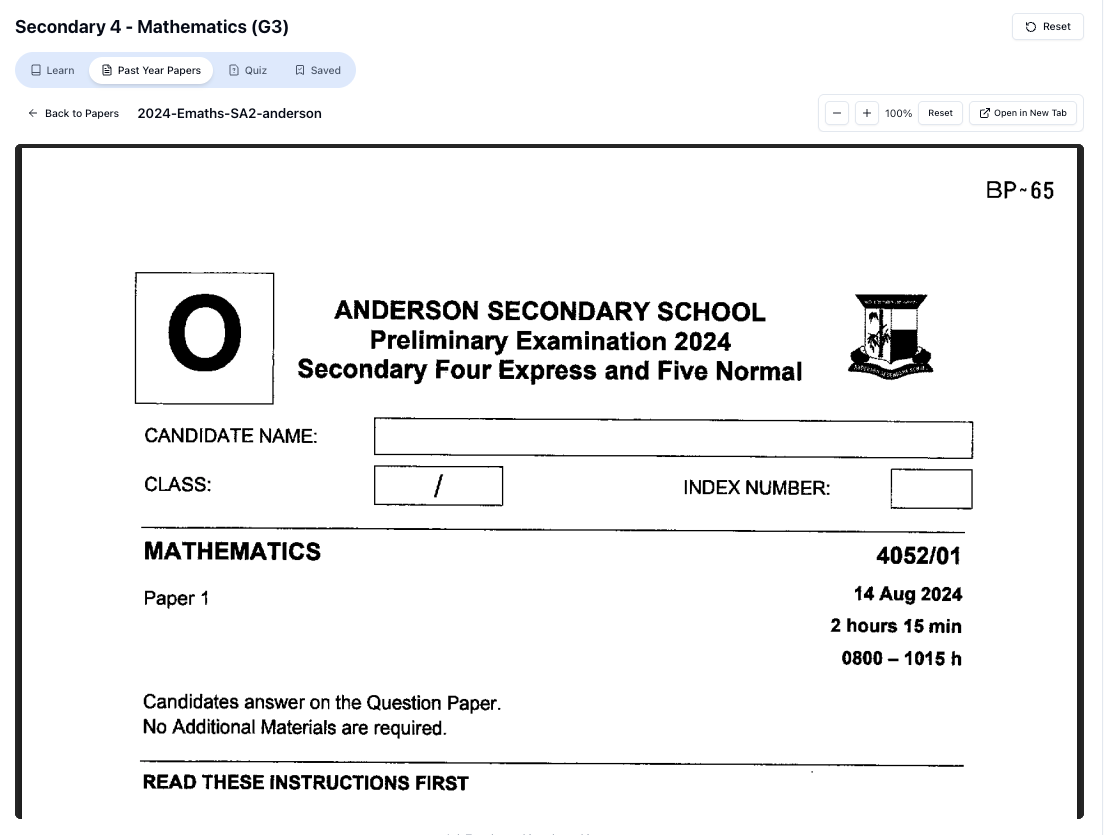
“Access more than 1000+ past year papers to practice”
👉 Start a paper today and test yourself like it’s the real exam.
What are you actually trying to improve?
Some examples:
- Primary 5: “I keep losing marks in problem sums even though I understand the concept.”
- Sec 3: “My Amath is okay, but my Algebra manipulation is messy and slow.”
- JC 1: “I can memorise notes, but I can’t apply concepts to novel questions in H 2 Chem.”
Once you know your goal, online tools become support, not distraction.
A simple 3-step way to set a clear goal
- Pick 1 subject to focus on first (e.g. Math, English, Chemistry).
- Identify 1 weak area (e.g. fractions, comprehension inference, kinematics).
- Set a time frame: “I want to improve this area over the next 2 weeks.”
Now you can choose tools that directly help this, instead of randomly trying everything.
2. Types Of Online Tools That Actually Help Singapore Students
Not all “study tools” are equal. Some are fun but not aligned to what you’ll be tested on in MOE exams.
Here are the main categories, and how they fit into your study plan.
(a) Content Learning Tools (Understand Concepts)
These help you understand a topic for the first time or revise it:
- MOE-approved online materials from school portals
- Video explanations (e.g. teachers’ recorded lessons, some YouTube channels)
- Websites with notes and summaries
Useful for:
- New topics you didn’t fully catch in class
- Revising Sec 1–2 foundations before O Levels
- Summarising JC lecture notes into something clearer
But: Content alone is not enough. You don’t score marks just by “understanding”. You score by applying.
(b) Practice Tools (Apply & Drill)
These give you questions to practise:
- Question banks / online quizzes
- Past-year papers (from schools or exam boards)
- Timed practice sites
Useful for:
- Training speed and accuracy
- Exposing yourself to different question styles
- Checking if you’re really exam-ready
(c) Feedback & Explanation Tools (Fix Mistakes)
This is where many students are weak.
You do 10 questions, get 6 wrong, and then… just move on. That’s wasted effort.
You need tools that:
- Check your final answer
- Show step-by-step how to reach the correct solution
- Explain in simple language where you went wrong
This is exactly the gap that Tutorly.sg is designed to fill: you paste or type your question, try it yourself, then ask Tutorly to show you a full solution and explanation aligned to the MOE syllabus.
(d) Planning & Organisation Tools
These help you manage your time:
- Online planners / calendars
- To-do list tools
- Simple timers (Pomodoro style)
You don’t need anything fancy. Even a basic Google Calendar + timer is enough if you use it properly.
3. Why Generic AI Tools Often Fail For MOE Students
You’ve probably tried using ChatGPT, Google, or some random AI helper.
Sometimes it helps. Sometimes it gives:
- Non-MOE methods
- Wrong formulas
- Explanations that don’t match what your teacher taught
- Answers that ignore PSLE / O Level / A Level marking schemes
The problem is: they’re not built for Singapore.
They don’t know:
- Our syllabus progression (e.g. what a P 5 student is expected to know vs P 6)
- Local exam terms (e.g. “model drawing”, “Paper 2 open-ended”, “L1R 5”, “H 2 vs H 1”)
- The way marks are allocated in MOE exams
That’s why many Singapore students feel, “AI is helpful… but not exactly what I need.”
[Tutorly.sg](https://tutorly.sg/ai-tutor-singapore) was built to fix this problem:
- It’s aligned to MOE syllabus from Primary 1 to JC 2
- It’s used by thousands of students in Singapore
- It has even been mentioned on Channel NewsAsia (CNA) as an example of how AI is supporting local students
So when you ask a question there, the explanations follow the style and standard you actually need for PSLE / O Levels / A Levels.
4. A Simple Framework: “Learn → Practise → Check → Fix”
No matter which online tool you use, your study process should roughly follow this loop:
- Learn the concept
- Practise questions
- Check your answers
- Fix your mistakes
Let’s see how online tools fit into each step.
Step 1: Learn (20–30% of your time)
Use:
- Your school notes / textbook
- Teacher’s slides / Student Learning Space (SLS) materials
- Short, targeted videos for specific sub-topics
What to do:
- Focus on one small part of a topic at a time
- e.g. “Simultaneous equations (elimination method only)”
- e.g. “PSLE Math: fraction of a remainder problems”
- After learning, close your notes and explain the idea in your own words.
- If you can’t, you haven’t really understood it yet.
You can also use Tutorly as a “mini teacher”:
“Explain quadratic factorisation to me like I’m Sec 3 NA in Singapore, and show me 3 simple examples.”
This gives you a quick, MOE-aligned explanation without watching a 30-minute video.
Step 2: Practise (40–50% of your time)
This is where marks are made.
Use:
- School worksheets
- Ten-year series (TYS)
- Online practice questions
What to do:
- Start with untimed practice to build accuracy
- Then move to timed sets to simulate exam pressure
- Mix easy + medium + a few hard questions
Online tools like Tutorly work best here if you attempt first, then ask for help.
Example:
- Solve the question on your own.
- Only when you’re stuck or done, ask:
“Here’s the question I just did. Show me a full solution using methods accepted for O Level E Math in Singapore.”
- Compare your method with the explanation.
Step 3: Check (5–10% of your time)
Checking should be fast:
- Use answer keys
- Use online tools that can tell you if the final answer is correct
Important: Don’t spend 15 minutes trying to “manually mark” every step. Just check your final answer, then move on to the next step.
Tutorly is strong here because you can:
- Paste the question
- Tell it your final answer
- Ask if it’s correct and request a step-by-step solution
It doesn’t read your workings, but it gives you a clear model solution you can compare with.
Step 4: Fix (20–30% of your time)
This is the step most students skip.
Instead of just “ah, wrong lor”, you should:
- Identify the type of mistake:
- Concept error (you misunderstood a rule)
- Careless mistake (sign error, copying wrong number)
- Method error (you used a long or wrong method)
- Re-do the question from scratch without looking at the solution.
- Do one more similar question to make sure you’ve really fixed it.
You can use Tutorly like this:
“Explain where a typical Sec 3 student might go wrong in this kind of question, and how to avoid it in exams.”
That way you’re not just memorising answers, you’re learning how to think like an examiner.
5. How To Use Online Tools For Different Levels In Singapore
For Primary (P 1–P 6, especially PSLE year)
Main goals:
- Build strong foundations (especially in Math and English)
- Avoid fear of subjects (“I hate Math”, “Science is so hard”)
- Prepare steadily for PSLE without burning out
How online tools can help:
- Short, regular practice
- 15–20 minutes a day of PSLE-style Math or English questions
- Step-by-step explanations
- For model drawing, fractions, heuristics (e.g. “before-and-after”, “work backwards”)
Using Tutorly for Primary:
- Type or paste a PSLE-style problem sum
- Let your child try first
- Then ask Tutorly:
“Show the model drawing method for this problem, using steps suitable for a P 5/P 6 student in Singapore.”
You can sit beside your child and go through the explanation together, just like a tutor session.
For Secondary (Sec 1–, including N/O Levels)
Main goals:
- Transition from “primary style” to more abstract thinking
- Handle heavier content (Algebra, pure sciences)
- Prepare for N Levels / O Levels
How online tools can help:
- Clarifying specific weak topics
- e.g. Algebraic fractions, trigonometry, mole concept, kinematics
- Practising exam-style questions
- Not just random overseas questions that don’t match our syllabus
Using Tutorly effectively:
- After school, take a photo or type out your homework question (no images needed on the site; you can type or paste the text).
- Ask:
“Explain this using methods accepted in O Level E Math in Singapore.”
- If you’re doing pure sciences:
“Show me how to structure a full-mark answer for this O Level Pure Chemistry question, following typical Singapore marking scheme.”
This helps you learn how to write answers, not just what the answer is.
For JC (JC 1–JC 2, A Levels)
Main goals:
- Deep understanding of concepts (especially H 2 subjects)
- Applying to unfamiliar, higher-order questions
- Time management for long papers
How online tools can help:
- Clarifying confusing lecture notes
- Providing alternate explanations for tough concepts
- Going through complex solutions step by step
Using Tutorly for JC:
Free on Tutorly.sg
Practise with step-by-step help — free to start
On Tutorly.sg/app you can practise unlimited Singapore syllabus questions, get instant explanations when you are stuck, and use past-year papers — no sign-up needed to start.
- ✓ PSLE, O Level, A Level, and more
- ✓ Step-by-step working when you are stuck
- ✓ Works on phone and laptop
- For Math:
“Give me a full solution to this H 2 Math question, and highlight common pitfalls for JC students in Singapore.”
- For Sciences:
“Explain why this is the correct mechanism / reasoning, in a way suitable for H 2 Chem students preparing for A Levels.”
- For GP:
“Critique this GP essay intro for relevance and clarity, based on typical A Level GP expectations in Singapore.”
Because Tutorly is MOE-aligned, the explanations stay realistic to what your teachers and examiners look for.
6. Avoiding Distractions: “Study Online” Without Falling Into The Social Media Hole
Online tools are powerful, but also dangerous for focus.
You might start with “just 10 minutes of practice” and end up on YouTube Shorts for an hour.
Here’s a simple system to keep yourself disciplined.
Use the “3–App Rule”
For each study session, decide:
- 1 tool for content (e.g. SLS or notes)
- 1 tool for practice/explanations (e.g. Tutorly.sg)
- 1 tool for timing/planning (e.g. a timer site)
That’s it. No extra tabs.
If you want to watch a YouTube explanation, do it only after you’ve tried the question and checked with Tutorly or your own answer key.
Time-box your online studying
Try this:
- Set a 25-minute timer (Pomodoro).
- During that time:
- Only open your 3 chosen tools
- Turn off notifications on your phone
- When the timer ends, take a 5-minute break away from the screen.
Repeat 3–4 cycles and you’ll be shocked how much real work you can finish.
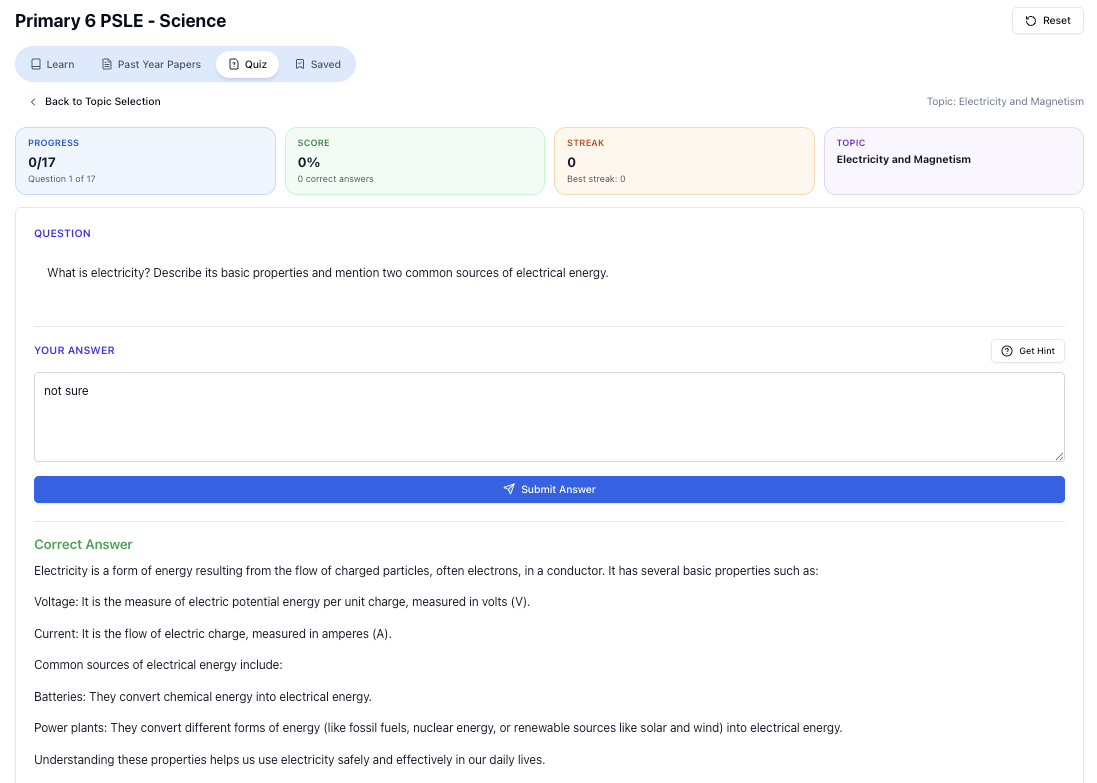
“Doing Secondary Science? Pick a topic and practise like it’s a real exam — with clear answers right after.”
👉 Try Tutorly now and start a Science topic in seconds.

7. Using Tutorly.sg As Your Online Study Partner
Since this is a Singapore-specific guide about using online tools, I want to be very direct:
If you’re a student here and you’re not using Tutorly.sg, you’re missing out on a tool that’s literally built for your exact situation.
Here’s what makes it different from random AI websites:
1. Built For MOE Syllabus, Not Generic “Global” Content
From Primary 1 to JC 2:
- Topics follow MOE’s progression
- Explanations use familiar methods (model drawing, algebra steps, science keywords)
- It understands local exam terms like PSLE, N Levels, O Levels, A Levels, H 1/H 2, etc.
So when you ask for help, you don’t have to explain “I’m Sec 3 in Singapore doing E Math” — the site already knows your level and subject from what you selected.
2. Works Best When You’re Stuck On Specific Questions
Tutorly is strongest when you:
- Try the question yourself
- Then ask for:
- A step-by-step solution
- An explanation in simple language
- A breakdown of common mistakes
It doesn’t read your working, but it shows you a full worked solution so you can compare and learn.
Example prompts you can use:
- “Explain this like I’m a Sec 2 student in Singapore who is weak in Algebra.”
- “Show the model method for this PSLE-style problem sum.”
- “Give a full solution using methods accepted for A Level H 2 Math.”
3. Available (No Need To Wait For Tuition)
You know that feeling when:
- It’s 11.30pm, you’re stuck on a question, and your test is tomorrow
- Your tutor session is only once a week
- Your friends also don’t know how to do
This is where having a AI tutor is a lifesaver.
You can log in to Tutorly.sg any time, paste your question, and get a clear explanation on the spot.
4. Trusted By Singapore Students (Not Just A Random Site)
- Thousands of students in Singapore have used Tutorly.sg to help with schoolwork and exams
- It has been mentioned on Channel NewsAsia (CNA) in discussions about how AI can support local education
So you’re not “experimenting” with some untested tool. You’re using something that’s already part of many students’ daily revision.
8. How To Combine School, Tuition, And Online Tools Without Burning Out
You don’t need to “study 10 hours a day online” to do well.
Instead, think of your learning like this:
- School: Main content + exposure to syllabus
- Tuition (if you have): Extra practice + targeted teaching
- Online tools: On-demand help + flexible revision
Here’s one realistic weekly structure.
Example: Sec 3 Student, Preparing For O Levels Next Year
On school days (Mon–Fri):
- After dinner:
- 30–45 minutes: Homework + clarify 2–3 questions using Tutorly
- 15 minutes: Quick revision of 1 past topic (e.g. Algebra, indices)
On weekends:
- 1–2 hours each day:
- 45 minutes: Timed practice (school worksheets / TYS)
- 30 minutes: Go through wrong questions with Tutorly
- 15 minutes: Short content review of weaker topics
You’re not adding a huge workload — just using online tools to make your existing study time more effective.
Example: P 6 Student, PSLE Year
Weekdays:
- 20–30 minutes:
- 1–2 Math problem sums
- 1 English comprehension passage or grammar practice
- Use Tutorly for questions your child cannot solve after trying
Weekends:
- 45–60 minutes:
- Mix of school homework + PSLE-style papers
- Use Tutorly to explain difficult questions in parent-friendly language so you can guide them too
9. Common Mistakes Singapore Students Make With Online Tools
If you avoid these, you’ll already be ahead of many of your classmates.
Mistake 1: Copying Solutions Without Thinking
You paste the question, get the solution, copy it, and move on.
End result: looks like you “finished” your homework, but you don’t actually learn.
Fix:
- After seeing the solution, close it.
- Re-do the same question from scratch without looking.
- If you can’t, you haven’t really understood it yet.
Mistake 2: Using Overseas Methods That Don’t Fit MOE
Some websites use methods or notations that:
- Your teacher never taught
- Don’t match marking schemes
- Confuse you more
Fix:
Use tools that are MOE-aligned, like Tutorly, so the methods match what you’re expected to know.
Mistake 3: Using AI For Everything, Including Memorisation
Don’t use AI for things you just need to memorise (e.g. formulas, definitions). That’s a waste of time.
Use AI for:
- Understanding
- Application
- Checking
- Fixing mistakes
For pure memorisation, use:
- Flashcards
- Repetition
- Writing summaries in your own words
Mistake 4: Studying “Randomly” Online
Jumping from topic to topic:
- One day: Trigonometry
- Next day: Kinematics
- Then: Mole concept
- Then: Back to Algebra
Fix:
- Focus on 1–2 topics per week per subject
- Track what you’ve already covered so you can see progress
10. A Practical Checklist: “Am I Using Online Tools Properly?”
Ask yourself these questions:
- Do I know my current weak topics?
- For each topic, have I:
- Learnt the concept from notes/teacher/short explanation?
- Done at least 10–15 practice questions?
- Checked my answers quickly?
- Gone through my mistakes and re-done them?
- When I use AI/online tools:
- Do I try first before asking for help?
- Do I re-do questions after seeing solutions?
- Are the methods MOE-aligned and suitable for my level?
If you can honestly say “yes” to most of these, you’re using online tools in a smart, Singapore-specific way.
11. Start Your Next Study Session With This Simple Plan
For your very next session, try this 45–60 minute routine:
- Pick 1 subject + 1 topic
- e.g. Sec 3 E Math – Quadratic Equations
- 10–15 minutes: Quick review
- Skim your notes / textbook
- If unclear, ask Tutorly:
“Give me a short explanation of quadratic equations suitable for a Sec 3 student in Singapore, with 2 examples.”
- 25–30 minutes: Practice
- Do 6–10 questions from school worksheets or TYS
- Attempt each question fully before checking
- 10–15 minutes: Check & fix
- For any question you’re unsure of, paste it into Tutorly.sg
- Ask for a full solution and explanation
- Re-do the question once without looking
Do this consistently, a few times a week, and you’ll feel your confidence grow — not because you’re “using more tools”, but because you’re using them properly.
Ready To Study Smarter, Not Just Harder?
Online tools can be a distraction, or they can be your biggest advantage in Singapore’s exam system.
Used well, they help you:
- Understand tough concepts in MOE subjects
- Practise exam-style questions efficiently
- Get immediate, clear explanations when you’re stuck
- Study flexibly around your CCA and tuition schedule
If you want a AI tutor built specifically for Singapore students, aligned to the MOE syllabus from Primary 1 to JC 2, you should definitely try:
Use it the way we talked about in this guide:
- Try questions yourself first
- Ask for step-by-step solutions and explanations
- Compare, correct, and re-do
That’s how you turn online tools from “just another website” into a real study partner that helps you move closer to your PSLE, O Level, or A Level goals.
“Practice PSLE Science questions and get clear, step-by-step answers instantly.”
👉 Try a question now and see how fast you can improve.
Ready to practise?
If you want a Singapore-focused AI tutor you can use immediately (website, no sign-up), try Tutorly here:
Related Articles
Free on Tutorly.sg
Practise with step-by-step help — free to start
On Tutorly.sg/app you can practise unlimited Singapore syllabus questions, get instant explanations when you are stuck, and use past-year papers — no sign-up needed to start.
- ✓ PSLE, O Level, A Level, and more
- ✓ Step-by-step working when you are stuck
- ✓ Works on phone and laptop