

Free on Tutorly.sg
Practise with step-by-step help — free to start
On Tutorly.sg/app you can practise unlimited Singapore syllabus questions, get instant explanations when you are stuck, and use past-year papers — no sign-up needed to start.
- ✓ PSLE, O Level, A Level, and more
- ✓ Step-by-step working when you are stuck
- ✓ Works on phone and laptop
If you’re taking your O Levels in Singapore, you’ve probably seen friends using ChatGPT to “study” and wondered:
- Is it actually useful for MOE syllabus revision?
- Will it give wrong info?
- How do you use it without wasting time scrolling random answers?
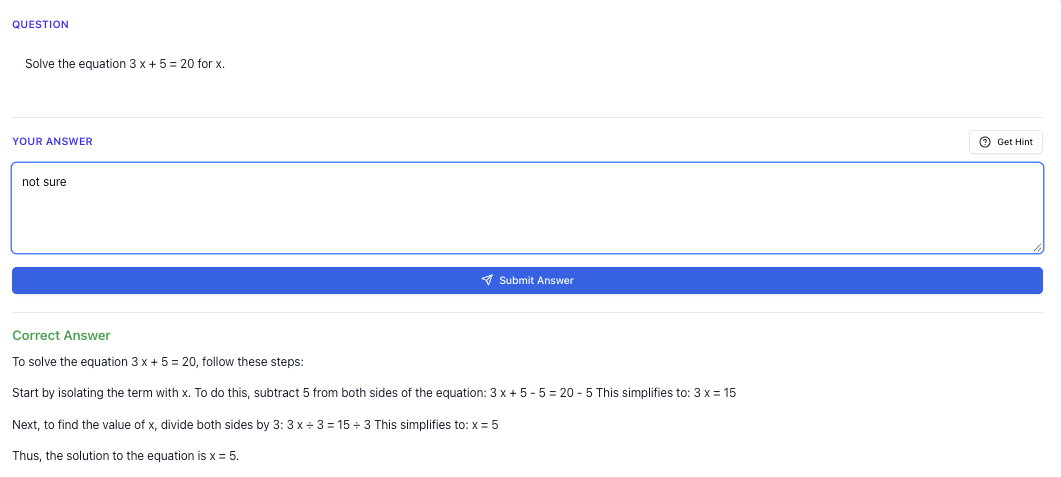
“Stuck on a question? See simple explanations that help you understand fast.”
👉 Give it a try and turn confusion into clarity in minutes.
You’re not alone. Many Sec 3–5 students tell me they tried using AI for school work but ended up more confused, or just used it to finish homework faster without really understanding.
This guide is for you if:
- You’re doing O Levels (or NA/NT streaming towards O Levels) in Singapore
- You want practical exam strategies, not just generic “AI is powerful” talk
- You want to know exactly how to use ChatGPT and Tutorly.sg for your revision
I’ll show you:
- How to prompt ChatGPT properly for MOE O Level style answers
- How to combine ChatGPT with Tutorly.sg (an AI tutor built specifically for Singapore students)
- How to turn AI into a serious revision tool, not a shortcut that backfires
Tutorly.sg has already been used by thousands of students in Singapore and has even been mentioned on Channel NewsAsia (CNA), so this isn’t just theory. These are strategies that real students are using right now.
Useful links to open in another tab:
- Tutorly’s O Level AI tutor page: https://tutorly.sg/ai-tutor-singapore
- Go straight to the AI tutor: https://tutorly.sg/app
Step-by-step tutorial
Let’s start with something concrete: how you can use ChatGPT today for O Level revision, subject by subject, in a way that actually helps you score.
I’ll also show you where Tutorly.sg fits in, because it’s built with MOE/O Level requirements in mind, unlike generic ChatGPT.
1. Set your goal for each session (10–20 minutes only)
Before you open any AI tool, decide:
- One subject
- One topic
- One clear outcome
For example:
- “Chemistry: finish 5 questions on writing ionic equations”
- “English: practise 1 full situational writing answer”
- “E Math: drill 10 questions on solving quadratic equations”
This stops you from falling into the “ask AI random things for 1 hour” trap.
2. Use ChatGPT to clarify concepts, not just answers
ChatGPT is good at explaining concepts in simple language. But you must guide it to match MOE style.
Example: O Level Chemistry – Ionic equations
Prompt you can use:
I’m a Secondary 4 student in Singapore preparing for O Level Pure Chemistry.
Explain how to write ionic equations for reactions, following the O Level MOE syllabus.
Use simple steps and give 2 worked examples that are similar in difficulty to O Level exam questions.
Then, read the explanation and check it against your textbook/notes. If something feels different from what your teacher said, ask:
This is what my teacher said: [paste teacher’s steps].
Compare your method with this and tell me if there is any difference, especially for spectator ions and state symbols.
This way, you use ChatGPT to:
- Re-teach you the concept in a clearer way
- Help you compare and reconcile with what you already learnt
3. Use Tutorly.sg to practise with MOE-style questions
After you understand the concept, you must practise exam-style questions.
This is where Tutorly.sg is stronger than generic ChatGPT, because:
- It’s aligned to MOE syllabus (Primary to JC, including O Levels)
- You choose level + subject first, so questions and explanations match your syllabus
- It gives you instant feedback on your final answer, then shows you step-by-step working so you can learn the method
How to use it:
- Go to https://tutorly.sg/app
- Select your level (e.g. Sec 4 Express) and subject (e.g. Chemistry)
- Ask for practice questions on a specific topic, for example:
- “Give me 5 O Level style questions on ionic equations, with answers only. I’ll tell you my answers first.”
- Attempt each question on your own first.
- Key in your final answer. Tutorly will tell you if you’re right or wrong, then show you the full working/solution.
Because Tutorly is built for Singapore students, the style of questions and explanations is much closer to what you’ll see in O Levels.
4. Use ChatGPT to rephrase explanations until you really get it
Sometimes, even after reading a solution, you still feel “blur”. Don’t just accept it.
Copy the explanation (from your teacher, textbook, or Tutorly.sg) into ChatGPT and say:
I’m a Sec 4 student in Singapore taking O Level E Math.
This explanation still confuses me:
[paste explanation]
Re-explain it in a simpler way, using step-by-step logic and a concrete example with numbers. Assume I’m weak in algebra.
Ask follow-up questions like:
- “Explain step 3 only.”
- “Why can we do this step?”
- “What common mistakes do students make here?”
You’re using ChatGPT as a patient tutor who can rephrase things 5 times without getting tired.
5. Use Tutorly.sg for targeted drilling before tests
One of the best ways to use AI for O Levels is to simulate exam-style practice.
For example, the week before your Chemistry test on Acids, Bases and Salts:
- Go to https://tutorly.sg/app
- Select Chemistry, Sec 3 or Sec 4 (depending on your level)
- Ask:
Give me 10 O Level style questions on Acids, Bases and Salts, mixed difficulty.
- Attempt under timed conditions (e.g. 20–25 minutes).
- Submit each answer to check if you’re right.
- For questions you got wrong, ask Tutorly to show the full solution and read the steps slowly.
Do this regularly and you’ll see patterns in the questions and your own weaknesses.
Exam strategy guide
Let’s talk about using ChatGPT and Tutorly.sg specifically for exam strategy, not just content.
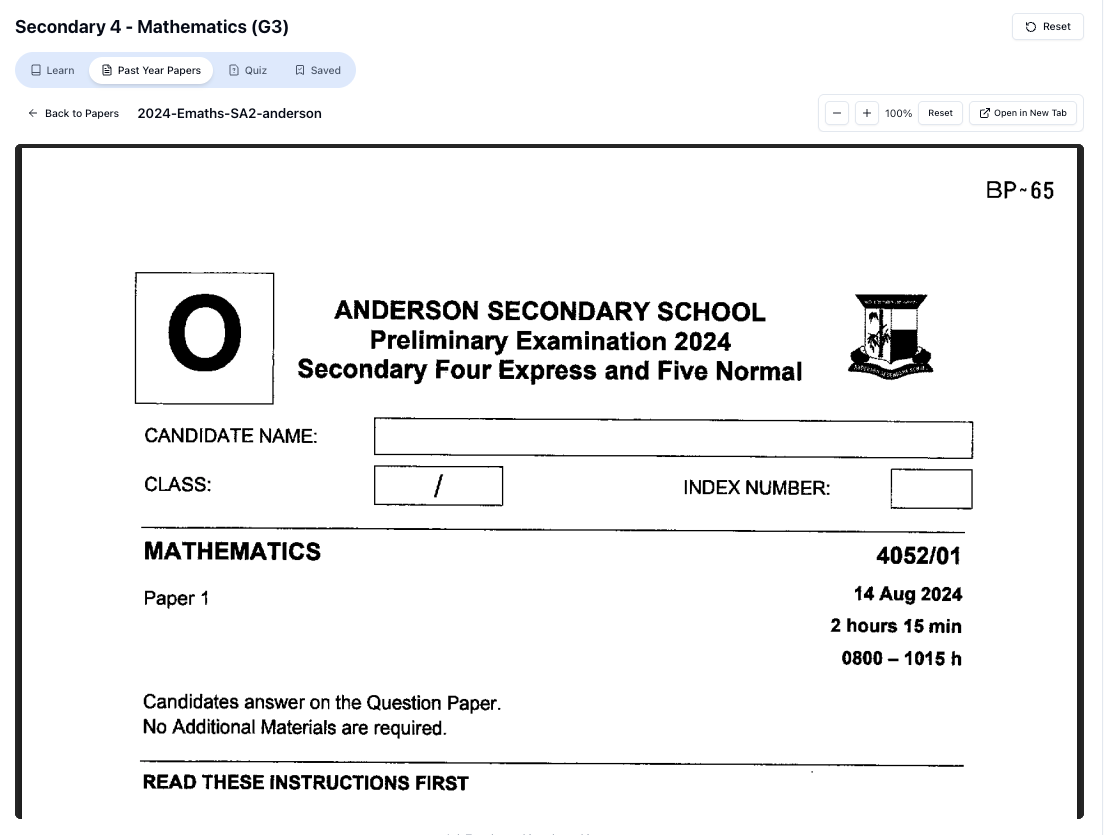
“Access more than 1000+ past year papers to practice”
👉 Start a paper today and test yourself like it’s the real exam.
1. English O Level: Using AI to improve compositions and situational writing
Many students use AI to “write the whole essay”. That’s risky and usually doesn’t sound like a Singapore student.
Instead, use AI for:
a) Planning and idea generation
Prompt:
I’m a Sec 4 student in Singapore taking O Level English.
Help me brainstorm 5 possible storylines for this continuous writing question:
“Write about a time you had to make a difficult decision.”
Each idea should be realistic for a Singapore teen and include:
- Setting
- Main conflict
- Climax
- Resolution
Pick the idea you like, then write the essay yourself.
b) Improving your own draft
After you write your essay, paste it into ChatGPT:
This is my O Level English continuous writing essay.
Mark it like an O Level teacher using MOE criteria (Content & Organisation, Language).
Then:
- Point out 5 specific grammar/vocabulary mistakes
- Suggest how to rewrite 3 weak sentences to sound more mature but still realistic for a Sec 4 student
You can do something similar with situational writing:
I wrote this situational writing response for an O Level style question.
Check if my tone, format and content match MOE expectations.
Suggest improvements and show me 1 sample paragraph that is band 1 quality.
Use the feedback to rewrite, not to copy-paste.
2. Math: Turning AI into a “mistake detector”
For E Math and A Math, your biggest enemy is careless mistakes and missing steps.
How to use AI smartly:
a) After doing a full paper
- Do a full past-year paper under timed conditions.
- Mark using the official marking scheme (if you have it).
- For questions you got wrong or left blank, type them into ChatGPT:
I’m a Sec 4 student doing O Level E Math.
Here is a question I got wrong:
[type question]
Show me a full solution, step-by-step, and then list 3 common mistakes students make for this type of question.
- Compare your working to the AI solution. Identify exactly where you went wrong.
b) Use Tutorly.sg to test if you actually improved
Once you understand the mistake:
- Go to https://tutorly.sg/app
- Ask for more questions of the same type:
Give me 5 O Level style questions on [e.g. solving quadratic inequalities / coordinate geometry], with answers only.
- Try them without looking at notes.
- Check your answers with Tutorly. If you still get some wrong, re-study that concept.
3. Sciences: Practising explanations in “O Level marking scheme” style
For subjects like Pure/Combined Physics, Chemistry and Biology, a lot of marks come from structured questions where you must explain concepts in specific keywords.
ChatGPT can help you practise phrasing.
Example (O Level Physics – Pressure):
I’m a Sec 4 student in Singapore taking O Level Physics.
Here is a structured question I tried:
[paste question and your answer]Mark my answer using O Level style marking, and:
- Show me what a full-mark answer would look like
- Highlight the key terms that must appear
- Explain briefly why my answer would lose marks
Then, rewrite your answer using the suggested key terms.
You can also ask:
Give me 5 short structured questions on [topic], at O Level difficulty, and model answers that follow MOE marking style.
Use Tutorly.sg in parallel to practise MCQs and structured questions and check your answers quickly.
4. Humanities: History / Social Studies / Geography
For humanities, the issue is usually:
- Don’t know enough content
- Or can’t structure answers properly (PEEL, PEE, etc.)
Use ChatGPT for:
- Content summaries:
Summarise the key points for O Level Social Studies, chapter on Governance in Singapore, in bullet points suitable for Sec 4 students.
- Essay planning:
Help me plan a 12-mark Social Studies essay on [question].
Use PEEL structure and give 3 main points with elaboration and examples relevant to Singapore.
Then, write the full answer yourself and ask AI to mark and comment.
Worksheet practice
Now let’s look at how you can use ChatGPT and Tutorly.sg to create and practise worksheet-style questions, including hard exam variants.
1. Start with standard questions, then level up
Let’s say you’re revising E Math – Quadratic Equations.
Step 1: Easy to medium questions (ChatGPT)
Prompt:
Free on Tutorly.sg
Practise with step-by-step help — free to start
On Tutorly.sg/app you can practise unlimited Singapore syllabus questions, get instant explanations when you are stuck, and use past-year papers — no sign-up needed to start.
- ✓ PSLE, O Level, A Level, and more
- ✓ Step-by-step working when you are stuck
- ✓ Works on phone and laptop
I’m a Sec 4 student in Singapore doing O Level E Math.
Give me 8 practice questions on solving quadratic equations, ranging from easy to medium O Level difficulty.
Only give questions first, no solutions.
Attempt them on paper. Then ask:
Now show me the full worked solutions for all 8 questions.
Check your steps against the solutions.
Step 2: Exam-style and harder variants (Tutorly.sg)
Now you want questions that feel more like actual O Level paper 2 questions.
- Go to https://tutorly.sg/app
- Select “E Math” and your level
- Ask:
Give me 6 O Level style questions where quadratic equations are hidden inside word problems or other topics (e.g. area, kinematics).
I want mixed difficulty, including some that are as hard as the latest O Level papers.
Attempt them under timed conditions, then key in your final answers to check. For the ones you get wrong, read Tutorly’s step-by-step solution carefully.
2. Hard exam variants: Examples for different subjects
Here are some sample prompts you can use to generate harder questions.
a) E Math – Coordinate Geometry (Hard variants)
ChatGPT prompt:
Give me 5 challenging O Level E Math coordinate geometry questions suitable for Sec 4 students in Singapore.
At least 2 questions should combine:
- Midpoint
- Gradient
- Distance
- Equation of a perpendicular bisector
Only give questions, no solutions yet.
After you try them, ask for full solutions and then ask:
For each question, tell me why it is considered challenging and what common mistakes students might make.
Then, use Tutorly.sg to drill similar questions and check your answers quickly.
b) Pure Chemistry – Mole Concept (Hard variants)
ChatGPT prompt:
I’m a Sec 4 Pure Chemistry student in Singapore preparing for O Levels.
Give me 6 challenging mole concept questions that involve:
- Limiting reagents
- Gas volumes
- Solutions and concentration
Make them similar in difficulty to the harder parts of O Level Pure Chemistry Paper 2.
Only give questions first.
After attempting, get the solutions and then:
- Go to https://tutorly.sg/app
- Ask for more questions on limiting reagents/gas volumes
- Use Tutorly to check your final answers and learn the method from the step-by-step solution.
c) English – Summary and Comprehension (Hard variants)
ChatGPT prompt:
I’m a Sec 4 student in Singapore taking O Level English.
Create one O Level style summary question based on a passage about social media and teenagers.
- Passage length: around 300–350 words
- Summary length: 80 words
After giving the passage and question, wait for my answer before showing a sample band 1 summary.
You can do the same for comprehension questions, especially inference questions which many students struggle with.
3. Building your own “AI-generated worksheet set”
Here’s a simple routine you can follow weekly:
- Choose 2–3 topics you’re weak in (e.g. Algebra, Mole Concept, Source-Based Questions).
- For each topic:
- Use ChatGPT to generate 5–8 questions (easy–medium).
- Use Tutorly.sg to generate 5–8 questions (medium–hard, exam-style) and check your answers.
- Save these questions in a document or notebook.
- Closer to exams, redo the harder questions without looking at solutions.
Over time, you’ll build your own personalised “worksheet bank” that targets your weaknesses.
Common mistakes
AI can be a huge help for O Level revision, but many students use it in ways that actually hurt their learning. Here’s what to avoid.
1. Copying AI answers for homework
If you just paste the question into ChatGPT or Tutorly.sg and copy the answer:
- You don’t build exam skills
- You get a false sense of confidence
- In the exam hall, there is no AI to save you
Use AI to check and learn, not to replace your thinking.
“Doing Secondary Science? Pick a topic and practise like it’s a real exam — with clear answers right after.”
👉 Try Tutorly now and start a Science topic in seconds.

Better approach:
- Try the question fully on your own.
- Then use Tutorly.sg to check your final answer.
- If wrong, study the step-by-step solution, then try a similar question.
2. Not specifying “Singapore O Level / MOE syllabus” in ChatGPT
Generic ChatGPT answers can:
- Use foreign examples
- Follow a different syllabus
- Miss out MOE-specific requirements (especially for English and Humanities)
Always include in your prompt:
- Your level (Sec /5)
- That you’re in Singapore
- That you’re following O Level / MOE syllabus
Example:
I’m a Sec 4 student in Singapore taking O Level Combined Science (Physics/Chemistry) under the MOE syllabus…
This nudges ChatGPT to frame explanations closer to what you need.
(With Tutorly.sg, you don’t need to say this because you already select your level and subject, and it’s built specifically for Singapore students.)
3. Accepting everything AI says without checking
AI can be wrong or slightly off, especially for very specific syllabus details or niche topics.
Always:
- Cross-check with your school notes / textbook
- Compare with Ten-Year Series style answers
- Ask your teacher if something looks very different
If ChatGPT’s explanation conflicts with what you learnt, ask:
My teacher taught it this way: [paste].
Your explanation is different here: [paste].
Explain the difference and which is more appropriate for O Level exams in Singapore.
This forces the AI to clarify and often correct itself.
4. Using AI only for “hard” things and ignoring basics
Some students only use AI when they’re totally stuck on a very hard question. But most O Level marks come from:
- Standard questions done accurately and quickly
- Clear explanations using correct keywords
You should also use AI to:
- Drill basic skills (e.g. simple algebra, basic chemical equations) until you’re fast
- Practise short structured answers with proper key terms
5. Over-relying on AI close to exam day
The last 1–2 weeks before O Levels should be:
- Past-year papers
- Timed practice
- Quick revision of notes
If you’re still heavily relying on AI to understand topics from scratch at that point, it’s stressful and inefficient.
Use AI earlier in the year to build understanding and create your own worksheets, so that closer to exams, AI is mainly for:
- Checking answers
- Clarifying doubts
- Doing targeted practice on weak topics
Using ChatGPT vs Tutorly.sg: When to use which?
To make it super clear:
Use ChatGPT mainly for:
- Explaining concepts in simple language
- Rephrasing explanations you don’t understand
- Brainstorming ideas for English / Humanities
- Generating practice questions (especially when you want variety)
Use Tutorly.sg mainly for:
- MOE-aligned practice for O Levels
- Getting instant feedback on whether your final answer is correct
- Seeing step-by-step worked solutions that match Singapore exam style
- Doing timed drills on specific topics before tests and exams
Because Tutorly.sg is built specifically for Singapore students and has already helped thousands of users here, it’s a lot more reliable when you want practice that feels like actual O Level papers.
You can read more about how it works here: https://tutorly.sg/ai-tutor-singapore
Final thoughts: Make AI work for you, not against you
If you use ChatGPT and Tutorly.sg the right way, you can:
- Understand difficult topics faster
- Get unlimited practice questions
- Check your answers anytime, even late at night
- Build confidence before tests and O Levels
But it only works if you still do the thinking.
Treat AI like:
- A tutor that explains and checks
- A question generator for your own worksheets
- A feedback tool to highlight your weak spots
Not:
- A shortcut to finish homework
- A replacement for your brain
Ready to try this for your own O Level revision?
You don’t need to overhaul your whole study routine. Start small:
- Pick one subject and one topic you’re weak in.
- Use ChatGPT to re-explain the concept and generate a few practice questions.
- Go to Tutorly.sg at https://tutorly.sg/app
- Select your level and subject, and ask for O Level style questions on that same topic.
- Do them, check your answers, and study the step-by-step solutions.
Repeat this a few times a week and you’ll feel the difference when you open your next test paper.
When you’re ready, head over to the AI tutor here:
https://tutorly.sg/app
Use it alongside ChatGPT, your school notes and your Ten-Year Series, and you’ll have a solid, Singapore-specific system for O Level revision.
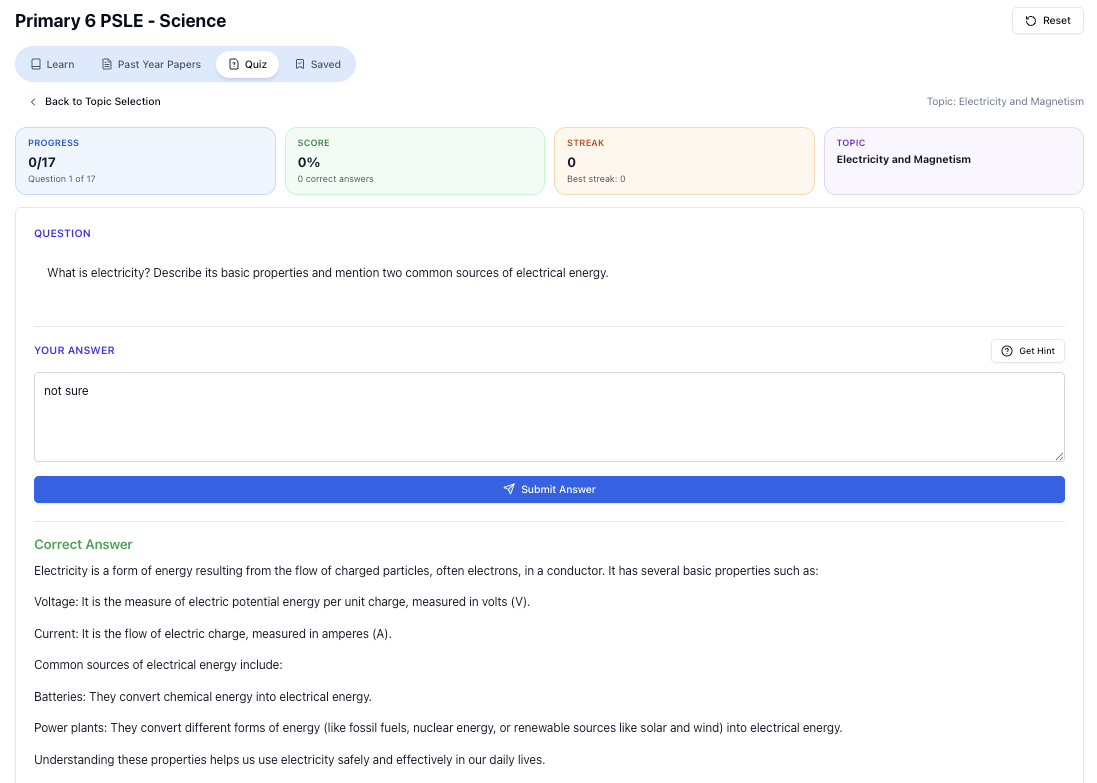
“Practice PSLE Science questions and get clear, step-by-step answers instantly.”
👉 Try a question now and see how fast you can improve.
Ready to practise?
If you want a Singapore-focused AI tutor you can use immediately (website, no sign-up), try Tutorly here:
Related Articles
Free on Tutorly.sg
Practise with step-by-step help — free to start
On Tutorly.sg/app you can practise unlimited Singapore syllabus questions, get instant explanations when you are stuck, and use past-year papers — no sign-up needed to start.
- ✓ PSLE, O Level, A Level, and more
- ✓ Step-by-step working when you are stuck
- ✓ Works on phone and laptop