

Free on Tutorly.sg
Practise with step-by-step help — free to start
On Tutorly.sg/app you can practise unlimited Singapore syllabus questions, get instant explanations when you are stuck, and use past-year papers — no sign-up needed to start.
- ✓ PSLE, O Level, A Level, and more
- ✓ Step-by-step working when you are stuck
- ✓ Works on phone and laptop
If you’re taking your O Levels in Singapore, you probably already know this:
You don’t fail exams because you “never studied at all”.
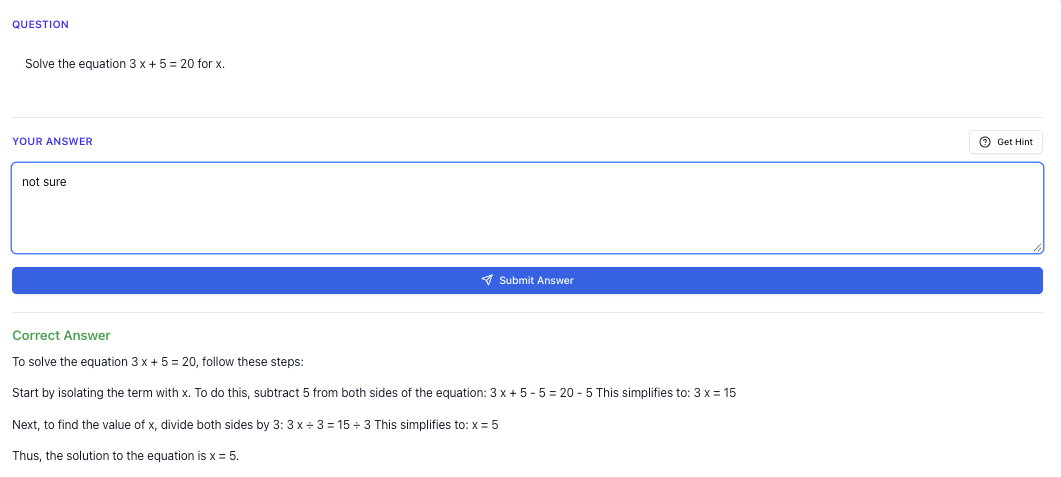
“Stuck on a question? See simple explanations that help you understand fast.”
👉 Give it a try and turn confusion into clarity in minutes.
Most of the time, you:
- did some practice…
- revised your notes…
- but didn’t do enough timed, exam-style questions under real pressure.
That’s where using ChatGPT for mock exams can actually help — if you set it up properly and don’t just ask for answers.
In this guide, I’ll show you how to use AI (including Tutorly.sg) to:
- run realistic O Level mock exams at home
- get instant marking and feedback
- generate harder variants of questions
- avoid the common mistakes students make when using ChatGPT
The focus here is Secondary / O Level students in Singapore (Sec 3–), following the MOE syllabus.
Why Use ChatGPT For Mock Exams (Especially In Singapore)?
Let’s be honest: arranging proper mock exams isn’t easy.
- Your school might give you only 1–2 full mock papers before prelims.
- Tuition centres usually go through topics, not full timed papers.
- At home, you sit down to “do a paper”, but your phone, snacks, and TikTok are all nearby.
Using ChatGPT (and even better, a Singapore-focused AI tutor like Tutorly.sg) can help you:
-
Generate fresh exam-style questions
So you don’t keep repeating the same Ten-Year Series (TYS) questions. -
Simulate real exam timing
You can tell the AI to act like an examiner and only show answers after time is up. -
Get instant marking and model answers
Instead of waiting for a teacher to have time. -
Target MOE / O Level style
With the right prompts, you can make the questions follow the Singapore O Level format.
Tutorly.sg is built specifically for Singapore students from Primary 1 to JC 2, aligned to MOE. It’s been mentioned on Channel NewsAsia (CNA) and has already been used by thousands of students in Singapore, so the style of questions and explanations are tuned to what you actually see in school and national exams.
Step-by-step Tutorial
Here’s a simple way to turn ChatGPT (and Tutorly) into your personal mock exam generator.
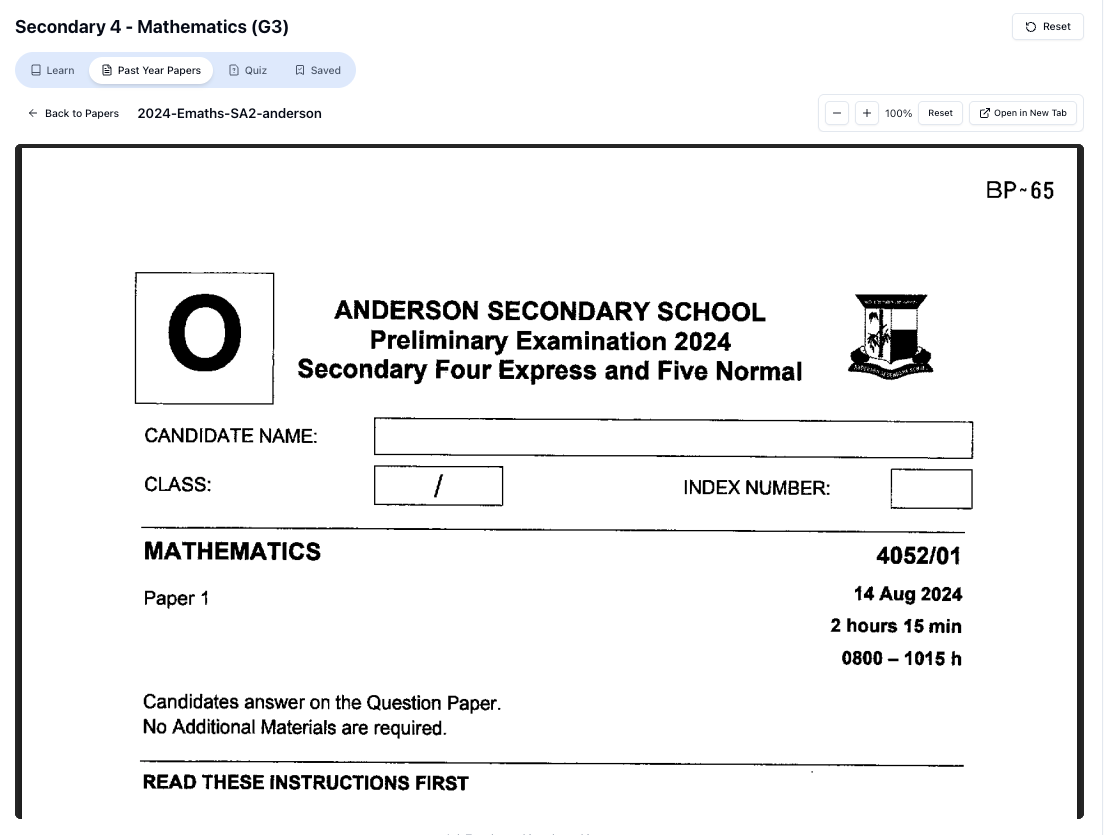
“Access more than 1000+ past year papers to practice”
👉 Start a paper today and test yourself like it’s the real exam.
I’ll walk you through a full example for O Level Mathematics and then show how to adapt it for English and Science.
Step 1: Decide Exactly What You’re Practising
Don’t just say, “I want to revise Math”.
Be specific:
- Subject: e.g. O Level Mathematics
- Level: Sec 4 Express / Sec 5 NA
- Paper: Paper 1 (short questions) or Paper 2 (structured)
- Topic focus (optional): e.g. Algebraic Manipulation, Trigonometry, Coordinate Geometry
Example decision:
“I want to do a 45-minute mini mock for O Level Math Paper 1, focusing on Algebra and Trigonometry.”
Being specific helps the AI generate questions that feel like a real paper, not random trivia.
Step 2: Use a Clear Prompt To Generate Your Mock Paper
You can paste something like this into ChatGPT:
“You are an MOE-aligned O Level Mathematics examiner in Singapore.
Create a 45-minute mini mock exam for O Level Mathematics Paper 1 (Sec 4 Express standard), focusing on Algebra and Trigonometry.
- Total marks: 40
- Include a mix of short-answer and longer questions, similar to O Level format.
- Do NOT show solutions yet.
- After listing the questions, remind me to start a timer and attempt them without help.”
For Tutorly.sg, the flow is even simpler:
- Go to: https://tutorly.sg/app
- Choose your level and subject (e.g. Sec 4, O Level Math).
- Ask it:
“Give me a 45-minute O Level Math mock paper (Paper 1 style), focused on Algebra and Trigonometry. Don’t show solutions yet.”
Because Tutorly already knows you’re a Singapore O Level student, you don’t need to keep reminding it about MOE or O Level — it’s built around that.
Step 3: Set Up Exam Conditions (As Real As You Can)
You don’t need a full exam hall, but you should at least:
- Put your phone on Do Not Disturb.
- Use only the allowed tools:
- For Math: calculator rules according to your paper (Paper 1 is usually without calculator; Paper 2 with).
- For English: no dictionaries.
- Print the questions if you can, or write answers neatly in a notebook.
- Set a timer: 45 minutes for a mini mock, or 1 h 30min / 2 h for full papers.
Then, do not switch back to ChatGPT or Tutorly until your timer ends. Treat it like the real O Levels.
Step 4: Attempt The Paper Without Any Help
This part is crucial.
If you keep “checking” with AI after every question, you’re not testing exam skills, only learning.
During your mock:
- Skip and come back to stuck questions, just like a real exam.
- Circle questions you’re unsure about.
- Write full working for Math and Science; write full paragraphs for English.
When the timer ends, stop writing, even if you haven’t finished. The point is to see whether your current speed and accuracy are exam-ready.
Step 5: Mark Your Own Paper Using AI
Now you can go back to ChatGPT or Tutorly and start marking.
With ChatGPT
You can copy your answers and say:
“Here are my answers to the mock exam you gave me.
Mark my answers according to O Level standards in Singapore.
- Show me the correct solution for each question.
- Give me a mark out of the total for each question and the overall score.
- Briefly explain where I lost marks, especially for careless mistakes or conceptual errors.”
You’ll need to manually compare your working with the solution and see where you went wrong.
With Tutorly.sg
On Tutorly.sg, you can:
- Take each question from your mock.
- Key in your final answer.
- Tutorly will tell you:
- whether the answer is correct
- show a step-by-step solution on how to get there
- explain the concept behind it
Remember: Tutorly checks your final answer, then shows you the steps. It doesn’t scan your working, so you still need to be honest with yourself about whether your own method was valid.
Step 6: Analyse Your Weaknesses (Don’t Skip This)
After marking, list down:
- Topics you keep getting wrong (e.g. Surds, Trig identities, Standard form).
- Types of mistakes:
- Conceptual (don’t understand the method)
- Careless (sign errors, copying numbers wrongly)
- Time management (didn’t reach last questions)
This is where AI is extremely helpful. You can ask:
“Based on my mistakes in this mock paper, what topics should I revise first for O Level Math? Suggest a 1-week revision plan focusing on my weak areas.”
Or on Tutorly:
“Explain this question to me like I’m a Sec 4 student who is weak in Trigonometry. Then give me 3 similar practice questions.”
Now you’re not just doing random revision — you’re fixing exactly what caused you to lose marks in a realistic exam setting.
Exam Strategy Guide
Mock exams are not just about content; they’re about strategy. Here’s how to use ChatGPT and Tutorly to sharpen your O Level exam techniques.
1. Train Question Selection And Time Management
In the actual O Levels, knowing which questions to do first can save you.
You can ask ChatGPT:
“Give me a 1-hour O Level Math mock paper with a mix of easy, medium, and hard questions.
After I finish, analyse my performance and tell me if I’m spending too much time on hard questions.”
Then, after you finish and key in your answers, ask:
“Based on which questions I got wrong or didn’t finish, advise me on how to choose questions more effectively in the real exam.”
Use this to practise:
- Doing all the easy marks first.
- Not getting stuck on a single 6-mark question for 20 minutes.
- Leaving time at the end to check.
2. Practise Exam-Style Explanations (Especially For English & Science)
For subjects like O Level English Language and Combined Science / Pure Sciences, your explanation style matters a lot.
You can use ChatGPT to simulate markers:
“I will give you my answer to an O Level English comprehension short-answer question.
Mark it like a Singapore O Level examiner.
- Tell me if I lifted too much from the passage.
- Show me a model answer.
- Explain how I can phrase my answer to get full marks.”
For Science:
“Mark my answer to this O Level Chemistry structured question using MOE standards.
- Show me a full-mark sample answer.
- Highlight which key terms I missed.”
This helps you get used to MOE marking expectations, not just “any reasonable answer”.
3. Build Realistic Stamina
A lot of students can focus for 20 minutes, but O Level papers are long.
Use AI to build stamina:
- Start with 45-minute mocks.
- Progress to 1-hour.
- Eventually do full-paper simulations (e.g. 1 h 30min for English Paper 1 sections, 2 h for Science).
Ask ChatGPT:
“Create a full-length O Level Combined Science (Physics/Chemistry) Paper 1 style MCQ mock with 40 questions. Don’t show answers until I finish.”
Then:
“Now mark my answers and show me which topics I’m weak in.”
Do this weekly and track your score and fatigue level.
4. Develop A Pre-Exam Routine
You can even ask AI to help you plan your routine:
“I’m a Sec 4 student in Singapore taking O Level Math, English, and Combined Science.
Design a 2-week pre-exam schedule that includes:
- 2 mock papers per week
- daily short revision sessions
- rest days
Make it realistic for someone who still has school and CCA.”
Instead of guessing what to do each day, let AI help you structure it — then you just follow through.
Worksheet Practice
Mock exams are great, but you also need targeted worksheet practice, especially with harder variants.
Here’s how to use ChatGPT and Tutorly to build your own “mini TYS” by topic.
1. Generate Topic-Specific Worksheets
Example for O Level Math – Trigonometry:
“Create a worksheet of 10 O Level Mathematics questions on Trigonometry for Sec 4 Express in Singapore.
- Questions 1–4: basic sine, cosine, tangent in right-angled triangles.
- Questions 5–7: angles of elevation and depression word problems.
- Questions 8–10: harder non-routine questions that are slightly above typical O Level difficulty.
Don’t show solutions yet.”
You can do the same for:
Free on Tutorly.sg
Practise with step-by-step help — free to start
On Tutorly.sg/app you can practise unlimited Singapore syllabus questions, get instant explanations when you are stuck, and use past-year papers — no sign-up needed to start.
- ✓ PSLE, O Level, A Level, and more
- ✓ Step-by-step working when you are stuck
- ✓ Works on phone and laptop
- Algebraic fractions
- Simultaneous equations
- Quadratic graphs
- Probability and Statistics
On Tutorly, you can ask:
“Give me 5 O Level standard questions on Trigonometry for Sec 4, starting from easy and moving to hard. Don’t show solutions until I ask.”
Then attempt them one by one, and after each, key in your final answer to check.
2. Include Hard Exam Variants
Many students can do straightforward questions but panic when the question is twisted slightly.
Ask for hard variants directly.
Example (Math):
“Give me 3 challenging O Level style Math questions that combine Trigonometry and Coordinate Geometry, similar to the hardest questions in Paper 2.
Don’t show solutions yet.”
Example (Chemistry):
“Create 4 difficult O Level Chemistry questions on mole concept and limiting reagents, similar to the most challenging structured questions in the national exam. Don’t show solutions yet.”
Example (English):
“Give me 3 O Level English continuous writing essay questions that are slightly more challenging than typical school prelim questions. Include one argumentative, one personal recount, and one discursive.”
These “hard variants” help you stretch beyond just what’s comfortable.
3. Turn Wrong Questions Into A Personal Drill Set
Whenever you get a question wrong in your mock exam or worksheet, don’t just move on.
Copy it into a “Weak Questions” document and ask:
“Based on this question I got wrong, generate 3 similar questions with increasing difficulty. Don’t show solutions yet.”
Then later:
“Now show me the step-by-step solutions for all 3 questions, and explain the key concept in simple terms for a Sec 4 O Level student in Singapore.”
On Tutorly, you can do something similar:
“I got this Trigonometry question wrong. Explain the method step-by-step, then give me 2 more questions that test the same idea.”
This way, every mistake becomes a mini practice set instead of just a sad red cross.
4. Mix Timed Drills With Untimed Concept Practice
Use AI to create two types of practice:
“Doing Secondary Science? Pick a topic and practise like it’s a real exam — with clear answers right after.”
👉 Try Tutorly now and start a Science topic in seconds.

-
Timed drills – to build speed
- e.g. “Give me 10 quick-fire algebra questions I can finish in 15 minutes.”
-
Untimed concept practice – to deeply understand
- e.g. “Explain how to approach any O Level question involving completing the square, then give me 3 practice questions and walk me through the solutions slowly.”
Balancing both helps you be fast and accurate, not just one or the other.
Common Mistakes When Using ChatGPT For Mock Exams
A lot of students use AI, but not all use it well. Here are the biggest traps to avoid.
1. Checking Every Question Immediately
If you:
- do a question
- check with ChatGPT
- adjust your answer
- then move on
You’re not simulating an exam. You’re just doing tutored practice, which is still useful, but it won’t reveal your real exam performance.
Fix:
Separate your sessions into:
- Mock mode – no checking until the end.
- Learning mode – ask for hints and explanations freely.
2. Asking For Answers Instead Of Explanations
Typing “What is the answer to Question 7?” over and over won’t help you in October/November.
Instead, try:
“Don’t give me the full answer yet. Give me a hint for the first step only.”
If still stuck:
“Show me the first two steps, but hide the final answer.”Only then:
“Now show me the complete solution and explain the key idea.”
On Tutorly, you can:
- Try the question yourself.
- Key in your final answer to see if it’s correct.
- If wrong, read the step-by-step solution and compare to your method.
This builds independence instead of dependence.
3. Using Non-Singapore Contexts
A lot of generic AI content is not aligned to MOE or O Level style.
You might get:
- US-style word problems
- different syllabus topics
- essay questions that don’t match local expectations
To avoid this, always specify:
“Use the Singapore O Level syllabus.”
“Mark this like an MOE O Level examiner.”
“Use examples and contexts relevant to Singapore.”
Or use a platform already tuned to Singapore, like Tutorly.sg, which is built exactly for MOE, PSLE, O Levels, and A Levels.
4. Not Timing Yourself Properly
If you do “mock exams” but pause halfway to:
- go to the toilet
- reply WhatsApp
- scroll IG
…then your timing data is useless.
Fix:
- Decide the duration before you start (e.g. 45 minutes).
- Use a physical timer or your laptop.
- No pausing unless it’s a real emergency.
- At the end, note:
- How many questions you didn’t reach.
- Whether your accuracy dropped in the last 15 minutes.
You can even tell ChatGPT:
“I finished only 70% of the questions in 45 minutes. Suggest strategies to improve my speed for O Level Math Paper 1.”
5. Ignoring Marking Schemes And Keywords
For English and Science especially, students often think:
“My answer is correct, why no marks?”
MOE mark schemes often require specific keywords or phrasing.
Ask ChatGPT:
“Show me the marking scheme-style breakdown for this O Level Science question. What keywords must appear to get full marks?”
And compare with your own.
On Tutorly, after seeing the model solution, ask:
“Highlight the key terms in this answer that examiners look for.”
Once you start noticing patterns in keywords, your marks will climb.
6. Relying Only On AI, Ignoring School Feedback
AI is powerful, but your school teacher’s feedback is still gold:
- They know your class’s common mistakes.
- They know what your school tends to emphasise for prelims.
- They see your handwriting, presentation, and consistency over time.
Use AI to supplement, not replace, your teacher.
For example:
- Use school worksheets as the base.
- When you’re stuck or want more practice, use Tutorly or ChatGPT to generate extra questions or explanations.
Bringing It All Together: A Sample Weekly Plan
Here’s a simple example of how a Sec 4 O Level student might use ChatGPT and Tutorly in one week.
Monday – Math
- 45-min mock Paper 1 (generated by AI).
- 30-min marking using Tutorly + ChatGPT explanations.
- Note 2 weakest topics.
Wednesday – English
- 1 comprehension passage with short-answer questions (from school or generated by AI).
- Ask ChatGPT to mark and show model answers.
- Rewrite 3 of your weaker answers using the model as a guide.
Friday – Science
- 30 MCQs (Paper 1 style) generated by AI for Physics/Chemistry.
- Time yourself strictly.
- Mark with Tutorly or ChatGPT, then request extra practice on topics you got wrong.
Weekend – Deep Dive
- Use Tutorly to drill 1–2 weak topics (e.g. Trigonometry, Mole Concept).
- Ask for 5–10 questions, with step-by-step solutions.
- End with a short 30-min mini mock to test improvement.
Repeat this pattern, and over a few weeks you’ll see:
- better speed
- fewer careless mistakes
- more confidence with exam-style questions
Ready To Try A Singapore-Focused AI Tutor?
If you want AI help that’s already tuned to MOE, PSLE, O Levels and A Levels, and used by thousands of students in Singapore, give Tutorly.sg a try.
- It’s a AI tutor website, not a mobile app.
- Built specifically for Singapore students (Primary 1 to JC 2).
- Great for:
- generating O Level-style questions
- checking your final answers
- showing step-by-step solutions
- explaining concepts in a way that matches what your teachers expect
You can read more about how it works here:
👉 https://tutorly.sg/ai-tutor-singapore
Or jump straight into using it for your own mock exams and practice here:
👉 https://tutorly.sg/app
Set up your first AI-powered O Level mock this week, time yourself properly, and use the feedback to sharpen your strategy before the real papers arrive.
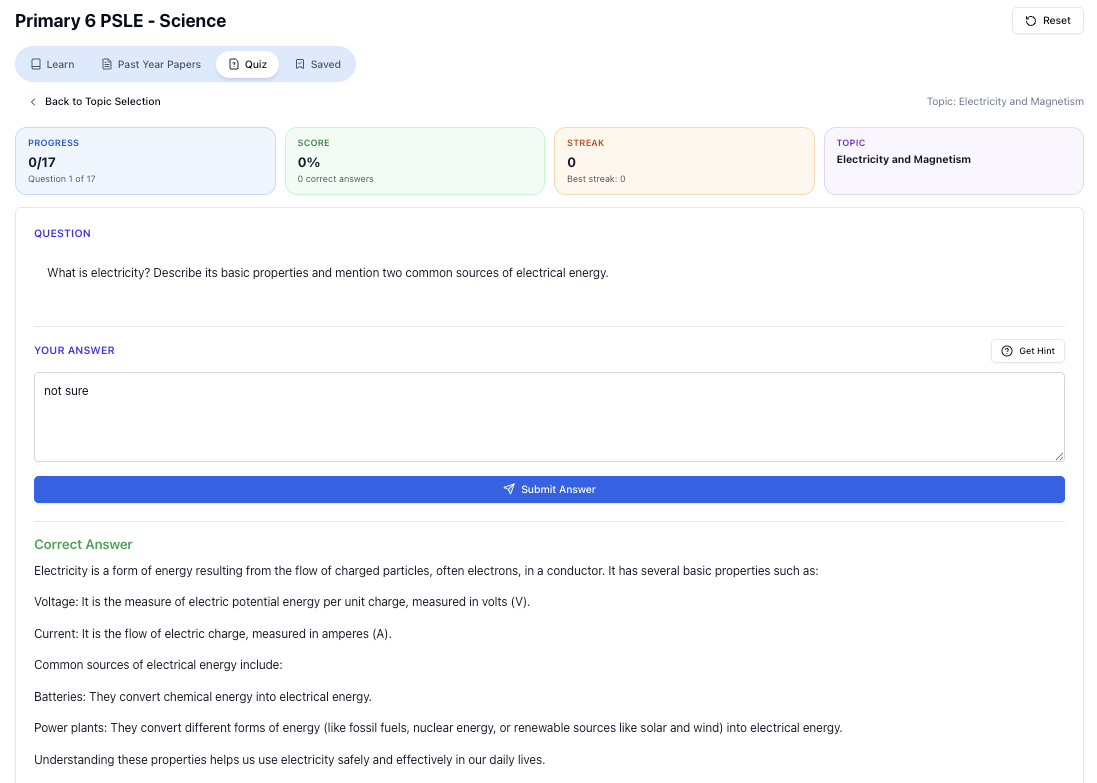
“Practice PSLE Science questions and get clear, step-by-step answers instantly.”
👉 Try a question now and see how fast you can improve.
Ready to practise?
If you want a Singapore-focused AI tutor you can use immediately (website, no sign-up), try Tutorly here:
Related Articles
Free on Tutorly.sg
Practise with step-by-step help — free to start
On Tutorly.sg/app you can practise unlimited Singapore syllabus questions, get instant explanations when you are stuck, and use past-year papers — no sign-up needed to start.
- ✓ PSLE, O Level, A Level, and more
- ✓ Step-by-step working when you are stuck
- ✓ Works on phone and laptop