

Free on Tutorly.sg
Practise with step-by-step help — free to start
On Tutorly.sg/app you can practise unlimited Singapore syllabus questions, get instant explanations when you are stuck, and use past-year papers — no sign-up needed to start.
- ✓ PSLE, O Level, A Level, and more
- ✓ Step-by-step working when you are stuck
- ✓ Works on phone and laptop
If you’re a Secondary student in Singapore, you’re probably juggling CCA, homework, tuition, and trying to survive Sec or Sec 5. On top of that, everyone keeps talking about “AI tools” for studying.
But which AI tools are actually useful for O Levels?
How do you use them without getting dependent or accidentally “cheating”?
And how can they fit into the MOE syllabus and exam style?
“Stuck on a question? See simple explanations that help you understand fast.”
👉 Give it a try and turn confusion into clarity in minutes.
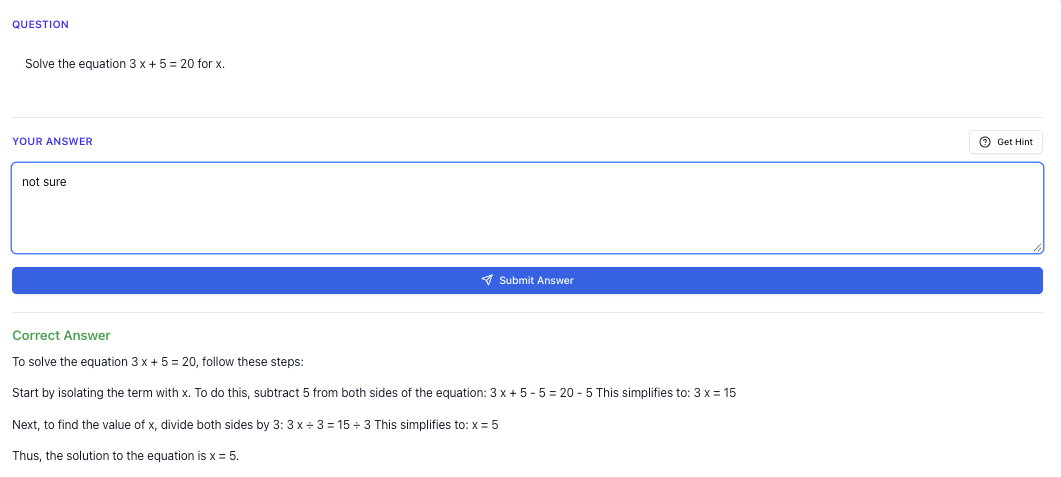
This guide is written specially for Secondary / O Level students in Singapore. I’ll walk you through:
- What “AI tools for students” really means (in the Singapore context)
- How to use them step-by-step for your daily revision
- Specific exam strategies for O Levels (Math, Science, English, Humanities)
- How to create your own hard practice questions
- Common mistakes Singapore students make with AI – and how to avoid them
Throughout, I’ll use Tutorly.sg as the main example, because:
- It’s built specifically for Singapore students, aligned with MOE syllabus
- It has already been used by thousands of students in Singapore
- It has been featured on CNA (Channel NewsAsia) as a local AI education tool
- It runs fully on the web: <https://tutorly.sg/ai-tutor-singapore> and <https://tutorly.sg/app>
Why AI Tools Matter For Secondary & O Level Students In Singapore
In lower sec, you can sometimes get by with last‑minute mugging. By Sec , that stops working.
You’re dealing with:
- New subjects (e.g. Pure Chem/Phy, POA, Social Studies)
- Heavier content load
- More structured exam formats (e.g. Paper , structured questions, data-based questions)
- Time pressure, especially for Math and Science
Traditional help:
- School teachers – but limited time to answer everyone’s questions
- Tuition – helps, but fixed timing and not cheap
- Friends – helpful, but they’re also busy or unsure
That’s where AI tools can fill the gap:
They give you , on-demand explanation and practice, as long as you have internet.
But not all AI tools are equal.
For O Level prep, you want tools that:
-
Understand the MOE syllabus and exam style
E.g. difference between E Math vs A Math, Pure vs Combined Science, SS SEQ format. -
Explain in clear, step-by-step ways
Not just give you an answer, but show the reasoning. -
Let you practise actively, not just read model answers.
That’s exactly what Tutorly.sg is designed for: a AI tutor website tuned for Singapore’s MOE syllabus, from Primary 1 to JC 2, including O Levels.
You can try it here:
- Overview: <https://tutorly.sg/ai-tutor-singapore>
- Direct web app: <https://tutorly.sg/app>
Step-by-step Tutorial: How To Use AI Tools (Like Tutorly) For Daily Study
Let’s walk through a realistic scenario: you’re a Sec student preparing for O Level Math and Science. Here’s how to use an AI tutor effectively, step by step.
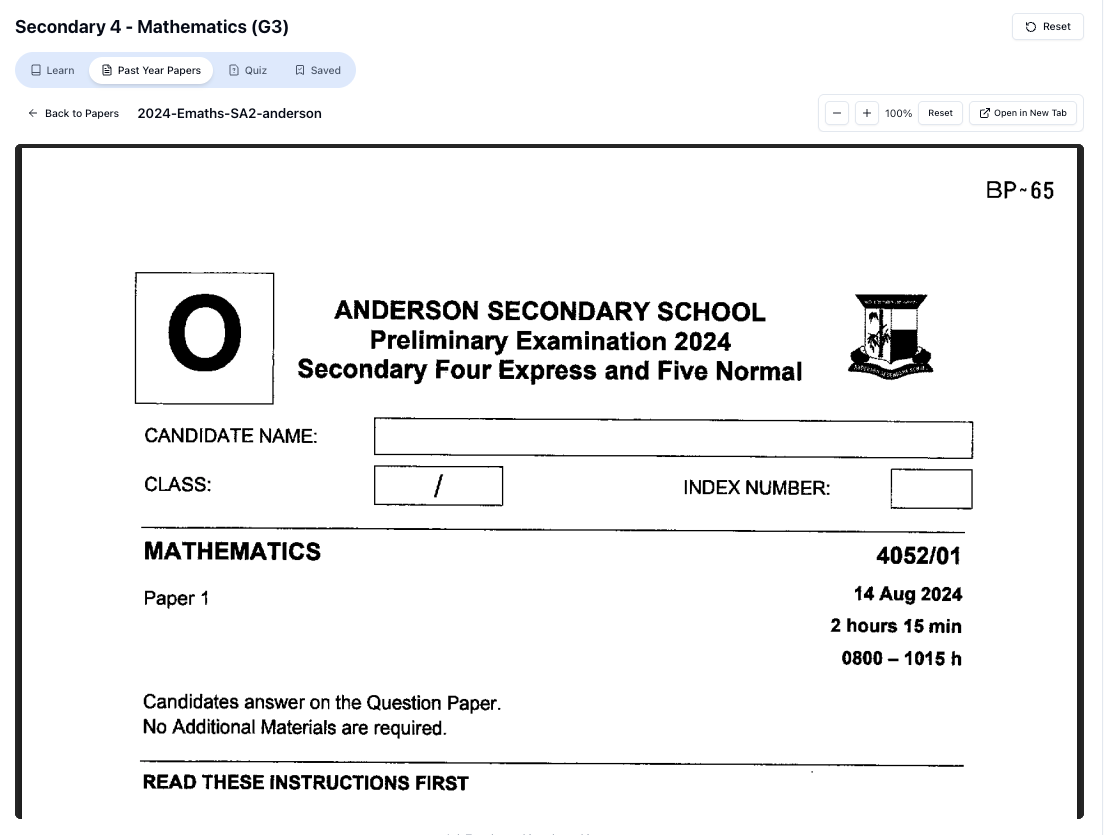
“Access more than 1000+ past year papers to practice”
👉 Start a paper today and test yourself like it’s the real exam.
Step 1: Decide Your Goal For The Session
Before you even open an AI tool, ask yourself:
- “What am I stuck on today?”
- “Is it a concept, a type of question, or a whole chapter?”
Examples:
- “I don’t really get completing the square in E Math.”
- “I always lose marks on Chemistry mole concept questions.”
- “I can’t finish Paper 2 short-answer questions in time.”
Having a clear goal stops you from just “playing” with AI and wasting time.
Step 2: Go To Tutorly.sg And Start A Session
Head to: <https://tutorly.sg/app>
You’ll be guided to choose your level and subject (e.g. “Secondary 4 – E Math” or “Secondary 3 – Pure Chemistry”). This is important because:
- The AI will explain using O Level terminology you see in school.
- It will follow the MOE syllabus and typical exam phrasing.
You can then type your question or paste a question from your worksheet or Ten-Year Series.
Step 3: Ask For Concept Explanations (Not Just Answers)
Instead of only pasting questions, try prompts like:
- “Explain completing the square for O Level E Math, and show me 3 worked examples, from easy to hard.”
- “I’m confused about limiting reagents in O Level Chemistry. Can you explain step-by-step with sample questions?”
- “How do I structure a Social Studies SEQ on governance? Show an example answer using PEEL.”
Tutorly will respond with explanations and step-by-step solutions that match the way O Level questions are usually tested.
You can then ask:
- “Can you explain step 3 again in a simpler way?”
- “Can you show me a similar question but slightly harder?”
- “What are the common mistakes students make for this topic?”
This is how you turn AI into a personal tutor, not just a calculator.
Step 4: Use It To Check Your Final Answers (Not Copy Solutions)
When you’re doing homework or practice papers, try this flow:
- Attempt the question fully on your own first.
- Then, type to Tutorly:
- “This is my question: [paste question]. My answer is: [your final answer]. Is it correct? If not, show me the correct solution step-by-step.”
- Tutorly will:
- Tell you if your final answer is correct or not
- Show a full step-by-step solution for how to get the correct answer
Important:
Tutorly does not read every working step you wrote. It checks your final answer, then shows you a clear method you can compare with your own.
This way, you still practise the thinking process yourself, but you don’t waste time stuck for hours on one question.
Step 5: Turn A Topic Into A Mini Quiz
Once you feel you roughly understand a topic, use AI to generate practice.
Example prompts to Tutorly:
- “I’m a Sec 4 student preparing for O Level E Math. Give me 5 questions on quadratic graphs, increasing in difficulty. After each question, wait for my answer before showing the solution.”
- “Give me 10 quick-fire Chemistry mole concept questions, focused on finding number of moles and mass. One question at a time.”
- “Create 3 Social Studies SEQ practice questions on ‘Healthcare in Singapore’. After I attempt, show me a band level answer.”
This is much more active than just reading notes. You’re training yourself in exam-style thinking.
Step 6: Use AI To Fix Your Weak Spots
After a few sessions, you’ll notice patterns:
- Maybe you always mess up signs in algebra.
- Or you forget units in Physics.
- Or your English compositions always lack strong conclusions.
Ask Tutorly directly:
- “From these mistakes, what patterns do you see? How can I avoid them?”
- “Give me a checklist for Physics calculation questions so I don’t forget units and significant figures.”
- “Give me 5 sample conclusion paragraphs for O Level English narrative essays.”
Use these checklists and examples when you practise on your own.
Exam Strategy Guide: Using AI Smartly For O Levels
AI tools are powerful, but O Levels is still a human exam. You sit in the hall alone with your pen and paper. So the goal is not to be good at using AI; the goal is to use AI to make you better.
Here’s how to do that for key subjects.
1. O Level E Math & A Math
Main problems students face:
- Not enough exposure to different question types
- Weak at linking concepts (e.g. algebra + graphs + inequalities)
- Careless mistakes and time management
How AI can help:
- Targeted topic drilling
-
Ask Tutorly:
“I’m weak at Simultaneous Equations in E Math. Give me 10 questions, starting from basic to O Level standard. One at a time. After I answer, show the solution and a short explanation of the key idea.” -
This is like having a personal question bank that adapts to you.
- Time practice
- “Give me a mini E Math Paper 1 (10 questions) that should take 25 minutes. After I finish, show me which questions are the most time-consuming and how to solve them more quickly.”
- Answer structure for proofs / explanations
-
For A Math (e.g. proving identities, differentiation proofs), you can ask:
“Show me how to write a full solution for this A Math question in clear, exam-style steps, with proper mathematical notation.” -
Then compare with how you usually write, and tighten your presentation.
2. O Level Pure / Combined Science (Chem, Physics, Bio)
Common issues:
- Memorising without understanding
- Losing marks on structured questions and data-based questions
- Difficulty explaining concepts in proper scientific language
How AI can help:
- Concept clarification in MOE style
-
“Explain ionic bonding in a way suitable for O Level Chemistry, including how to describe it in full sentences for structured questions.”
-
“Explain moment in Physics with formulas, units, and one worked example.”
- Practise data-based questions
- “Create a data-based O Level Chemistry question on rate of reaction, including a table of results. After I attempt, show me the marking scheme and how to phrase answers.”
- Exam-style phrasing
-
You can paste your answer and ask:
“This is my answer to a Biology question on diffusion and osmosis. How can I improve it to sound more like an A 1 answer, using proper keywords?” -
This helps you learn the exact phrases and keywords markers look for.
3. O Level English
AI tools are surprisingly helpful here, as long as you don’t let them “write everything for you”.
Use AI to:
- Generate ideas and outlines
-
“Give me 5 possible storylines for this O Level English composition question: ‘Write about a time you had to make a difficult decision.’ Keep them realistic for a Singapore student.”
-
Then you pick one and write it yourself.
- Improve your drafts
- Paste your composition and ask:
“This is my O Level English narrative essay. Point out weak parts in my plot and language, and suggest how I can improve them. Don’t rewrite the whole essay; just give targeted suggestions.”
- Practise situational writing
- “Give me a situational writing task similar to O Level English, about a school event. After I write my letter, show me a band 1 sample and compare structure with mine.”
4. Humanities (Social Studies, History, Geography)
For Humanities, the struggle is usually structure, evidence, and explanation.
With AI, you can:
- Practise PEEL / PEED / SEQ structure
- “Give me a Social Studies SEQ question on ‘Diversity in Singapore’. After I attempt, show me a model answer using PEEL, and explain how each sentence fits the structure.”
- Learn how to use case studies properly
- “Show me how to write a strong paragraph for Geography using Singapore as a case study for housing. Keep it at O Level depth.”
Free on Tutorly.sg
Practise with step-by-step help — free to start
On Tutorly.sg/app you can practise unlimited Singapore syllabus questions, get instant explanations when you are stuck, and use past-year papers — no sign-up needed to start.
- ✓ PSLE, O Level, A Level, and more
- ✓ Step-by-step working when you are stuck
- ✓ Works on phone and laptop
- Timed practice
- “Give me one SS SEQ and one SBQ that together should take 35 minutes. After I write my answers, give me feedback on whether my explanation is deep enough for a band .”
Worksheet Practice: Using AI To Create Hard Exam Variants
You already have school worksheets and Ten-Year Series. So why use AI for more practice?
Because AI can adapt difficulty and create variants of the same concept, including harder-than-usual questions to stretch you.
Here’s how to do it.
1. Start With A Normal Question
Take a standard question from your worksheet. Example (E Math):
Solve the equation .
You can ask Tutorly:
- “Show me a full solution to this question using factorisation.”
Then, ask for harder variants.
2. Ask For Harder Variants On The Same Concept
Example prompts:
- “Create 3 harder O Level style questions that test the same concept as this quadratic equation, including one that involves a word problem.”
Tutorly might give:
- “The product of two consecutive integers is 56. Find the integers.”
You then:
- Attempt them yourself
- Check final answers using Tutorly
- Study the step-by-step solutions to see new patterns
3. Mixed-topic Hard Variants (Math)
To simulate Paper 2 difficulty, ask:
- “I’m a Sec 4 student aiming for A 1 in O Level E Math. Give me 5 challenging questions that combine algebra, graphs, and inequalities. One at a time. Wait for my answer before showing the solution.”
This gives you practice with:
- Interpreting graphs
- Turning word problems into inequalities
- Solving and representing solutions
4. Hard Science Practice
“Doing Secondary Science? Pick a topic and practise like it’s a real exam — with clear answers right after.”
👉 Try Tutorly now and start a Science topic in seconds.

Example for Chemistry (mole concept):
- “Give me 5 challenging O Level Chemistry mole concept questions, including at least 2 involving limiting reagents and 1 involving gas volumes. One at a time.”
For each question:
- Attempt fully on paper.
- Type your final answer into Tutorly.
- Compare your working with the AI’s step-by-step solution.
You’ll start to see standard patterns in how these questions are set.
5. Structured Question Practice (Humanities)
For Social Studies:
- “Give me a hard SEQ question on ‘Healthcare in Singapore’ that would be about 8–10 marks. After I attempt, show me a band sample answer and explain why it deserves that band.”
You can also ask:
- “Now give me a slightly different question on the same topic, requiring a different stand or angle.”
This forces you to adapt your knowledge, not just memorise one model answer.
6. Full Mini-Tests
Near exams, use AI to create short, targeted tests.
Examples:
-
“Create a 30-minute E Math test with 8 questions, focusing on Algebra and Trigonometry, O Level standard. After I finish, mark my final answers and show me which topics I’m weakest at.”
-
“Create a 45-minute Pure Chemistry test with MCQ + structured questions on Atomic Structure and Chemical Bonding. After I finish, show me a breakdown of which question types I struggled with.”
Use these mini-tests weekly to track your progress.
Common Mistakes Students Make When Using AI Tools
AI can really help you, but many students use it in ways that hurt their learning. Be careful of these.
Mistake 1: Copying Solutions Without Thinking
If you paste a question, get a full solution, and just copy it down… you’re not learning. You’re outsourcing your brain.
Fix:
- Always attempt the question first, even if you’re unsure.
- When you see the AI’s solution, ask:
- “Which step did I not know how to do?”
- “What pattern or method is this question using?”
- Re-do a similar question without looking at the solution.
Mistake 2: Using AI During School Assessments (Cheating)
Some students try to sneak AI into:
- Take-home tests
- Group projects
- School essays (copy-pasting AI-generated content)
Teachers can usually tell when your work suddenly jumps in style or content. And more importantly, you’re risking disciplinary action and losing your own learning.
Fix:
- Use AI as a study tool, not a shortcut for graded work.
- For essays, use AI for ideas, outlines, and feedback, but write the actual content yourself.
Mistake 3: Asking Vague Questions
If you type “Explain math” or “Teach me Chemistry”, you’ll get something too general.
Fix:
Ask specific, focused questions:
- “Explain how to find the equation of a straight line given two points, for O Level E Math.”
- “I don’t understand the difference between diffusion and osmosis in Biology. Explain with examples.”
The more specific your question, the more useful the answer.
Mistake 4: Treating AI As 100% Perfect
AI is powerful, but not a god. Sometimes:
- It may misinterpret a poorly worded question.
- It might not match exactly how your teacher prefers to explain something.
Fix:
- Cross-check with your textbook, notes, or teacher if something feels off.
- Use AI explanations as one more perspective, not the only truth.
With Tutorly.sg, the content is tuned to the MOE syllabus and exam style, which helps reduce mismatch. But it’s still good to stay critical and thoughtful.
Mistake 5: Over-relying And Not Practising Independently
If you use AI for every single question, you might feel “good” now, but in the exam hall, there’s no AI.
Fix:
- Set “AI-free” practice time: e.g. 1–2 full papers a week where you don’t check anything until the end.
- Use AI after the paper to:
- Mark your own answers
- Understand mistakes
- Generate similar questions to fix weak spots
How Tutorly.sg Fits Into Your Weekly Study Routine
To make this practical, here’s a sample weekly plan for a Sec 4 O Level student using Tutorly.sg.
Weekday (Short Sessions, 20–30 mins)
Example (Monday – E Math):
- Do 3–5 questions from your school worksheet.
- Use Tutorly to:
- Check your final answers
- See step-by-step solutions for questions you got wrong
- Ask for 2–3 similar but slightly harder questions on your weakest type
Example (Wednesday – Chemistry):
- Pick one topic (e.g. Mole Concept).
- Ask Tutorly for:
- A quick recap explanation
- 5 practice questions, one at a time
- Review solutions and write a short summary page in your own words.
Weekend (Longer Sessions, 60–90 mins)
Example (Saturday – Mixed Practice):
- Do a mini mock paper:
- 30 mins E Math
- 30 mins Pure/Combined Science
- After finishing, use Tutorly to:
- Check answers
- Identify topics you lost marks on
- Generate 3–5 targeted questions on those weak topics
Example (Sunday – English / Humanities):
- Write one English composition or SS SEQ.
- Paste into Tutorly:
- Ask for feedback on structure, clarity, and depth
- Ask for a sample band answer for comparison
- Note down useful phrases or structures and try to use them in your next essay.
Final Thoughts: Using AI Wisely As A Singapore Secondary Student
AI is not here to replace your teachers or your own hard work.
But if you use it wisely, it can:
- Give you instant help at 11pm when everyone else is busy
- Provide unlimited practice questions, including hard variants
- Explain concepts in clear, step-by-step ways aligned to MOE and O Level style
- Help you see your own mistakes and fix them faster
Among the many AI tools out there, Tutorly.sg is built specifically for:
- Singapore students (Primary 1 to JC 2)
- MOE syllabus and exam formats (PSLE, O Levels, A Levels)
- Text-based, step-by-step tutoring – not just giving final answers
It’s already been used by thousands of students in Singapore and even featured on Channel NewsAsia (CNA), so you’re not experimenting with something random.
If you’re serious about improving for O Levels, especially in Math, Science, English, and Humanities, I strongly recommend making Tutorly part of your routine.
You can explore more about the AI tutor here:
And start using the web app directly here:
Try it for your next homework or revision session, and see how much smoother your studying can be when you have a AI tutor on your side.
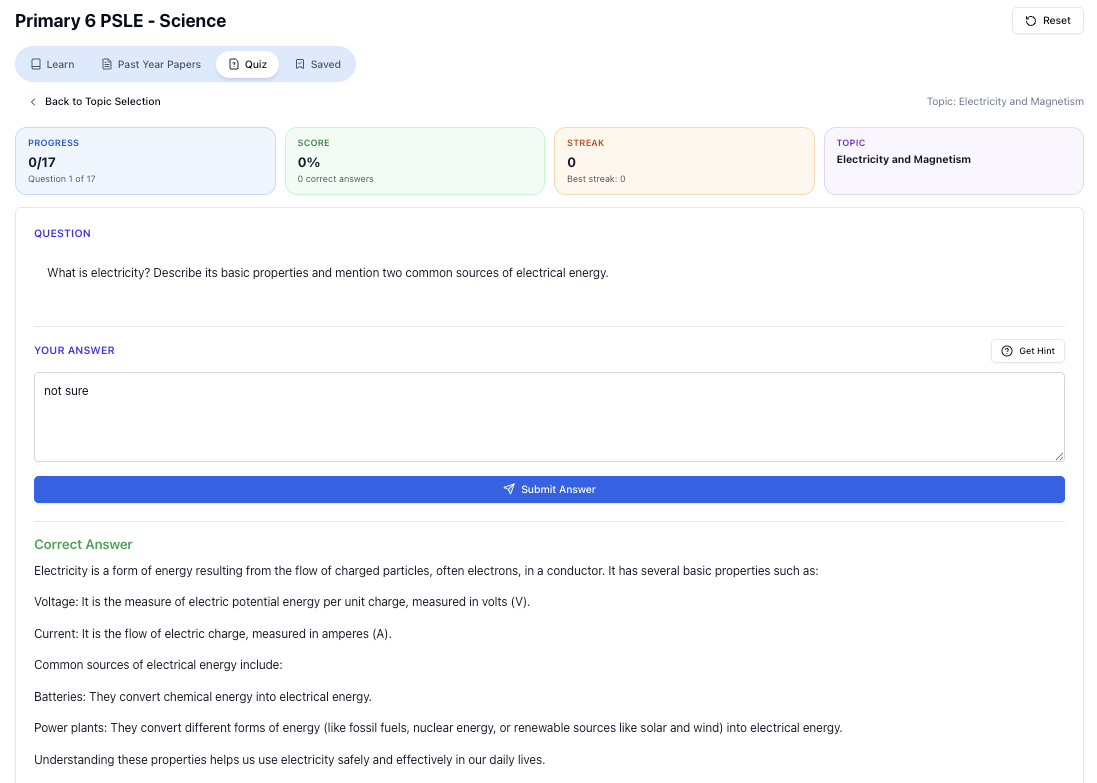
“Practice PSLE Science questions and get clear, step-by-step answers instantly.”
👉 Try a question now and see how fast you can improve.
Ready to practise?
If you want a Singapore-focused AI tutor you can use immediately (website, no sign-up), try Tutorly here:
Related Articles
Free on Tutorly.sg
Practise with step-by-step help — free to start
On Tutorly.sg/app you can practise unlimited Singapore syllabus questions, get instant explanations when you are stuck, and use past-year papers — no sign-up needed to start.
- ✓ PSLE, O Level, A Level, and more
- ✓ Step-by-step working when you are stuck
- ✓ Works on phone and laptop