

Free on Tutorly.sg
Practise with step-by-step help — free to start
On Tutorly.sg/app you can practise unlimited Singapore syllabus questions, get instant explanations when you are stuck, and use past-year papers — no sign-up needed to start.
- ✓ PSLE, O Level, A Level, and more
- ✓ Step-by-step working when you are stuck
- ✓ Works on phone and laptop
If you’re in secondary school in Singapore, your week is probably packed.
CCA, remedials, tuition, group projects, family stuff… and somewhere in there, you’re supposed to revise for O Levels.
“Stuck on a question? See simple explanations that help you understand fast.”
👉 Give it a try and turn confusion into clarity in minutes.
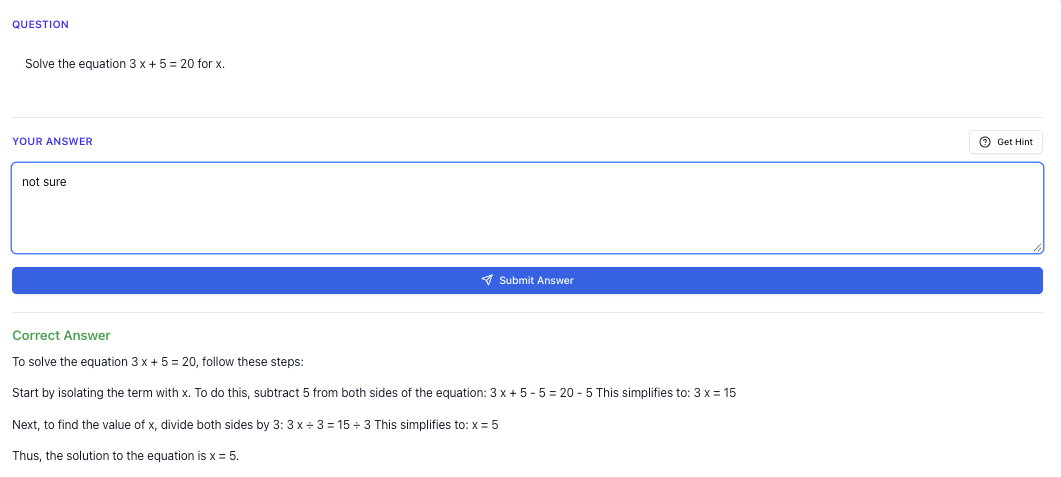
An “ai tuition schedule” isn’t about replacing your teachers or tuition centres. It’s about using an AI tutor to plan your week, fill in learning gaps between tuition lessons, and stop wasting time staring at your notes not knowing what to do next.
In this guide, I’ll walk you through how you can use Tutorly.sg — a AI tutor website built specifically for Singapore students — to:
- Plan a weekly tuition + self-study timetable that actually fits your life
- Turn random free pockets of time into focused revision
- Practise exam-style questions (including tough variants) for the MOE syllabus
- Avoid the most common mistakes students make when “studying with AI”
Tutorly.sg isn’t a mobile app; it’s a website you can use on your laptop, iPad or phone browser anytime. It’s been mentioned on Channel NewsAsia (CNA) and has already been used by thousands of students in Singapore, from Sec 1 all the way to O Levels and JC.
Let’s start with the most important part: your weekly schedule.
Step-by-step tutorial
1. Map out your real week (not your “ideal” week)
Before you bring AI into your study life, you need to be very honest about your time.
Take a piece of paper (or a Google Sheet) and block out:
- School hours
- CCA days and timings
- Fixed tuition slots (e.g. Friday 7–9pm E Math, Sunday 3–5pm Pure Chem)
- Travel time (be realistic – that 30 mins bus ride is not magically 10 mins)
- Non-negotiables: meals, family commitments, religious activities, rest
Now you’ll see your actual free pockets. For many Sec 3–4 students, it looks like:
- 30–45 mins before school
- 1–1.5 hours after school on some days
- 1–2 hours on weekends between tuition classes
These are the slots where an AI tutor like Tutorly.sg can quietly become your “on-demand” tuition.
2. Decide what each subject really needs from you
Not all subjects need the same type of time.
Ask yourself, honestly, for each subject:
- Math / A Math – Do I mainly need question drilling and step-by-step worked solutions?
- Sciences (Pure / Combined) – Do I need concept explanations or more data-based questions?
- English – Is my weak point comprehension, summary, or situational/continuous writing?
- Humanities (SS, History, Geog) – Do I struggle with content recall or PEEL/SEED paragraph structure?
Write down one main goal per subject for the next 4 weeks. Examples:
- “E Math: nail quadratic equations and simultaneous equations”
- “Chemistry: master mole concept and stoichiometry calculations”
- “Social Studies: improve SBQ inference and reliability answers”
You’re going to feed these into your AI-based schedule.
3. Use Tutorly.sg to build a realistic weekly plan
Head to: https://tutorly.sg/app
You can access it anytime on your browser. No downloads, no installations.
Here’s a simple way to use Tutorly to create your AI tuition schedule:
-
Look at one free slot. Example:
- Tuesday 4.30–5.30pm (after school, before CCA)
-
Decide the subject and topic. Example:
- E Math – Quadratic Equations (Sec 3, MOE syllabus)
-
Go to Tutorly and type something like:
“I have 60 minutes to revise Sec 3 E Math quadratic equations for O Levels.
Please plan this 60 minutes into a detailed schedule with:
- 10 mins: quick concept recap
- 40 mins: practice questions (increasing difficulty, exam-style)
- 10 mins: summary of common mistakes and what I should revise next.
Follow the Singapore O Level syllabus.”
-
Tutorly will generate a time-sliced plan for that 1 hour, including specific question types.
-
Follow the plan. When it says “Practice Question 1”, ask:
“Give me Practice Question 1 now. Don’t show the solution yet. I will try first.”
- After you answer, you can say:
“My answer: and . Check my answer and show me the step-by-step working if I’m wrong.”
Tutorly checks your final answer, then shows you the full step-by-step working to reach the correct solution. You see exactly where you went off.
Repeat this for each free slot in your week.
4. Turn your weekly timetable into a simple “AI + tuition” combo
Your week might look something like this:
- Monday
- After school (4–5pm): AI session – SS SBQ practice with Tutorly
- Tuesday
- 4.30–5.30pm: AI session – E Math quadratic equations
- Wednesday
- Tuition: Pure Chem 7–9pm
- 9.15–9.35pm: 20-min AI recap – ask Tutorly to summarise today’s Chem lesson into key exam points and generate 2–3 application questions
- Thursday
- 5–6pm: AI session – English comprehension practice (O Level style)
- Friday
- Tuition: A Math 7–9pm
- Saturday
- 10–11am: AI session – A Math follow-up questions based on what was covered in tuition
- Sunday
- 3–5pm: Tuition – Combined Physics
- 8–8.30pm: AI session – Physics formula recall + conceptual MCQs
Notice the pattern:
- Tuition centres / private tutors = deep explanation + structured teaching
- Tutorly = on-demand practice, recap, and targeted drills in between
That’s what an “AI tuition schedule” really is: using AI to fill the gaps and keep you consistent, instead of only being productive on tuition days.
Exam strategy guide
Now that you’ve got a weekly plan, let’s make it O Level–focused.
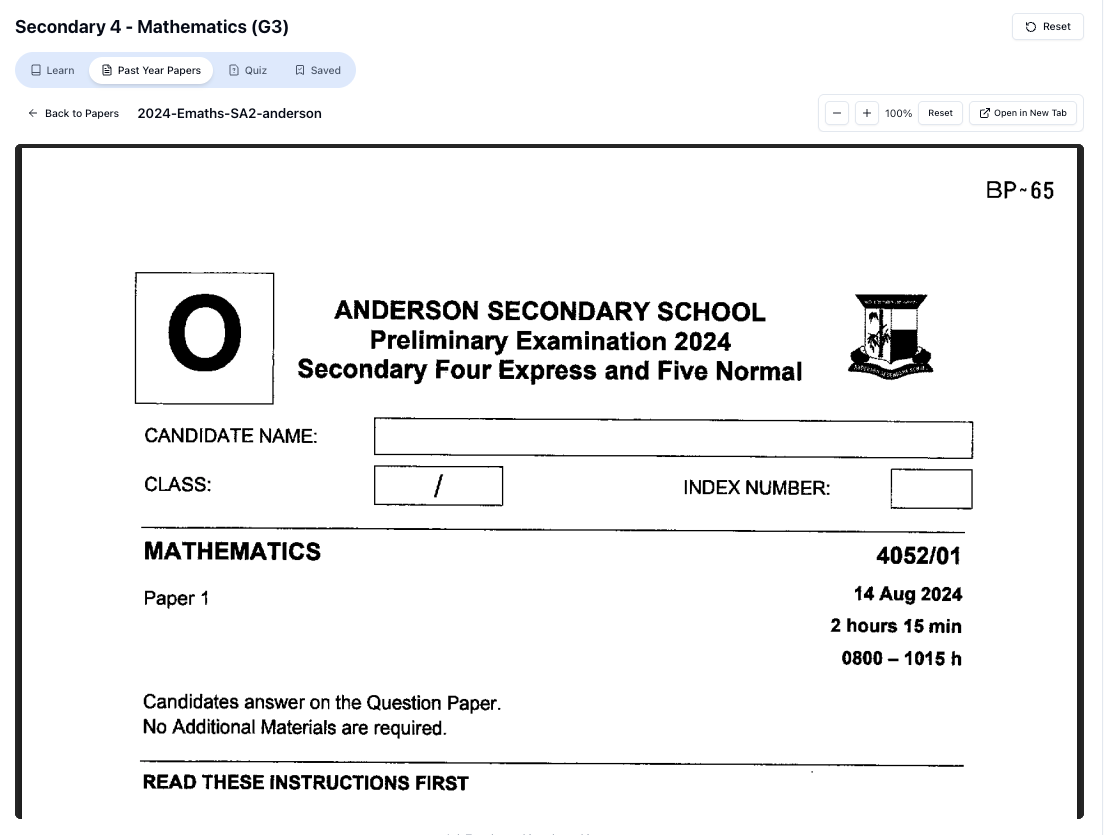
“Access more than 1000+ past year papers to practice”
👉 Start a paper today and test yourself like it’s the real exam.
1. Use AI differently at different stages of the year
Sec 3 (or early Sec 4) – Foundation & understanding
- Use Tutorly to clarify concepts immediately when you’re stuck on homework.
- Ask it to explain topics “like I’m Sec 3 in Singapore, following MOE syllabus”.
- Focus on building strong basics in algebra, indices, chemical bonding, cells, etc.
Mid Sec 4 – Application & exam-style practice
- Shift from “teach me” to “test me”.
- Ask Tutorly:
“Give me 5 O Level–style questions on [topic] with increasing difficulty.
After each question, check my final answer. If I’m wrong, show step-by-step working and explain where I went wrong.”
Prelims & O Levels – Time management & mixed-topic practice
- Practise mixed-topic sets:
“Give me a 30-minute mixed E Math practice (10 questions) combining algebra, quadratic equations, and graphs, following O Level standard. At the end, show me which topics I’m weakest in based on my wrong answers.”
- Use AI to simulate timed conditions:
- Set a timer on your phone.
- Do not look at solutions until the end.
- Then ask Tutorly to mark your answers and explain.
2. Subject-specific AI strategies
Math (E Math / A Math)
- Use AI to:
- Generate step-by-step worked solutions after you attempt each question
- Show alternative methods (e.g. completing the square vs quadratic formula)
- Create targeted drills:
“I always make mistakes in completing the square. Give me 8 questions focusing only on that, from easy to hard, O Level style.”
- For A Math, especially:
- Ask for questions that combine topics, e.g. indices + logarithms, or trigonometry + coordinate geometry.
Sciences (Pure / Combined)
- Use AI to:
- Turn your notes into question practice:
“Here are my notes on electrolysis. Based on this, generate 5 structured questions that are similar to O Level exam questions, with mark allocation.”
- Practise data-based questions:
“Give me a data-based question on enzyme activity like in O Level Pure Biology. After I answer, mark it using typical O Level marking scheme and show a model answer.”
- After school lab sessions or experiments, you can ask:
“Explain today’s experiment on [topic] using O Level Chemistry terms and show how it might appear in a structured question.”
English
- Use AI to:
- Practise writing introductions and conclusions for continuous writing
- Generate sample paragraphs for different question types
- Check if your topic sentence actually answers the question
Example prompt:
“I’m practising O Level English continuous writing.
Question: ‘Is social media more harmful than helpful to teenagers?’
I’ll write my introduction. Please:
- Comment if it clearly answers the question
- Suggest 1–2 ways to improve it
- Give me a sample intro that would likely score higher.”
Humanities (SS, History, Geog)
- Use AI to:
- Practise PEEL/SEED paragraphs
- Convert your notes into SBQ and structured questions
- Get model answers to compare with your own
Example:
“Give me a Social Studies SBQ on governance in Singapore, O Level standard. After I answer, show me:
- A model answer
- Why my answer might lose marks
- How to phrase my inference more clearly.”
3. Weekly rhythm: what to do on which days
To keep things simple, you can follow this pattern:
-
Mon–Thu:
- Short AI sessions (30–60 mins) focusing on:
- Homework help
- Clarifying doubts from school
- 5–10 exam-style questions on 1–2 topics
- Short AI sessions (30–60 mins) focusing on:
-
Fri–Sun:
- Longer AI sessions (60–90 mins) focusing on:
- Timed practice sets
- Mixed-topic questions
- Recap of tuition lessons
- Longer AI sessions (60–90 mins) focusing on:
This way, your AI tuition schedule isn’t random. It’s aligned to the O Level exam timeline and your actual school week.
Worksheet practice
You can also use Tutorly as your personal worksheet generator. Let me show you how to structure this, including some hard variants.
1. E Math sample practice set (with hard variants)
Tell Tutorly something like:
“Generate a Sec 4 E Math practice set for O Levels on:
- Quadratic equations
- Simultaneous equations
- Linear graphs
Include:- 3 easy questions
- 4 medium questions
- 3 hard questions (similar to the harder parts of Paper 2).
Don’t show solutions until I ask. After each question, I’ll give my final answer for you to check.”
Here’s the kind of structure you should aim for in your practice (I’ll describe, you let Tutorly generate the exact questions):
-
Easy
- Straightforward solve-for-𝑥 quadratic
- Simple simultaneous equations with substitution
- Basic gradient/intercept from graph equation
-
Medium
- Word problem leading to quadratic equation
- Simultaneous equations involving fractions
- Graph question asking for intersection of two lines
-
Hard variants (what you should request)
- Quadratic with parameter
- Question where the discriminant is used to find the range of values of a parameter 𝑘 such that the equation has real roots.
- Quadratic with parameter
-
Graph + inequality combo
- Given the graph of a quadratic and a line, find the range of 𝑥 satisfying an inequality like .
-
Real-world context
- Maximum area or profit problem where you must form and solve a quadratic, identify vertex, and interpret the answer in context.
Free on Tutorly.sg
Practise with step-by-step help — free to start
On Tutorly.sg/app you can practise unlimited Singapore syllabus questions, get instant explanations when you are stuck, and use past-year papers — no sign-up needed to start.
- ✓ PSLE, O Level, A Level, and more
- ✓ Step-by-step working when you are stuck
- ✓ Works on phone and laptop
You can tell Tutorly:
“For the hard questions, please include:
- One question involving discriminant and parameter 𝑘
- One question involving quadratic inequalities using a graph
- One real-world application question (e.g. area, revenue).
At the end, summarise which skills each question tested.”
2. A Math sample practice set
For A Math, you want more depth and linking of concepts.
Prompt idea:
“Create an A Math practice worksheet for Sec 4 Singapore student preparing for O Levels on:
- Logarithms
- Trigonometric identities
- Coordinate geometry (circles)
2 easy, 4 medium, 4 hard questions.
I will try each question first and give my final answer. Check my answers and show full step-by-step working if I’m wrong.”
Ask specifically for hard variants like:
- Proving a trig identity that involves multiple steps and factorisation
- Logarithm equations requiring change of base and use of \log a + \log 𝑏 = \log ab
- Coordinate geometry question involving a circle, tangent, and intersection points
3. Science sample practice set (Pure / Combined)
You can ask Tutorly:
“Generate a Sec 4 Pure Chemistry worksheet on mole concept and stoichiometry, O Level standard, with:
- 4 structured questions
- 2 data-based questions
Include at least 2 hard questions that combine multiple steps (e.g. limiting reagent + gas volume). Don’t show solutions until I ask.”
For hard variants, specify:
- Limiting reagent calculations with multiple substances
- Questions mixing concentration, volume, and mole ratios
- Multi-step questions where you must:
- Find moles
- Use mole ratio
- Convert to mass or volume
You can then say:
“I’ll now attempt Question 1. Here is my final answer: [your answer]. Check if it’s correct and show the full working if not.”
4. Humanities & English practice
For Social Studies:
“Create 3 SBQs and 2 structured questions on Sec 4 SS topic [e.g. Governance in Singapore], O Level style.
For each SBQ, include:
- Inference
- Reliability
- Usefulness
I will write my answers and you mark them using typical O Level marking scheme, then show a model answer.”
For English:
“Give me one O Level–style comprehension passage with:
- Vocabulary in context
- Inference questions
- 1 summary question
After I answer, show me:- Suggested answers
- Why certain phrases score and others don’t.”
Use these AI-generated worksheets as your weekly practice backbone. You don’t need to wait for your school to hand out more papers.
Common mistakes
Using AI in your tuition schedule can be powerful, but a lot of students accidentally sabotage themselves. Avoid these:
1. Treating AI like a magic answer machine
If you copy-paste a question and immediately ask:
“Show me the full solution.”
You’re not really learning.
Instead, try:
- Ask for the question (or type in your own).
- Attempt it fully.
- Give your final answer only.
- Ask Tutorly to check and then show step-by-step if you’re wrong.
You’ll learn where your thinking went off, not just what the final answer is.
2. Over-scheduling and burning out
Some students create a crazy AI timetable:
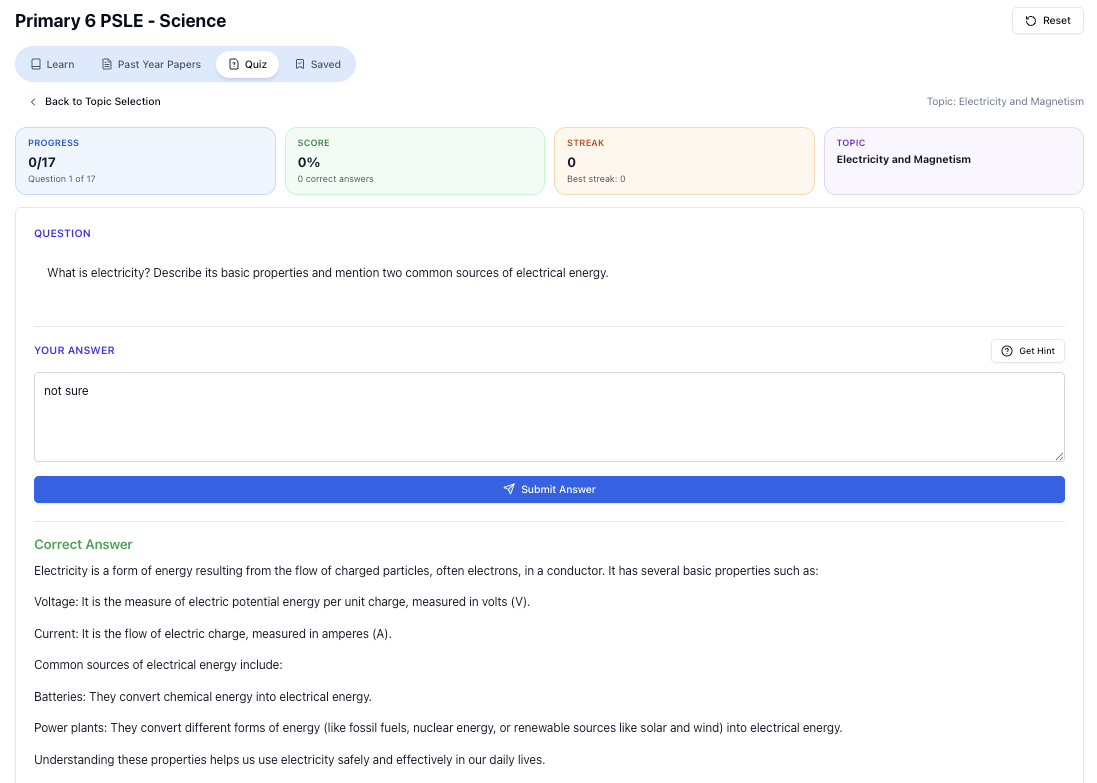
“Doing Secondary Science? Pick a topic and practise like it’s a real exam — with clear answers right after.”
👉 Try Tutorly now and start a Science topic in seconds.

- 3 hours a day, 7 days a week, 5 subjects…
Then they follow it for 3 days and give up.
Aim for something realistic:
- On school days: 30–60 mins AI practice
- On weekends: 60–90 mins AI practice
Consistent, smaller blocks beat one huge “study marathon” that never repeats.
3. Ignoring the MOE / O Level context
If you use some random overseas AI tool that doesn’t know our syllabus, you might get:
- Topics not in the MOE syllabus
- Wrong emphasis (e.g. focusing on things tested in other countries’ exams)
- Question styles that don’t match O Levels
Tutorly.sg is built specifically for Singapore students and aligned with MOE, so when you say “Sec 4 E Math” or “O Level Pure Chem”, it understands the context.
Still, you should:
- Mention “O Level”, “Sec ”, and the topic name in your prompts
- Occasionally compare AI-generated questions with your school papers to confirm style match
4. Not reviewing your mistakes
Doing 50 questions is useless if you never look back at what you got wrong.
Use Tutorly to build a mistake log:
- Every time you get a question wrong, copy it into a document.
- Below it, paste or summarise:
- The correct method
- The concept you misunderstood
- Once a week, ask Tutorly:
“I keep making these mistakes in [topic]. Here are a few examples: [paste].
Explain the patterns in my mistakes and generate 5 questions to help me fix them.”
This turns your weaknesses into targeted practice.
5. Using AI only when exams are near
Many Sec 4 s only start using AI tools in August/September.
By then, it’s mostly firefighting.
If you’re in Sec 3 or early Sec 4 now, start using Tutorly:
- To understand new topics the week they’re taught
- To revise the previous term during holidays
- To keep your weaker subjects on life support even when school is rushing other topics
Your future Prelim/O Level self will thank you.
How to get started with your own AI tuition schedule this week
Here’s a simple 3-day “starter plan” you can copy.
Day 1: Build your first AI block
- Go to https://tutorly.sg/app
- Pick one subject you’re weakest in.
- Give Tutorly this prompt:
“I’m a Sec [] student in Singapore preparing for O Levels.
My weak subject is [subject].
My goal for the next 4 weeks is to improve in [topic].
I have 45 minutes today.
Please create a 45-minute study plan with:
- Short concept recap
- 4–6 practice questions
- Reflection at the end on what I’m still weak at.”
- Follow the plan, question by question. Don’t rush.
Day 2: Connect AI with your existing tuition
After your next tuition lesson:
- Immediately after class (or that night), open Tutorly.
- Type:
“Today in tuition we covered [topic].
Please:
- Summarise the key concepts in exam-focused bullet points
- Generate 5 questions similar to what might appear in O Levels
- At the end, tell me which sub-topics I seem to struggle with based on my wrong answers.”
- Attempt the questions, then ask Tutorly to check your final answers.
Day 3: Create your weekly template
-
Look at your timetable and mark out:
- 2–3 short weekday slots (30–45 mins)
- 1–2 longer weekend slots (60–90 mins)
-
For each slot, decide:
- Which subject
- Which topic
- What type of task (concept recap / practice / timed set / mistake review)
-
Tell Tutorly:
“Help me design a weekly AI tuition schedule for the next 4 weeks.
I’m in Sec [] in Singapore, preparing for O Levels.
My weak subjects are [subjects].
I have these free slots: [list].
Please allocate each slot to specific topics and practice types, following the MOE syllabus.”
- Save that plan somewhere you’ll actually see it (wall, planner, phone notes).
Stick to it for 2 weeks, then adjust based on what feels too heavy or too light.
Ready to plan your own AI tuition schedule?
You don’t need to cancel your current tuition or sign up for 5 more classes.
You just need to:
- Be honest about your weekly time
- Decide clear goals for each subject
- Use an AI tutor that actually understands the Singapore MOE syllabus
- Turn random free pockets into focused, exam-style practice
[Tutorly.sg](https://tutorly.sg/ai-tutor-singapore) is a AI tutor website built for Singapore students from Primary to JC, aligned to PSLE, O Level, and A Level requirements. It has already helped thousands of students in Singapore, and has been mentioned on Channel NewsAsia (CNA).
If you’re serious about improving your O Level performance and want a structured way to fit AI into your busy week, start here:
👉 Plan your first AI study block now at https://tutorly.sg/app and test it out for one week.
Adjust, refine, and you’ll have an AI tuition schedule that actually works for your life — not just on paper.
“Practice PSLE Science questions and get clear, step-by-step answers instantly.”
👉 Try a question now and see how fast you can improve.
Ready to practise?
If you want a Singapore-focused AI tutor you can use immediately (website, no sign-up), try Tutorly here:
Related Articles
Free on Tutorly.sg
Practise with step-by-step help — free to start
On Tutorly.sg/app you can practise unlimited Singapore syllabus questions, get instant explanations when you are stuck, and use past-year papers — no sign-up needed to start.
- ✓ PSLE, O Level, A Level, and more
- ✓ Step-by-step working when you are stuck
- ✓ Works on phone and laptop