

Free on Tutorly.sg
Practise with step-by-step help — free to start
On Tutorly.sg/app you can practise unlimited Singapore syllabus questions, get instant explanations when you are stuck, and use past-year papers — no sign-up needed to start.
- ✓ PSLE, O Level, A Level, and more
- ✓ Step-by-step working when you are stuck
- ✓ Works on phone and laptop
Introduction: AI Tools Are Everywhere… But Are They Actually Helping You?
You’ve probably already tried using some AI tool to help with homework or revision.
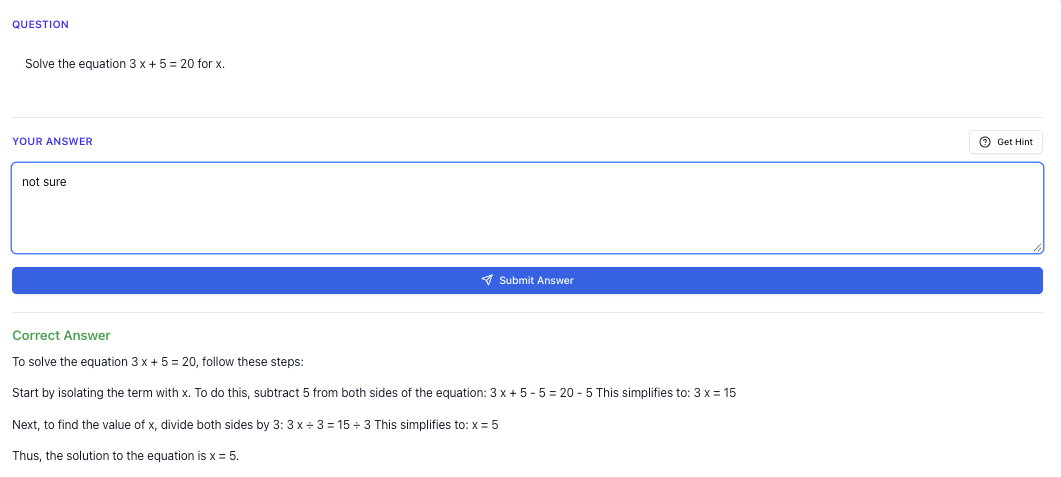
“Stuck on a question? See simple explanations that help you understand fast.”
👉 Give it a try and turn confusion into clarity in minutes.
1. What Makes a Good AI Tool for Singapore Exams?
Not all AI tools are built with Singapore students in mind.
If you want something that really helps with PSLE / O Levels / A Levels, here’s what actually matters.
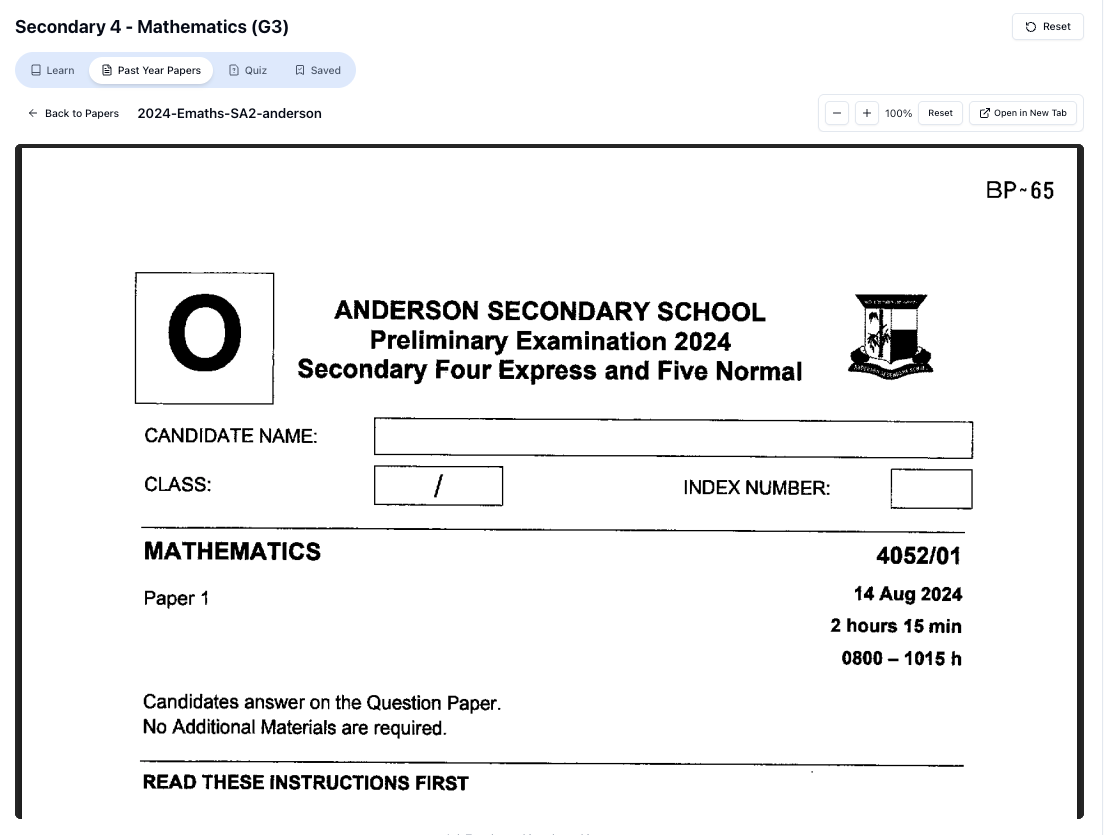
“Access more than 1000+ past year papers to practice”
👉 Start a paper today and test yourself like it’s the real exam.
1.1 Aligned to the MOE Syllabus (Not Random Overseas Content)
A lot of general AI tools are trained mainly on US or UK content.
That’s why you might get:
- Chemistry examples using units or terms you’ve never seen in your notes
- Math solutions that don’t use the methods your teacher insists on
- English answers that don’t follow our exam formats
For example, if you’re doing A Level Math and ask about integration, you want explanations that match H 2 Math style questions, not some random calculus course from overseas.
Tutorly.sg is built specifically for MOE content, from Primary 1 up to JC 2. That means:
- PSLE topics like model drawing, heuristics, situational writing
- O Level topics like kinematics, mole concept, algebraic manipulation
- A Level topics like electrochemistry, macroeconomic policies, complex numbers
You don’t waste time filtering out irrelevant or non-syllabus content.
1.2 Uses Singapore Exam Formats and Keywords
You’re not just studying to “know things”.
You’re studying to score marks under exam conditions.
That means the AI tool should understand:
- PSLE English: continuous writing, situational writing, editing
- O Level English: argumentative essays, discursive essays, summary
- O Level Math: Paper 1 vs Paper 2 style questions
- A Level GP: issue-based essays, AQ, structuring arguments
- A Level Sciences: structured questions, planning questions, data-based questions
Tutorly.sg is built to respond in Singapore exam style – so when you practise, you’re not just learning content, you’re getting used to how questions and answers actually look in your papers.
1.3 Available (Because Your Schedule Is Crazy)
Most students in Singapore have:
- School
- CCA
- Tuition
- Family commitments
- Maybe part-time work (for older students)
You don’t always have a teacher or tutor available when you’re stuck at 11.30pm before a test.
Tutorly.sg is a AI tutor website. You can log in anytime, ask your question, and get help immediately. No need to schedule, no need to wait for a reply.
And just to be clear: it’s a website, not a mobile app. You access it through your browser.
1.4 Safe, Reliable, and Already Used in Singapore
You shouldn’t be a guinea pig for some random AI experiment.
Tutorly.sg has already been:
- Mentioned on Channel NewsAsia (CNA)
- Used by thousands of students and parents in Singapore
So it’s not some untested tool. It’s already part of many students’ revision routine.
You can try it here:
Main AI tutor page: https://tutorly.sg/ai-tutor-singapore
Direct web app access: https://tutorly.sg/app
2. What Tutorly.sg Actually Does (And What It Doesn’t)
Let’s be very clear, so you know exactly how to use it.
2.1 What Tutorly.sg Can Help You With
Tutorly works like a subject-specific AI tutor that you can chat with.
You can:
- Paste a question (Math, Science, English, Humanities, etc.)
- Type the question out if it’s from your worksheet or TYS
- Ask for explanations of topics you don’t understand
- Practise questions and get instant feedback on your final answer
- Ask it to mark essays or short answers based on Singapore exam standards
Tutorly will:
- Check your final answer (e.g. your final value in Math, your final sentence in an MCQ, your completed paragraph)
- Then show you a step-by-step solution or explanation of how to get there
- Highlight key concepts and common mistakes
- Use Singapore-style phrasing, methods, and examples
It’s like having a patient tutor who doesn’t get tired of your “Can you explain again?” questions.
2.2 What Tutorly.sg Does Not Do (Important)
To use AI properly, you also need to know its limits.
- Does not check every little working step you write on your paper
- Does not read your scribbles or diagrams
- Does not magically make you understand if you never practise
You still have to:
- Try the question yourself
- Type your final answer
- Ask good questions when you’re confused
- Put in the revision hours
Think of Tutorly as a very strong helper. It won’t sit the exam for you, but it will make your practice much more efficient.
3. Using an AI Tool for PSLE: Practical Ways to Study Smarter
If you’re in Primary 6, you’re probably juggling school homework, revision books, and maybe tuition.
Here’s how to use an AI tool like Tutorly.sg specifically for PSLE.
3.1 PSLE Math: From “Idk How to Start” to “Ohhh, That’s the Method”
PSLE Math often feels difficult not because of the calculations, but because of how to start.
For example:
A tank is full. After 24 litres of water is added, it becomes full.
What is the capacity of the tank?
You can:
- Try the question yourself.
- Type the question into Tutorly.sg.
- Type your final answer (even if you’re unsure).
- Ask: “Show me the step-by-step solution in PSLE style.”
Tutorly will:
- Show you the method (e.g. using unitary method or bar models)
- Explain each step in simple Primary-level language
- Help you see the pattern, so similar questions feel easier next time
Use it to:
- Check answers from your assessment books
- Learn how to solve common PSLE heuristics-style questions
- Clarify topics like fractions, ratio, percentage, area & volume
3.2 PSLE English: Practising Situational Writing and Compositions
For PSLE English, you can use Tutorly to:
- Practise situational writing based on prompts (letters, emails, etc.)
- Ask it to mark your composition for:
- Content relevance
- Organisation
- Language and grammar
Example:
- Paste your situational writing answer into Tutorly.
- Ask: “Mark this like a PSLE English teacher. Give me feedback and show me how to improve my intro and conclusion.”
You’ll get:
- Comments on your tone and format
- Suggestions to improve vocabulary and sentence variety
- Sample improved paragraphs (so you can learn phrases and structures)
Use Tutorly as your feedback machine when you don’t have a teacher available.
3.3 PSLE Science: Understanding Concepts, Not Just Memorising
PSLE Science is very application-based.
You can:
- Ask Tutorly to explain concepts like:
- Photosynthesis
- States of matter
- Heat transfer
- Forces
- Then ask for exam-style questions to test your understanding
Example:
“Give me 3 PSLE-style questions on heat transfer, and explain the answers step-by-step.”
This way, you’re not just reading notes. You’re practising how the concept appears in real PSLE questions.
4. Using an AI Tool for O Levels: Content, Practice, and Exam Skills
O Levels are a big jump from lower sec. There’s more content, more subjects, and more stress.
Here’s how to use AI properly at this level.
4.1 O Level Math / A Math: Step-by-Step Help (Without Over-Relying)
For E Math and A Math, you can:
- Paste the full question
- Attempt it yourself
- Type your final answer
- Ask for the full solution
For example, an algebra question:
You can ask:
“Show me the full working using factorisation, like how it’s done in O Level E Math.”
Tutorly will:
- Show each step
- Use standard methods that match what you see in school
- Explain why each step is done (not just throw the answer at you)
Use it especially for:
- Algebra
- Trigonometry
- Coordinate geometry
- Differentiation (for A Math)
4.2 O Level Pure Sciences: Data-Based and Structured Questions
For subjects like Pure Chemistry, Physics, and Biology:
You can ask Tutorly to:
- Explain topics (e.g. electrolysis, forces, respiration)
- Give you structured questions in exam style
- Mark your short answers based on:
- Key points
- Scientific terms
- Clarity
Example:
“Give me a 3-mark O Level Chemistry question on the mole concept and show me the ideal answer.”
Then:
- Try to answer it yourself
- Paste your answer
- Ask Tutorly to compare and show what you missed
This helps you see the exact phrasing and keywords examiners are looking for.
4.3 O Level English & Humanities: Essays and Source-Based Questions
Free on Tutorly.sg
Practise with step-by-step help — free to start
On Tutorly.sg/app you can practise unlimited Singapore syllabus questions, get instant explanations when you are stuck, and use past-year papers — no sign-up needed to start.
- ✓ PSLE, O Level, A Level, and more
- ✓ Step-by-step working when you are stuck
- ✓ Works on phone and laptop
For English:
- Practise argumentative or discursive essays
- Ask Tutorly for:
- Essay outlines
- Sample introductions and conclusions
- Feedback on your paragraph structure
For Humanities (History, Social Studies, Geography):
- Ask for:
- Sample LORMS-style answers
- PEEL paragraph examples
- Practice inference or reliability questions
Example:
“Explain how you would structure a 12-mark Social Studies reliability question answer, using PEEL and Singapore exam format.”
Tutorly will guide you through the structure, not just content. That’s key for scoring higher bands.
5. Using an AI Tool for A Levels: Depth, Clarity, and Exam Technique
At JC level, content is heavier and more abstract. You’re also expected to write and think more independently.
An AI tutor can be extremely useful here – if you use it right.
5.1 A Level Math: Clarifying Concepts and Practising Methods
For H 1/H 2 Math:
“Doing Secondary Science? Pick a topic and practise like it’s a real exam — with clear answers right after.”
👉 Try Tutorly now and start a Science topic in seconds.

- Use Tutorly to:
- Clarify tough topics (e.g. complex numbers, Maclaurin series, integration techniques)
- Get step-by-step solutions to questions you’ve already tried
- Generate similar practice questions on the same concept
Example:
“I don’t understand how to use integration by parts for . Explain slowly, like you’re teaching an A Level student.”
Tutorly can:
- Break the method down
- Show the full working
- Highlight common mistakes (like mixing up 𝑢 and dv)
5.2 A Level Sciences: Linking Concepts and Practising Application
For H 2 Physics, Chem, Bio:
Use Tutorly to:
- Explain complex concepts:
- Chemistry: buffer solutions, equilibrium, electrochemistry
- Physics: SHM, EM induction, quantum physics
- Biology: gene expression, immunity, ecology
- Ask for data-based questions and worked answers
- Get help planning long-structured answers
Example:
“Give me a planning question for H 2 Chemistry involving titration, and show me a full-mark sample answer.”
You’ll see how to:
- Lay out your procedure
- Control variables
- Describe expected results
- Use proper scientific language
5.3 General Paper (GP): Structure, Arguments, and AQ
For GP:
Use Tutorly as a:
- Brainstorming partner for essay topics
- Feedback tool for your essays and AQ
You can:
- Paste your essay
- Ask: “Mark this like an A Level GP teacher. Comment on content, organisation, and language. Suggest how to improve my thesis and topic sentences.”
Tutorly can:
- Suggest clearer thesis statements
- Show how to strengthen arguments with examples (including Singapore context)
- Help you avoid common GP issues like being too descriptive or going off-topic
6. Common Mistakes Students Make with AI Tools (And How To Avoid Them)
AI can help you a lot, but it can also become a trap if you use it wrongly.
6.1 Mistake 1: Copying Answers Without Thinking
If you just paste a question and copy the solution, you’re not actually learning.
Fix:
- Always try the question first.
- Even if you’re stuck, write down where you got stuck.
- When you see the solution, compare it with your attempt and ask:
- “Which step did I miss?”
- “What pattern or method can I reuse next time?”
6.2 Mistake 2: Asking Vague Questions
If you type “I don’t understand Math”, no AI can help you properly.
Fix:
Ask specific things like:
- “Explain how to find the gradient of a straight line from two points.”
- “Show me 3 PSLE-style questions on ratio and give step-by-step solutions.”
- “I keep losing marks in O Level Chem mole questions. Show me typical mistakes and how to avoid them.”
The more specific you are, the more useful the answer.
6.3 Mistake 3: Treating AI as a Replacement for School or Teachers
AI is powerful, but it’s not a full replacement for:
- Your teachers’ guidance
- School lessons
- Actual exam practice
Fix:
Use AI to:
- Clarify what you didn’t catch in class
- Get extra practice
- Check your understanding
Not to skip lessons or ignore your teacher’s advice.
7. A Simple “AI-Boosted” Study Routine You Can Actually Follow
Here’s a realistic way to use Tutorly.sg in your weekly study routine, whether you’re doing PSLE, O Levels, or A Levels.
Step 1: Pick 2–3 Focus Topics Per Week
Don’t try to revise everything at once.
Examples:
- PSLE: Fractions, Heat, Situational Writing
- O Levels: Algebra, Kinematics, SS Inference Questions
- A Levels: Integration, Equilibrium, GP Essays
Step 2: Do 3–5 Questions Without AI First
From:
- School worksheets
- TYS
- Assessment books
Try them fully on your own.
Step 3: Use Tutorly.sg to Check and Learn
For each question:
- Type or paste the question into Tutorly.
- Type your final answer.
- Ask for a step-by-step solution.
Then:
- Compare your method with the AI’s method.
- Note down patterns, formulas, or phrasing you didn’t know.
Step 4: Ask Tutorly for 2–3 Similar Questions
Tell Tutorly:
“Give me 3 similar O Level style questions on quadratic equations and show full solutions after I attempt them.”
Use it like a smart practice generator.
Step 5: End with a Short “Explain Back” Session
At the end of your study block, tell Tutorly:
“Test me on this topic with a few conceptual questions.”
or
“I’ll explain the concept of photosynthesis, and you tell me what I missed.”
When you can explain something clearly, you usually know it well enough for exams.
8. Why Tutorly.sg Is a Strong Choice as Your AI Tool for Singapore Exams
Let’s summarise why Tutorly.sg works well specifically for Singapore students:
- Built for MOE syllabus: From Primary 1 to JC 2, including PSLE, O Levels, and A Levels
- Understands local exam formats: PSLE heuristics, O Level structured questions, A Level essay styles
- AI tutor website: Always available when you’re stuck, no scheduling needed
- Trusted locally:
- Mentioned on Channel NewsAsia (CNA)
- Used by thousands of students in Singapore
- Practical for real life:
- Helps with homework questions
- Explains topics clearly
- Gives step-by-step solutions after checking your final answers
- Provides exam-style practice questions and feedback
If you’re already spending hours each week on revision, it makes sense to have a tool that’s actually aligned to the exams you’re taking here in Singapore – not somewhere else.
You can explore more about the AI tutor here:
https://tutorly.sg/ai-tutor-singapore
Or jump straight into using it here:
https://tutorly.sg/app
Final CTA: Try Tutorly.sg as Your AI Study Buddy
If you’ve read this far, you’re clearly serious about doing better for your PSLE, O Levels, or A Levels.
Instead of struggling alone with one more TYS paper or Googling random answers, try adding a Singapore-specific AI tutor into your routine.
- Ask your actual homework questions
- Get explanations that match the MOE syllabus
- Practise exam-style questions any time you want
You don’t need to install anything. Just go to:
Start using Tutorly.sg now:
https://tutorly.sg/app
Use it for one week alongside your normal revision and see how much easier it feels to clear doubts and keep up with school.
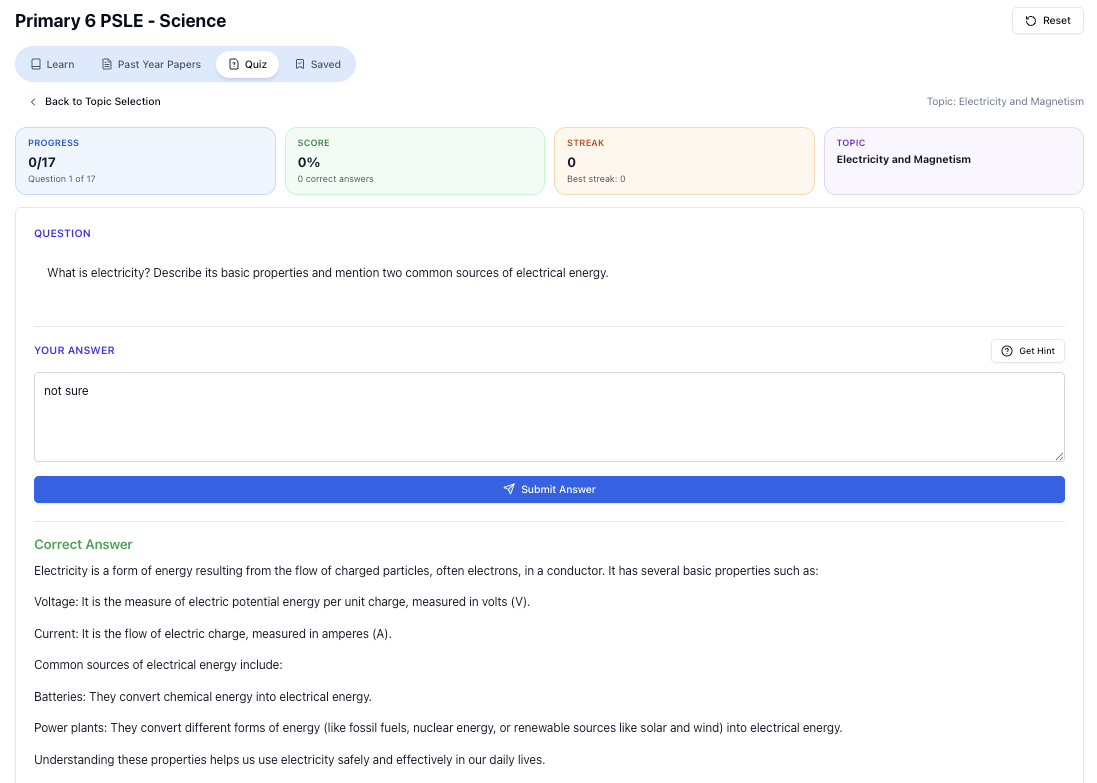
“Practice PSLE Science questions and get clear, step-by-step answers instantly.”
👉 Try a question now and see how fast you can improve.
Ready to practise?
If you want a Singapore-focused AI tutor you can use immediately (website, no sign-up), try Tutorly here:
Related Articles
Free on Tutorly.sg
Practise with step-by-step help — free to start
On Tutorly.sg/app you can practise unlimited Singapore syllabus questions, get instant explanations when you are stuck, and use past-year papers — no sign-up needed to start.
- ✓ PSLE, O Level, A Level, and more
- ✓ Step-by-step working when you are stuck
- ✓ Works on phone and laptop