

Free on Tutorly.sg
Practise with step-by-step help — free to start
On Tutorly.sg/app you can practise unlimited Singapore syllabus questions, get instant explanations when you are stuck, and use past-year papers — no sign-up needed to start.
- ✓ PSLE, O Level, A Level, and more
- ✓ Step-by-step working when you are stuck
- ✓ Works on phone and laptop
Introduction: PSLE Stress Is Real (But Your Revision Can Be Smarter)
If you’re preparing for PSLE in Singapore, your life is probably a mix of:
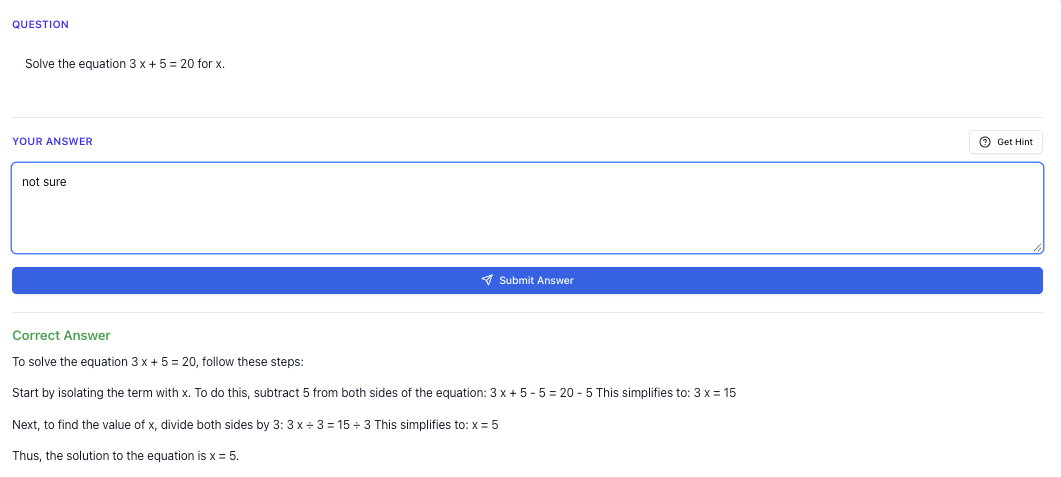
“Stuck on a question? See simple explanations that help you understand fast.”
👉 Give it a try and turn confusion into clarity in minutes.
Why Use An AI Tool For PSLE Revision In Singapore?
Before we dive into specifics, you should be clear about what an AI tool can and cannot do.
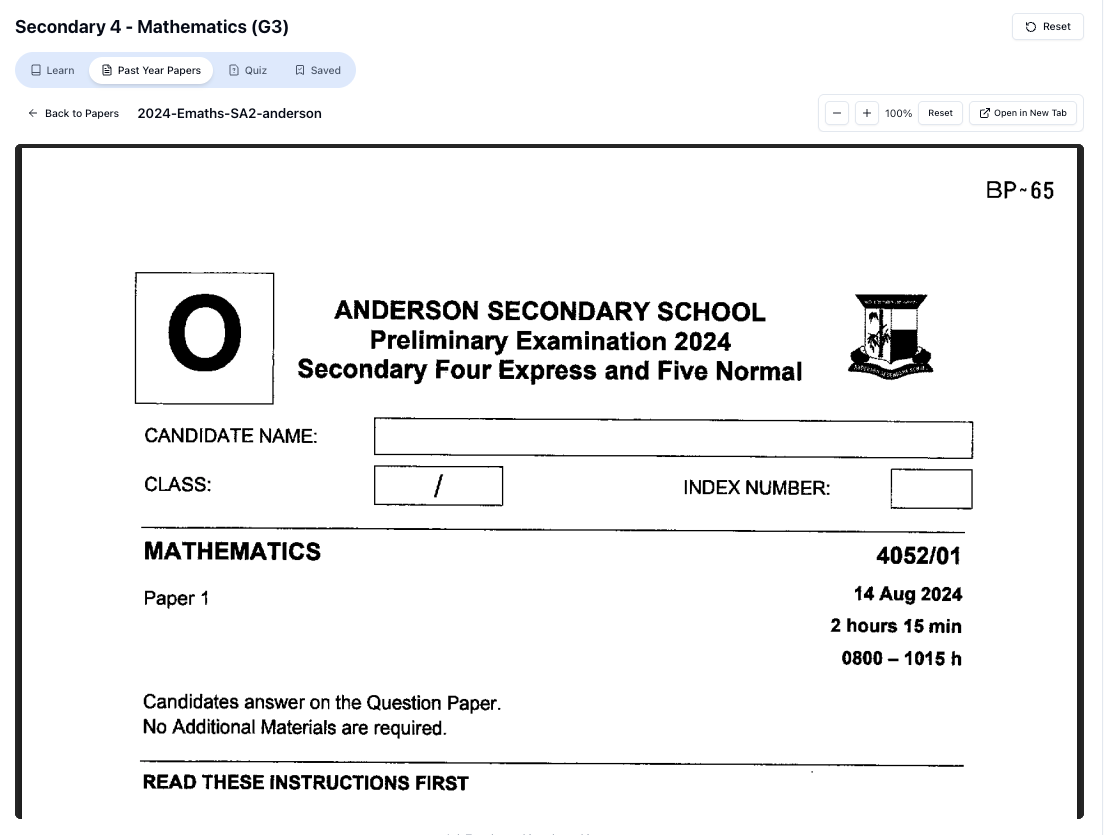
“Access more than 1000+ past year papers to practice”
👉 Start a paper today and test yourself like it’s the real exam.
What An AI Tool Is Good For
Used properly, an AI tutor like Tutorly.sg can help you:
- Get instant explanations at your level
When you’re stuck on a PSLE question at 10.30pm, your school teacher isn’t around, and your parents may not remember how to do ratio or synthesis & transformation.
An AI tutor can:
- Explain the concept in simple steps
- Use examples similar to PSLE questions
- Re-explain in a different way if you still don’t get it
- Practise more, without waiting for someone to mark
You can:
- Try your own answer
- Check if your final answer is correct
- See a step-by-step solution to compare with your own
This is especially useful for Math and Science structured questions, where working matters.
- Revise according to MOE / PSLE style
Because Tutorly is built for Singapore, it knows:
- PSLE-style question formats
- MOE terminology (e.g. “model method”, “heuristics”, “open-ended Science questions”)
- Local context (e.g. MRT, HDB, NEA, hawker centres)
No need to wait for tuition day. If you suddenly realise you forgot how to do area of a triangle or subject-verb agreement, you can get help immediately.
How To Use An AI Tool For PSLE English Revision
PSLE English isn’t just about being “good at English”. It’s very exam-format specific:
- Grammar & vocabulary
- Comprehension
- Situational writing
- Continuous writing (composition)
- Editing
- Synthesis & transformation
Here’s how to use an AI tool like Tutorly for each part.
1. Grammar & Vocabulary Practice
You can ask Tutorly things like:
“Explain the difference between ‘has been’ and ‘had been’ with PSLE examples.”
Or:
“Give me 5 PSLE-style multiple-choice questions to practise prepositions, then mark my answers.”
How to use it well:
- Step 1: Ask for a small set of questions (e.g. 5–10).
- Step 2: Answer them yourself first (on paper or in your head).
- Step 3: Key in your answers and let Tutorly check.
- Step 4: For every wrong answer, ask:
“Explain why my answer is wrong in simple steps, like how a PSLE teacher would explain.”
This way, you’re not just memorising; you’re actually understanding the rule.
2. Synthesis & Transformation Help
S&T is one area many P 6 students struggle with.
Example prompt you can use:
“This is a PSLE-style synthesis & transformation question I don’t know how to do:
‘The boy was tired. He continued doing his homework.’
Join the two sentences using ‘although’.
Show me the correct answer and explain why other common answers are wrong.”
Tutorly can:
- Give the correct sentence:
“Although the boy was tired, he continued doing his homework.” - Explain why things like
“Although the boy was tired but he continued doing his homework.”
are wrong (you don’t use both “although” and “but” together).
3. Situational Writing
For situational writing (emails, letters, reports), AI can help you:
- Understand the tone (formal / informal)
- Structure your answer (introduction, body, closing)
- Check if you covered all the points in the question
Example:
“I have a PSLE situational writing question about writing an email to my principal about a school event. Help me plan the structure and key points first, then I will write my own answer.”
Important: Write your own answer first.
After that, you can paste it in and ask:
“Mark this like a PSLE teacher. Comment on content, language and tone. Suggest 3 improvements.”
4. Composition (Continuous Writing)
This is where many students misuse AI by asking it to “write the whole compo”. That doesn’t help you improve.
A better way:
- Use AI to brainstorm ideas
“The PSLE composition topic is ‘A Difficult Choice’.
Give me 3 possible storylines that are realistic for a P 6 student in Singapore, with clear problem and resolution.”
- Ask for help with structure
“Help me plan a 5-paragraph structure (intro, build-up, problem, climax, conclusion) for Storyline 2.”
-
Write the composition yourself.
-
Use AI for feedback
Paste your compo and ask:
“Mark this like a PSLE English teacher.
- Comment on content and organisation.
- Point out 5 grammar or vocabulary mistakes.
- Suggest better phrases for my weak parts, but keep it realistic for PSLE level.”
This way, you still do the real thinking and writing, and AI acts like a patient marker giving feedback.
How To Use An AI Tool For PSLE Math Revision
For PSLE Math, practice is everything—but mindless practice doesn’t help. You need to understand your mistakes.
Tutorly is especially useful here because it:
- Checks your final answer
- Then shows you a step-by-step method to reach the answer
1. Clarifying Concepts You Keep Forgetting
If there’s a topic that always confuses you (e.g. ratio, percentage, area & perimeter, volume, speed), you can ask:
“Explain PSLE ratio questions in a simple way using model method, with 3 example questions and full solutions.”
Or:
“I don’t understand how to convert fractions to percentages. Explain step-by-step and give me 5 practice questions. After I answer, check my answers.”
You can also ask it to:
- Compare different methods (e.g. model method vs algebra)
- Explain why a certain step is done, not just “do this, do that”
2. Using AI For Word Problem Practice
This is where many P 6 students lose marks.
Example:
“Here is a PSLE-style word problem I’m stuck on:
‘Ali had some stickers. Ben had 3 times as many stickers as Ali. After Ali gave away 24 stickers and Ben gave away 30 stickers, they had the same number of stickers. How many stickers did Ali have at first?’
Show me a step-by-step solution using model method.”
Tutorly will:
- Show the model / reasoning in words
- Break down each step clearly
- Help you see the relationship between the numbers
Once you understand, try another similar question (you can ask Tutorly to generate one) and solve it without looking at the solution first.
3. Checking Your Work Efficiently
When you do your own assessment books or school worksheets, you can use Tutorly like this:
- Finish a page of questions.
- For each question you’re unsure of, type:
“This is my final answer: 48 cm².
The question is: [paste question].
Tell me if my answer is correct. If it’s wrong, show me a clear step-by-step solution.”
- Compare your method with the AI’s method.
If your answer is correct but your method is very long or confusing, you can also ask:
“Is there a shorter or clearer method to solve this, suitable for PSLE Math?”
4. Learning Common PSLE Heuristics
PSLE Math often uses certain heuristics, like:
- Draw a diagram/model
- Guess and check
- Make a systematic list
- Work backwards
- Use before-and-after tables
You can ask:
“Teach me common PSLE Math heuristics with one example each. Then give me 5 practice questions and tell me which heuristic I should use for each.”
This helps you recognise question patterns, not just memorise answers.
How To Use An AI Tool For PSLE Science Revision
PSLE Science is not just memorising facts. MOE is very clear: you must understand concepts and apply them to new situations.
An AI tool can help you do both.
1. Clarifying Concepts (Especially The “Tricky” Ones)
Topics that many students struggle with:
- Heat and temperature
- Forces and friction
- Photosynthesis and respiration
- Circulatory & respiratory systems
- Electrical circuits
Example prompt:
“Explain the difference between heat and temperature in a PSLE Science way. Give me 3 common misconceptions and correct them.”
Or:
“I always get confused by series and parallel circuits. Explain the differences using PSLE-style questions and answers.”
Ask for:
- Simple explanations first
- Then exam-style questions to test yourself
2. Practising Open-Ended Questions
This is where AI can be very helpful if you use it correctly.
Example:
“Here is an open-ended PSLE Science question I tried:
[Paste question]
This is my answer: [paste your answer].
Mark my answer like a PSLE Science teacher.
- How many marks would I get?
- Which key points are missing?
- Show me a full-mark answer.”
Tutorly can:
- Show you the key marking points
- Highlight if you used vague words like “more”, “less”, “some”, instead of proper scientific terms
- Suggest how to phrase answers more precisely
3. Using AI To Build Summary Notes
Instead of reading the whole textbook again and again, you can ask:
“Summarise the key points for the PSLE Science topic ‘Matter’ in bullet points suitable for P 6. Include definitions, examples and common exam traps.”
Then, use these notes to:
- Do quick revision before school tests
- Check if you missed any concept your teacher taught
Free on Tutorly.sg
Practise with step-by-step help — free to start
On Tutorly.sg/app you can practise unlimited Singapore syllabus questions, get instant explanations when you are stuck, and use past-year papers — no sign-up needed to start.
- ✓ PSLE, O Level, A Level, and more
- ✓ Step-by-step working when you are stuck
- ✓ Works on phone and laptop
You can also ask:
“Give me 10 PSLE-style MCQ questions on ‘Matter’ and explain each answer.”
The explanations are very important. Don’t just see “A, B, C, D”. Ask why the wrong options are wrong.
Avoiding The Biggest Mistake: Using AI Just To Copy Answers
Let’s be honest: it’s very tempting to paste a question and say:
“Give me the answer.”
But if you rely on that, you might feel “productive” now, but:
- You won’t remember how to solve similar questions in the exam
- You’ll panic during PSLE when there’s no AI
- Your fundamentals will be weak going into Secondary 1
Here’s a simple rule you can follow:
The 3-Step “Responsible AI” Method
- Try first (even if you’re unsure).
Spend at least 3–5 minutes thinking and writing something down.
- Then ask AI to check and explain.
- “My answer is 72. Is it correct? If not, show me the right method step-by-step.”
- “This is my Science explanation. What did I miss?”
- Do one similar question without help.
“Doing Secondary Science? Pick a topic and practise like it’s a real exam — with clear answers right after.”
👉 Try Tutorly now and start a Science topic in seconds.

After seeing the solution, immediately ask Tutorly:
“Give me another similar PSLE-style question to practise the same concept, but with different numbers or context.”
Solve that on your own first. This is how real learning happens.
Why Use Tutorly.sg As Your AI Tool For PSLE Revision In Singapore?
You might be thinking, “There are so many AI tools, why specifically Tutorly?”
Here’s what makes Tutorly.sg different and actually useful for PSLE students:
1. Built For Singapore, Not Overseas Syllabuses
Many generic AI tools are trained on global content, so:
- The math methods may not follow MOE style
- Science examples may not match what you learn in school
- English marking may not reflect PSLE expectations
Tutorly is designed only for Singapore students (Primary 1 to JC 2), so it understands:
- PSLE, O Levels, A Levels
- MOE syllabus and local exam formats
- Singapore context (CCA, HDB, MRT, etc.)
2. AI Tutor Website (Not A Mobile App)
Tutorly is a website, not a mobile app, so you can use it on:
- Your home computer
- A laptop
- A tablet with browser
You just go to:
👉 https://tutorly.sg/app
No need to download anything.
3. Proven And Recognised In Singapore
- Used by thousands of students in Singapore
- Mentioned on Channel NewsAsia (CNA) as part of how students are using AI for learning
So you’re not experimenting with something random; it’s already part of the local education conversation.
4. Designed For Self-Study
Tutorly is especially helpful if:
- Your parents are busy
- You don’t have tuition for every subject
- You want to revise at your own timing
It’s like having a patient tutor sitting beside you, explaining things over and over without getting tired.
Practical Study Plans: How To Fit AI Into Your PSLE Revision Routine
Let’s make this very concrete. Here are some sample routines you can adapt.
Option 1: Weekday “Mini Sessions” (30–45 minutes)
For busy days with school and CCA.
Example (Monday – English focus):
-
10 min – Grammar practice with Tutorly
- Ask for 10 PSLE-style MCQs on a weak area (e.g. tenses).
- Do them, check, and review mistakes.
-
15 min – Compo or situational writing planning
- Take one topic.
- Use Tutorly to brainstorm ideas and structure.
- Write an introduction or one body paragraph.
-
10–15 min – Reading & vocabulary
- Ask Tutorly:
“Give me a short passage (about 300 words) suitable for P 6 with 5 vocabulary questions at the end.”
- Read, answer, and check.
- Ask Tutorly:
Example (Tuesday – Math focus):
-
15 min – One topic revision
- E.g. fractions.
- Ask Tutorly for a quick explanation and 5 practice questions.
-
15–20 min – School worksheet help
- Do your school questions.
- Use Tutorly only to check and explain questions you’re stuck on.
Option 2: Weekend “Deep Dive” (1.5–2 hours)
For more serious revision.
Example (Saturday – Science focus):
-
20–30 min – Concept revision
- Choose 1–2 topics (e.g. “Heat” and “Matter”).
- Ask Tutorly for summary notes and common misconceptions.
-
30–40 min – Open-ended practice
- Use your school papers or assessment books.
- After writing your answers, paste them into Tutorly for marking and improvement suggestions.
-
20–30 min – Mixed-topic MCQ
- Ask for a mini “mock” set:
“Give me 15 PSLE-style Science MCQ questions across different topics.”
- Do them timed, then review every explanation.
- Ask for a mini “mock” set:
Tips For Parents: How To Guide Your Child Using AI For PSLE
If you’re a parent reading this, here’s how you can use an AI tool like Tutorly to support your child without hovering over them .
1. Set Clear Rules For Use
For example:
- Must try every question first before asking AI
- Can use AI for checking and explaining, not for copying homework
- No switching to games / unrelated sites during revision time
2. Focus On Understanding, Not Just Scores
When reviewing with your child, ask:
- “What did you learn from this mistake?”
- “Can you explain the solution to me in your own words?”
You can even ask Tutorly:
“Explain this solution in a way a parent can understand so I can test my child.”
3. Use AI To Save Your Own Time
If you’re not confident in PSLE Math or Science, you don’t have to struggle with the marking schemes.
Let Tutorly handle:
- Explaining concepts
- Showing step-by-step solutions
- Marking open-ended answers
You can focus on:
- Encouraging your child
- Making sure they have a consistent routine
- Checking that they’re not just copying
Common Questions About Using AI For PSLE Revision In Singapore
“Will AI make my child lazy?”
It depends how it’s used.
If your child is only asking for answers, then yes, it can become a shortcut.
But if you set rules like:
- Try first
- Ask AI to explain
- Do a similar question without help
Then AI becomes a powerful learning tool, not a shortcut.
“Is it safe to rely on AI explanations?”
With generic AI tools, sometimes you do have to be careful.
But with Tutorly.sg, the content is designed around:
- MOE syllabus
- Local exam styles
- Singapore context
Of course, if something looks very different from what the school teacher says, always clarify with your teacher. But for most day-to-day revision, it’s a very helpful support.
“Can AI replace tuition?”
For some students, AI + school + self-discipline may be enough.
For others, they still benefit from:
- A human tutor to push them
- Personalised strategies
- Emotional support
Think of Tutorly as:
- A helper - Great for daily practice, last-minute questions, and clarifying doubts
- Something that can reduce the need for extra tuition hours, or make tuition more effective (because you come prepared with specific questions)
Final Thoughts: Study Smarter, Not Just Harder
PSLE is important, but it doesn’t have to destroy your entire Primary 6 year.
Using an AI tool for PSLE revision in Singapore is not about replacing your teacher or your own effort. It’s about:
- Getting help anytime you’re stuck
- Practising more efficiently
- Understanding your mistakes faster
- Building confidence step by step
If you use it wisely—try first, then check, then practise again—you’ll see real improvement.
Try Tutorly.sg For Your PSLE Revision
If you want to start using an AI tool that’s actually built for Singapore PSLE students, you can try Tutorly directly in your browser:
👉 Start here: https://tutorly.sg/app
And if you want to read more about how the AI tutor works for Singapore students from Primary 1 to JC 2, including PSLE, O Levels and A Levels:
👉 Learn more: https://tutorly.sg/ai-tutor-singapore
You don’t need to wait for tuition day or feel stuck alone with your homework.
Use Tutorly as your AI tutor website, and turn your PSLE revision into something more manageable—and a lot less stressful.
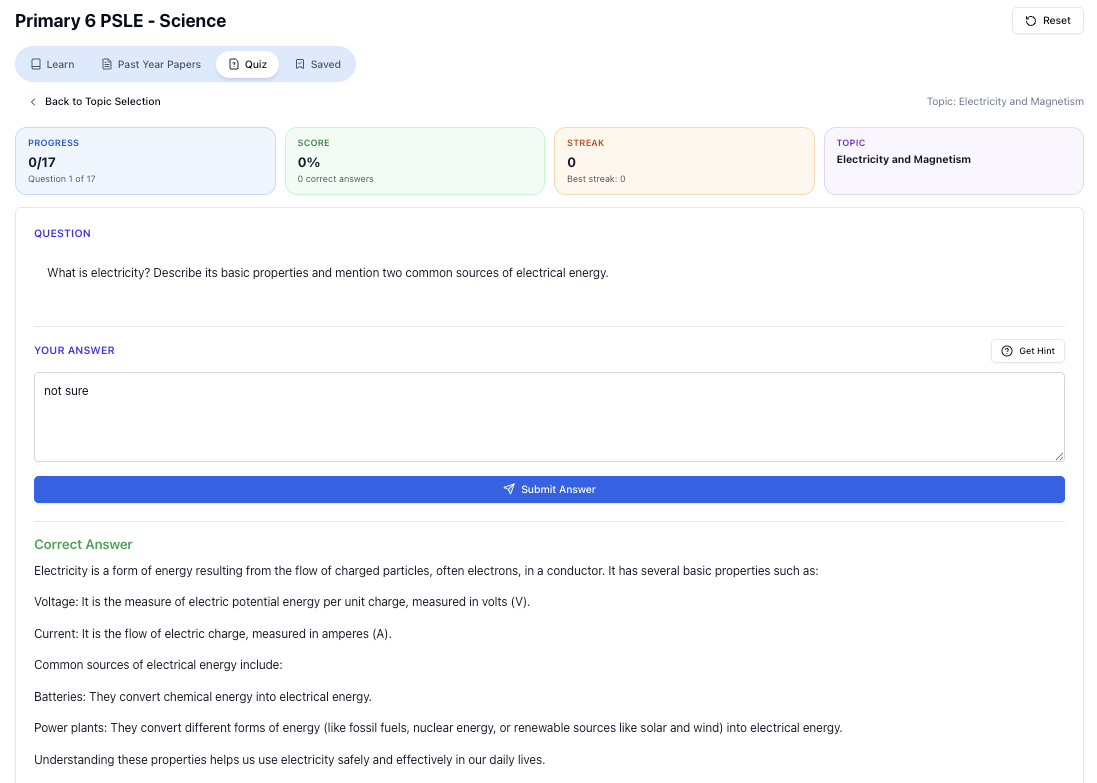
“Practice PSLE Science questions and get clear, step-by-step answers instantly.”
👉 Try a question now and see how fast you can improve.
Ready to practise?
If you want a Singapore-focused AI tutor you can use immediately (website, no sign-up), try Tutorly here:
Related Articles
Free on Tutorly.sg
Practise with step-by-step help — free to start
On Tutorly.sg/app you can practise unlimited Singapore syllabus questions, get instant explanations when you are stuck, and use past-year papers — no sign-up needed to start.
- ✓ PSLE, O Level, A Level, and more
- ✓ Step-by-step working when you are stuck
- ✓ Works on phone and laptop