

Free on Tutorly.sg
Practise with step-by-step help — free to start
On Tutorly.sg/app you can practise unlimited Singapore syllabus questions, get instant explanations when you are stuck, and use past-year papers — no sign-up needed to start.
- ✓ PSLE, O Level, A Level, and more
- ✓ Step-by-step working when you are stuck
- ✓ Works on phone and laptop
If you’re studying in Singapore right now, your life is basically:
School → CCA → tuition → homework → revision → repeat.
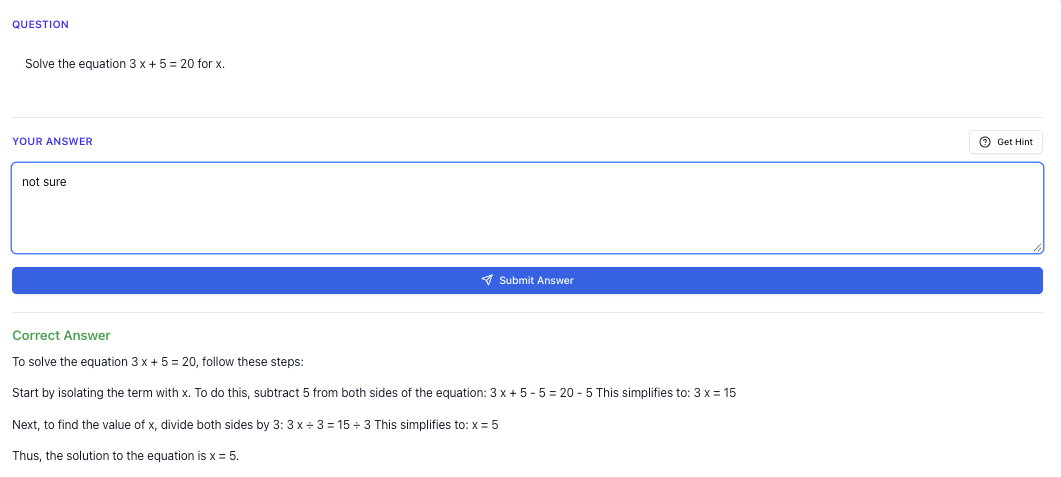
“Stuck on a question? See simple explanations that help you understand fast.”
👉 Give it a try and turn confusion into clarity in minutes.
1. What Exactly Is An AI School Study Tool (Singapore Context)?
Let’s be clear first.
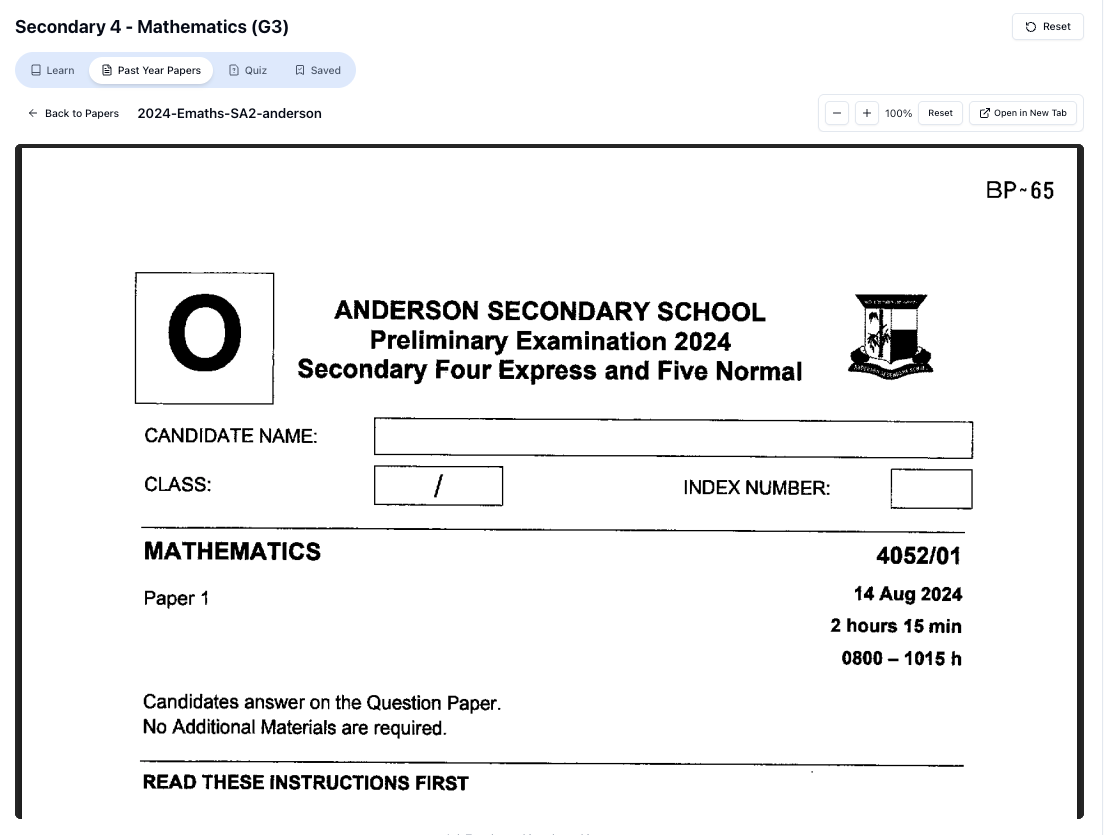
“Access more than 1000+ past year papers to practice”
👉 Start a paper today and test yourself like it’s the real exam.
When I say “AI school study tool” here, I’m not talking about some random global chatbot that doesn’t know what “model essay for situational writing” or “Sec 3 A-Math indices” even means.
I’m talking about something like Tutorly.sg:
- Built specifically for Singapore students (P 1–JC 2)
- Aligned to MOE syllabus, PSLE, O Level, N Level, A Level
- Available on the web (no need to download anything – it’s a website, not a mobile app)
- Used by thousands of students in Singapore, and even mentioned on Channel NewsAsia (CNA)
The idea is simple:
You ask a question → AI gives you a clear explanation step by step → you understand and try similar questions on your own.
Done right, it’s like having a patient tutor sitting beside you, anytime, anywhere.
2. Why Generic AI Tools Often Fail Singapore Students
You might be wondering, “Why can’t I just use any free AI chatbot?”
You can, but here’s what usually goes wrong for Singapore students.
2.1 Not aligned to MOE syllabus
Global AI tools:
- Use US/UK curriculum examples
- Don’t follow Singapore exam formats
- May give concepts that are not tested here (or tested differently)
Example:
- You ask for help with PSLE model drawing.
- A generic AI replies with some US-style bar models or even algebra that’s not how MOE expects P 5/P 6 students to show working.
Or:
- You ask for O Level Social Studies SBQ help.
- It gives you some generic “source-based question” answer structure that doesn’t match LORMs / inference + evidence style used here.
2.2 Wrong or misleading content
Generic AI can:
- Invent syllabus topics that don’t exist in MOE
- Use different notations (e.g. statistics or vectors)
- Give essay structures that don’t match SEAB marking schemes
When you’re in Sec 4 or JC 2, you don’t have time to “filter” wrong or irrelevant content. You need something that speaks Singapore exam language straightaway.
This is why using an AI tool built for Singapore, like Tutorly, matters. It’s trained and tuned around our system: PSLE bands, O Level formats, A Level question styles.
3. How A Singapore-Focused AI Study Tool Actually Helps You
Let’s break it down by level and subject, so you can see how to use it in a practical way.
3.1 Primary (P 1–P 6, PSLE)
Common struggles:
- Heuristics & word problems
- Composition ideas
- Science open-ended questions
How an AI study tool helps:
- Math word problems (including model drawing)
- You paste or type the question.
- AI shows you how to understand the story, then walks through a solution.
- For PSLE level, it can suggest ways to think about model drawing or simple equations, depending on what’s appropriate.
You can then try a similar question on your own and compare your final answer with the AI’s.
- English composition ideas
- You give the topic, e.g. “Write a composition about a time you lost something important.”
- AI helps you brainstorm:
- Possible plots
- Characters
- Feelings and descriptive phrases
- It can also help you improve a paragraph you already wrote, showing better vocabulary or sentence structures.
Important: use it to improve your own writing, not to let it write everything for you.
- Science open-ended questions
- You paste the question: “Explain why there are water droplets on the outside of a cold glass of water.”
- AI explains condensation in PSLE-friendly wording, with key terms that markers expect.
3.2 Secondary (Sec 1–4, N/O Levels)
Common struggles:
- Algebra, indices, surds, trigonometry
- Chemistry mole concept, acids & bases, qualitative analysis
- Social Studies SBQ and structured essays
- English situational writing & discursive essays
How an AI study tool helps:
- Math step-by-step explanations
You can:
- Paste a question:
- AI shows the step-by-step solution from clearing denominators to isolating 𝑥.
- You compare your own working with the AI’s explanation, and see where your logic went wrong.
Remember: the AI checks the final answer, then shows you a clear route to get there.
-
Chemistry calculations & concepts
- Ask: “Explain mole concept for O Level with a simple example.”
- Then ask a follow-up: “Now help me with this question: 2 g of hydrogen reacts with oxygen to form water. Calculate the number of moles of hydrogen.”
- AI guides you through the calculation, and you can then apply the method to your own worksheet.
-
English & Social Studies
- For situational writing, you can ask:
“What is the structure and tone for an O Level situational writing email to a principal?” - For Social Studies SBQ, you can paste a source and the question, and ask:
“Show me how to answer this using inference + evidence with explanation in Singapore O Level style.”
- For situational writing, you can ask:
Use it to learn the structure and exam language, not to copy full essays.
3.3 JC (JC 1–JC 2, A Levels)
Common struggles:
- H 2 Math (vectors, complex numbers, calculus)
- H 2 Chemistry (organic mechanisms, energetics, equilibria)
- H 2 Physics (kinematics, fields, quantum)
- GP essay planning and AQ
How an AI study tool helps:
-
Breaking down abstract math
- Ask: “Explain what a vector is in H 2 Math using simple analogies first, then show a formal definition.”
- Then: “Now show worked examples for finding the angle between two vectors.”
- You get both conceptual understanding and exam-style application.
-
Organic chemistry mechanisms
- Paste a question: “Explain the mechanism for the reaction between bromoethane and aqueous NaOH.”
- AI shows nucleophilic substitution (SN 1/SN 2) explanation, with conditions and reasoning.
-
GP essays & AQ
- Use it to generate outlines:
- Thesis
- 2–3 main points
- Counter-argument
- Conclusion
- Then you write the essay yourself, and ask AI how to tighten your argument or improve examples.
- Use it to generate outlines:
4. How To Use An AI Study Tool Without Getting Dependent
This part is important.
AI can help you learn faster, but if you use it wrongly, you’ll just:
- Copy answers
- Feel “productive”
- Then blank out in the exam hall
Here’s a simple rule you can follow.
4.1 The “3-Step” AI Usage Rule
For any question:
-
Try it yourself first
- Spend at least 5–10 minutes honestly attempting.
- Even if you’re stuck, write down what you think might work.
-
Ask the AI after your attempt
- Paste the question into Tutorly.sg.
- Ask for a step-by-step explanation or concept breakdown.
- Compare your attempt with the AI’s reasoning.
-
Do a similar question without AI
- Immediately find a similar question (from your textbook, Ten-Year Series, school worksheet).
- Solve it fully on your own.
- Only then, if unsure, check with AI again.
This way, AI is a tutor, not a crutch.
4.2 Signs You’re Overusing AI
You might be over-relying on it if:
- You paste whole worksheets and don’t attempt anything first
- You feel lost when you try questions without AI
- You “understand” the AI explanation when reading, but can’t reproduce it the next day
If this sounds like you, adjust your approach:
- Use AI only after you’ve tried a question
- Limit yourself: e.g. for every 1 AI-guided question, do 2–3 solo questions
5. Why Tutorly.sg Works Especially Well As An AI Study Tool In Singapore
Since we’re talking about AI tools in Singapore, I’ll be direct: Tutorly.sg is one of the best fits for local students right now.
Here’s why.
5.1 It’s built around Singapore’s MOE system
Tutorly is not a generic chatbot. It’s tuned for:
- Primary: PSLE-style math problems, Science keywords, composition type questions
- Secondary: O Level / N Level topics, exam formats, question styles
- JC: H 1/H 2 content, A Level style questions, and explanations pitched at your level
You don’t have to explain what “E Math vs A Math” means, or what “Paper 2” refers to. It already understands the context.
### 5.2 It’𝑠 \frac{24}{7} and web-based
You access it through:
- https://tutorly.sg/ai-tutor-singapore
- Or directly at https://tutorly.sg/app
No need to download anything. It runs in your browser, so you can use it on:
- Laptop
- Tablet
- Phone browser
This matters when you’re doing late-night revision and your human tutor is obviously asleep.
5.3 Thousands of Singapore students already use it
You’re not the first one testing this out. Tutorly:
- Has been used by thousands of users in Singapore
- Has even been mentioned on Channel NewsAsia (CNA)
That doesn’t magically make you top in class, but it does show that the platform is trusted and relevant in our local context.
6. Concrete Ways To Use Tutorly.sg For Daily Study
Let’s get practical. Here’s how you can fit an AI school study tool into your actual weekly routine.
6.1 On normal school days
You come home tired, with homework and maybe tuition work.
Plan (30–60 minutes with Tutorly):
Free on Tutorly.sg
Practise with step-by-step help — free to start
On Tutorly.sg/app you can practise unlimited Singapore syllabus questions, get instant explanations when you are stuck, and use past-year papers — no sign-up needed to start.
- ✓ PSLE, O Level, A Level, and more
- ✓ Step-by-step working when you are stuck
- ✓ Works on phone and laptop
-
Homework “stuck” questions (10–20 mins)
- Try the questions first.
- For anything you really can’t solve, paste it into Tutorly.sg/app.
- Ask for a clear explanation and then re-do the steps yourself on paper.
-
Quick concept revision (10–15 mins)
- Before a quiz, ask:
- “Explain photosynthesis for Sec 2 in Singapore context, including key terms needed for exams.”
- “Summarise PSLE percentage word problems with 3 example questions.”
- Use it like a “mini revision sheet” generator.
- Before a quiz, ask:
-
English practice (10–20 mins)
- Paste a paragraph you wrote and ask:
- “How can I improve this for O Level narrative writing? Suggest better vocabulary and sentence flow.”
- Or for GP:
- “Critique this paragraph for clarity and argument strength.”
- Paste a paragraph you wrote and ask:
6.2 During exam periods (CA 1, SA 1, prelims, PSLE/O/A Levels)
You’re probably doing past-year papers and Ten-Year Series.
Plan (1–2 hours with Tutorly, broken into chunks):
-
Timed practice first
- Do a full paper or at least one full section under timed conditions.
- Mark what you can with your own notes/marking scheme.
-
AI as a “post-mortem” tutor
- For questions you got wrong or left blank, paste them into Tutorly.
- Ask:
- “Show me a step-by-step solution.”
- “Explain why my method is wrong compared to the correct one.”
- Take notes on common mistakes you’re making.
-
Targeted drilling
- Once you notice patterns (e.g. always weak in algebra fractions or inference questions in SS), ask Tutorly to:
- Summarise the concept
- Generate a few similar practice questions
- Do those questions on your own, then check.
- Once you notice patterns (e.g. always weak in algebra fractions or inference questions in SS), ask Tutorly to:
7. Using AI To Study Smarter, Not Longer
You don’t always need to study more hours. Sometimes you just need to remove wasted time:
- Staring at a question for 40 minutes and still not understanding
- Re-reading the same paragraph in your textbook 5 times
- Waiting days for a teacher or tutor to reply to your question
Here’s how an AI tool actually saves time without making you lazy.
7.1 Instant clarification
When you’re stuck on something like:
- “Why do we use here and not ?”
- “How do I know if this is an oxidation or reduction reaction?”
- “What exactly does ‘evaluate’ mean in this GP question?”
“Doing Secondary Science? Pick a topic and practise like it’s a real exam — with clear answers right after.”
👉 Try Tutorly now and start a Science topic in seconds.

You can ask Tutorly immediately and get:
- A short explanation
- A simple example
- Sometimes a comparison with a similar but different situation
You don’t waste half an hour searching random websites.
7.2 Turning notes into questions
Instead of just reading notes passively, you can:
- Paste a short chunk of your notes into Tutorly.
- Ask: “Turn this into 5 practice questions at my level.”
- Attempt them without looking at the notes.
- Ask Tutorly to mark your final answers and show worked solutions.
That’s active recall, which is much more effective than just reading.
7.3 Customising difficulty
If something feels too easy or too hard, you can literally say:
- “Make it easier, like Sec 2 level.”
- “Make it tougher, like O Level exam standard.”
- “Explain again, but assume I’m completely new to this topic.”
You don’t get that level of instant adjustment from most textbooks.
8. Common Mistakes Students Make With AI (And How To Avoid Them)
You’re not the first to use AI for studying, so learn from other people’s mistakes.
8.1 Copying full answers for homework
Your teacher might not catch it immediately, but you’re just lying to yourself. In exams, there’s no AI.
Fix:
Use AI to check and understand, not to produce your entire assignment. At minimum, always:
- Attempt first
- Compare methods
- Be able to explain the solution in your own words
8.2 Not asking follow-up questions
If you don’t understand, don’t just accept the explanation and move on.
You can (and should) ask:
- “Explain step 3 in more detail.”
- “Why can’t we do it this other way?”
- “Show me a similar question but slightly simpler.”
Treat it like a real tutor. The more specific your questions, the more helpful the answers.
8.3 Letting AI replace your school teacher / tutor
AI is great, but it doesn’t replace:
- Your teacher’s understanding of your class’s common mistakes
- School’s marking style and expectations
- The human encouragement and push you sometimes need
Use AI as:
Extra support between lessons, late at night, or when you’re revising alone.
Not as a full replacement for school or good teachers.
9. How Parents Can Guide Their Child’s Use Of AI Study Tools
If you’re a parent reading this, you might be thinking:
“Is this just another distraction?”
“Will my child just copy answers?”
“Is it safe?”
Here are some guidelines you can actually implement.
9.1 Set clear rules
For example:
- AI can be used only after your child attempts the question
- No copying full compositions or essays
- Use it mainly for checking, explaining, and revising, not doing entire homework sheets
You can even sit with your child for the first few sessions to see how they’re using it.
9.2 Focus on understanding, not marks alone
Ask your child:
- “Can you explain to me what you just learned from Tutorly?”
- “What mistake did you realise you were making?”
- “What kind of questions are you still scared of?”
If they can explain clearly, the AI is being used well.
9.3 Use Tutorly to fill timing gaps
Many parents in Singapore already have:
- School
- Tuition
- Enrichment
But there are still gaps:
- Late-night questions
- Weekends when tutors are not around
- Last-minute doubts before exams
This is where Tutorly.sg fits in nicely as on-demand support, without needing to schedule anything or travel.
10. Getting Started: A Simple 3-Day Trial Plan With Tutorly.sg
If you’re curious but not sure how to begin, try this mini-plan.
Day 1: Homework helper (30–45 mins)
- Pick one subject you’re weakest in (e.g. Math, Chem, GP).
- Do your homework and mark the questions you’re stuck on.
- Use https://tutorly.sg/app to:
- Get step-by-step explanations
- Ask why your method was wrong
- Note down at least one new thing you learned
Day 2: Concept revision (30–60 mins)
- Choose a topic coming up in a test (e.g. Sec 3 Trigonometry, PSLE Fractions, H 2 Equilibrium).
- Ask Tutorly to:
- Summarise the topic at your level
- Give 3–5 practice questions
- Do the questions, then check your final answers and study the worked solutions.
Day 3: Exam-style practice (45–90 mins)
- Take a section from a past-year paper (e.g. Paper 1 MCQ, or a structured section).
- Do it under timed conditions.
- Use Tutorly as your “after-action review”:
- For each wrong question, get a clear explanation
- Write down the type of mistake (careless, concept, misreading)
- Ask for 1–2 similar questions to practise
After 3 days, you’ll have a clear feel of whether this fits your study style.
11. Final Thoughts: AI Is A Tool, Not A Shortcut
Singapore’s education system is intense. You already know that.
An AI school study tool won’t:
- Magically get you an AL 1 / A 1 / A without effort
- Replace the need to practise past-year papers
- Remove exam stress completely
But used correctly, it can:
- Save you time when you’re stuck
- Explain concepts in a way that finally “clicks”
- Give you immediate feedback any time of the day
- Make self-study less painful and more efficient
If you want an AI study tool that actually understands MOE syllabus, PSLE, O Level, and A Level standards, and is already used by thousands of Singapore students, then:
- Learn more here: https://tutorly.sg/ai-tutor-singapore
- Or jump straight in and start asking questions at: https://tutorly.sg/app
Ready To Try A Singapore-Focused AI Study Tool?
You don’t need to change your entire study routine overnight.
Just start by using Tutorly the next time you’re stuck on a question, or when you want a quick, clear explanation before a test.
Visit https://tutorly.sg/app, ask your first question, and see how it feels to have a friendly AI tutor that actually speaks “Singapore student”.
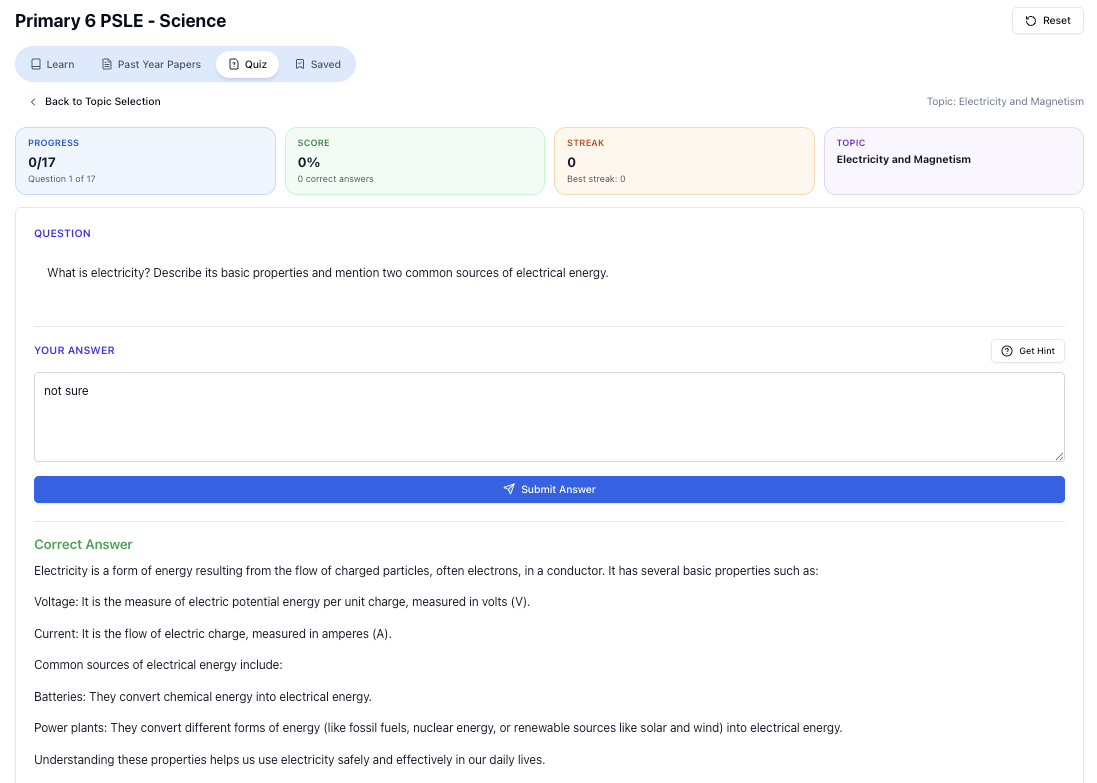
“Practice PSLE Science questions and get clear, step-by-step answers instantly.”
👉 Try a question now and see how fast you can improve.
Ready to practise?
If you want a Singapore-focused AI tutor you can use immediately (website, no sign-up), try Tutorly here:
Related Articles
Free on Tutorly.sg
Practise with step-by-step help — free to start
On Tutorly.sg/app you can practise unlimited Singapore syllabus questions, get instant explanations when you are stuck, and use past-year papers — no sign-up needed to start.
- ✓ PSLE, O Level, A Level, and more
- ✓ Step-by-step working when you are stuck
- ✓ Works on phone and laptop