

Free on Tutorly.sg
Practise with step-by-step help — free to start
On Tutorly.sg/app you can practise unlimited Singapore syllabus questions, get instant explanations when you are stuck, and use past-year papers — no sign-up needed to start.
- ✓ PSLE, O Level, A Level, and more
- ✓ Step-by-step working when you are stuck
- ✓ Works on phone and laptop
Introduction: Why AI Quiz Generators Matter In Singapore
If you’re studying in Singapore, your life is basically structured around tests:
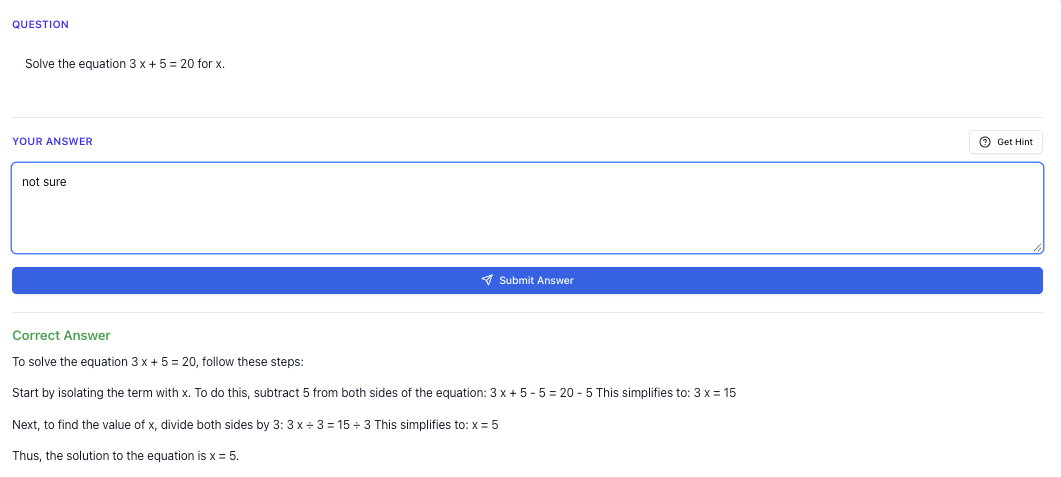
“Stuck on a question? See simple explanations that help you understand fast.”
👉 Give it a try and turn confusion into clarity in minutes.
What Is An AI Quiz Generator (For Singapore Students, Specifically)?
An AI quiz generator is simply a tool that can:
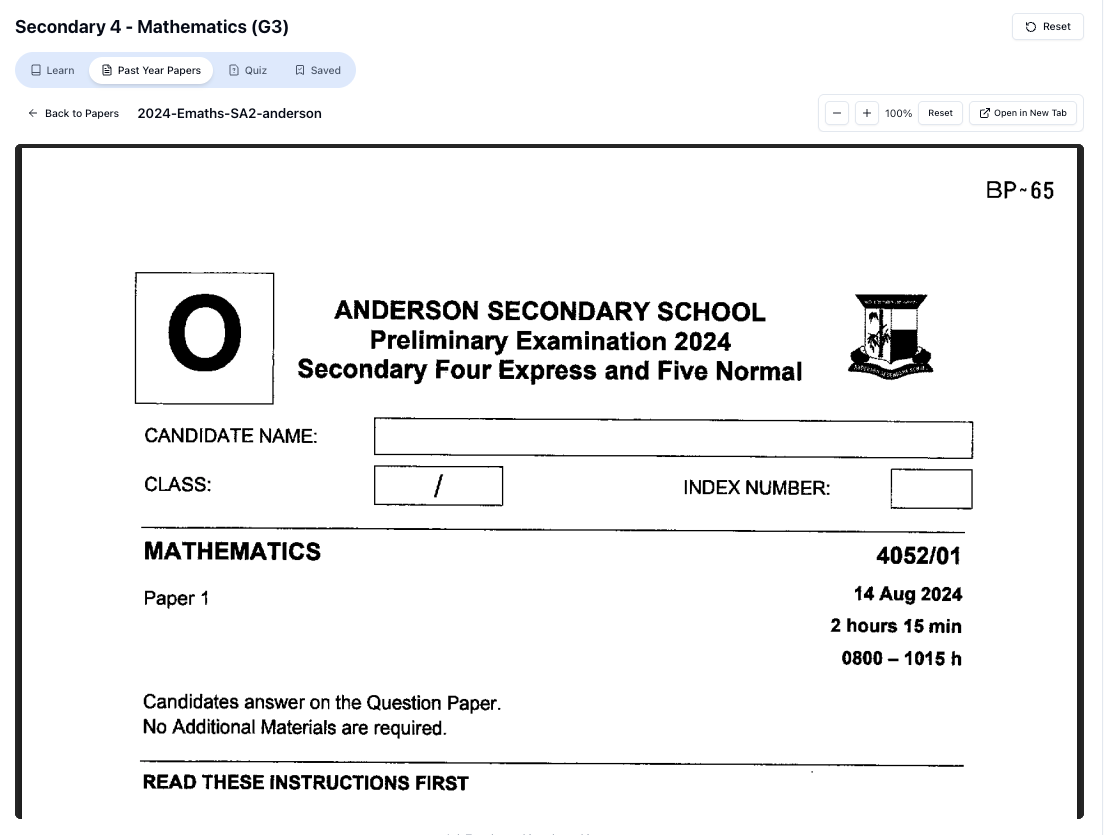
“Access more than 1000+ past year papers to practice”
👉 Start a paper today and test yourself like it’s the real exam.
- Generate questions for you on the spot
- Let you attempt them
- Check your final answers
- Show you step‑by‑step how to get the correct answer
For Singapore students, the key is this:
The questions must match the MOE syllabus and the style of PSLE / O Level / A Level exam questions.
A random overseas AI tool might:
- Use different terminology (e.g. “grade 7” instead of Sec 1)
- Test topics that aren’t in the MOE syllabus
- Ignore local exam formats (e.g. structured questions, Paper 2 formats, comprehension styles)
That’s why a Singapore‑specific tool like Tutorly.sg matters. It’s built for:
- Primary 1 to JC 2
- MOE-aligned content (PSLE, N/O/A Levels)
- Local exam styles and phrasing
So when you ask it to generate a quiz on, say, “Sec 3 Amath indices and surds” or “P 5 English synthesis & transformation”, you’re not getting some random overseas worksheet. You’re getting practice that actually helps you for school and national exams.
Why AI Quiz Generators Are So Useful In Singapore’s Exam Culture
You already know our system is intense. But let’s be clear about what’s really stressing students out:
- Not knowing what kind of questions will be tested
- Feeling like there’s never enough practice
- Having doubts at night when tuition isn’t around
- Wasting time flipping through assessment books just to find the right type of question
An AI quiz generator helps with these pain points:
1. Instant, Targeted Practice
Instead of doing 50 random questions, you can do:
- “10 PSLE-style fraction word problems with unlike denominators”
- “8 O Level Physics electricity questions with calculations”
- “5 A Level H 2 Chem organic mechanism questions on nucleophilic substitution”
You get exactly what you need, when you need it.
2. No Waiting For Help
You don’t have to wait till tuition class or school the next day.
With a tool like Tutorly.sg, you can:
- Generate a quiz at 11.30pm
- Attempt it
- Check answers immediately
- See worked solutions step‑by‑step
This is especially helpful during exam periods when your doubts pile up quickly.
3. Practice Without Wasting Paper (Or Money)
You don’t need to keep buying new assessment books just to get “fresh” questions.
With an AI quiz generator:
- You can generate unlimited new questions
- You can focus on weak topics instead of redoing everything
- You save time and money, and you don’t need to carry heavy books around
How Tutorly.sg Works As An AI Quiz Generator (Website, Not App)
First, an important point:
Tutorly.sg is a website, not a mobile app.
You access it via your browser: https://tutorly.sg/app
Tutorly has been:
- Mentioned on Channel NewsAsia (CNA)
- Used by thousands of students in Singapore across Primary, Secondary, and JC
Here’s how it functions as a practical AI quiz generator for you.
Step 1: Choose Your Level & Subject
You start by selecting:
- Level: e.g. P 6, Sec 3, JC 1
- Subject: e.g. Math, Science, English, A Math, H 2 Chemistry
Tutorly already knows the MOE syllabus for that level and subject, so you don’t have to explain your whole background.
Step 2: Tell It The Topic & Question Type
You can be as specific as you want. For example:
- “Generate 5 PSLE-style fraction word problems involving mixed numbers and unlike denominators.”
- “Create 8 O Level E Math questions on quadratic factorisation and solving.”
- “Give me 6 JC 2 H 2 Physics questions on SHM including energy calculations.”
- “Make 5 Sec 2 English comprehension questions based on this passage: [paste passage].”
Step 3: Attempt The Questions
Tutorly will generate the questions in text. You:
- Solve them on your own (on paper or mentally)
- Type in your final answers
Important:
Tutorly does not check every working step. It checks the final answer, then shows you how to get the correct one.
Step 4: Check Answers & Learn From Worked Solutions
After you submit your answers:
- Tutorly marks whether your final answer is correct
- Shows you a step‑by‑step solution for each question
- Explains the concept behind the solution (not just the calculation)
So it acts like a tutor sitting next to you, going:
“Okay, here’s where you went wrong. For this kind of question, you should first… then…”
You can try it directly here: https://tutorly.sg/ai-tutor-singapore
Using An AI Quiz Generator For Different Levels In Singapore
Let’s break it down by key milestones: PSLE, O Levels, and A Levels.
For PSLE Students
At PSLE level, the main pressure points are:
- Math problem sums
- English Paper 2 (grammar, synthesis, comprehension)
- Science open-ended questions
PSLE Math
Common weak areas:
- Fractions
- Ratio
- Percentage
- Rate & speed
- Heuristics (before–after, working backwards, etc.)
How to use an AI quiz generator:
- Pick a specific topic:
- “P 6 Math, ratio word problems involving 3 quantities”
- Ask Tutorly to generate a small quiz, e.g. 5 questions
- Do them under light time pressure (e.g. 10–12 minutes)
- Check answers and read the full worked solutions
Example prompt you can use:
“Generate 5 PSLE-style P 6 Math word problems on ratio involving three quantities. Include at least one question with a before-and-after scenario.”
PSLE English
Useful areas to target:
- Synthesis & transformation
- Grammar cloze
- Comprehension open-ended
Example usage:
- Paste a short passage and ask for 5 comprehension questions
- Ask for 10 synthesis questions focusing on “although”, “despite”, “in spite of”, “because”
Example prompt:
“Create 10 PSLE-style synthesis and transformation questions using connectors like ‘although’, ‘despite’, ‘in spite of’ and ‘because’. Provide model answers.”
PSLE Science
Focus on:
- Explaining concepts clearly
- Using correct scientific terms
- Understanding common experiments and setups
Example prompt:
“Generate 6 PSLE Science open-ended questions on ‘Human Respiratory System’ and ‘Circulatory System’. Include questions that require explaining cause-and-effect.”
For O Level Students (N & O Levels)
By Sec 3–, the content gets heavier, and you have more subjects to juggle.
O Level E Math / A Math
You can use an AI quiz generator to:
- Drill specific topics (e.g. quadratic equations, trigonometry, indices, logarithms)
- Mix topics to simulate Paper 2 style questions
Examples:
- “Generate 8 O Level E Math questions on simultaneous equations, including at least 3 word problems.”
- “Create 6 A Math questions involving indices and surds, increasing difficulty.”
For each question:
- Attempt fully on paper
- Input final answer
- Compare with Tutorly’s step‑by‑step solution
Over time, you’ll start to recognise patterns in questions, which is exactly what helps in exams.
O Level Pure / Combined Science
You can get:
- Structured questions
- Calculation questions
- Short-answer concept checks
Examples:
- “Generate 7 O Level Pure Chemistry questions on mole concept, including one involving gas volume and one involving concentration.”
- “Create 5 Pure Physics questions on kinematics with calculations and graphs.”
Make it realistic by giving yourself exam-style timing, e.g.:
- 1–2 minutes for simple MCQ
- 3–5 minutes for structured/calculation questions
O Level English
For English, an AI quiz generator can help with:
- Editing (grammar, vocabulary)
- Situational writing ideas and outlines
- Comprehension practice
Example prompt:
“Using this passage, generate 8 O Level English Paper 2-style comprehension questions, including vocabulary in context, inference, and language use. Then provide model answers.”
You can also ask Tutorly to:
- Mark your summary answer based on content points and language
- Suggest how to improve clarity and conciseness
For A Level Students (JC 1–JC 2)
At A Levels, the content is deep and the questions are demanding. An AI quiz generator is especially useful for high-yield topics.
H 1/H 2 Math
Commonly tested topics:
- Functions and graphs
- Differentiation & integration
- Maclaurin series
- Complex numbers
- Probability & statistics
Example usage:
- “Generate 5 H 2 Math questions on differentiation applications, including maximum/minimum and rate of change.”
- “Create 6 H 2 Math statistics questions on hypothesis testing with normal distribution.”
After attempting each question:
- Compare not just the final answer, but also the method in the worked solution
- Learn alternative approaches (e.g. different ways to set up an equation)
H 2 Chemistry
Topics like:
- Organic mechanisms
- Equilibria
- Energetics
- Electrochemistry
Example prompt:
“Generate 5 H 2 Chemistry questions on organic mechanisms focusing on nucleophilic substitution and electrophilic addition. Include skeletal formulae described in text and ask for reagents and conditions.”
Free on Tutorly.sg
Practise with step-by-step help — free to start
On Tutorly.sg/app you can practise unlimited Singapore syllabus questions, get instant explanations when you are stuck, and use past-year papers — no sign-up needed to start.
- ✓ PSLE, O Level, A Level, and more
- ✓ Step-by-step working when you are stuck
- ✓ Works on phone and laptop
You can also ask Tutorly to:
- Explain why certain mechanisms are preferred
- Clarify common misconceptions (e.g. SN 1 vs SN 2)
H 2 Physics
High-value areas:
- Kinematics & dynamics
- SHM & waves
- Electric fields & capacitance
- Modern physics
Example prompt:
“Create 6 H 2 Physics structured questions on SHM, including energy, displacement-time and velocity-time graphs, and resonance.”
Use the worked solutions to:
- See how to structure long answers
- Learn how to present reasoning clearly, not just calculations
How To Actually Study Smarter With An AI Quiz Generator
The tool is powerful, but how you use it matters even more. Here’s a practical system.
1. Use It For Short, Focused Sessions
Instead of endless, unfocused study, try:
- 20–30 minutes per session
- 1–2 topics only
- 5–10 questions each time
Example:
- “P 6 Math – Fractions (20 minutes, 8 questions)”
- “Sec 4 E Math – Trigonometry (25 minutes, 6 questions)”
- “JC 2 H 2 Chem – Equilibria (30 minutes, 5 questions)”
This keeps your brain fresh and reduces burnout.
“Doing Secondary Science? Pick a topic and practise like it’s a real exam — with clear answers right after.”
👉 Try Tutorly now and start a Science topic in seconds.

2. Track Your Weak Topics
After each quiz, note:
- Which topics you got wrong
- What kind of mistakes you made (careless? concept? misreading?)
You can keep a simple table:
| Date | Subject | Topic | % Correct | Main Mistake Type |
|---|---|---|---|---|
| 12 May | P 6 Math | Fractions (mixed no.) | 50% | Misread question |
| 14 May | Sec 4 Chem | Redox | 40% | Conceptual |
| 16 May | JC 2 H 2 Math | Integration by parts | 60% | Method error |
Then use Tutorly to regenerate quizzes specifically on your weak areas.
3. Always Review The Solutions (Even If You’re Correct)
Don’t skip the worked solutions just because you got the answer right.
Sometimes:
- Your method is longer than necessary
- You used a risky shortcut
- You were lucky, not solid
By reading Tutorly’s step‑by‑step solution, you can:
- Learn faster methods
- Strengthen your conceptual understanding
- Avoid bad habits before exams
4. Simulate Exam Conditions Occasionally
Once you’re comfortable with a topic:
- Ask Tutorly to generate a longer quiz (e.g. 15–20 questions, or a full-paper style set)
- Set a realistic time limit (e.g. 1 h 45min for an O Level paper)
- Attempt without checking notes
- Mark and review afterwards
This helps with:
- Time management
- Stamina
- Handling exam pressure
Common Mistakes Students Make With AI Quiz Generators
It’s easy to misuse these tools. Watch out for these:
Mistake 1: Treating It Like A Shortcut, Not A Tutor
If you:
- Just copy the solution
- Don’t try the question properly
- Ask for the answer immediately
…you’re not learning. You’re just reading.
Fix: Always attempt first. Even if you’re unsure, write something. Then compare with the solution.
Mistake 2: Asking For Everything At Once
“Give me all the questions I need for O Levels” is not helpful.
You’ll get overwhelmed and waste time.
Fix: Be specific.
- Topic
- Level
- Question type
- Number of questions
Example:
“Generate 7 Sec 3 Pure Physics questions on pressure, including both qualitative and calculation questions.”
Mistake 3: Ignoring The MOE Syllabus
Some students mix overseas topics or ask for things not in the syllabus.
Fix: Stick to MOE topics and your school’s scheme of work. Tools like Tutorly.sg are already aligned to the MOE syllabus, so you’re safe as long as you choose the correct level and subject.
Mistake 4: Not Combining With Other Study Methods
AI quiz generators are powerful, but they don’t replace:
- School notes
- Ten-year series (TYS)
- Past-year papers
- Teacher feedback
Fix: Use AI quizzes to support your main revision, especially for:
- Daily practice
- Weak topics
- Last-minute clarification
How Parents Can Use An AI Quiz Generator To Help Their Child
If you’re a parent, you might not remember all the content from school, but you still want to support your child.
Here’s how you can use an AI quiz generator like Tutorly.sg effectively:
1. Set Small, Clear Targets
Instead of saying, “Go and study,” try:
- “Do one 20-minute quiz on P 6 Fractions today.”
- “Finish 8 questions on Sec 2 Algebra before dinner.”
You can even sit with your child while they:
- Generate the quiz
- Attempt it
- Review the solutions
2. Use It As A “Night Tutor”
If your child usually asks:
- “Mum/Dad, how to do this question?” at 10pm
You can guide them to:
- Type or paste the question into Tutorly
- Get a step‑by‑step explanation
- Ask follow-up questions if they still don’t understand
This reduces stress for both you and your child, especially during exam season.
3. Monitor Progress Without Being Overbearing
You don’t need to mark their work yourself.
Instead, you can:
- Ask them to show you their quiz history
- Look at which topics they’re struggling with
- Encourage them to redo weak areas using new AI-generated quizzes
Why Tutorly.sg Is A Strong Choice For Singapore Students
There are many AI tools out there, but Tutorly.sg is designed specifically for Singapore’s MOE system.
Here’s what makes it stand out:
- Built for P 1–JC 2: From simple P 1 addition to JC 2 H 2 Math and Science
- MOE-aligned: PSLE, O Level, and A Level style questions
- website access: No need to download an app; just go to https://tutorly.sg/app
- Trusted locally: Mentioned on Channel NewsAsia (CNA) and used by thousands of Singapore students
- Step-by-step explanations: It doesn’t just say “wrong”; it shows you how to do it properly
You can explore more about how it works here:
https://tutorly.sg/ai-tutor-singapore
Simple Study Plans Using An AI Quiz Generator (By Level)
To make this super practical, here are sample weekly plans.
PSLE Student (P 5–P 6)
Goal: Strengthen Math and Science, maintain English
Weekly plan:
- 3 x per week – 20 minutes each
- Day 1: P 6 Math fractions/ratio (8 questions)
- Day 2: P 6 Science (6 open-ended questions, alternating topics)
- Day 3: P 6 English synthesis & transformation (10 questions)
Use Tutorly’s explanations to build a “mistake notebook” where you write down:
- The question type
- Your mistake
- The correct method
### 𝑂 Level Student (Sec 3–\frac{4}{5})
Goal: Prepare for EOY / Prelims / O Levels
Weekly plan:
- 4 x per week – 30 minutes each
- Day 1: E Math (one topic, 8–10 questions)
- Day 2: Pure/Combined Science (7–8 structured questions)
- Day 3: A Math / second Science (depending on your combi)
- Day 4: English comprehension or summary practice
Every 2 weeks, do one mock paper-style session using AI-generated questions with exam timing.
A Level Student (JC 1–JC 2)
Goal: Handle heavy content and tough questions
Weekly plan:
- 4 x per week – 30–40 minutes each
- Day 1: H 2 Math (pure math topic)
- Day 2: H 2 Chem (physical or inorganic topic)
- Day 3: H 2 Physics / Econs (depending on your combi)
- Day 4: Mixed-topic quiz for one subject
Closer to exams, increase the length of sessions and simulate full-paper style practice.
Final Thoughts: Use AI As Your Consistent, Patient Study Partner
An AI quiz generator, when aligned to the Singapore MOE syllabus, can genuinely help you:
- Get unlimited, targeted practice
- Clarify doubts any time of day
- Study more efficiently, not just “more”
But it’s not magic. It works best when you:
- Attempt questions seriously
- Review the step‑by‑step solutions
- Track your weak areas and revisit them
If you want a tool that’s already tuned for PSLE, O Levels and A Levels, and has been tried by thousands of students in Singapore, you can start with Tutorly.sg.
Try Tutorly.sg Today
You don’t need to install anything.
- Go to https://tutorly.sg/app in your browser
- Choose your level and subject
- Start generating quizzes and asking questions instantly
If you’re a Singapore student (or parent) looking for a reliable AI quiz generator that actually matches what’s tested in school, Tutorly.sg is built exactly for you.
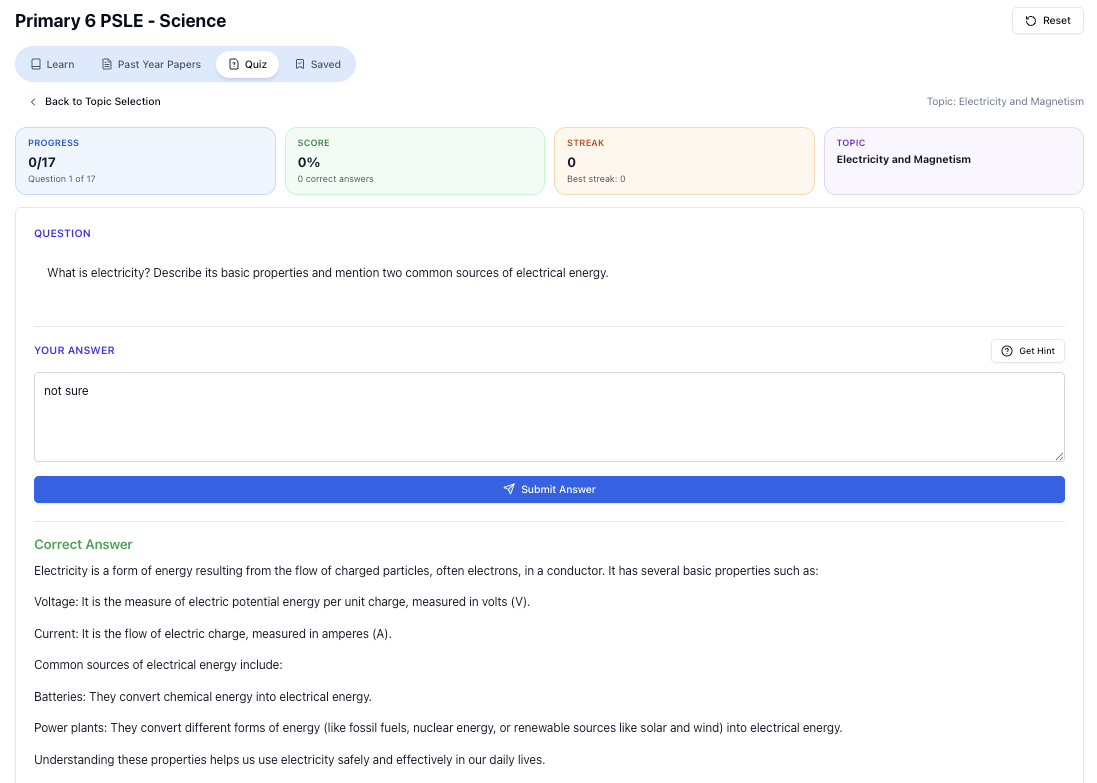
“Practice PSLE Science questions and get clear, step-by-step answers instantly.”
👉 Try a question now and see how fast you can improve.
Ready to practise?
If you want a Singapore-focused AI tutor you can use immediately (website, no sign-up), try Tutorly here:
Related Articles
Free on Tutorly.sg
Practise with step-by-step help — free to start
On Tutorly.sg/app you can practise unlimited Singapore syllabus questions, get instant explanations when you are stuck, and use past-year papers — no sign-up needed to start.
- ✓ PSLE, O Level, A Level, and more
- ✓ Step-by-step working when you are stuck
- ✓ Works on phone and laptop