

Free on Tutorly.sg
Practise with step-by-step help — free to start
On Tutorly.sg/app you can practise unlimited Singapore syllabus questions, get instant explanations when you are stuck, and use past-year papers — no sign-up needed to start.
- ✓ PSLE, O Level, A Level, and more
- ✓ Step-by-step working when you are stuck
- ✓ Works on phone and laptop
AI Question Generator For Singapore Students: What Actually Helps You Score
If you’re in Singapore, you already know the drill: endless ten-year-series, assessment books stacked higher than your water bottle, and teachers reminding you that practice questions are everything for PSLE, O Levels and A Levels.
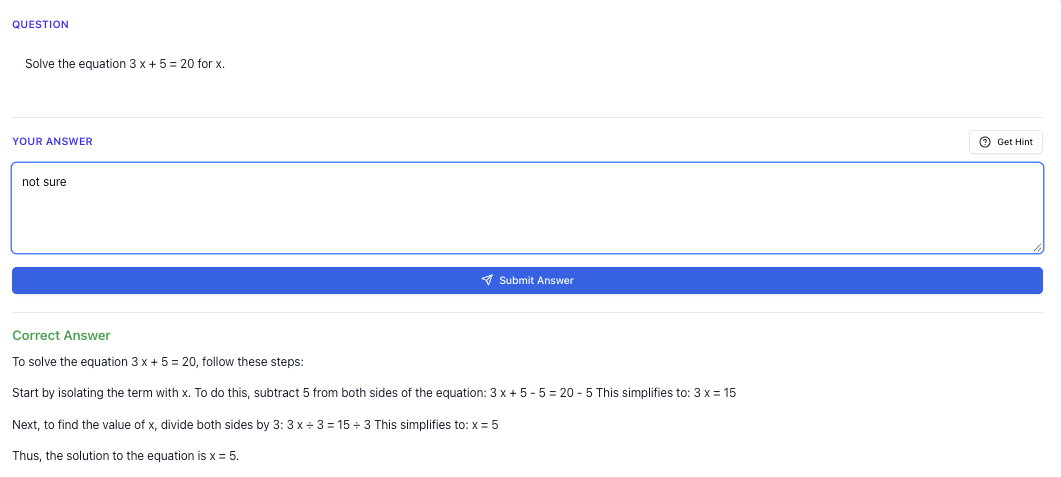
“Stuck on a question? See simple explanations that help you understand fast.”
👉 Give it a try and turn confusion into clarity in minutes.
What Is An AI Question Generator (For Singapore Context)?
An AI question generator is basically a smart system that:
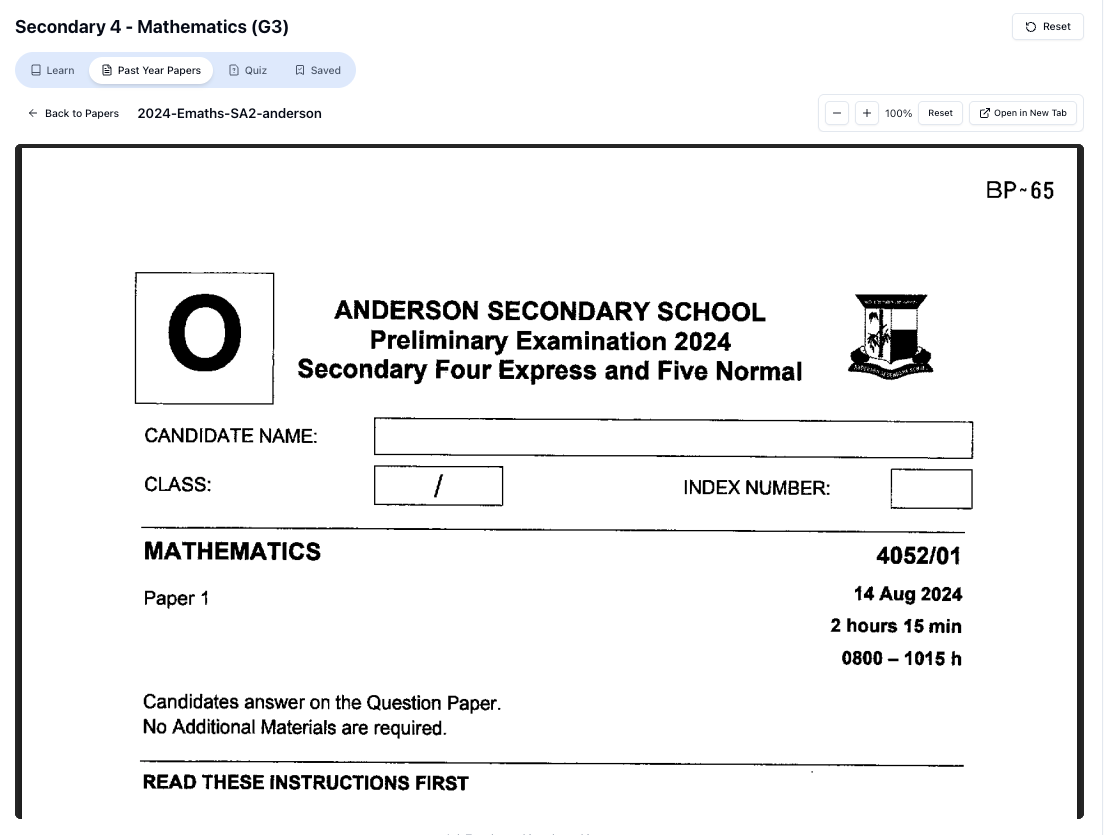
“Access more than 1000+ past year papers to practice”
👉 Start a paper today and test yourself like it’s the real exam.
- Takes in what you want to practise (topic, chapter, question type, difficulty)
- Uses AI to create new practice questions
- Gives you answers and explanations so you can learn from your mistakes
For Singapore students, the key part is this:
It must be aligned to the MOE syllabus and your exam style (PSLE / N Levels / O Levels / A Levels), not some random overseas curriculum.
That’s why a Singapore-focused AI tutor like Tutorly.sg matters. It’s built specifically for Primary 1 to JC 2, based on the MOE syllabus, and it “thinks” in the same style as your school exams and national papers.
Also important:
Tutorly.sg is not a mobile app. It’s a website you can access anytime, which is handy when you’re already on your laptop doing homework or past-year papers.
Why Singapore Students Actually Need An AI Question Generator
You’re not lazy. You’re just overloaded.
Between CCA, tuition, school homework and family time, it’s honestly hard to:
- Find the right level of questions (not too easy, not too hard)
- Get enough variety of questions beyond your school worksheet
- Cover the full syllabus properly before prelims or national exams
- Always have someone to mark and explain your mistakes
An AI question generator helps you:
1. Practise Weak Topics On Demand
Example: You realise you’re weak in Sec 3 Math: Indices and Surds.
Instead of flipping through five different books, you can:
- Go to Tutorly.sg
- Choose your level and subject
- Ask for questions like:
“Give me 5 O-Level style questions on simplifying surds and rationalising denominators.”
You instantly get questions to practise, plus answers and step-by-step explanations for each.
2. Adjust Difficulty As You Improve
You know that feeling when assessment book questions are either:
- So easy that you’re just wasting time, or
- So hard that you stare at the page for 20 minutes and still don’t know what’s going on?
With AI, you can control this:
- “Give me basic practice questions first.”
- After you’re more confident:
“Now give me 3 challenging questions similar to O-Level Paper 2 standard.”
This helps you build up gradually, which is key for confidence.
3. Practise Exam-Style Questions, Not Just Random Ones
For Singapore students, question style matters a lot.
- PSLE has specific formats for open-ended Math and Science
- O Levels and A Levels have very structured formats for structured questions, essays, and data-based questions
A good AI question generator (like Tutorly.sg) doesn’t just give you any question. It gives you questions that feel like school / exam questions:
- Correct marks allocation style
- Realistic phrasing
- Proper use of MOE keywords (e.g. “state”, “explain”, “describe”, “account for”)
How Tutorly.sg Works As An AI Question Generator
Tutorly.sg is a AI tutor website built just for Singapore students. It’s been:
- Used by thousands of students in Singapore
- Mentioned on Channel NewsAsia (CNA) as part of the AI-in-education space here
You can try it here: https://tutorly.sg/ai-tutor-singapore
Here’s how you can use it specifically as your AI question generator.
Step 1: Pick Your Level And Subject
Tutorly covers Primary 1 to JC 2, so you can use it for:
- PSLE prep (P 5–P 6)
- Lower sec (Sec 1–2)
- N / O Level prep (Sec 3–5)
- A Level prep (JC 1–JC 2)
You first select your level and subject. This tells the system which MOE syllabus to follow.
Step 2: Tell It What Topic Or Skill You Want Questions For
You can be very specific, for example:
- “Sec 2 Math, questions on Pythagoras’ Theorem involving word problems”
- “P 6 Science, PSLE-style open-ended questions on Photosynthesis”
- “JC 1 H 2 Math, questions on Maclaurin series”
- “Sec 4 Pure Chemistry, 3-4 mark structured questions on electrolysis”
The more specific you are about the topic and style, the better the questions match what you need.
Step 3: Get Questions, Then Check Your Final Answer
Tutorly will give you:
- A question (or several)
- The final answer
- Then a step-by-step explanation of how to get from the question to the answer
Important: Tutorly doesn’t read your working. It checks the final answer you give, then shows you a clear, logical solution so you can compare your method.
This is actually good training for exams, because:
- In exams, only the final answer and your key steps matter
- You learn to structure your working more clearly
- You can see how a “model solution” would write the steps
Using AI Question Generators For Different Subjects
Let’s go subject by subject, with concrete ways you can use an AI question generator like Tutorly.sg.
1. Math (Primary, Secondary, JC)
Primary (PSLE Math)
Common struggles:
- Heuristic word problems
- Fractions, ratios, percentages
- Speed / time / distance
How to use an AI question generator:
-
Target one heuristic at a time
- Example:
“Give me 3 PSLE-style word problems that use the ‘before–after’ concept with fractions.”
- Example:
-
Focus on one topic
- E.g.
“Create 5 PSLE Math questions involving percentage discount and GST.”
- E.g.
-
Check answers and compare methods
- After solving, compare your working with Tutorly’s step-by-step solution.
- Look for: Are your steps logical and easy to follow? Did you skip any important reasoning?
Secondary (O-Level / N-Level Math, A Math)
Topics where AI question generators are very helpful:
- Algebra (indices, surds, quadratic equations)
- Coordinate geometry
- Trigonometry
- Differentiation and integration (for A Math)
Examples of prompts:
- “Sec 3 A Math: Give me 4 questions on solving quadratic equations by completing the square.”
- “O-Level E Math: Generate 5 coordinate geometry questions involving gradient and midpoint.”
You can also ask for mixed-topic practice:
“Generate a short O-Level style quiz (5 questions) mixing algebra, graphs and trigonometry, with answers and step-by-step solutions.”
JC (H 1/H 2 Math)
AI question generators are especially useful for:
- Practising calculus (differentiation, integration, applications)
- Getting more exposure to exam-style problem-solving questions
Examples:
- “H 2 Math: Give me 3 questions on differentiation involving product and quotient rules.”
- “H 2 Math: Create 2 application questions involving maximum/minimum problems, similar to A-Level style.”
You can even specify the format:
“Make them 8–10 mark questions, like Paper 2 problem-solving questions.”
2. Science (Primary, Lower Sec, Pure / Combined, JC)
Primary (PSLE Science)
PSLE Science is very keyword-focused. You need practice for:
- Open-ended questions
- Explaining using correct scientific terms
- Applying concepts to new scenarios
How to use an AI question generator:
- “Give me 5 PSLE-style open-ended questions on Heat, focusing on conduction, convection and radiation.”
- “Generate 3 questions where I must explain why an object floats or sinks, using the concept of density.”
After answering, compare your response with Tutorly’s explanation:
- Did you use the right keywords?
- Did you answer the question focus properly (e.g. “explain why”, “state and explain”)?
Lower Sec Science
You can target specific branches:
- Physics (forces, density, light, electricity)
- Chemistry (elements, compounds, mixtures, atomic structure)
- Biology (cells, systems, ecology)
Example prompts:
- “Sec 1 Science: 5 short questions on density involving calculations and explanations.”
- “Sec 2 Science: Open-ended questions on digestion, focusing on enzymes and their functions.”
Upper Sec (Pure / Combined Science)
For O Levels, the style of question really matters.
Examples for Pure Chemistry:
- “Sec 4 Pure Chemistry: 3 structured questions on acid-base titration calculations.”
- “Generate 4 O-Level style questions on writing ionic equations for precipitation reactions.”
For Physics:
- “O-Level Physics: 5 calculation questions on kinematics (speed, velocity, acceleration), with step-by-step solutions.”
- “Create 3 structured questions on electricity involving series and parallel circuits.”
For Biology:
- “Pure Bio: 3 questions on osmosis and diffusion comparing plant and animal cells.”
- “Generate 4 questions on human circulatory system, 3–4 marks each, exam style.”
JC (H 1/H 2 Physics, Chem, Bio)
Here’s where an AI question generator becomes really powerful, because:
- There are so many topics
- The questions can get quite abstract and application-heavy
Examples:
- “H 2 Chemistry: 3 questions on buffer solutions with calculations.”
- “H 2 Physics: 2 data-based questions on photoelectric effect, A-Level style.”
- “H 2 Biology: 3 essay-style questions on gene expression and protein synthesis.”
You can also ask for structured questions with sub-parts:
“Create a 12-mark H 2 Chem question on redox reactions with 3–4 sub-parts, and provide full solutions.”
Free on Tutorly.sg
Practise with step-by-step help — free to start
On Tutorly.sg/app you can practise unlimited Singapore syllabus questions, get instant explanations when you are stuck, and use past-year papers — no sign-up needed to start.
- ✓ PSLE, O Level, A Level, and more
- ✓ Step-by-step working when you are stuck
- ✓ Works on phone and laptop
3. English And GP
AI question generators are not just for Math and Science. They can also help you with English and General Paper.
Primary / Lower Sec English
You can use AI to generate:
- Cloze passages
- Comprehension questions
- Situational writing practice
Examples:
- “P 6 English: Give me a short comprehension passage (about 250 words) with 5 questions, PSLE style.”
- “Sec 1 English: Create a situational writing task for an email to a teacher, with bullet points like in exams.”
You can then:
- Attempt the questions
- Check your answers against the model ones
- Ask Tutorly to explain why certain answers are correct or wrong
Upper Sec English (O-Level)
You can focus on:
- Comprehension practices
- Summary writing
- Continuous writing (compositions)
Example prompts:
- “O-Level English: Give me a narrative essay question, then help me plan a solid outline.”
- “Generate a non-narrative essay question (argumentative), then suggest 3 possible points for each side.”
For comprehension:
“Doing Secondary Science? Pick a topic and practise like it’s a real exam — with clear answers right after.”
👉 Try Tutorly now and start a Science topic in seconds.

“Create a short O-Level style comprehension passage with 8 questions, including vocabulary-in-context and inference questions.”
You can then ask Tutorly to:
- Check your summary word count and content
- Suggest how to improve your phrasing and clarity
JC GP (General Paper)
For GP, an AI question generator is great for:
- Generating essay questions
- Giving sample outlines
- Creating short comprehension-style passages with questions
Examples:
- “Give me 5 GP essay questions on technology and society, similar to A-Level style.”
- “Generate a GP passage (~700 words) about social media and politics, with 8 questions including summary and application.”
You can:
- Practise writing outlines under timed conditions
- Ask Tutorly to critique your outline (missing angles, weak arguments)
- Get suggestions on how to strengthen topic sentences and examples
4. Chinese And Other Mother Tongue Languages
Many students struggle with Mother Tongue not because they don’t know anything, but because they don’t practise enough.
An AI question generator can help you with:
- Cloze passages
- Comprehension questions
- Composition prompts
- Sentence construction
Examples:
- “O-Level Chinese: Give me 3 composition questions (作文题目) and suggest 5 useful phrases for each.”
- “Create a short Chinese comprehension passage with 5 questions, O-Level style.”
You can also ask Tutorly to:
- Suggest better phrases to replace your simple ones
- Help you rephrase sentences more naturally
- Explain why certain answers for comprehension are not acceptable
How To Use AI Question Generators Without Becoming Over-Dependent
AI is powerful, but it’s not a shortcut to skip thinking. Here’s how to use it properly.
1. Attempt First, Check Later
When you get a question:
- Try it yourself first.
- Only then check the answer and solution.
- Compare your approach with the model solution.
This trains your brain to struggle productively, which is how you actually improve.
2. Don’t Just Memorise The Solution
Ask yourself:
- Why did they use this method?
- Could I have used a different method?
- What kind of question is this (what “pattern” is it)?
Over time, you’ll recognise patterns faster in exams.
3. Use It To Fill Gaps, Not Replace School Work
AI question generators should:
- Complement your school worksheets, not replace them
- Help you revise weak topics
- Give you more exposure before prelims and national exams
You still need:
- Your textbook / notes for learning concepts
- Past-year papers for real exam feel
- Teacher feedback (school or tuition) for writing-heavy subjects
Sample Study Routines Using An AI Question Generator
Here are some realistic study plans you can try.
For PSLE Students (P 6)
On a weekday evening (45–60 minutes):
- 10 mins – Revise notes for one topic (e.g. Fractions / Heat)
- 20 mins – Use Tutorly to generate 5–8 questions on that topic
- 15 mins – Check answers, read step-by-step solutions, note down mistakes
- 10 mins – Ask Tutorly follow-up questions on parts you still don’t understand
### For 𝑂-Level Students (Sec \frac{4}{5})
On a weekend (2–3 hours spread out):
-
45 mins – Math:
- Generate 8–10 questions on one weak topic (e.g. Trigonometry)
- Mark and review with Tutorly’s solutions
-
45 mins – Science:
- Generate 3–4 structured questions on one topic (e.g. Electrolysis)
- Practise writing full answers with proper keywords
-
30 mins – English:
- Generate one essay question
- Plan an outline and write intro + 1 body paragraph
- Ask Tutorly how to improve those paragraphs
For A-Level Students (JC 2)
On a weekday night (1.5–2 hours):
-
45 mins – H 2 Math:
- Generate 3–4 problem-solving questions on a single topic
- Do them under timed conditions
-
45 mins – H 2 Chem / Physics / Bio:
- Generate 2–3 structured or data-based questions
- Focus on writing high-quality answers with correct reasoning
-
Optional 15–20 mins – GP:
- Generate 1 essay question and draft a full outline
Common Mistakes Singapore Students Make With AI Question Generators
Mistake 1: Treating It Like A Cheat Code
If you just copy solutions without trying, you’re only cheating yourself. In the exam hall, there’s no AI.
Fix: Always attempt first. Even if you can’t finish the whole question, try some steps.
Mistake 2: Asking For Questions That Are Too General
“Give me Math questions” is too vague.
Better:
- “Give me Sec 3 A Math questions on logarithms involving change of base.”
- “Give me PSLE Math word problems using the ‘guess and check’ heuristic.”
Mistake 3: Not Following Up With “Why?”
If you don’t understand a step in the solution, don’t just accept it. Ask:
- “Why do we choose this formula?”
- “Is there another method?”
- “Can you explain this step in simpler terms?”
Tutorly can explain in different ways until it clicks for you.
Why Tutorly.sg Is A Strong Choice For Singapore Students
There are many AI tools out there, but most are not designed for MOE students. They follow US/UK syllabuses, or they’re too generic.
Tutorly.sg is:
- Built specifically for Singapore’s MOE syllabus, from Primary 1 to JC 2
- Available as a website (no need to download any app)
- Used by thousands of students in Singapore
- Featured on Channel NewsAsia (CNA), so it’s not some random unknown tool
You can access it here:
- Main AI tutor page: https://tutorly.sg/ai-tutor-singapore
- Directly start using it: https://tutorly.sg/app
If you’re already spending hours on assessment books and tuition, using Tutorly as an AI question generator is a very practical way to:
- Get unlimited practice questions on demand
- Cover topics your teacher rushed through
- Clarify doubts even at 11.30pm when everyone else is asleep
Final Tips To Get The Most Out Of Any AI Question Generator
- Be specific about topic, level and style
- Attempt questions seriously before checking the solution
- Track your mistakes in a notebook or digital doc (by topic)
- Revisit weak topics regularly with fresh AI-generated questions
- Use it consistently, not just during exam week
Ready To Try An AI Question Generator Built For Singapore Students?
If you want:
- PSLE / O-Level / A-Level style questions,
- MOE syllabus alignment,
- And step-by-step explanations whenever you need them,
You can start using Tutorly as your AI question generator here:
It’s a website, so you can just open it on your browser and start practising immediately—no downloads, no app store needed.
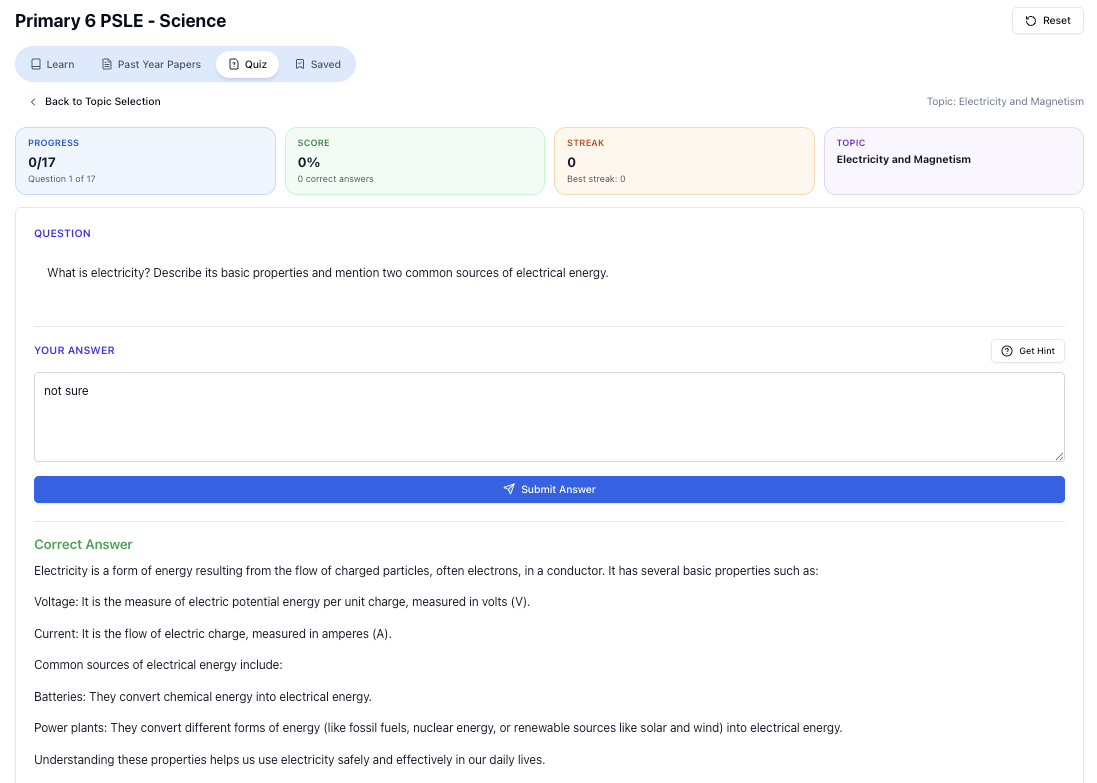
“Practice PSLE Science questions and get clear, step-by-step answers instantly.”
👉 Try a question now and see how fast you can improve.
Ready to practise?
If you want a Singapore-focused AI tutor you can use immediately (website, no sign-up), try Tutorly here:
Related Articles
Free on Tutorly.sg
Practise with step-by-step help — free to start
On Tutorly.sg/app you can practise unlimited Singapore syllabus questions, get instant explanations when you are stuck, and use past-year papers — no sign-up needed to start.
- ✓ PSLE, O Level, A Level, and more
- ✓ Step-by-step working when you are stuck
- ✓ Works on phone and laptop