

Free on Tutorly.sg
Practise with step-by-step help — free to start
On Tutorly.sg/app you can practise unlimited Singapore syllabus questions, get instant explanations when you are stuck, and use past-year papers — no sign-up needed to start.
- ✓ PSLE, O Level, A Level, and more
- ✓ Step-by-step working when you are stuck
- ✓ Works on phone and laptop
If you’ve ever thought, “I need more practice questions, but I don’t have time to dig through assessment books”, you’re not alone.
In Singapore, with PSLE, O Levels, and A Levels, you’re constantly told: “Practice more, practice more.” But no one talks about how much time you waste just finding good questions.
“Stuck on a question? See simple explanations that help you understand fast.”
👉 Give it a try and turn confusion into clarity in minutes.
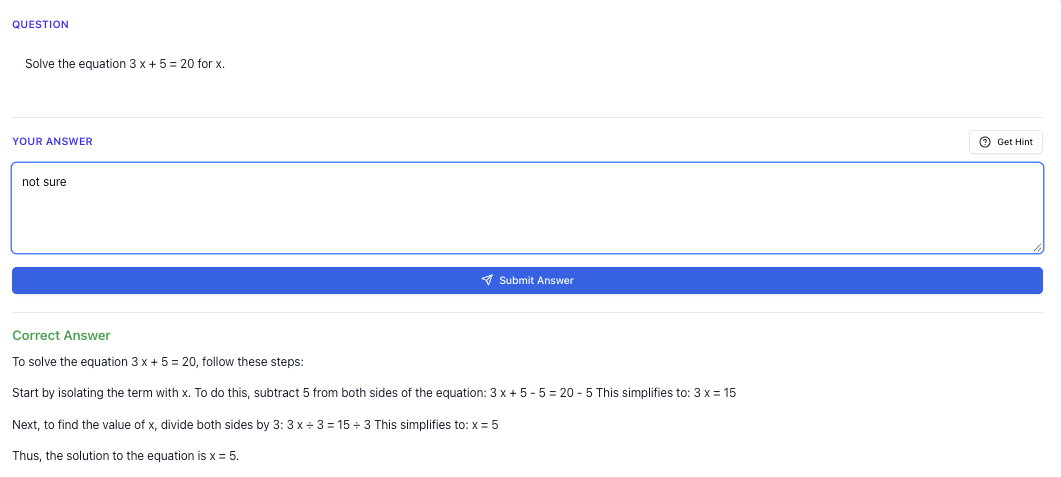
1. What Is an AI Practice Questions Generator (Singapore Context)?
Let’s keep it simple.
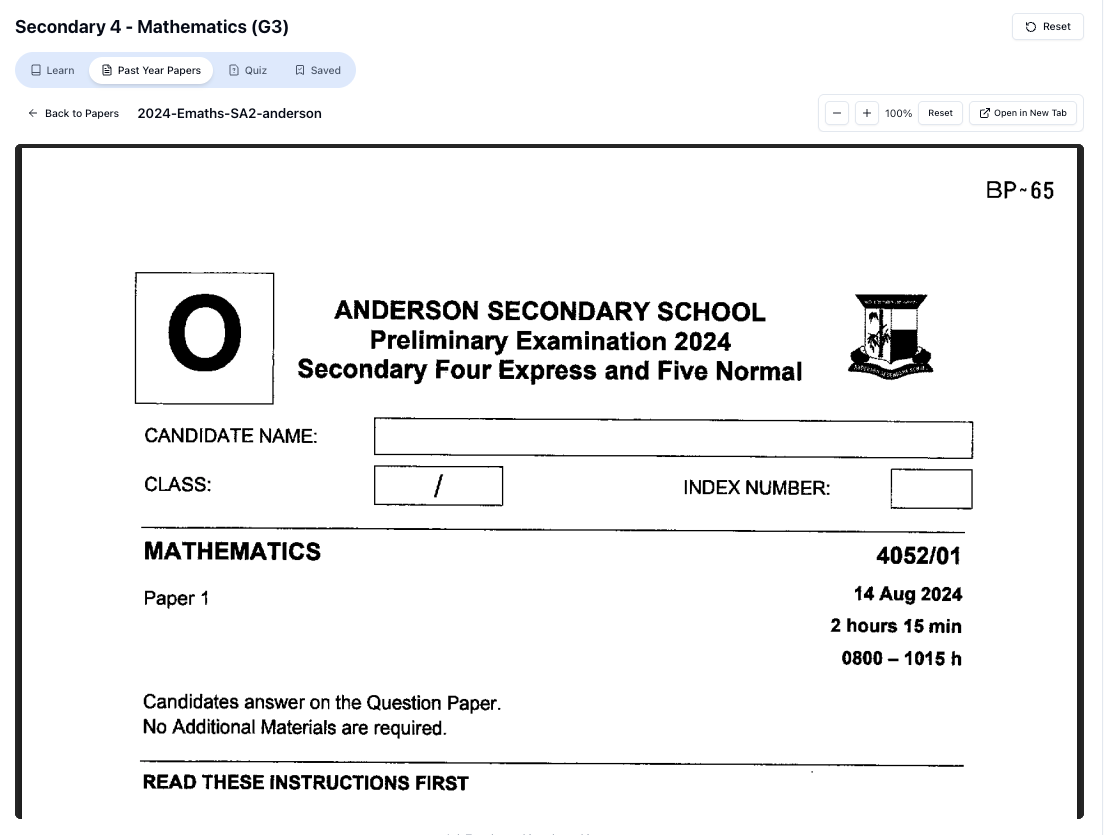
“Access more than 1000+ past year papers to practice”
👉 Start a paper today and test yourself like it’s the real exam.
An AI practice questions generator is a tool that:
- Creates new questions for you on the spot
- Based on the topic and difficulty you want
- And usually gives you instant answers and explanations
For Singapore students, the key part is this:
It must follow the MOE syllabus and match PSLE / O Level / A Level style questions.
Random overseas questions aren’t very helpful if:
- The format is different
- The topics don’t match what’s tested here
- The working methods don’t match what your teacher taught
That’s why something like Tutorly.sg is built specifically for Singapore students, so the questions and explanations follow the same style you see in school and national exams.
Tutorly has already been used by thousands of students in Singapore, and it’s even been mentioned on Channel NewsAsia (CNA) — so it’s not some random overseas tool guessing your syllabus.
2. Why “More Practice Questions” Is Not Always Better
You’ve probably heard this:
“Practice makes perfect.”
But in exam prep, the real rule is:
Targeted practice makes improvement.
If you just spam questions without thinking, three things usually happen:
-
You repeat the same mistakes
You keep applying the same wrong method because no one is correcting your thinking. -
You waste time on topics you already know
You feel “productive”, but your weak chapters stay weak. -
You get dependent on answers
Once you know the AI will show you the solution, it’s tempting to peek early.
So when you use an AI practice questions generator like Tutorly, you must be very intentional:
- Which topic are you practising?
- What level of difficulty do you want?
- Are you honestly attempting before checking the answer?
3. How a Good AI Practice Questions Generator Should Work
Let’s define what a good generator does for a Singapore student.
3.1 It should follow MOE syllabus topics
For example:
- Primary: Fractions, Model Drawing, Heuristics, Situational Writing
- Lower Sec: Algebra, Linear Graphs, Cells, Kinetic Particle Theory
- O Levels: Trigonometry, Differentiation, Redox, Source-Based Questions
- A Levels: Complex Numbers, Vectors, Kinematics, Elasticity of Demand
On Tutorly.sg, topics are aligned with MOE syllabuses. So when you practise “Sec 3 E Math Trigonometry”, the questions are in the right style and scope.
3.2 It should let you control difficulty
You don’t want to jump from “I don’t understand” to “top school prelim killer question” in one step.
You should be able to:
- Start with basic questions (test your concepts)
- Move to exam-style questions (timed practice)
- Then try challenging ones (stretch yourself)
With Tutorly, you can guide the AI by asking things like:
- “Give me a basic practice question on Primary 5 fractions.”
- “Generate a harder O Level Algebra question similar to Paper 2 short-answer.”
- “Give me an A Level H 2 Math integration question at exam difficulty.”
3.3 It should give step-by-step explanations
Important point for Tutorly:
- It does not check every step of your working.
- It checks your final answer, then shows you a clear step-by-step method to solve it.
This is actually good for learning, because:
- You are forced to try the question fully first
- Then you compare your method with the AI’s method
- If your answer is wrong, you can see exactly where your approach differs
4. How To Use an AI Practice Questions Generator Without Getting Lazy
Here’s a simple rule:
Attempt first. Check later. Copy never.
Let’s break it down into a clear routine you can follow with Tutorly.
Step 1: Choose a specific topic
Instead of:
“Math questions please”
Try:
“Give me a Sec 2 Algebra expansion and factorisation question.”
Or:
“Give me a PSLE-style problem sum on ratio.”
The more specific you are, the better the practice.
Step 2: Time yourself
- For MCQ: 1–2 minutes
- For short-answer: 2–4 minutes
- For long questions: 5–10 minutes
Don’t type anything into Tutorly yet. Use your own paper or notepad. Pretend it’s a real exam.
Step 3: Only then, submit your answer
Type in:
- The final answer (for Math/Science)
- Or your full response (for English/Humanities)
Tutorly will:
- Tell you if your final answer is correct
- Show you a step-by-step solution or model answer
Step 4: Compare, don’t copy
Ask yourself:
- “Did I use the same method?”
- “If not, is my method still valid?”
- “Which step did I mess up?”
If you’re lost, you can ask Tutorly:
- “Explain Step 2 more slowly.”
- “Why did you choose this formula?”
- “Can you show me another method?”
This is how you use an AI generator as a tutor, not a shortcut.
5. Using an AI Practice Questions Generator for PSLE
Let’s go level by level. We’ll start with PSLE.
5.1 PSLE Math
Common pain points:
- Model drawing
- Fractions and ratios
- Multi-step problem sums
How you can use Tutorly:
- Go to Tutorly.sg
- Select Primary and your level
- Ask:
- “Give me a PSLE-style problem sum on fractions involving 3 steps.”
- “Generate a question on ratio where units increase and decrease.”
- Solve on your own first.
- Key in your final answer and compare with Tutorly’s working.
Over time, you’ll see the same patterns appear in different questions — this is exactly what you need for PSLE.
5.2 PSLE English
Struggling with:
- Comprehension open-ended
- Continuous writing
- Synthesis and transformation
You can ask Tutorly to:
- “Give me a PSLE-style comprehension passage with 5 open-ended questions.”
- “Give me 5 synthesis questions to practise ‘although’, ‘despite’, ‘in spite of’.”
Then:
- Attempt on your own
- Type in your answers
- Compare with Tutorly’s suggested answers and explanations
You’ll start to see how marks are actually awarded and what examiners look for.
6. Using an AI Practice Questions Generator for O Levels
6.1 O Level E Math & A Math
For E Math:
- Algebra manipulation
- Trigonometry
- Coordinate geometry
- Statistics
For A Math:
- Quadratic functions
- Logarithms and indices
- Differentiation and integration
- Trigonometric identities
How to use Tutorly:
- “Generate an O Level E Math Paper 2 style question on trigonometry.”
- “Give me an A Math differentiation question that involves product and chain rule.”
Then:
- Attempt fully
- Submit your final answer
- Study the step-by-step solution
- Ask follow-up questions if needed, e.g.
- “Why did you choose this substitution?”
- “Can you explain the chain rule in simpler terms?”
6.2 O Level Pure / Combined Science
Common issues:
- Not sure how to present answers for structured questions
- Weak in application questions (not just recall)
Examples of what you can ask Tutorly:
- “Give me a Combined Science (Chemistry) question on electrolysis similar to O Level Paper 2.”
- “Generate a Pure Physics question on kinematics with calculations and explanation.”
Again:
- Attempt first
- Then compare with the model answer
Pay special attention to keywords in Science answers (e.g. “rate”, “collision frequency”, “kinetic energy” in Chemistry).
7. Using an AI Practice Questions Generator for A Levels
7.1 H 1/H 2 Math
At A Level, the questions are longer and more structured.
Free on Tutorly.sg
Practise with step-by-step help — free to start
On Tutorly.sg/app you can practise unlimited Singapore syllabus questions, get instant explanations when you are stuck, and use past-year papers — no sign-up needed to start.
- ✓ PSLE, O Level, A Level, and more
- ✓ Step-by-step working when you are stuck
- ✓ Works on phone and laptop
You can ask Tutorly:
- “Give me an H 2 Math question on complex numbers in Argand diagram form.”
- “Generate a H 2 Math integration question that requires substitution and partial fractions.”
Then:
- Try to write your own full solution, step by step
- Compare with Tutorly’s solution, line by line
- Check if your method is valid even if it’s different
This is how you refine your rigour and clarity — very important for A Levels.
7.2 H 2 Physics / Chemistry / Biology
For example, in H 2 Chemistry:
- “Give me a question on buffer solutions that involves calculations and explanation.”
- “Generate an H 2 Chem organic chemistry question on reaction pathways.”
For H 2 Physics:
- “Generate a kinematics question involving relative motion.”
- “Give me a question on SHM that includes energy considerations.”
Use Tutorly to:
- Practise structured questions
- Check if your explanation has the right concepts and terms
- See how to structure answers clearly for full marks
7.3 General Paper (GP)
You can even use an AI practice questions generator for essays and AQ.
Ask Tutorly:
- “Give me 3 GP essay questions about technology and society.”
- “Generate a GP AQ question based on this short passage.”
Then:
- Try to plan your essay (thesis + points + examples)
- Ask Tutorly to critique your outline
- Or write a paragraph and ask how to improve it
This helps you build speed and structure for GP papers.
“Doing Secondary Science? Pick a topic and practise like it’s a real exam — with clear answers right after.”
👉 Try Tutorly now and start a Science topic in seconds.

8. Common Mistakes Students Make With AI Practice Generators
Let’s be honest about the pitfalls.
Mistake 1: Treating it like an answer machine
If you just:
- Ask for question
- Immediately ask for solution
- Copy into your notebook
You’re not learning. You’re just copying.
Mistake 2: Not checking why you’re wrong
Some students see “Wrong” and move on.
Instead, you should:
- Compare your method vs Tutorly’s
- Identify the exact step you messed up
- Ask a follow-up question if you still don’t get it
Mistake 3: Over-relying on AI, ignoring school materials
Your school worksheets, Ten-Year-Series, and notes are still very important.
Use Tutorly to:
- Generate extra practice when you’ve finished your school work
- Clarify doubts when your teacher/tuition isn’t available
- Get exposure to different question styles
Don’t replace your entire revision with only AI practice.
9. Why Tutorly.sg Works Well as an AI Practice Questions Generator in Singapore
There are many AI tools out there, but here’s why Tutorly is particularly useful if you’re in Singapore:
9.1 It’s built for Singapore students
- Primary 1 to JC 2
- MOE-aligned syllabus
- PSLE / N / O / A Level style questions
So when you generate questions, they’re not random foreign formats.
### 9.2 It’𝑠 available \frac{24}{7}
You don’t need to wait for tuition or school consultation.
- Stuck at 11.30pm?
- Need last-minute practice before your paper?
You can log in to Tutorly.sg and get instant questions and explanations.
9.3 Thousands of Singapore users + CNA mention
You’re not experimenting with some untested tool. Tutorly:
- Has already been used by thousands of students in Singapore
- Has been mentioned on Channel NewsAsia (CNA)
So it’s trusted enough to be recognised in our local context.
9.4 It’s not just questions — it’s a tutor
Besides generating practice questions, Tutorly can:
- Re-explain concepts you forgot
- Break down tough steps
- Show alternative methods
- Help you build intuition, not just memorise formulas
Think of it as a patient, always-awake tutor that you can keep asking until you truly understand.
10. Sample Ways To Use Tutorly as Your AI Practice Questions Generator
To make this super practical, here are some ready-to-use ideas.
10.1 For a 30-minute PSLE Math session
- Open Tutorly.sg
- Ask: “Give me 3 PSLE-style problem sums on ratio, increasing difficulty.”
- Spend 20 minutes solving them on paper.
- Spend 10 minutes checking answers and studying Tutorly’s solutions.
10.2 For a 45-minute O Level E Math session
- Ask: “Generate 5 O Level E Math questions on algebraic manipulation, mixed difficulty.”
- Time yourself: 7–8 minutes per question.
- After each question, submit your final answer and compare solutions.
- If you get 3 or more wrong, ask Tutorly: “Summarise the common mistakes students make for this topic.”
10.3 For a 1-hour A Level H 2 Math session
- Ask: “Give me 3 H 2 Math questions: one on complex numbers, one on vectors, one on integration, exam difficulty.”
- Treat it like a mini-paper.
- After finishing, key in your final answers one by one.
- For any question you struggle with, ask Tutorly to:
- “Break the solution into smaller steps.”
- “Explain the intuition behind Step 3.”
11. How To Know If the AI Practice Questions Are “Good Enough”
You might wonder, “How do I know if AI-generated questions are actually useful?”
Here’s a quick checklist:
- Does the question look like what you see in school worksheets or Ten-Year-Series?
- Does the solution use methods your teacher recognises (not some weird overseas method)?
- Are you challenged, but not totally lost?
With Tutorly, because it’s designed for Singapore’s MOE syllabus, the questions will generally match what you’ll see in school and national exams.
If anything looks too weird or unfamiliar, you can always ask:
- “Is this type of question common in O Level E Math?”
- “Would this be suitable for PSLE standard?”
12. Simple Weekly Plan Using an AI Practice Questions Generator
You don’t need a complicated study plan. Here’s a simple way to build AI practice into your week.
Primary / PSLE (about 3 days a week)
- 20–30 minutes per session
- Focus on: Math problem sums, English comprehension
Example:
- Mon: PSLE Math – 3–5 problem sums from Tutorly
- Wed: PSLE English – 1 comprehension passage + questions
- Sat: Mix of weaker topics (fractions, ratio, synthesis)
Lower Sec / O Levels (about 4 days a week)
- 30–45 minutes per session
- Focus on: Math, Science, English
Example:
- Mon: E Math (Algebra/Graphs)
- Tue: Science (Chem/Physics concepts)
- Thu: E Math or A Math (depending on stream)
- Sun: English comprehension or summary practice
JC / A Levels (about 5 days a week)
- 45–60 minutes per session
- Focus on: H 2 Math + 1–2 other content subjects
Example:
- Mon: H 2 Math (pure math topics)
- Tue: H 2 Chem (physical/inorganic)
- Wed: GP essay planning with Tutorly
- Fri: H 2 Math (statistics topics)
- Sat: H 2 Physics/Bio structured questions
Each time, use Tutorly as your question generator + explainer.
13. Final Tips: Getting the Most Out of AI Practice Questions
To wrap up, here are some final habits that will really help:
-
Be specific with your requests
Mention level, subject, topic, and difficulty. -
Always attempt before checking
Don’t train your brain to depend on instant answers. -
Ask follow-up questions
If a step doesn’t make sense, ask Tutorly to re-explain or simplify. -
Track your weak topics
If you keep getting a topic wrong, write it down and revisit it with more AI practice. -
Mix AI practice with real papers
Use Ten-Year-Series and school papers for exam feel, and Tutorly for extra targeted practice and explanations.
Start Using Tutorly.sg as Your AI Practice Questions Generator
If you’re serious about improving for PSLE, O Levels, or A Levels, an AI practice questions generator can save you a lot of time and guesswork — as long as you use it properly.
With Tutorly.sg:
- You get MOE-aligned questions on demand
- You can practise anytime, even late at night
- You always have a friendly AI tutor ready to explain step-by-step
You can learn more about how the AI tutor works here:
👉 https://tutorly.sg/ai-tutor-singapore
Or if you’re ready to start generating questions and practising right away, just head here and try it for yourself:
👉 https://tutorly.sg/app
Use it well, and your “I don’t have enough practice questions” problem will disappear — and you can finally focus on what really matters: understanding, improving, and walking into your exam with confidence.
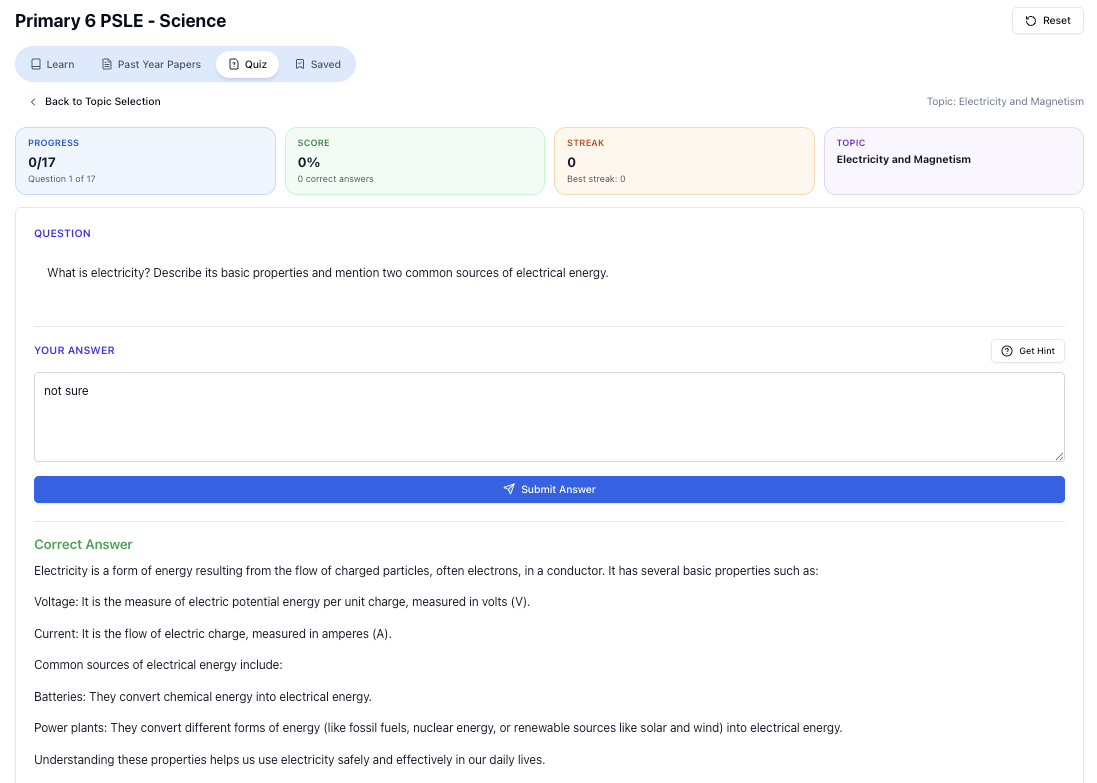
“Practice PSLE Science questions and get clear, step-by-step answers instantly.”
👉 Try a question now and see how fast you can improve.
Ready to practise?
If you want a Singapore-focused AI tutor you can use immediately (website, no sign-up), try Tutorly here:
Related Articles
Free on Tutorly.sg
Practise with step-by-step help — free to start
On Tutorly.sg/app you can practise unlimited Singapore syllabus questions, get instant explanations when you are stuck, and use past-year papers — no sign-up needed to start.
- ✓ PSLE, O Level, A Level, and more
- ✓ Step-by-step working when you are stuck
- ✓ Works on phone and laptop