

Free on Tutorly.sg
Practise with step-by-step help — free to start
On Tutorly.sg/app you can practise unlimited Singapore syllabus questions, get instant explanations when you are stuck, and use past-year papers — no sign-up needed to start.
- ✓ PSLE, O Level, A Level, and more
- ✓ Step-by-step working when you are stuck
- ✓ Works on phone and laptop
Why “AI Mock Exam Generator Singapore” Is Suddenly Everywhere
If you’ve been googling study tips, you’ve probably seen phrases like “AI mock exam generator” or “AI exam practice” popping up.
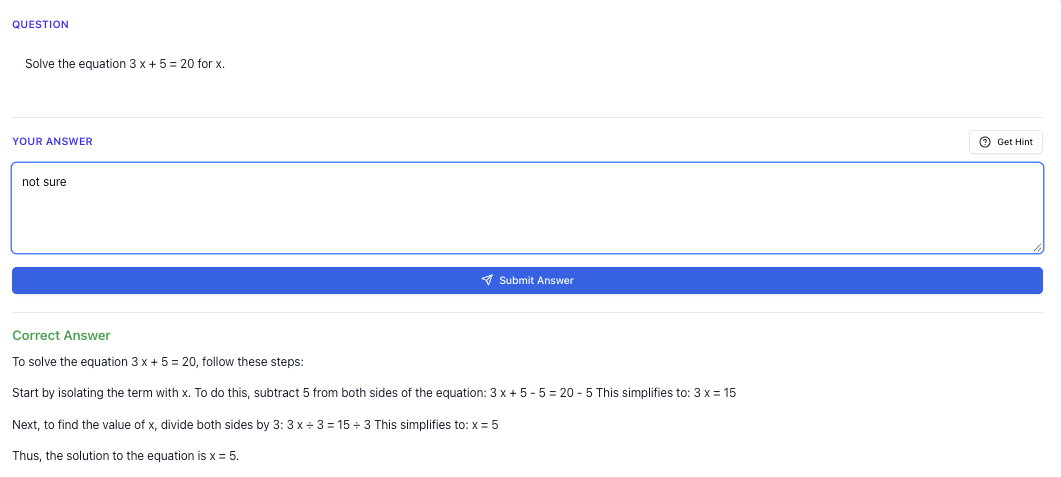
“Stuck on a question? See simple explanations that help you understand fast.”
👉 Give it a try and turn confusion into clarity in minutes.
What Is An AI Mock Exam Generator (In Simple Terms)?
When people say “AI mock exam generator”, they usually mean a system that:
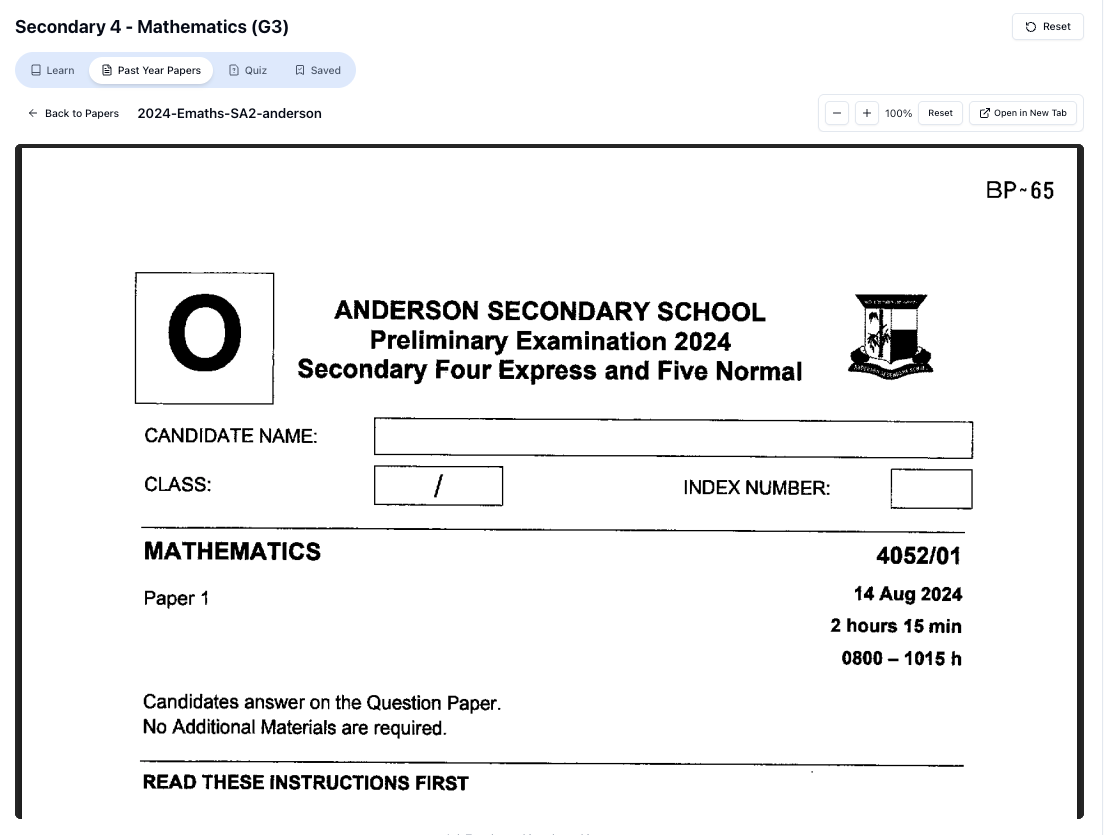
“Access more than 1000+ past year papers to practice”
👉 Start a paper today and test yourself like it’s the real exam.
- Gives you practice questions
- Checks your answers
- Explains the solution
- Lets you try more questions of similar difficulty
The key idea is: you get unlimited fresh questions, instead of being stuck with only one assessment book.
But here’s the important part for you in Singapore:
A mock exam generator is only useful if it follows the MOE exam style and local syllabus.
If the AI gives you:
- US-style math with different notations
- Science questions that don’t match your MOE textbook
- English questions that don’t follow PSLE / O-Level formats
…then it’s not helping you. It’s just extra noise.
That’s why for Singapore students, you should look for an AI tool that is built for MOE, not a generic global one.
Why Generic AI Tools Often Fail Singapore Students
You might have tried using ChatGPT or some random AI site to “generate mock exams” and realised:
- The math format looks strange
- The science content doesn’t match what your teacher teaches
- The English questions don’t follow PSLE or O-Level formats
- The answers can be outright wrong with no proper working
That’s because those tools are:
- Not tuned to the MOE syllabus
- Not aware of PSLE / O-Level / A-Level exam styles
- Often mixing content from many countries
For example:
- Primary Science: They might ask about seasons like winter and autumn, which is not the focus of our MOE syllabus.
- O-Level Math: They might use US-style notation or skip important topics like bearings or standard form.
- A-Level Math: They may not follow the H 1/H 2 structure or typical question style from JC prelims.
So when you’re searching “AI mock exam generator Singapore”, what you really need is:
An AI tutor that generates practice questions and exam-style problems aligned to the MOE syllabus, not just random questions.
That’s exactly where Tutorly.sg comes in.
Meet Tutorly.sg: Your AI Tutor That Doubles As A Mock Exam Generator
Tutorly.sg is a AI tutor website built specifically for Singapore students, from Primary 1 all the way to JC 2, aligned to the MOE syllabus.
A few important credibility points:
- Tutorly.sg has been mentioned on Channel NewsAsia (CNA)
- It has already been used by thousands of users in Singapore
- It runs fully in your browser – no mobile app needed – at:
While Tutorly is not branded as a “mock exam generator”, it functions like one for you:
- You get unlimited practice questions
- It checks your final answer
- Then it shows you step-by-step how to get the correct solution
- You can keep asking for more questions of the same topic / difficulty
So instead of downloading some random “AI exam generator” from overseas, you use a Singapore-specific AI tutor that understands:
- PSLE
- N-Level / O-Level
- A-Level (H 1/H 2)
- IP / IB students who still follow many MOE-style concepts
How Tutorly Works As An AI Mock Exam Generator (Step By Step)
Here’s how you can use Tutorly.sg like your own AI mock exam generator.
1. Go To The Right Place
Open Tutorly in your browser:
- General info: https://tutorly.sg/ai-tutor-singapore
- Direct access to the AI tutor: https://tutorly.sg/app
No need to install anything. It’s a website, not a mobile app.
2. Select Your Level And Subject
Tutorly is built around the MOE system, so you’ll see options like:
- Primary 1–6 (PSLE prep included)
- Secondary 1–5 (Express / NA / NT)
- JC 1–JC 2 (A-Level prep)
You pick your level and subject first. After that, Tutorly already knows what kind of questions are relevant for you.
3. Ask For Exam-Style Questions
You can be very direct, like:
- “Give me 5 PSLE-style Math questions on fractions, medium difficulty.”
- “Create a mock O-Level E-Math paper on Algebra and Coordinate Geometry.”
- “Give me 3 H 2 Math exam-style questions on Maclaurin series.”
- “I want challenging Sec 3 Physics questions on forces and moments.”
Tutorly will then generate MOE-aligned questions that feel like real exam or prelim questions.
4. Attempt The Question First
Try to solve each question on your own first.
For math / science:
- Work it out on paper
- Once you’re done, type in only your final answer (e.g. , , “Option C”, etc.)
For English / essays:
- Type your answer directly
- Or paste what you’ve written elsewhere
5. Let Tutorly Check Your Final Answer
Tutorly will:
- Check whether your final answer is correct
- If it’s wrong, it will walk you through the correct solution step-by-step
- If it’s correct, you can still ask: “Show me the full working to confirm.”
Remember: Tutorly does not read each tiny step of your own working. Instead, it:
Checks your final answer, then shows you a clear, exam-style step-by-step solution.
This is actually useful, because you can compare:
- Your method vs the model solution
- Where you might have taken a longer route
- Any common mistakes you made (sign errors, misreading the question, etc.)
6. Ask For More Questions Of The Same Type
If you’re weak in one topic, don’t just do one question and move on.
You can tell Tutorly:
- “Give me 5 more similar questions, slightly easier.”
- “Give me 3 harder questions on the same concept.”
- “Now mix in a word problem version of this topic.”
This is where Tutorly acts like a true AI mock exam generator – you’re never “out of questions”.
Using An AI Mock Exam Generator For PSLE Prep
If you’re in Primary 5 or 6, AI tools can help you prepare more efficiently for PSLE Math, English, and Science.
PSLE Math
Common problem: You finish your assessment books but still feel weak in certain topics like:
- Fractions
- Ratio
- Percentage
- Area & Volume
- Speed
Here’s a simple routine using Tutorly:
- Go to https://tutorly.sg/app
- Select Primary 6 → Math
- Ask:
- “Give me 10 PSLE-style Math questions on ratio and percentage, mixed difficulty.”
- Attempt each one on paper, then type in your final answer.
- For every question you get wrong, ask Tutorly:
- “Explain step-by-step and show me where students usually make mistakes.”
- After that set, ask:
- “Give me 5 more questions focusing only on the types I got wrong.”
You’re basically building your own personalised PSLE mock paper focused on your weak spots.
PSLE Science
For Science, the biggest challenge is often open-ended questions.
Use Tutorly like this:
- Select Primary 6 → Science
- Ask:
- “Give me 5 PSLE-style open-ended questions on cycles in matter and water.”
- Type your answers in full sentences.
- Ask Tutorly to:
- Mark them for content
- Show you a model answer
- Highlight key phrases you should include (e.g. “gain heat”, “expand”, “condense”)
Over time, you’ll see patterns in how PSLE Science answers are structured.
Using An AI Mock Exam Generator For O Levels
For O-Level students, time is always tight. CCA, schoolwork, tuition… and somehow you’re expected to finish multiple Ten-Year Series.
An AI mock exam generator like Tutorly can help you target topics faster.
O-Level E-Math / A-Math
Example routine for E-Math:
- At https://tutorly.sg/app, choose Sec 4 → E-Math.
- Tell Tutorly:
- “I want a mini mock exam: 15 marks on Algebra, 15 marks on Coordinate Geometry, 20 marks on Trigonometry.”
- Attempt the questions under timed conditions (e.g. 45 minutes).
- Submit only final answers.
- For wrong questions, ask:
- “Show the full working and explain which concept I’m missing.”
- End by asking:
- “Summarise the exact topics I should revise based on the questions I got wrong.”
For A-Math:
- Focus on trickier topics like indices & surds, binomial theorem, differentiation, integration, trigonometric identities.
- Ask Tutorly for exam-style problem questions, not just simple drills.
O-Level Pure / Combined Science
You can ask for:
- “Give me 10 O-Level Pure Chemistry questions on mole concept and stoichiometry.”
- “I want structured Physics questions on kinematics and dynamics, O-Level style.”
- “Give me Combined Science (Chem/Physics) questions that mix two topics.”
Again, attempt them, then use Tutorly’s step-by-step solutions to see:
- How to structure full answers
- Where to include units, significant figures, and proper scientific terms
Free on Tutorly.sg
Practise with step-by-step help — free to start
On Tutorly.sg/app you can practise unlimited Singapore syllabus questions, get instant explanations when you are stuck, and use past-year papers — no sign-up needed to start.
- ✓ PSLE, O Level, A Level, and more
- ✓ Step-by-step working when you are stuck
- ✓ Works on phone and laptop
O-Level English
AI can be helpful especially for:
- Situational writing
- Continuous writing
- Editing
- Comprehension practice
Example:
- Ask:
- “Give me an O-Level English situational writing question with a formal email format.”
- Write your answer.
- Ask Tutorly to:
- Comment on tone, structure, and clarity
- Suggest improvements
- Point out grammar issues
You can also ask:
- “Give me 10 editing questions like O-Level Paper 1 Section A.”
- “Give me a short comprehension passage with 8 marks worth of questions.”
Using An AI Mock Exam Generator For A Levels (JC 1 / JC 2)
At JC level, you’re dealing with:
- H 1 / H 2 Math
- H 2 Sciences (Physics, Chemistry, Biology)
- GP
- And maybe Econs, Geog, History, etc.
This is where AI mock exam generation becomes very powerful, because high-quality prelim questions are often limited.
H 2 Math
“Doing Secondary Science? Pick a topic and practise like it’s a real exam — with clear answers right after.”
👉 Try Tutorly now and start a Science topic in seconds.

You can ask Tutorly for:
- “Give me 5 H 2 Math exam-style questions on Maclaurin series, with full solutions.”
- “Create a short mock test (40 marks) on complex numbers and vectors, A-Level style.”
- “Give me a challenging integration question that involves substitution and partial fractions.”
Then:
- Attempt under timed conditions.
- Submit final answers.
- Compare your method with Tutorly’s step-by-step solution.
- Ask:
- “Show me a faster method if possible.”
- “Explain how I should present this in an exam to get full marks.”
H 2 Physics / Chemistry / Biology
For sciences, the key is exam-style structured questions and data-based questions.
Examples:
- “Give me 3 H 2 Physics data-based questions on SHM and waves.”
- “Generate 4 H 2 Chemistry questions on buffer solutions and titration curves.”
- “Give me H 2 Bio questions on DNA replication and gene expression, exam style.”
Then focus on:
- The quality of your explanations
- Correct use of terms (e.g. “enthalpy change”, “activation energy”, “allele”, “transcription”)
- How you structure long answers in point form
GP (General Paper)
GP is all about practice.
You can use Tutorly to:
- Generate essay questions based on recent issues (e.g. AI, climate change, social media, meritocracy in Singapore)
- Give you sample outlines and thesis statements
- Critique your intros and conclusions
- Suggest better topic sentences and examples
Example:
- Ask:
- “Give me 5 GP essay questions that could realistically appear in A Levels, focused on technology and society.”
- Choose one and write a full intro + 1 body paragraph.
- Paste it into Tutorly and ask for:
- Feedback on clarity
- Suggestions for stronger examples
- Ways to improve your argument flow
How To Build A Weekly Study Plan Using An AI Mock Exam Generator
Instead of randomly using AI here and there, you can build a simple weekly routine.
Step 1: Pick 2–3 Focus Subjects Per Week
For example:
- PSLE: Math, English, Science
- O-Level: E-Math, Pure Chem, English
- A-Level: H 2 Math, H 2 Chem, GP
You don’t need to cover everything every day. Rotate.
Step 2: Do Short, Focused Mock Sessions
Use Tutorly.sg for 30–60 minutes per subject:
- Generate 5–15 questions (depending on difficulty).
- Attempt them seriously, with timing.
- Check answers using Tutorly.
- Note down topics you keep getting wrong.
Step 3: Use Your School Notes / TYS To Patch The Gaps
After each session:
- Take 5–10 minutes to revise those weak topics from your notes or Ten-Year Series.
- If something still doesn’t make sense, go back to Tutorly and ask:
- “Explain this concept to me in a simpler way.”
- “Give me a few easier practice questions first.”
Step 4: Repeat And Increase Difficulty
As you improve, you can ask Tutorly for:
- “Harder questions on this topic”
- “Mixed-topic questions like a real exam”
- “A full mock paper worth 80–100 marks”
You’ll slowly build both:
- Content mastery
- Exam stamina and timing
Common Mistakes When Using AI Mock Exam Generators (And How To Avoid Them)
Mistake 1: Copying The Solution Without Trying
If you just read Tutorly’s solution without attempting, you’re not really training your brain.
Fix:
- Always try the question first, even if it’s just a rough attempt.
- Only then check the solution and compare.
Mistake 2: Asking For Random Topics
If you jump from algebra to probability to geometry in 10 minutes, your brain doesn’t get enough repetition.
Fix:
- Focus on one topic per session (e.g. “Today is only surds and indices”).
- Once you’re more comfortable, then do mixed-topic questions.
Mistake 3: Not Timing Yourself
You may be able to solve a question in 20 minutes, but the exam gives you 3–5 minutes per mark.
Fix:
- Use a timer when doing AI-generated mock questions.
- Try to match real exam timing (e.g. 1.5–2 minutes per mark for many papers).
Mistake 4: Treating AI As A Replacement For School / Tuition
AI is powerful, but it doesn’t replace:
- Your teacher’s guidance
- School worksheets
- Past-year papers and prelims
- Human tutors (if you have one)
Fix:
- Use Tutorly.sg as a practice and explanation tool, not as your only source.
- Combine it with your school materials and human feedback.
Why Tutorly.sg Works Well For Singapore Students Specifically
To summarise why Tutorly is a strong option if you’re searching for “AI mock exam generator Singapore”:
- It’s built for MOE syllabus, not generic overseas content
- It covers Primary 1 to JC 2, including PSLE, O Levels, and A Levels
- It has been mentioned on CNA and used by thousands of students in Singapore
- It’s available as a website (no mobile app needed)
- It can:
- Generate exam-style questions
- Check your final answers
- Show you step-by-step solutions
- Explain concepts in a way that matches what you learn in school
If you’re already using assessment books and Ten-Year Series, Tutorly doesn’t replace them — it adds unlimited extra practice and instant explanations whenever you’re stuck.
Getting Started Today (In Under 5 Minutes)
You don’t need to overhaul your whole study plan to start.
Here’s a simple way to try Tutorly.sg as your AI mock exam generator today:
- Think of one topic you’re weak at (e.g. PSLE fractions, O-Level kinematics, H 2 integration).
- Go to: https://tutorly.sg/app
- Select your level and subject.
- Ask:
- “Give me 5 exam-style questions on [your topic], medium difficulty.”
- Attempt them under a small timer (e.g. 25 minutes).
- Check answers with Tutorly and study the step-by-step solutions.
- Ask for 3 more questions only on the parts you got wrong.
If you repeat this a few times a week, you’ll notice:
- Less fear when you see similar questions in school tests
- Better speed and confidence
- Clearer understanding of what examiners actually want
Ready To Practise Smarter?
If you’ve been searching “AI mock exam generator Singapore”, what you really want is:
- Unlimited practice
- Proper MOE-style questions
- Clear, step-by-step explanations
- Something that fits your busy schedule
That’s exactly what Tutorly.sg is built for.
You can start practising right now, in your browser, at:
Use it as your AI tutor and on-demand mock exam generator, and turn your weak topics into your strongest ones — one focused session at a time.
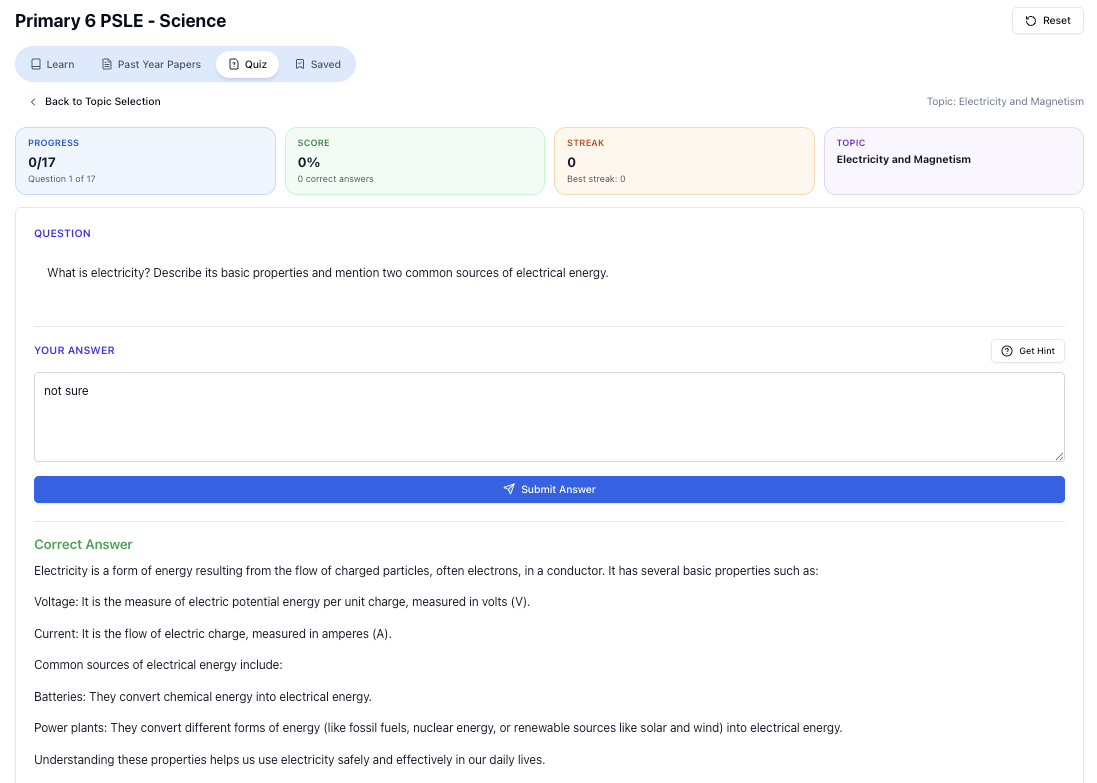
“Practice PSLE Science questions and get clear, step-by-step answers instantly.”
👉 Try a question now and see how fast you can improve.
Ready to practise?
If you want a Singapore-focused AI tutor you can use immediately (website, no sign-up), try Tutorly here:
Related Articles
Free on Tutorly.sg
Practise with step-by-step help — free to start
On Tutorly.sg/app you can practise unlimited Singapore syllabus questions, get instant explanations when you are stuck, and use past-year papers — no sign-up needed to start.
- ✓ PSLE, O Level, A Level, and more
- ✓ Step-by-step working when you are stuck
- ✓ Works on phone and laptop