

Free on Tutorly.sg
Practise with step-by-step help — free to start
On Tutorly.sg/app you can practise unlimited Singapore syllabus questions, get instant explanations when you are stuck, and use past-year papers — no sign-up needed to start.
- ✓ PSLE, O Level, A Level, and more
- ✓ Step-by-step working when you are stuck
- ✓ Works on phone and laptop
If you’re a student in Singapore, you’ve probably already tried using some kind of AI answer generator for homework or revision.
Type a question in, get an answer out. Sounds amazing… until:
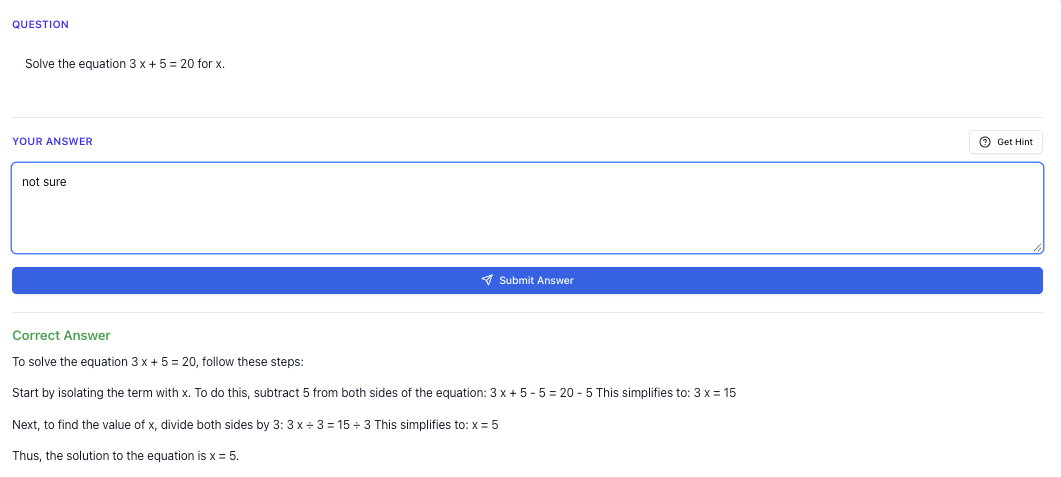
“Stuck on a question? See simple explanations that help you understand fast.”
👉 Give it a try and turn confusion into clarity in minutes.
1. What Exactly Is An “AI Answer Generator”?
When people say “AI answer generator”, they usually mean any website where you:
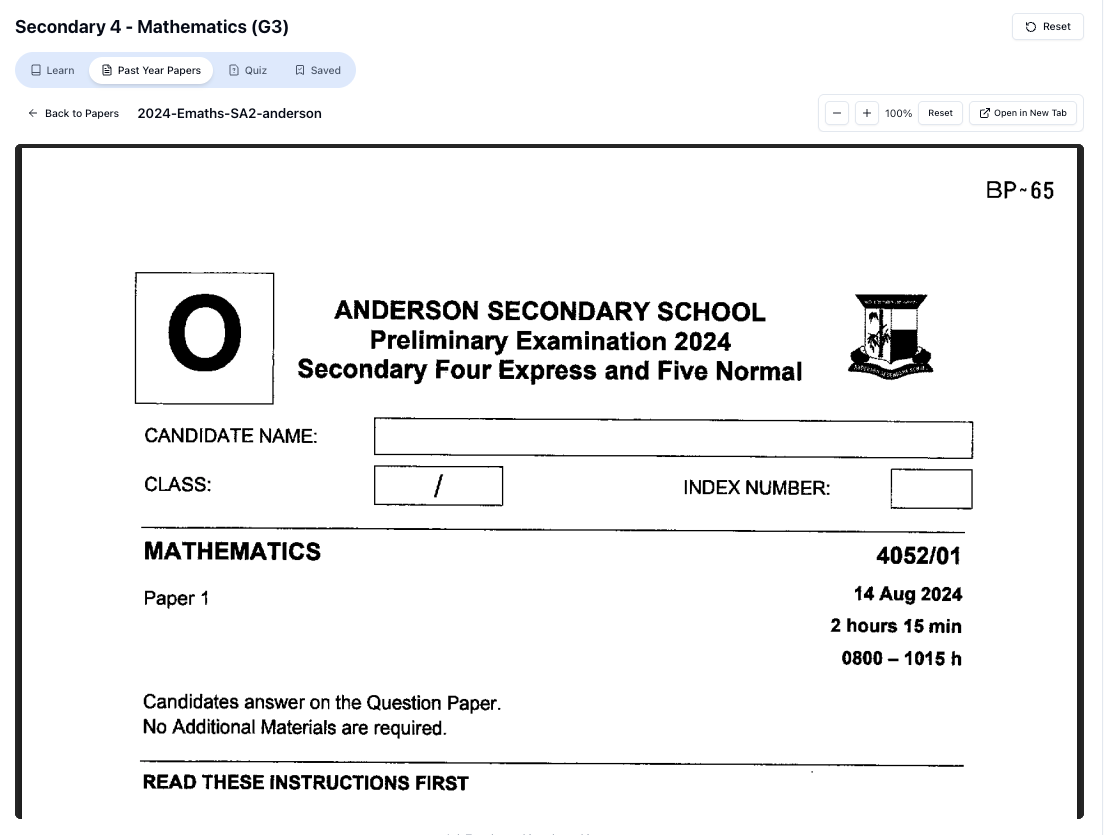
“Access more than 1000+ past year papers to practice”
👉 Start a paper today and test yourself like it’s the real exam.
- Type a question
- Click a button
- Get a ready-made answer
This can be:
- A generic chatbot (e.g. ChatGPT, Gemini, etc.)
- A “homework solver” site
- Or a specialised tool like Tutorly.sg that’s built specifically for Singapore students and the MOE syllabus
The problem is: not all AI answer generators are designed for exams like PSLE / O Levels / A Levels.
Most global AI tools:
- Don’t follow MOE syllabus wording
- Use foreign examples (US/UK context)
- Sometimes give methods that don’t match what your teacher expects
- May skip key steps or use concepts not in your level
That’s why you might feel:
“Wah, online answer looks so chim… but my teacher never teach like that leh.”
You’re not imagining it. The AI isn’t thinking about your exam format. It’s just trying to sound “smart”.
2. Why Singapore Students Need A Different Kind Of AI Tool
In Singapore, your marks don’t just depend on being “roughly correct”. You’re graded based on:
- Specific MOE learning outcomes
- Mark schemes for PSLE, O Levels, A Levels
- Very particular methods and phrasing (especially in English, GP, History, Social Studies, and Sciences)
So when you use an AI answer generator, you should ask:
“Is this answer good enough for MY exam in Singapore?”
2.1. The MOE Syllabus Matters
For example:
- PSLE Math: Model drawing is still heavily used.
- O Level A-Math: Certain techniques (like completing the square, factorisation) are standard.
- A Level H 2 Math: You’re expected to show proper notation and logical steps.
A generic AI answer generator might:
- Use methods not taught at your level
- Skip explanation and just throw formulas
- Answer in a way that’s correct, but not exam-friendly
2.2. Why Tutorly.sg Is Different From Generic AI
Tutorly.sg is built specifically for:
- Primary 1–6 (including PSLE)
- Secondary (including N/O Levels)
- JC (including A Levels)
It’s not just “AI that knows maths”. It’s an AI tutor aligned to the MOE syllabus.
Some key differences:
- It focuses on Singapore exam styles
- It explains answers using methods commonly taught in local schools
- It has been used by thousands of students in Singapore, and even mentioned on Channel NewsAsia (CNA), so it’s not some random overseas tool
So yes, it can generate answers — but it’s also designed to help you understand, not just copy.
3. The Biggest Danger: Copy-Paste Mentality
Let’s be honest. When you’re tired after CCA, tuition, and school, it’s very tempting:
“I just need this math question done. I’ll copy the AI answer first, understand later.”
But “later” usually never comes.
Here’s what happens if you treat AI purely as an answer generator:
-
Homework looks perfect
Your teacher thinks you’re fine. -
You don’t struggle on your own
Your brain never really practices the skills. -
During tests / exams, no AI
Suddenly you realise you don’t know how to start the question.
By then, it’s very hard to catch up, especially for high-stakes exams like PSLE, O Levels, A Levels.
So the main mindset shift is this:
Use AI to check and learn, not to replace your thinking.
4. How To Use An AI Answer Generator The Smart Way (Step-By-Step)
Here’s a simple way to use tools like Tutorly that actually builds your understanding.
Step 1: Attempt The Question Yourself First
Even if you’re not confident, try:
- Write down what you do know
- Set up the equation, draw the model, list what’s given
- For English/humanities, brainstorm points or a rough structure
You don’t need a full solution. You just need to engage your brain first.
Step 2: Then Ask The AI
Paste the question into Tutorly.sg and let it generate an answer.
Remember:
- Tutorly checks the final answer.
- Then it shows you a step-by-step method to get there.
- You compare these steps with what you tried earlier.
This is powerful because:
- If your answer is wrong, you see exactly where you went off.
- If your answer is right, you can still learn a clearer or faster method.
Step 3: Compare, Annotate, Learn
Don’t just read and close the tab.
Do this:
- Circle or underline steps you didn’t think of.
- Add short notes to your own working:
“Use this method next time” / “Remember to convert units first” / “Forgot to consider negative sign”.
For English / GP / humanities:
- Compare your points with Tutorly’s suggestions.
- Note down phrases or argument structures that are strong and reusable.
- But rewrite in your own words — don’t memorise blindly.
Step 4: Redo A Similar Question Without AI
This is the test of whether you actually learned.
- Find a similar question from your school worksheet, Ten-Year-Series, or textbook.
- Try it without AI.
- If you get stuck again, then go back to Tutorly — but only after you’ve tried.
This loop — attempt → check → learn → redo — is how you turn AI from a shortcut into an actual tutor.
5. Subject-By-Subject: How AI Answer Generators Can Help (Singapore Context)
Let’s break it down by level and subject, because the way you use AI should be different.
5.1. Primary School & PSLE
PSLE Math
How AI can help:
- Checking final answers to practice questions
- Showing step-by-step model drawing or algebra method
- Explaining tricky topics like fractions, ratio, percentage, speed
Example:
You try a ratio question and get .
You enter it into Tutorly. It shows:
- Correct answer is
- Steps from ratio to units to value
- Where your arithmetic or understanding went wrong
Use it to:
- Learn the standard PSLE methods
- Practise converting word problems into models/equations
But don’t:
- Copy the full solution into your workbook without trying
- Rely on it to “do” your whole PSLE revision for you
PSLE English
AI can help with:
- Generating sample compositions ideas
- Suggesting better vocabulary or sentence structures
- Explaining grammar errors
How to use it well:
- Write your own compo first.
- Then ask Tutorly how to improve specific parts:
“How can I improve this introduction for PSLE English?” - Learn a few phrases, then rewrite in your own style.
5.2. Secondary School & O Levels
E-Math & A-Math
Here’s where many students overuse AI answer generators.
Good use:
- Check your final answers to Ten-Year-Series questions.
- Learn alternative methods (e.g. different ways to solve quadratic equations).
- Understand step-by-step solutions for questions you’re really stuck on.
Bad use:
- Copy entire solutions for your school homework.
- Use AI on every single question before even attempting.
A smart approach:
- Do a full page of questions on your own.
- Use Tutorly to check all your final answers.
- For the ones you got wrong, ask for explanations and compare methods.
Pure/Combined Sciences (Physics, Chem, Bio)
AI can help you:
- Clarify concepts (e.g. “Why does increasing temperature increase rate of reaction?”)
- Summarise chapters in your own words
- Generate practice questions based on a topic you’re revising
But be careful with:
- Calculation questions: always check units and whether the method matches your teacher’s style.
- Definition questions: MOE mark schemes often want very specific wording. Use AI to practise, then fine-tune using your school notes.
Humanities (History, Social Studies, Geography, Literature)
AI is very useful here, but only if you guide it properly.
Use it to:
- Brainstorm points for “Explain” / “Account for” questions.
- Suggest essay structures (intro, point, evidence, explanation, link).
- Generate possible LORMs or levels answers (e.g. Level 1, 2, 3) so you see what a high-level answer looks like.
But remember:
Free on Tutorly.sg
Practise with step-by-step help — free to start
On Tutorly.sg/app you can practise unlimited Singapore syllabus questions, get instant explanations when you are stuck, and use past-year papers — no sign-up needed to start.
- ✓ PSLE, O Level, A Level, and more
- ✓ Step-by-step working when you are stuck
- ✓ Works on phone and laptop
- Always adapt to Singapore context:
– For Social Studies: local examples, government policies, etc.
– For History: Cambridge syllabus topics, not random world history. - Don’t rely on AI to memorise content for you. Use it as a sparring partner to test your understanding.
5.3. JC & A Levels
At JC level, content and rigour go up a lot. AI can be both very helpful and very dangerous.
H 2 Math
AI answer generators can:
- Show you clean, step-by-step solutions to complex questions (e.g. vectors, complex numbers, calculus)
- Suggest different methods (e.g. using substitution vs integration by parts)
- Help you check your final numerical answers
But:
- Always check that the method is allowed at A Levels (no fancy shortcuts that Cambridge doesn’t expect you to know).
- Make sure the notation is correct and matches what your tutor/school uses.
A good habit:
- After seeing a solution on Tutorly, try to explain it back in your own words, step by step, as if you’re teaching a friend.
If you can’t do that, you don’t really understand it yet.
H 2 Physics / Chemistry / Biology
AI can:
- Help you understand derivations or explanations
- Summarise long chapters into key ideas
- Generate conceptual questions for you to test yourself
But always:
- Cross-check with your lecture notes and tutorials
- Ensure that explanations match the A Level syllabus, not some uni-level content that’s too deep or irrelevant
GP (General Paper)
This is where AI can really boost your practice if you use it correctly.
“Doing Secondary Science? Pick a topic and practise like it’s a real exam — with clear answers right after.”
👉 Try Tutorly now and start a Science topic in seconds.

You can:
- Ask Tutorly to critique your essay intro or paragraph
- Get suggestions to strengthen your argument or add counter-arguments
- Practise outlines: give it a question, write your own outline, then compare with AI’s outline
Just don’t:
- Let AI write your full essay, then hand it in. Your teacher can tell.
- Memorise AI essays — your exam script will sound fake and off-topic.
6. How Tutorly.sg Works As An AI Answer Generator (But Better)
You might be wondering:
“So is Tutorly just another AI answer generator?”
It does generate answers, but it’s designed to work like a patient, tutor instead of a “one-shot answer machine”.
6.1. Not Just “Here’s The Answer”, But “Here’s How To Think”
When you ask a question on Tutorly.sg, it will:
- Give you the final answer
- Show a step-by-step explanation to reach that answer
- Explain in simple language that matches your level
It doesn’t read your working line by line, but it shows you a full, clear method so you can:
- Spot where your approach went wrong
- Learn a more efficient or exam-friendly way
- Build your own “template” for similar questions
6.2. Aligned To MOE Syllabus
Because Tutorly is built for Singapore students:
- The style of explanation matches MOE standards
- It’s aware of local exam formats (PSLE, O Level, A Level)
- Examples and phrasing are suitable for local context
This is a big difference from random overseas tools that might:
- Use different curriculum content
- Include topics not in your syllabus
- Miss out on key local expectations (e.g. model drawing at primary level)
6.3. Used (And Trusted) In Singapore
- Has been used by thousands of students in Singapore
- Has been mentioned on Channel NewsAsia (CNA)
- Is focused on Primary to JC students only — not adults, not overseas
So the whole design is centred around your exams, not a generic global audience.
7. Avoid These 5 Common Mistakes With AI Answer Generators
Let’s be very clear about what to avoid.
Mistake 1: Using AI Before You Even Try
If you ask AI for every single question immediately, you’re basically outsourcing your brain.
Fix it:
Always attempt first — even if it’s just setting up the first step.
Mistake 2: Blindly Trusting Every Answer
AI can be wrong. Sometimes slightly, sometimes completely.
Fix it:
- For maths/science, try to estimate or check whether the answer makes sense.
- For humanities, ask: “Does this actually answer the question? Is it relevant to Singapore’s syllabus?”
Mistake 3: Copy-Pasting Full Solutions
Your teacher can tell when the language suddenly changes. And more importantly, you’re only cheating yourself.
Fix it:
- Use Tutorly’s explanation to understand.
- Then rewrite the solution in your own words in your notebook or on scrap paper.
Mistake 4: Depending On AI For Last-Minute Cramming
The night before exams is not the time to learn entirely new methods from AI.
Fix it:
- Use AI consistently throughout the term for checking and clarifying.
- Closer to exams, use it mainly to check answers and patch small gaps, not to learn whole topics from scratch.
Mistake 5: Using Random Global Tools For Local Exams
Some AI tools are great for general knowledge but not tuned for MOE.
Fix it:
- For exam-related work, use a Singapore-focused AI tutor like Tutorly.sg.
- For fun or extra reading, you can still explore global tools — just don’t rely on them for exam-style answers.
8. How To Build A Healthy Daily Routine With AI Help
Instead of using AI only when you’re desperate, build it into your normal study routine.
Here’s one simple structure you can try.
On A Normal School Day
-
After school
Do your homework without AI first. -
After finishing a worksheet / set
Use Tutorly.sg to:- Check your final answers
- Get explanations for 2–3 questions you struggled with
-
Before sleeping
Spend 10–15 minutes revising one tricky concept using AI:- “Explain photosynthesis in a way a Sec 2 student can understand.”
- “Give me 3 practice questions on simultaneous equations similar to O Level standard.”
On Weekends / Revision Days
- Use AI to:
- Generate extra practice questions on topics you’re weak in
- Summarise a chapter into key points and test yourself
- Clarify any doubts from tuition or school lessons
Over time, you’ll notice:
- You become less scared of “hard questions”
- You’re less dependent on teachers to be available
- You build confidence because you know you can always check and learn, anytime
9. When You Should Still Get A Human Tutor
Even with a strong AI tutor like Tutorly, there are times when a human tutor is still very helpful:
- You have serious foundation gaps across many topics
- You need someone to plan your revision and keep you accountable
- You struggle with motivation and need regular pushing
- You want targeted help for very high-stakes exams (e.g. borderline grades for O Level / A Level)
In those cases, you can:
- Use a human tutor for overall guidance and planning
- Use Tutorly.sg daily for quick questions, checking, and practice
This combination is actually very powerful — your human tutor doesn’t need to answer every small question, and you don’t waste tuition time on basic checking.
10. Final Thoughts: Use AI As Your Study Partner, Not Your Crutch
AI answer generators are not going away. In fact, they’ll become more common.
The students who benefit the most are not the ones who copy the fastest.
They’re the ones who:
- Try questions themselves first
- Use AI to check, understand, and refine
- Practise again without AI to confirm they’ve really learned
If you’re studying in Singapore and preparing for PSLE, O Levels or A Levels, it makes a big difference to use a tool that actually understands the MOE syllabus and local exam style.
That’s exactly what Tutorly.sg is built for.
Try Tutorly.sg Today
If you want an AI answer generator that behaves more like a real Singapore tutor, you can start using Tutorly right away in your browser:
No need to download anything. Just head to the site, ask your questions, and start turning your doubts into clear, exam-ready understanding.
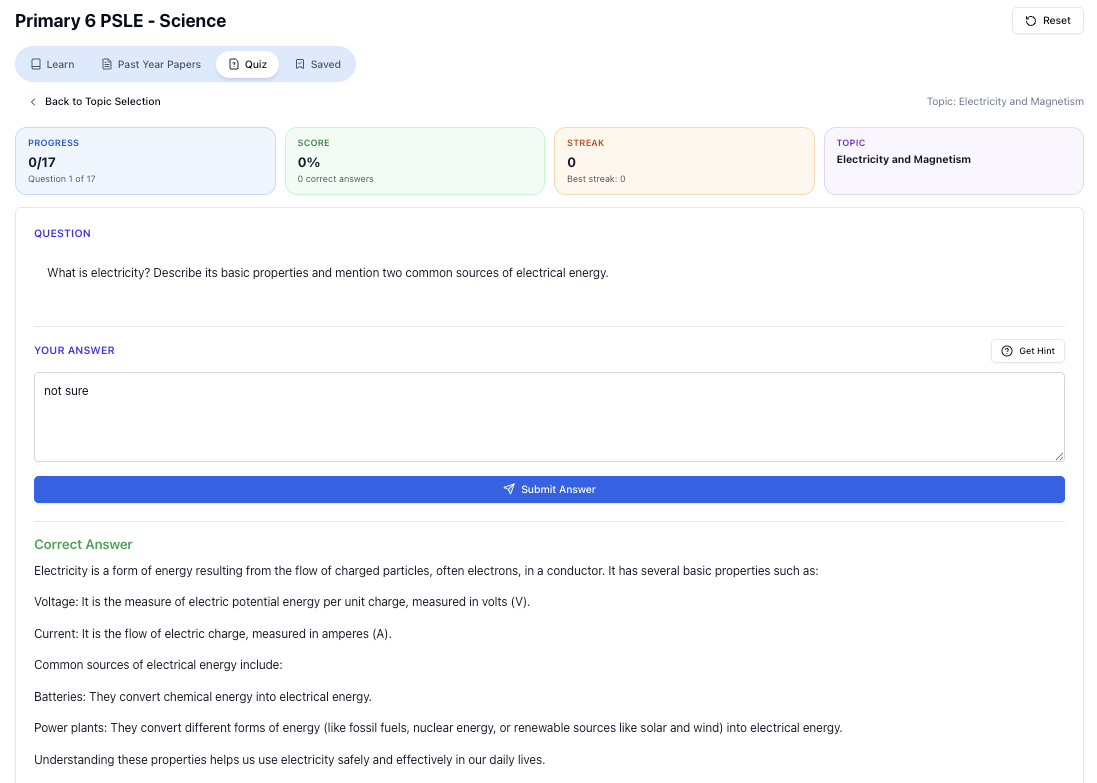
“Practice PSLE Science questions and get clear, step-by-step answers instantly.”
👉 Try a question now and see how fast you can improve.
Ready to practise?
If you want a Singapore-focused AI tutor you can use immediately (website, no sign-up), try Tutorly here:
Related Articles
Free on Tutorly.sg
Practise with step-by-step help — free to start
On Tutorly.sg/app you can practise unlimited Singapore syllabus questions, get instant explanations when you are stuck, and use past-year papers — no sign-up needed to start.
- ✓ PSLE, O Level, A Level, and more
- ✓ Step-by-step working when you are stuck
- ✓ Works on phone and laptop