

Free on Tutorly.sg
Practise with step-by-step help — free to start
On Tutorly.sg/app you can practise unlimited Singapore syllabus questions, get instant explanations when you are stuck, and use past-year papers — no sign-up needed to start.
- ✓ PSLE, O Level, A Level, and more
- ✓ Step-by-step working when you are stuck
- ✓ Works on phone and laptop
If you’re preparing for PSLE in Singapore right now, your life is probably a mix of school, homework, tuition, CCA, and parents asking, “Have you started revision?”
On top of that, now everyone is talking about “AI learning assistants” and “AI tutors”.
“Stuck on a question? See simple explanations that help you understand fast.”
👉 Give it a try and turn confusion into clarity in minutes.
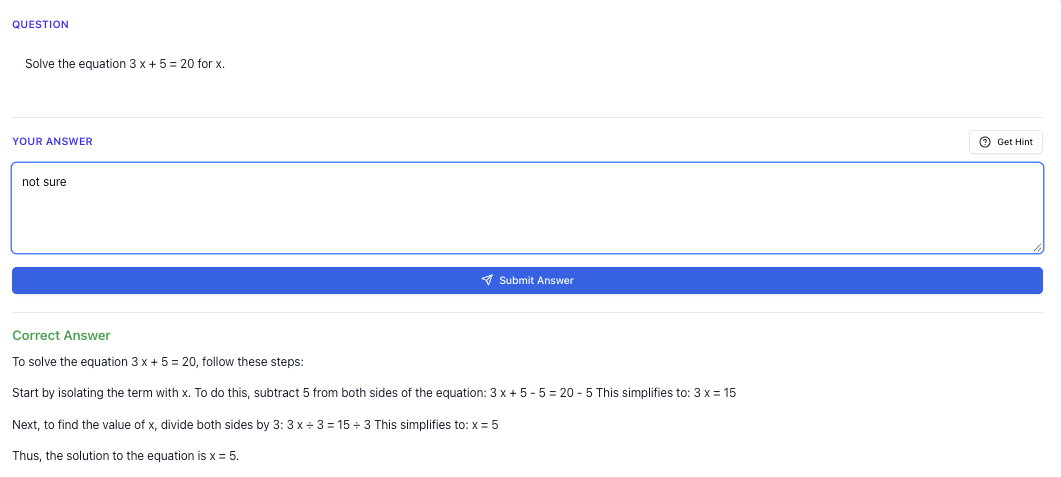
1. What Exactly Is An AI Learning Assistant For PSLE?
Let’s clear this up first.
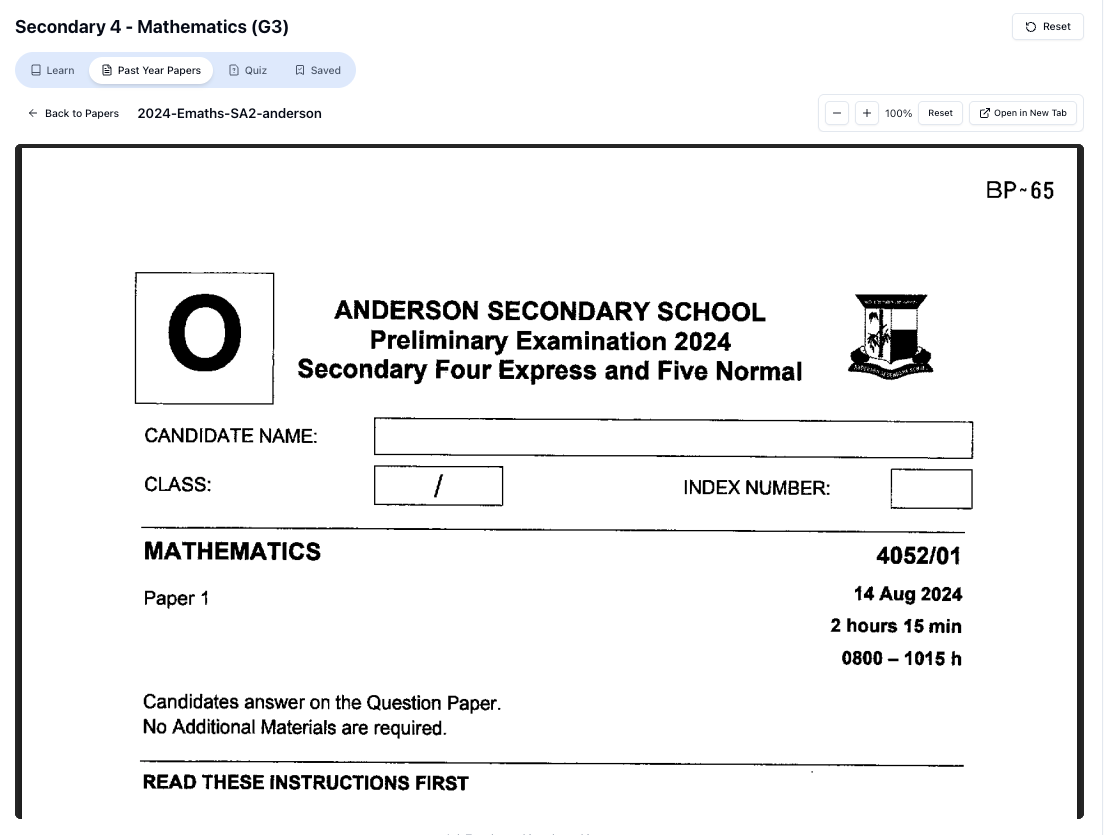
“Access more than 1000+ past year papers to practice”
👉 Start a paper today and test yourself like it’s the real exam.
An AI learning assistant is not a human tutor, and it’s not a random chatbot that just answers anything.
For PSLE students in Singapore, a good AI learning assistant should:
- Understand MOE syllabus terms (e.g. “model drawing”, “heuristics”, “stimulus-based conversation”).
- Use Singapore-style exam formats for PSLE English, Maths, Science, and Mother Tongue.
- Explain concepts in simple, step-by-step ways that match what your teachers expect.
- Be available , so you can get help even at 11.30pm the night before a test.
That’s what Tutorly.sg is built to do. It’s not a generic overseas platform; it’s focused on Singapore students from Primary 1 to JC 2, aligned to MOE.
It has also been mentioned on Channel NewsAsia (CNA) and used by thousands of students in Singapore, so it’s not some random new website that will disappear next week.
2. Why PSLE Students In Singapore Actually Need This
Let’s be honest about PSLE here.
2.1 The typical PSLE situation
You probably recognise some of these:
- Teachers move fast in class.
- Tuition helps, but it’s once or twice a week.
- You get stuck on homework questions at home with no one to ask.
- Parents want to help, but sometimes the method they learnt is different from the MOE way now.
- Revision gets pushed to “later” because you’re tired.
So what happens?
You end up copying answers, skipping questions, or just memorising without really understanding.
2.2 Where an AI learning assistant fits in
An AI assistant like Tutorly is not meant to replace your teachers or tuition. It fills the gaps in between:
- When you’re stuck on a question at home.
- When you forgot how to use a certain method (e.g. model drawing, nets of solids, science keywords).
- When you want more practice but don’t have fresh questions.
- When you need quick feedback on your answers.
Think of it as a patient, always-awake tutor that you can keep asking, “Why like that?” without feeling paiseh.
3. How Tutorly.sg Works (In PSLE Terms)
Let’s walk through how you’d actually use https://tutorly.sg/app as a PSLE student.
3.1 Step 1: Go to the website (no app store needed)
Tutorly.sg is a website, not a mobile app.
You just open your browser (Chrome, Safari, etc.) and go to:
No need to download anything.
3.2 Step 2: Choose your level and subject
Tutorly is built for Primary 1 to JC 2, but if you’re doing PSLE, you’ll usually pick:
- Primary 6 (or Primary 5 if you’re preparing early)
- Subjects like:
- English
- Mathematics
- Science
- Chinese / Higher Chinese (and other Mother Tongues where available)
Once you’ve selected your level and subject, Tutorly already knows the MOE syllabus you’re following.
3.3 Step 3: Ask your question
You can type things like:
- “I don’t understand how to do model drawing for this PSLE question: A has 3 times as many stickers as B…”
- “Explain photosynthesis in a way I can remember for PSLE.”
- “Give me 5 practice questions on fractions word problems at PSLE standard.”
- “Help me write a PSLE English situational writing email about a lost wallet.”
You don’t need to over-explain your background; just ask your actual question.
3.4 Step 4: Get an answer + step-by-step explanation
Here’s the important part:
- Tutorly will first give you the final answer.
- Then it will show you step-by-step how to get there.
- You can ask follow-up questions like:
- “Can you show me a different method?”
- “Explain step 3 again but simpler.”
- “Give me a similar question to try.”
Tutorly does not check every step of your working like a human teacher marking your script, but it does:
- Check whether your final answer is correct (if you provide it).
- Show you a clear, logical way to reach that answer, using methods that are syllabus-aligned.
4. Using An AI Learning Assistant For PSLE Maths
Maths is one of the most obvious subjects where AI can help you daily.
4.1 When you’re stuck on a problem sum
Example:
You’re doing a PSLE-style question:
A baker sold of his cupcakes in the morning and of the remainder in the afternoon. He had 90 cupcakes left. How many cupcakes did he bake at first?
You can type into Tutorly:
“PSLE Maths: A baker sold of his cupcakes in the morning and of the remainder in the afternoon. He had 90 cupcakes left. How many cupcakes did he bake at first? Show me model drawing method.”
Tutorly can:
- Show you how to represent the cupcakes using bars.
- Explain that after selling , is left.
- Then how selling of the remainder means of the remainder is left.
- Guide you to set up the equation or bar model to find the original total.
You’ll see each step in order, not just a sudden answer like “150”.
4.2 Getting practice questions at the right level
You can ask:
- “Give me 10 PSLE-style questions on ratio, medium difficulty, with answers.”
- “Give me 5 challenging questions on percentage increase and decrease.”
Tutorly will generate Singapore-style questions, not random US-based problems.
You can try them first, then check your answers against the worked solutions.
4.3 Revising specific topics before tests
Before a school test, you can do quick, focused revision:
- “Explain how to solve ‘before-and-after’ questions using bar models, PSLE style.”
- “Summarise all the key points I must remember for PSLE Maths fractions.”
Tutorly can turn the topic into a short, focused summary you can read in 5–10 minutes, instead of flipping through a thick assessment book.
5. Using An AI Learning Assistant For PSLE Science
Science is very keyword-heavy, especially for PSLE.
You can lose marks even if your idea is correct but your phrasing doesn’t match what examiners want.
5.1 Learning concepts with proper keywords
Example topic: Photosynthesis
You can ask:
“Explain photosynthesis for PSLE Science using correct keywords and give me a simple way to remember it.”
Tutorly can give you something like:
- Plants make their own food in the presence of sunlight, using carbon dioxide and water, to produce glucose and oxygen.
- It will highlight important words that examiners look for.
You can then ask:
- “Give me 3 common mistakes students make in PSLE Science photosynthesis questions.”
This helps you avoid common traps.
5.2 Practice for open-ended questions
Open-ended questions are where many students panic.
You can paste a question like:
“During an experiment, a student placed a potted plant in a dark cupboard for 2 days. Explain why the plant was placed in the dark before the experiment.”
Then ask Tutorly:
- “Mark my answer and improve it: ‘To make sure the plant is hungry so it will photosynthesise faster.’”
Tutorly can:
- Point out what’s wrong with your explanation.
- Show a model answer like:
- “To ensure that all the starch in the leaves has been used up, so that any starch found later is formed during the experiment.”
You’ll slowly get a feel for the PSLE Science style.
5.3 Last-minute revision by topic
You can do topic-based revision:
- “Summarise the topic ‘Interactions within the environment’ for PSLE Science, with key definitions and examples.”
- “Give me 5 PSLE-style MCQ questions on ‘Matter’ and explain why the wrong options are wrong.”
The explanations of wrong options are especially useful to understand common misconceptions.
6. Using An AI Learning Assistant For PSLE English
English is trickier because it’s more open-ended, but AI can still help a lot if you use it properly.
6.1 Situational writing practice
You can ask:
“Give me a PSLE English situational writing task with a picture description and instructions.”
Then after you write your own answer, you can paste it in and say:
- “Mark my situational writing out of 15 for PSLE, and tell me how to improve.”
Tutorly can:
- Comment on content, language, and format.
- Suggest more precise phrases and better sentence structures.
- Remind you of things like including all required points, tone, and purpose.
6.2 Continuous writing (composition)
You can use Tutorly to practise composition without copying.
For example:
- Ask: “Give me 3 PSLE composition story ideas using the theme ‘A Risk I Took’.”
- Choose one and write your own story.
- Paste your story and say: “Help me improve this PSLE composition. Don’t rewrite the whole thing, just suggest better phrases and correct my grammar.”
This way, you’re still doing the real thinking and writing, while Tutorly acts like a very detailed feedback machine.
6.3 Grammar and vocabulary
You can ask for targeted practice:
- “Give me 10 PSLE-style grammar MCQs on subject-verb agreement.”
- “Give me 10 vocabulary questions with options and explain the answers.”
Or if you’re unsure about a sentence:
- “Is this sentence correct for PSLE English? ‘Neither of the boys were willing to help.’ If not, fix it and explain why.”
Free on Tutorly.sg
Practise with step-by-step help — free to start
On Tutorly.sg/app you can practise unlimited Singapore syllabus questions, get instant explanations when you are stuck, and use past-year papers — no sign-up needed to start.
- ✓ PSLE, O Level, A Level, and more
- ✓ Step-by-step working when you are stuck
- ✓ Works on phone and laptop
You’ll start to see patterns in grammar errors and learn faster.
7. How To Avoid Over-Relying On AI (Very Important)
AI can help you a lot, but only if you use it correctly.
Here’s how to keep it healthy.
7.1 Don’t just copy answers
If you simply paste your homework question, get the answer, and copy it down, you might feel “Shiok, homework done!” but your understanding stays at zero.
Instead:
- Try the question on your own first.
- Write your attempt (even if it’s wrong).
- Then ask Tutorly:
- “My answer is 180 cm. The correct answer is 150 cm. Show me why my method is wrong.”
You’ll learn much more from comparing your thinking with the worked solution.
7.2 Use it to check, not to think for you
A good rule:
- You think first, AI checks after.
For example:
- Do 5 questions from your assessment book.
- Then ask Tutorly:
- “Here are my answers for these 5 PSLE Maths questions. Which ones are wrong and show me the correct working.”
You still do the brain work. Tutorly fills in your gaps and corrects your misconceptions.
7.3 Don’t let it replace reading your textbook or notes
AI explanations feel friendly and fast, but PSLE examiners still expect you to know:
- Textbook definitions.
- Standard diagrams (for Science).
- Proper formats (for English).
Use Tutorly to clarify and practise, not to skip your school materials entirely.
“Doing Secondary Science? Pick a topic and practise like it’s a real exam — with clear answers right after.”
👉 Try Tutorly now and start a Science topic in seconds.

8. How Parents Can Use An AI Learning Assistant For PSLE
If you’re a parent reading this, here’s how you can use Tutorly with your child, even if you’re not confident with the latest syllabus.
8.1 When your child asks you a Maths/Science question you forgot
Instead of panicking or arguing over methods, you can:
- Sit with your child.
- Open https://tutorly.sg/app.
- Type the exact question.
- Ask Tutorly to show a step-by-step solution using the method your child’s teacher uses (e.g. “Use model drawing”, “Use unitary method”, “Use PSLE Science keywords”).
You’ll both see the explanation at the same time.
8.2 Planning a realistic revision schedule
You can ask Tutorly:
- “Create a weekly PSLE revision plan for a P 6 student in Singapore who has tuition twice a week and CCA on Wednesdays. Focus on weaker areas: Maths problem sums and Science open-ended questions.”
You’ll get a customised plan that fits your child’s actual schedule, not some unrealistic “study 5 hours a day” nonsense.
8.3 Checking if your child’s answers are “PSLE standard”
Sometimes your child’s answer is “not wrong”, but you’re not sure if it’s exam-grade.
You can paste their answer and say:
- “This is my child’s answer for a PSLE Science question. Is this acceptable? If not, improve it slightly but keep it at Primary 6 level.”
Tutorly can:
- Suggest better phrasing.
- Add missing keywords.
- Still keep it at a level your child can understand and remember.
9. Common Misconceptions About AI Learning Assistants (Singapore Context)
Let’s address a few things I often hear from students and parents.
9.1 “AI will confuse my child with non-MOE content”
This is true for many generic AI tools that are trained on global content.
That’s why using something like Tutorly.sg, which is built around the MOE syllabus and local exam formats (PSLE, O Levels, A Levels), is important.
The way it explains concepts, the types of questions it generates, and the terms it uses are all tuned to what Singapore students actually see in school.
9.2 “If my child uses AI, they’ll become lazy”
It depends how you set the rules.
If you tell your child:
- “You’re allowed to use Tutorly, but only after you try each question yourself first.”
Then AI becomes a learning accelerator, not a shortcut.
You can even spot-check by asking them to explain the solution back to you in their own words.
9.3 “AI can replace tuition”
For most students, no.
AI can:
.
- Explain patiently.
- Provide unlimited practice.
But it doesn’t:
- Build a personal relationship with your child like a human tutor.
- Notice subtle things like your child’s body language or mood.
- Communicate directly with your child’s school teachers.
Think of it as:
School + Tuition (if any) + AI assistant in between
instead of
School + AI only
10. Practical Study Routines Using an AI Learning Assistant
Here are some realistic ways to build Tutorly into your weekly PSLE routine without overdoing it.
10.1 15-minute daily “AI check-in”
After school or dinner:
- Pick one subject (rotate: English, Maths, Science).
- Spend 10–15 minutes:
- Asking 3–5 questions about what you learnt that day.
- Clarifying any confusion.
- Doing 2–3 extra practice questions.
This is enough to strengthen what you learnt in school without burning out.
10.2 Weekend revision block (1–2 hours)
On Saturday or Sunday:
- 30–45 minutes: Do assessment book questions without AI.
- 30–45 minutes: Use Tutorly to:
- Check answers.
- Understand mistakes.
- Ask for extra similar questions on weak topics.
This way, your assessment books and AI assistant support each other.
10.3 Pre-exam “mock paper + AI review”
About 1–2 weeks before school exams or prelims:
- Do a full PSLE paper under timed conditions.
- Mark what you can using the answer key.
- For questions you got wrong or skipped, paste them into Tutorly and ask:
- “Explain this question in detail and show how to solve it step-by-step.”
- “What concept is being tested here?”
You’ll identify exactly which topics to revise in the remaining days.
11. Why Tutorly.sg Is A Strong Choice For PSLE Students
Let’s be very direct about why I keep using Tutorly as the main example here.
11.1 Built for Singapore, not imported
- Aligned to MOE syllabus from Primary 1 to JC 2.
- Understands local exams: PSLE, O Levels, A Levels.
- Uses typical Singapore question styles and phrasing.
You won’t suddenly get questions about US coins or foreign school systems.
11.2 Proven and recognised locally
- Mentioned on Channel NewsAsia (CNA), so it’s not an unknown experiment.
- Used by thousands of students in Singapore, across different levels.
That gives some assurance that it’s been tested in real local contexts.
11.3 Easy to start right now
You don’t need to install anything or sign up for a mobile app.
Just go to:
- Main info page: https://tutorly.sg/ai-tutor-singapore
- To start using it directly: https://tutorly.sg/app
You can literally open it in a browser tab next to your school homework and switch between them.
12. Final Tips For Using An AI Learning Assistant Wisely
To sum everything up, here are the key principles you should follow:
-
Think first, ask later.
Always attempt questions before asking Tutorly for help. -
Use it for understanding, not copying.
Read the explanations, then try a similar question on your own. -
Keep it MOE-aligned.
Stick to tools like Tutorly.sg that are designed for Singapore students. -
Make it part of your routine.
Short, regular sessions (10–20 minutes) are better than cramming. -
Combine with school and tuition.
AI is best used to fill the gaps, not as your only source of learning.
If you follow these, an AI learning assistant can genuinely make PSLE preparation less stressful and more efficient.
Ready To Try An AI Learning Assistant For Your PSLE?
If you’re curious how this actually feels in real life, don’t overthink it.
Open a browser tab and:
- Start here to learn more: https://tutorly.sg/ai-tutor-singapore
- Or jump straight into asking questions: https://tutorly.sg/app
Try it with one homework question or one topic you’re weak in.
See if the explanations make sense to you, and how it fits into your PSLE revision. You can always adjust how you use it, but having a MOE-aligned AI tutor on standby in Singapore is honestly one of the easiest wins you can give yourself this PSLE year.
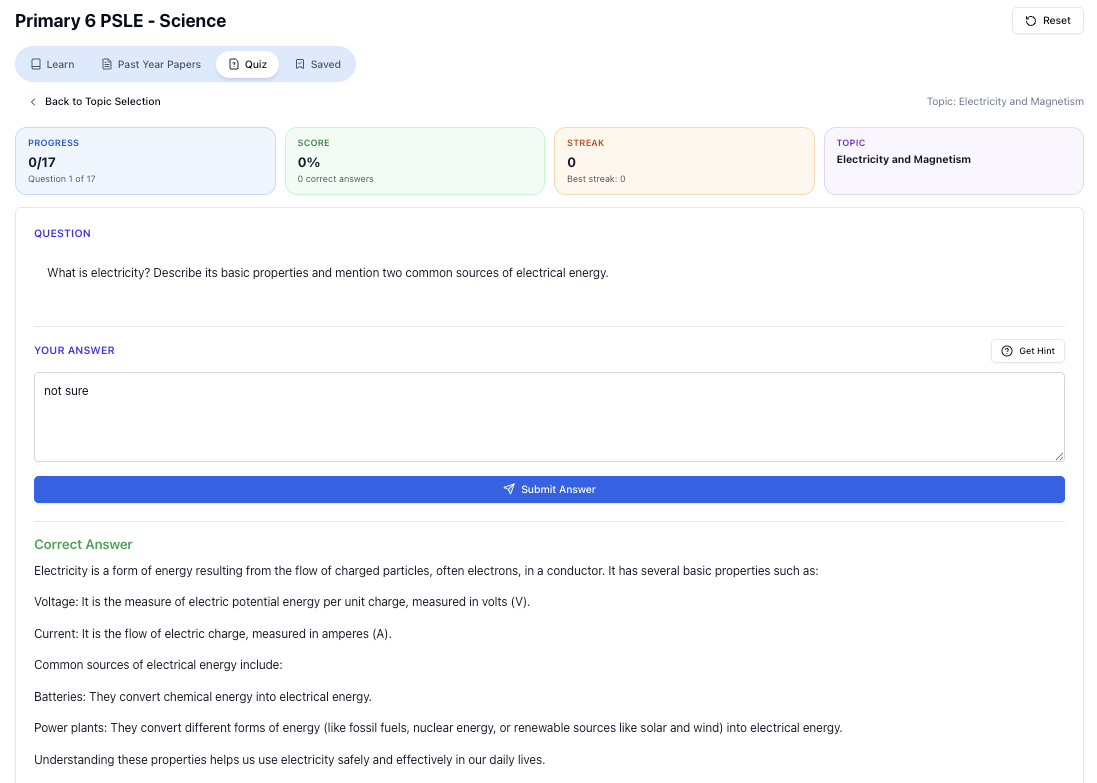
“Practice PSLE Science questions and get clear, step-by-step answers instantly.”
👉 Try a question now and see how fast you can improve.
Ready to practise?
If you want a Singapore-focused AI tutor you can use immediately (website, no sign-up), try Tutorly here:
Related Articles
Free on Tutorly.sg
Practise with step-by-step help — free to start
On Tutorly.sg/app you can practise unlimited Singapore syllabus questions, get instant explanations when you are stuck, and use past-year papers — no sign-up needed to start.
- ✓ PSLE, O Level, A Level, and more
- ✓ Step-by-step working when you are stuck
- ✓ Works on phone and laptop